Bans · action blocks, feature limits, suspensions, disables, so-called device bans, unban tools and what help costs
How to unban Instagram account access, starting with which of six bans you're under
Instagram's screens never say ban, but searchers do, for six different things. On 3 October 2026 we matched each screen to Meta's own pages, Instagram's EU appeal figures and a GitHub search for unban tools, to see which ones can be lifted and how.
How to unban Instagram account access depends on the screen. Action blocks usually lift once you stop the blocked activity. Suspensions and disables are lifted only through the free review on the notice, which reversed about 36% of EU account complaints in early 2026. No tool, seller or new account changes that.
What does getting unbanned from Instagram actually involve?
It depends on which of six things happened. People call all six a ban, and each one is lifted a different way, or not at all.
Instagram itself almost never uses the word ban. Its screens say an action was blocked, a feature is limited, an account is suspended or an account is disabled. Searchers use one word for all of it, and that's where most wasted effort starts: someone with a 24-hour comment block reads advice written for a disabled account, or someone with a disabled account spends a week clearing cache and switching Wi-Fi as if it were a block.
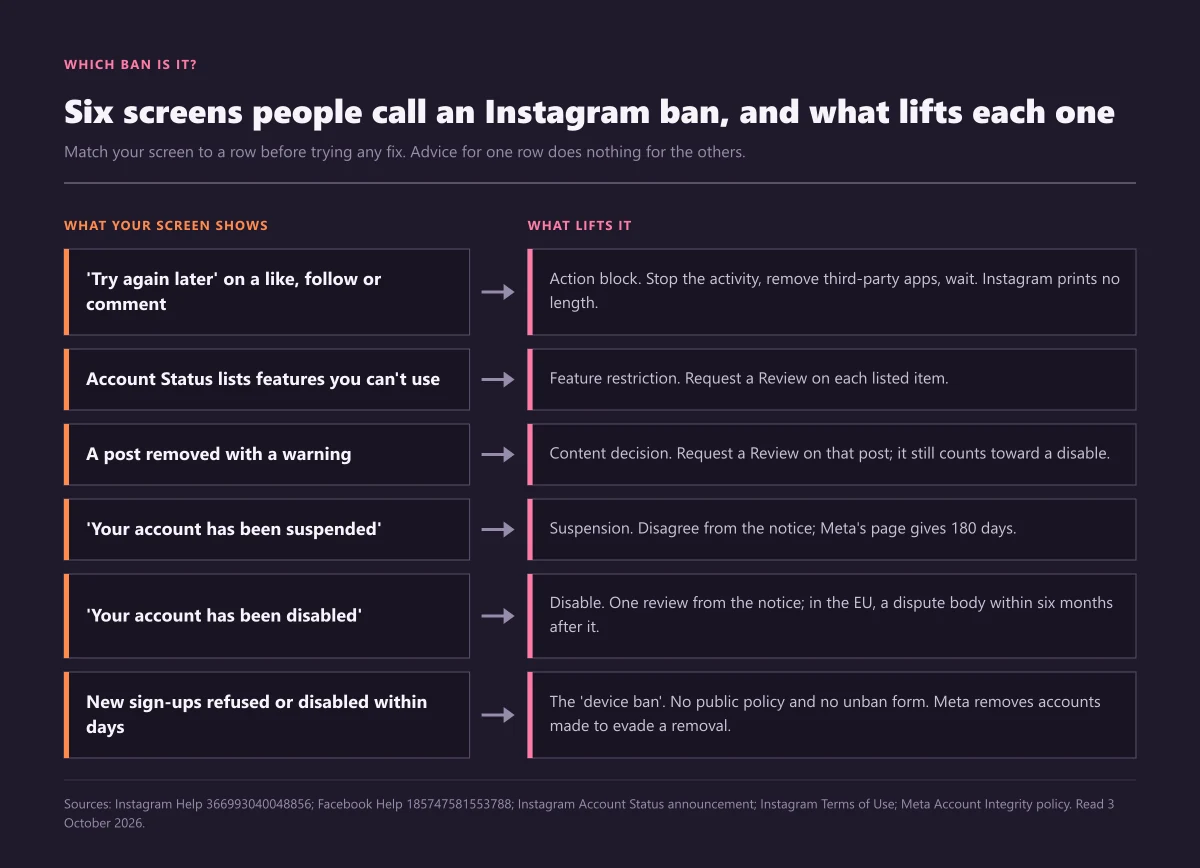
So before any step, match your screen to a row. We built this table on 3 October 2026 from Instagram's help pages on disabled accounts, Meta's Facebook page on suspended or disabled accounts, Instagram's Account Status announcement and Meta's Account Integrity policy.
| What your screen shows | What it is | Lifts by itself? | How it gets lifted |
|---|---|---|---|
| "Try again later" when you like, follow or comment | An action block on one activity | Usually; Instagram prints no length | Stop the activity, remove third-party apps, wait |
| Account Status lists features you can't use | A feature restriction after violations | Not on a stated timer | Request a Review on each listed item |
| A post removed with a warning | A content decision that counts toward a disable | No | Request a Review on that post |
| "Your account has been suspended" | A suspension with a review still open | No | Disagree from the notice; 180 days on Meta's page |
| "Your account has been disabled", or permanently disabled | A disable, final once the window closes | No | The review on the notice; in the EU, a dispute body after it |
| New sign-ups refused or disabled within days | What people call a device or IP ban | No public rule exists | No unban route; Meta treats the new account as evasion |
A seventh case looks like a ban and isn't one: a deleted account. Instagram's disabled-accounts page says a deleted account can't be restored, and the deleted-account guide covers the 30 days in which a self-requested deletion can still be cancelled. Everything below is about the six rows, with the rule side set out in the list of what triggers an Instagram ban.
What's the difference between an Instagram action block and a fully disabled account?
An action block stops one thing you do. A disable stops you, everywhere, until a review says otherwise.
With an action block you can still log in, scroll, post in most cases, and read your messages. One action fails: the follow button, the like, a comment, a DM to strangers. The message usually asks you to try again later. Instagram doesn't publish a help page with a fixed length for these blocks, and the third-party explainers that quote "24 to 48 hours" are guessing from experience, not reading it from Meta. What Instagram does say, in its Account Status announcement, is that it may restrict certain features on an account that appears not to be following its Community Guidelines.
A fully disabled account is a different object. The login itself leads to a notice. The profile disappears for everyone else. Nothing you do inside the app works, because you aren't inside the app. Meta's Facebook help page sets a 180-day window to appeal; Instagram's own page says only that you may be able to ask for a review by logging in and following the on-screen instructions.
The causes overlap less than people think. Action blocks follow behaviour: too many follows an hour, the same comment pasted forty times, an automation app logging in from a server farm. Disables follow content and identity: posts that break the rules, a pattern of violations, a fake or evading account. That is why the fixes don't transfer. Waiting cures most action blocks and cures no disables.
Clearing an action block
Stop the action that was blocked for a day or two. Revoke any app with access to the account: under Settings, check Apps and websites and Accounts Centre for connected services, and change your password if a growth tool ever had it. The report apps and SMM panels we tested log in as their customers, and a login from a data centre is exactly the behaviour these blocks exist to slow. If the block returns every time you resume normal use, open Account Status; a block that keeps coming back can be the visible edge of a feature restriction.
How to unban an Instagram account, ban by ban
Every official route is free and starts inside Instagram. The order of the steps matters more than the wording of any appeal.
People asking how to unban yourself on Instagram are asking the right question, because for suspensions and disables the account holder is the only person Instagram lets start the review. Nobody else can file it for you, and nobody else can see the notice.
How to unban yourself on Instagram, step by step
- Read the screen to the end. The notice tells you whether you can disagree, and sometimes which rule was applied. Screenshot it with the date showing.
- Open Account Status if you still can. It sits under Settings, then Account, then Account Status. It lists removed posts and limited features, and each item has its own Request a Review button. Instagram's help page on it says that in most cases you'll get a warning before losing access to your account.
- Request the review from the notice, the same day. For a suspension or disable, this is the appeal. There is no separate form, email address or phone line that replaces it.
- Pass any identity check you're offered. If Instagram asks for a video selfie, its page says you won't have access while the video is reviewed.
- Fix the cause if there was one. A hacked account that posted spam needs its email and password back under your control first; the hacked-or-banned recovery guide covers that side.
- Watch your email for the answer. Instagram's page on emails from Instagram says it never contacts people about account security through Direct messages.
That is how to get unbanned on Instagram for every row of the table except the first and the last. A suspended account follows the same path; our suspended-account walkthrough goes through its screens one by one, and the no-email, no-phone guide handles the case where you can't log in far enough to see the notice. If you need to reach a person at Meta about it, the contact routes that actually exist are short.
Knowing how to get Instagram account unbanned is half the job; keeping it is the other half. When the review restores the account, check Account Status the moment you're back in. An instagram account unbanned after review keeps its history, and the removed posts and warnings that led to the disable are still counted. The next disable can come faster than the first.
A word on reports, since many people assume a rival caused the ban. Reports start a review; they don't decide it, as the explainer on what a report does sets out, and the count isn't the trigger, according to the report-count page. You won't learn who filed one either: Instagram keeps reporters' names private, and a reported user isn't told who it was. A mass-report campaign can push a clean account into review, but the review is where it should fail, and the appeal is where you say so.
How long does it take to unban an Instagram account through the official appeal process?
Instagram publishes no promise. The only official timing figure is an EU median of 60.2 hours, and the spread around it is wide.
The number comes from Meta's Instagram transparency report under the EU's Digital Services Act, covering January to June 2026. It counts 8,955,778 complaints through Instagram's internal complaint system in the EU, with a median handling time of 60.2 hours, which is two and a half days. Half took longer. A median says nothing about the slow tail, and the slow tail is where most of the angry posts come from.
The same report shows how often the answer is yes. Of 7,816,585 complaints against account suspensions and terminations, 2,838,533 ended with Instagram reversing itself, about 36%. That is roughly one account in three back after the free review, in the region where Instagram has to publish the figure. No such number exists for the rest of the world.
Three things stretch the wait. An identity check adds its own review. A disable that came in a wave, like the mass disables of mid-2025 that TechCrunch reported on 2 July 2025, joins a queue swollen by everyone else hit that week. And an account linked to others under review, through Accounts Centre or shared details, may wait for the whole group. None of these speed up if you send the request twice.
The review queue works the same way for accounts reported by others: checking whether a reported account was banned shows the outcome from the other end, and reporting an account toward a disable explains when such reports succeed.
Can I appeal more than once if my first request to get unbanned from Instagram is denied?
For a disabled account, no: one review, then the decision stands inside Meta. For posts and feature limits, sometimes.
Meta's Facebook help page is direct about accounts. If the appeal isn't successful, the account is permanently disabled, and the page says You won't be able to request another review of the decision.
Instagram's own page says nothing about a second review in either direction. In practice the notice changes after a lost review, and the button to disagree is gone.
Items listed in Account Status are treated differently. Instagram's announcement of the feature says that in some cases you may be able to ask for an additional review after the first, and each removed post carries its own button. That is item by item, though, not a second appeal of a disabled account.
So the honest route after a denied account appeal is outside Meta, and only in some places:
- In the EU, Article 21 of the Digital Services Act lets you take the decision to a certified out-of-court body. The Appeals Centre Europe covers Instagram, takes decisions from the last six months and charges users no fee at present. In the first half of 2026, Instagram's report counts 10,328 disputes taken to such bodies and 6,277 reversed, across all decision types.
- Outside the EU, a court is the remaining route, and a costly one for a personal account.
- Not the Oversight Board. It takes content appeals with a reference number; its first account case, decided on 4 June 2026, came in as a referral from Meta, and the Board upheld the ban.
Our guide to what follows a denied appeal walks through each of those doors and the evidence each one needs.
Can a permanently disabled Instagram account be recovered, or is it gone forever?
Gone inside Meta, still reachable outside it for a while in the EU, and gone everywhere once the deadlines pass.
"Permanently" on an Instagram notice is a stage, not a verdict handed down on day one. Meta's Facebook page reaches it in two ways: no appeal within 180 days, or an appeal that fails. Before either happens, the account can come back through the ordinary review, and about a third of EU account complaints do.
After it happens, the account still exists on Meta's servers, but no button will reopen it. EU users can take the decision to a dispute body within six months. Elsewhere, the account is gone in practice. The username usually stays locked to it as well, and claiming a held username explains why Instagram rarely frees one on request.
Some bans are meant to be final from the start. Meta's policies treat accounts disabled for severe harm differently from those disabled for an accumulation of smaller violations, and the page on permanent Instagram bans sets out which ones the review rarely reverses. If the account belonged to someone who has died, there's no ban to lift: memorialising the account is the family's route instead. For a day-by-day account of the 180-day window, see permanently disabled account recovery.
How do I unban my IP on Instagram or get a device unbanned from Instagram?
There's no official IP or device unban, because Meta publishes no IP or device ban to lift. What it does publish is a rule against new accounts that evade a removal.
We looked for a Meta or Instagram statement saying that a phone or an IP address gets banned. There isn't one in the Help Centre, the Terms of Use or the Community Standards as they read on 3 October 2026. Nobody can unban my IP on Instagram, or yours, through any form, because no form exists. The searches for how to get a device unbanned from Instagram usually come from one experience: a new account made after a disable gets refused at sign-up or disabled within days.
That experience has a written cause. Instagram's Terms of Use list as a condition of use: We must not have previously disabled your account for violation of law or any of our policies.
Meta's Account Integrity policy goes further and removes accounts Created or repurposed to evade a previous account or entity removal
, including those assessed to have common ownership and content as accounts already removed. It also lists accounts owned by the same person as a disabled one.
How Meta assesses common ownership isn't published. It is reasonable to assume that the same phone, email, phone number, contacts, face in the photos and posting pattern all point the same way. A VPN changes one of those signals and none of the others. Factory-resetting a phone changes perhaps two. And the attempt itself is what the evasion clause describes.
So the only real way to get a device unbanned from Instagram is to get the original account back. If the review on it succeeds, the evasion problem disappears with it. If it can't succeed, a new account on any device is sitting on the same clause.
Will Instagram unban me faster if I just create a new account on the same device?
No. A new account does nothing for the old account's review and can create a second violation of its own.
The review of a disabled account is about that account. A new one doesn't join the queue or add weight to the appeal. What it can do is give the system a fresh account with the old one's signals, which is the situation Meta's evasion rule is written for. If it's caught, you now have two disabled accounts, and the first one's appeal is still where it was.
There's a business cost too. A new account made to keep selling while the main one is under review starts with no followers and no reach, and any customers it collects can vanish with it. Wait for the review on the original, keep a record of everything, and tell customers through channels Meta doesn't control, such as your website or an email list.
If the old account is past saving and you're starting again lawfully, make sure the disable was not for something the Terms treat as a bar to use at all. If it was, no amount of patience changes that clause.
Is there a real Instagram unban tool that actually works in 2026?
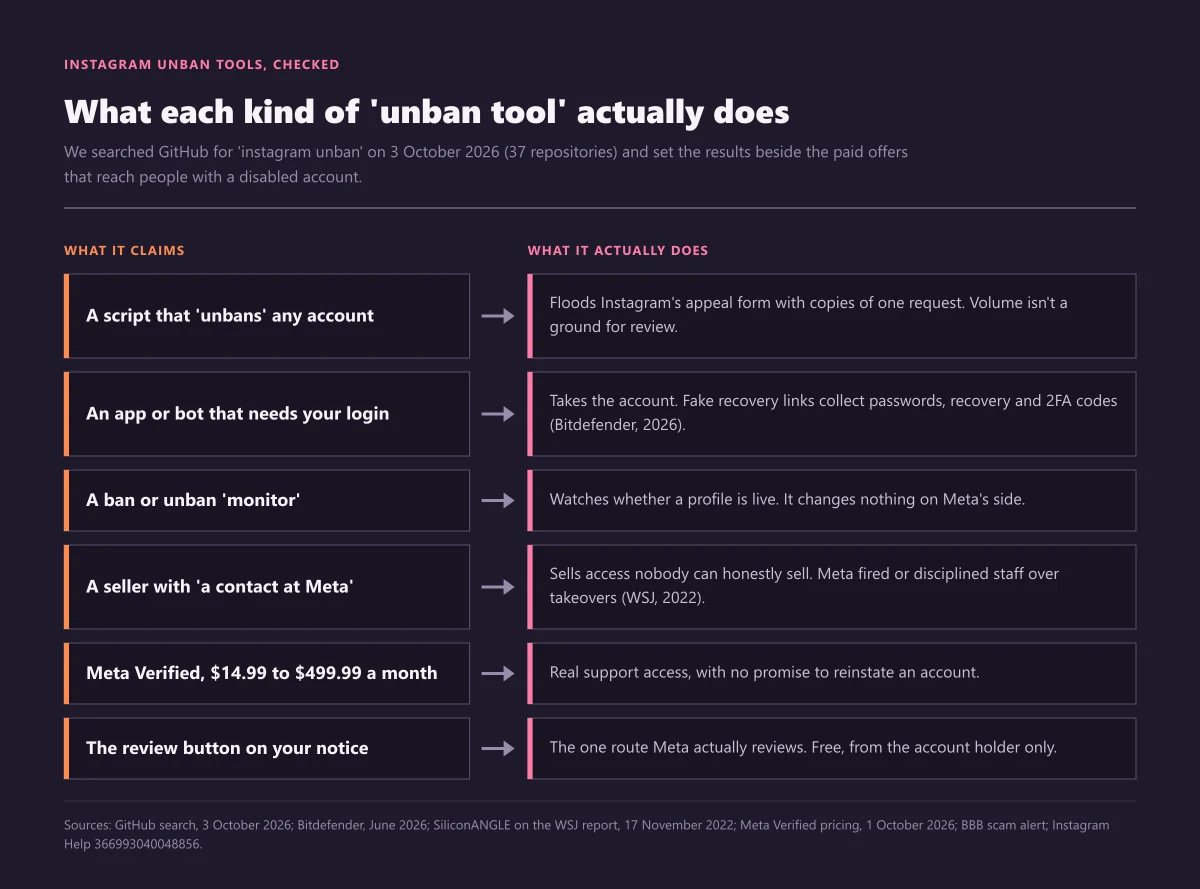
No. Everything sold or published as one either floods Meta's forms, wants your login, or does nothing.
On 3 October 2026 we searched GitHub for "instagram unban". It listed 37 repositories. The one whose description was clearest says it exists to flood Instagram's ban appeal form, which is a way to get the request ignored, not reviewed. Several others are short scripts whose method isn't explained. A few are bots that only watch whether an account is banned or unbanned, and change nothing. None reaches Meta's review in any way the official button doesn't.
Off GitHub, the instagram unban tool usually arrives as a DM, a Telegram bot or a paid app. Security firm Bitdefender warned in June 2026 that fake Instagram recovery links are used to steal passwords, recovery codes, two-factor codes and payment details, and named "pay now and I can unlock it instantly" as a typical line. A tool that needs your password to unban an Instagram account has just been handed the account.
The same shops are often on both sides of the trade. The Telegram channels that sell unbans also sell bans, and we've traced those offers too: mass-report bots, spam-report bots, downloadable "reporter tools", ban-as-a-service listings and the sellers behind mass-reporting offers. The pattern across all of them is the same. They sell access to Meta that they don't have.
How much does it cost to hire a professional to help unban my Instagram account?
The official routes cost nothing. Paid help ranges from a monthly subscription that promises no reinstatement to sellers asking hundreds of dollars for promises nobody can keep.
Start with what's free. The review on the notice is free. Account Status reviews are free. In the EU, Article 20 of the Digital Services Act requires the complaint system to be free of charge, and the Appeals Centre Europe charges users nothing at present. The Better Business Bureau's scam alert puts it in one line: account recovery is always free.
Meta Verified is the only paid product Meta itself sells near this problem. Its tiers ran from $14.99 to $499.99 a month when we checked on 1 October 2026, and none of them promises to reinstate an account. Paying subscribers told TechCrunch in July 2025 that the support was useless during the mass-disable wave.
Then the sellers. When we read four recovery-seller homepages on 1 October 2026, one advertised work "directly with Meta representatives", one promised "Guaranteed Recovery" from $250, and two carried footers saying they weren't affiliated with Meta. A promised contact inside Meta is the claim to distrust most. In 2022 the Wall Street Journal reported that Meta had fired or disciplined more than two dozen staff over account takeovers, some allegedly for bribes. Those are the "contacts" such offers imply, and the ones Meta caught lost their jobs or were disciplined.
We've written up what an unban service can and can't do and how to tell a recovery service from a scam. If someone instead demands money to give your account back, that is extortion, not a service: the extortion reporting steps and reporting impersonation used for blackmail apply.
What should you watch for while the account is under review?
Your followers can't see you, so someone else may try to be you. The reports for that are open to you even while your own account is locked.
Copies appear fast when a known account goes dark. A profile using your name and photos is an impersonator to report; one built around an invented person is a fake-account case. Where the copy reposts your photos and videos, choosing between impersonation and DMCA matters, and the copyright route for stolen posts covers the reposts on their own. Instagram's help page on impersonation sends people who can't report in the app to a contact form instead, which matters when your own account is the one that's locked.
Copies tend to go after your followers' money. Fake payment requests belong in a scam or fraud report, fake prize draws in a giveaway or business report, and both start from the whole-profile report. Tell followers on another channel that your account is under review and won't be asking anyone for anything.
Some copies are personal. A profile that follows you to new accounts is a stalker report; one that posts your address or threatens you is a threats and doxxing case; one built to mock you goes through the bullying and harassment route. Single items can go one at a time: a post, a comment or a Story. When the whole profile has to go, compare taking down a post or the account, the steps to have an account taken down and the account takedown overview. If a copy surfaced on Reddit as well, our survey of Reddit takedown threads shows how those requests went.
Keep to the rules on that side too. Reporting a real rule-breaker is fine; trying to get an honest rival banned isn't, and the pages on getting someone banned on Instagram, having someone's Instagram deleted and deleting an account that isn't yours explain where that line sits.
Where does Instagram Ban Service fit in?
On the other side of the problem. We don't unban accounts. We take down the copies, scams and abuse that break Instagram's rules.
Instagram Ban Service never asks for a login and doesn't sell access to Meta, because nobody honestly can. What the desk does is file the impersonation, fraud and harassment reports covered above, through Instagram's official channels, and only against profiles that genuinely break its rules or the law. The full set of our Instagram guides lists each case we take, and the contact page explains what to send: the profile link, screenshots, and the date on your own notice if your account is the reason the copy appeared.
For the unban itself, the order stays simple. Match the screen to the right row. Use the review on the notice, the same day. Check Account Status when you're back. Don't open a stand-in account, don't pay for a tool, and in the EU keep the decision's date, because it decides whether the outside route is still open.
Sources
- Meta Transparency CenterAccount Integrity policy: accounts created or repurposed to evade a previous removal
- Instagram Help CentreVideo selfie review: no access while the video is reviewed
- Instagram Help CentreEmails from Instagram: no security messages through Direct
- Instagram Help CentreDownload your information: contact Instagram if you can't access the account
- Meta Transparency CenterInstagram DSA transparency report, 1 January to 30 June 2026
- Appeals Centre EuropeRules of procedure: Instagram covered, no user fee at present, six-month limit
- Oversight BoardBoard upholds ban in first accounts case, 4 June 2026
- BitdefenderInstagram account recovery scams, June 2026
- Better Business BureauBBB Scam Alert: why you should never pay to recover your social media account
Frequently asked questions
How do I know if I'm banned or just restricted on Instagram?
If you can still log in and only one action fails, it's a restriction, most often an action block. Account Status, under Settings then Account, lists any features you can't use. If logging in leads to a notice instead of your feed, the account itself is suspended or disabled.
Does reinstalling the app or switching Wi-Fi lift an Instagram ban?
Not a suspension or a disable, which belong to the account rather than the app or the connection. It can seem to work on an action block only because the block was going to lift anyway. Spend the time removing third-party apps that log in as you.
Will a VPN get me unbanned from Instagram?
No. Meta publishes no IP ban to get around, and a disabled account stays disabled on any network. A VPN used to open a replacement account changes one signal among many, and Meta's Account Integrity policy removes accounts created to evade a previous removal.
Can Instagram support unban my account if I call or email them?
Meta says it doesn't have a general public phone number for customer service, and no email address replaces the review on your notice. Meta Verified subscribers can reach support staff, but the subscription carries no promise to reinstate an account.
Do Instagram bans expire on their own?
Action blocks usually do, though Instagram publishes no length. Suspensions and disables don't expire; they harden. Meta's Facebook help page says an account not appealed within 180 days, or whose appeal fails, is permanently disabled.
Can a hacked account get me banned, and should I say so in the appeal?
Yes to both. Spam or scams posted by a hacker count against the account. Secure the email and password first, then say plainly in the review that the account was taken over and when. One checkable fact helps a reviewer more than a long message.
Is it worth paying someone who says they can unban my Instagram account?
No. The Better Business Bureau says account recovery is always free, and nobody outside Meta decides your review. Sellers who hint at a Meta insider are describing the staff Meta fired or disciplined over account takeovers, as the Wall Street Journal reported in 2022.
Can I download my data while my Instagram account is banned?
Sometimes. Instagram's help page on downloading your information says that if you can't get into your account you can contact Instagram to ask for a copy. The link can take up to 30 days to arrive and stays available for four days, so ask early and watch your email.