Tool vs bot·Reviewed 2 November 2026·17 min read
Instagram spam report bot: the tool that fails, and the spam bot you can report
Two people type this phrase. One wants a bot that fires spam reports at somebody; the other has a spam bot sitting in their comments or DMs. This file answers the first quickly and spends the rest of its length on the second.
An Instagram spam report bot, meaning software that fires reports at an account, does not work: Instagram says the number of reports doesn't determine removal. If a spam bot is in your comments or DMs, report that item where it appeared, under Scam, fraud or spam. A bot asking for money or copying someone needs a different reason.
Which Instagram spam report bot do you mean?
The phrase covers two opposite jobs: a tool that fires spam reports at somebody, and a spam bot that somebody wants to report.
The first searcher has a target. They want software, a panel or a paid order that sends spam reports at an account until it disappears. That request fails on Instagram's own rules, breaks Meta's, and is declined here. The second searcher has a problem: a bot stamping the same link under their posts, a stranger pushing a crypto tip into their message requests, or a sudden wave of empty followers.
That second need is ordinary, and it has an answer inside the app.
Instagram Ban Service is an independent case desk that works on accounts genuinely breaking Instagram's rules, through Instagram's official channels, and it neither runs report software nor sells reports. So most of this page is written for the person with the bot in their inbox, because that is the person a page can actually help.
Search wording rarely separates the two. Instagram report spam bot, report spam bot instagram and report spam instagram bot read like someone holding a bot they want gone, while instagram spam bot report and spam bot instagram report could go either way. Spam report bot instagram, spam report instagram bot and spam report instagram account bot read more like a shopper looking for the tool. If you are unsure which one you are, a single test settles it: has this account done something to you that you could show a stranger? If yes, keep reading. If the honest answer is that you just want it gone, the next section is the short one.
Does a bot that fires spam reports at an account work?
No. Instagram's Help Centre says the number of times something is reported doesn't determine whether it is removed, so extra reports add no weight.
The sentence sits in How Instagram decides what to remove, read on 2 November 2026: "The number of times something is reported doesn't determine whether or not it's removed from Instagram." The same article says Instagram uses a combination of technology and user reports and applies the same guidelines each time, and it gives no threshold, tally or priority for repeat complaints. A report asks one question, whether this item breaks this rule. An account that breaks nothing gives the same answer on the thousandth asking, and an account that does break something needs only one accurate report. An Instagram spam report bot changes neither case. The threshold myth has a file of its own: how many reports it takes to delete an Instagram account.
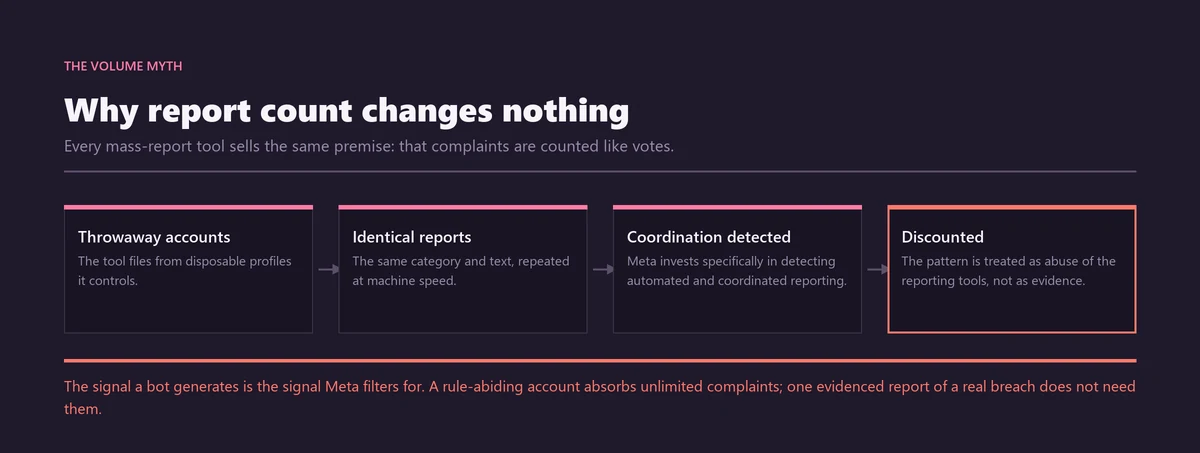
The bot also carries risk for whoever orders it. Meta's Inauthentic Behavior policy, updated in December 2025, bars using inauthentic accounts to misuse its reporting systems to harass, intimidate or silence others, and its security threats page defines mass reporting as coordinated abuse of those systems to get accounts or content incorrectly taken down. Then there is the login. Instagram's third-party apps page says never to share your login information with any person or app you don't trust, and a report tool asking for your session is asking for exactly that. The wider market is examined in our file on mass reporting an Instagram account and in the comparison of report apps, bots and panels.
Instagram Ban Service does not sell reports, does not run bots, panels or recruited crowds, and will not file against a rule-abiding account, whether that account belongs to an ex, a rival, a critic or a competitor. False reasons picked because they seem faster are refused too, as is any request for a password or two-factor code. This page names no tool and links to none, on purpose.
How do you recognise a spam bot on Instagram?
Judge behaviour rather than looks: repeated content, very high activity and misleading links are what Meta's Spam policy actually names.
Meta's Spam policy, read on 2 November 2026, bars content "designed to deceive, mislead, or overwhelm users" for the sake of artificial viewership. It covers posting, engaging or creating accounts at very high frequencies, manually or automatically, and it says accounts acting at lower frequencies can still be restricted when other signs, such as repetitive content, are present. That wording gives you a better checklist than any tip about profile photos:
- The same line, or a close copy, dropped under many unrelated posts.
- A link that promises one thing and delivers another, which the policy calls a misleading link.
- A giveaway that demands a like, share or follow first. The policy bars offering cash or anything of monetary value in exchange for engagement.
- An offer to sell you likes, follows or views, since buying and selling engagement is barred as well.
- A burst of new followers with empty profiles, which Instagram itself may catch.
No single sign proves anything. A photo-less account with a numbered username might belong to someone who reads and never posts. Two or three signs together, plus repetition you have seen yourself, is worth a report; irritation alone is not, and the report list even carries an entry called "I just don't like it" for that feeling.
Instagram does some of this sorting for you. Its page on managing unwanted followers says it may flag accounts that are potentially spam, bots or irrelevant, on public accounts, under a Flagged for review notice in your Followers list, with Remove all or Remove beside each one. Removed accounts aren't notified. The page also warns the feature may not be available to you yet. The same patterns explain why real people sometimes get limited, covered in what triggers an Instagram ban.
Report spam bot Instagram: which path fits a comment, a DM or the account?
Report the item from where it appeared, once, under the reason that matches. Each surface keeps its Report button in a different place.
| Where the bot is | What to report | The detail people miss |
|---|---|---|
| Under your post | The comment, via Options then Report | It vanishes for you whether or not Instagram removes it |
| A DM or request | One message, or the whole one-on-one chat | Up to 30 recent messages get reviewed; whole group chats cannot be reported |
| The whole profile | The account, via Options, Report, Report account | Better when every post is the spam, not just one |
| Your follower list | Remove first, then report the profile if it is abusive | Flagged accounts can be cleared in one go on public profiles |
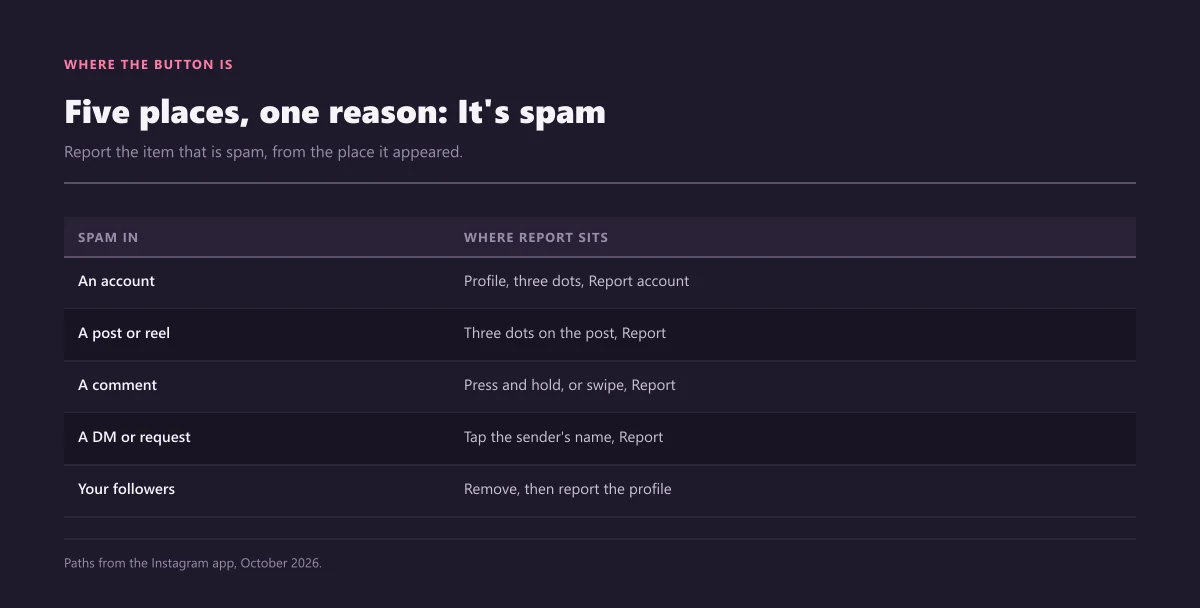
Comments: reporting hides it from you, not from everyone
Instagram's page on reporting a comment is plain about this: "After you report a comment you'll no longer see it, but this doesn't mean the comment was removed by Instagram." So a vanished comment is not a verdict. Under your own post you can also delete it, and the same screen offers restrict or block. The fuller walk-through lives in the guide to reporting a comment.
DMs and message requests: report while the spam is recent
You can report a single message or a one-on-one conversation. Because Instagram reviews up to 30 of the most recent messages in a reported conversation, a long reply thread can push the spam out of that window, which is one more reason not to answer. In a group chat you report the message, photo, video or person, never the chat as a whole. Reporting one post, Story or message has the item-level detail.
The whole account: when the profile exists only to spam
Open the profile, choose Options, then Report, then Report account, and follow the screens. Instagram's report page lists three profile grounds: posting content it shouldn't be, pretending to be someone else, or being a child under 13. A plain spam account belongs under the first. For the button-by-button version on every surface, use the manual route to reporting spam; this page exists to help you pick the path, not to repeat it.
Stopping the next wave
Reports deal with what already arrived. Filters deal with what comes next, and Instagram's hiding settings sit in your own account: Hide unwanted comments is on by default, Hide unwanted message requests is off by default and sends likely scams to a spam folder, and Hidden Words takes your own list of words, phrases, numbers and emojis. The sender isn't told when something is hidden. Instagram Ban Service runs through this same sorting before any file opens, because a report filed on the wrong surface or under the wrong reason asks the reviewer the wrong question.
When is a spam bot really a scam or an impersonator?
When it wants your money, your login or somebody's identity. The spam label then undersells it, so pick the reason that names the harm.
| What the account does | What it really is | Where it goes |
|---|---|---|
| Asks for an advance fee to release a prize or loan | Scam | The scam and fraud report route, money side included |
| Claims to be Instagram and warns about your account | Phishing | Don't click; report it, then check official emails in Settings |
| Uses your name or photos, or those of someone you follow | Impersonation | "It's pretending to be someone else", see a fake account of you |
| A friend's real account suddenly pushing an investment | Possibly compromised | Warn them by another channel; hacked account recovery is theirs to run |
| Threatens to share intimate images unless you pay | Extortion | The extortion route, not a spam report |
Instagram's scam page supplies the two most useful checks. Its first instruction is "don't respond". And it says Instagram will never send you direct messages about your account in the app, while official emails from the last 14 days can be viewed in your Settings. So a DM warning of a copyright strike, signed by Instagram, has answered its own question. The same page lists the giveaways: strangers or famous people asking for money, advance fees for a loan or prize, and someone claiming to be a friend or relative in an emergency.
Impersonation has a narrow edge worth knowing. According to the impersonation help page, the reason covers an account pretending to be you, someone you follow, a public figure or a business, and you can only report an account "for impersonating someone or something, but not for misrepresenting itself". A bot with an invented persona therefore stays a spam or scam report. If the copied person is someone you are authorised to represent, such as your child, the page says to contact Meta.
Scale explains why precision pays. On 11 March 2026 Meta said it removed over 159 million scam ads in 2025 and took down 10.9 million Facebook and Instagram accounts associated with criminal scam centres. Systems at that size catch patterns, whereas your report carries what they cannot see: that this account messaged you and asked for this. Instagram Ban Service builds its files on that kind of first-hand evidence, which is the one thing a report bot can never supply.
What happens after you report, and where does Instagram Ban Service fit?
The account isn't told who reported it, the status can sometimes be checked, and Instagram alone decides.
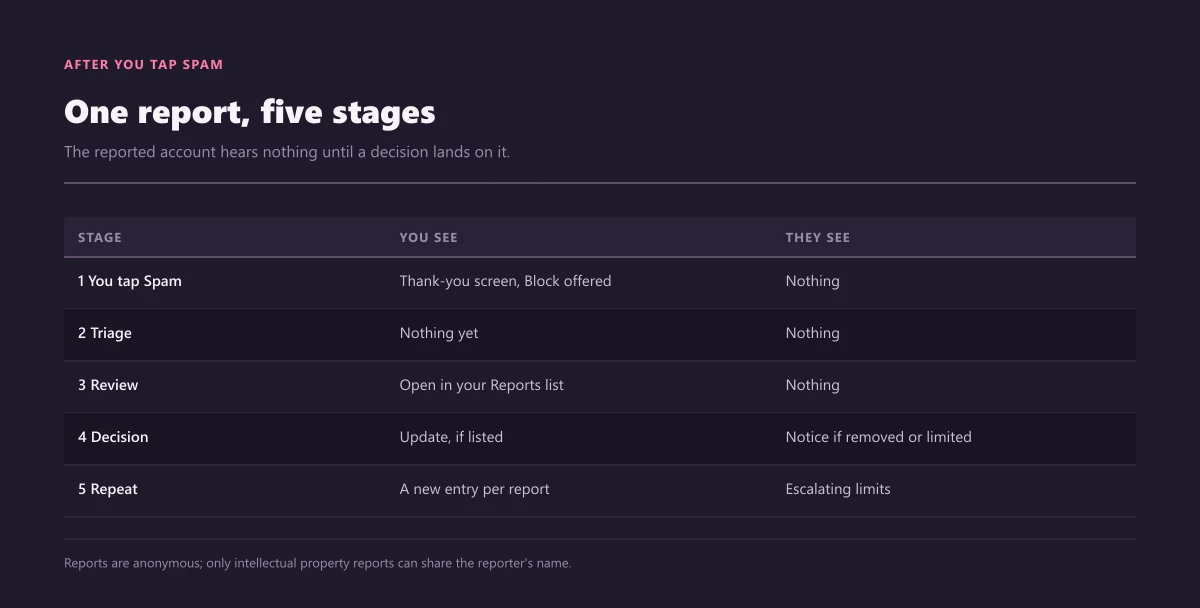
Instagram's report page says your report is anonymous, except for intellectual property reports, and that the reported account won't see who filed it. It says the status can sometimes be checked afterwards, and it adds a detail most guides skip: even when nothing is removed, Instagram may use your report to make similar content appear lower in your feed and recommendations. So a declined report can still change what you see. Repeating the same report does not change the answer. If you disagree with a decision, that page links to what you can do next; a separate file covers whether the person finds out.
A plain comment bot does not need a paid service. Everything above is free, takes minutes, and is the whole job, and Instagram Ban Service will say so if that is what a request turns out to be. A file earns its place in harder cases: a scam account with backups, a bot network using your brand, an impersonator the in-app route has already refused.
In those cases the desk starts from a link and a dated capture, then asks which rule the account breaks. If none fits, the file closes and the client is told why. If one fits, the desk picks the route, files once and logs the date. What a client pays for is case preparation, never a count of reports. Instagram Ban Service files the report; Instagram makes the final decision, so no ban, timeline or success rate is promised here.
Instagram and Meta sources behind this page
- Instagram Help CentreHow Instagram decides what to remove: report count doesn't determine removal
- Instagram Help CentreReport a post or profile: the reasons, profile grounds, anonymity, status check
- Instagram Help CentreReport a comment: a reported comment leaving your view isn't removal
- Instagram Help CentreReport a message or chat: 30 most recent messages, group chat limits
- Instagram Help CentreHide comments or message requests: default settings and Hidden Words
- Instagram Help CentreManage unwanted followers: Flagged for review and Remove all
- Instagram Help CentreReport an account for impersonation: who it covers and its limit
- Instagram Help CentreThird-party apps: never share your login with a person or app you don't trust
- Meta Transparency CenterSpam policy: high frequency, misleading links, engagement for reward
- Meta Transparency CenterInauthentic Behavior: misuse of reporting systems
- Meta Transparency CenterSecurity threats: definition of mass reporting
Questions about spam bots and report bots
Does an Instagram spam report bot actually get accounts removed?
No. A spam report bot instagram seller offers more reports, and Instagram's Help Centre says the number of times something is reported doesn't determine whether it is removed. A review asks whether one item breaks one rule, so a compliant account gives the same answer however often it is asked, and a genuine spammer needed only one accurate report in the first place. What the tool adds is exposure. Meta's Inauthentic Behavior policy bars using inauthentic accounts to misuse its reporting systems to harass, intimidate or silence others, and a program that wants your login puts your own account within reach of whoever wrote it. A seller of a spam report instagram bot may point to an account that later vanished as proof, yet nothing shows those reports caused it, because Instagram issues no receipt to third parties. Treat any such claim as unverifiable, and keep your login to yourself.
Will Instagram Ban Service run a spam report bot for me or sell me reports?
No, on both counts. Instagram Ban Service does not run report software, does not sell reports in any quantity, and declines requests aimed at accounts that break no rule, whoever owns them. Anyone asking for a spam report instagram account bot because they want a rival, an ex or a critic gone will get that answer at intake, along with the reason: report volume is not how Instagram decides, and Meta's rules treat coordinated abuse of reporting as a threat in its own right. What the desk does take is a real case, such as a scam page, an impersonator or a bot network using your brand. It starts from a profile link and a dated capture, identifies the rule, and files one report through Instagram's own channels. The client pays for preparing that case. Instagram makes the decision, so no outcome is promised, and the desk never asks for a password or a two-factor code.
How do I report a spam bot in my Instagram comments?
Report the comment itself. Instagram's steps on a computer run: open Comments below the post, hover over the comment, choose Options, then Report, and pick the reason; in the app the same Report option comes from holding or swiping the comment. If you came here to report spam bot instagram comments on your own post, you can also delete the comment and restrict or block the person on the next screen. One thing confuses people. Instagram says that after you report a comment you'll no longer see it, but that doesn't mean it was removed, so disappearing from your view is not a result. An instagram report spam bot search usually ends at this exact screen, and no tool improves on it. When the same line keeps returning from new handles, turn on Hidden Words with the phrase in question rather than reporting each one for ever.
How do I report a spam bot that keeps sending me DMs?
Open the conversation and report either the single message or the whole one-on-one chat, then choose the reason and submit. To report spam instagram bot messages properly, do it early and without replying, because Instagram reviews up to 30 of the most recent messages in a reported conversation and says it cannot see your messages unless you report them. Whole group chats cannot be reported, only the messages, photos, videos and people inside. If you want to stop the sender, block them or report the profile as well. For requests you never opened, Instagram says you can always view, delete or report them. An instagram spam bot report from inside the chat also carries the content with it, which a report from the profile alone may not. Then switch on Hide unwanted message requests, which is off by default and moves likely scams into a spam folder without telling the sender.
How can I tell whether an account is a spam bot before I report it?
Check what it does before how it looks. Meta's Spam policy names very high activity, repetitive content, misleading links, engagement-for-reward giveaways and the sale of likes or follows, so those are the signs worth writing down. A photo-less profile with digits in its name proves little alone, since plenty of real people read and never post. Look for two or three signs together: the same comment under unrelated posts, a link that doesn't deliver what it promises, a giveaway that demands a follow. Instagram also flags potentially spam, bot or irrelevant followers on public accounts under Flagged for review, where it offers Remove all, though it warns the feature may not be available to you yet. A spam bot instagram report built on what you saw yourself is more useful than a guess, and it also keeps you from reporting a real person who has merely annoyed you.
When should I stop treating it as spam and use another report reason?
As soon as it wants something from you personally. If an account asks for an advance fee, promises a prize or pushes an investment, treat it as a scam and follow the scam route, which includes your bank or payment provider if money has already moved. If it uses your name or photos, or those of someone you follow, report it with the reason It's pretending to be someone else; Instagram says that reason covers impersonating someone or something, not an account misrepresenting itself, so an invented persona stays a spam or scam report. A DM signed by Instagram about your account is phishing, because Instagram says it never sends those in the app. Threats to share intimate images belong on the extortion route, and severe illegal content belongs with police or a hotline. In each case capture the evidence first, since these accounts tend to rename or delete once they notice attention.
Will the spam account know I reported it, and should I report it again?
It won't learn who you are. Instagram says reports are anonymous except for intellectual property infringement, and the reported account won't see who reported it. Nor does a second report help. The count doesn't determine removal, so filing the same item again from the same account adds no weight, and asking friends to pile in turns a true complaint into something that looks like coordination. Report once from where the spam appeared, then look for an update, as the Help Centre says you may be able to check the status. If nothing changed and the account still bothers you, restrict or block it, and remove it from your followers if it follows you. Filters then cut the repeat traffic. Should a later message reveal a scam or a copy of you, that is new information and a fresh reason, so a new report under the right heading makes sense at that point.