Spam · the manual report, from the first tap to the verdict
Report spam on Instagram: the five buttons, and what happens after you tap Spam
Spam on Instagram turns up in five places, and each has its own Report button in a slightly different spot. This page is the manual route: which button to press where, and then what the report does after you send it, stage by stage, so you know what to expect instead of reporting the same account ten times.
To report spam on Instagram, open the account, post, comment or chat, tap the three dots or hold the item, choose Report, then It's spam. The report is anonymous. Instagram reviews it against its spam rules, and you can follow it under Help, then Reports, in your settings.
Report spam Instagram: which button sits where
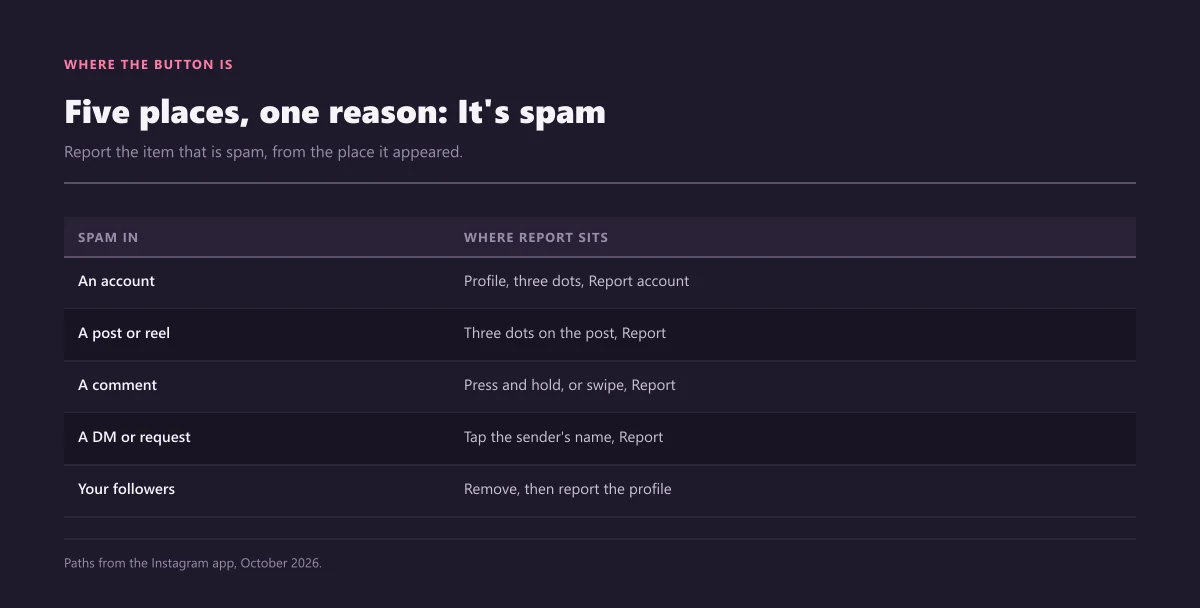
Five places, five slightly different paths, one reason to pick: It's spam.
Most people who search report spam Instagram already know the Spam option exists. What trips them up is finding it, because Instagram puts Report in a different spot on a profile, a post, a comment and a chat. The table lists the five places spam shows up, where the button is, and which reason to choose. It is the short answer to how to report spam on Instagram wherever it lands.
| Where the spam is | Where Report sits | Reason to pick |
|---|---|---|
| An account that only exists to spam | Profile, three dots, Report | Report account, then It's spam |
| A post or reel pushing a link or a giveaway | Three dots on the post, Report | It's spam |
| A comment flood under your posts | Press and hold (or swipe) the comment, Report | It's spam |
| A DM or message request from a stranger | Open the chat, tap the name, Report | Spam, then Block if offered |
| Bots in your follower list | Followers, the account, Remove, then Report | It's spam, or the bot reason |
Two rules hold on every surface. Report the thing that is spam, not the person who annoyed you; and pick spam only when the account is pushing links, giveaways or copy-paste messages. If it pretends to be you or someone you know, that is a different reason, covered further down. Instagram's own page on reporting something on Instagram lists the reasons for profiles and posts.
How to report a spam account on Instagram
From the profile, not from one of its posts, when the whole account exists to spam.
How to report a spam account on Instagram is the question behind most of these searches, and the path is short. It is also the answer to how to spam report an Instagram account you do not follow, and to how to spam report Instagram account profiles that keep coming back under new names.
- Open the profile and tap the three dots at the top right.
- Tap Report, then Report account.
- Choose the option about posting content that should not be on Instagram, then It's spam.
- Block the account on the screen that follows, if you do not want to see it again.
That is how to report a spam Instagram account and how to report spam Instagram account pages that mirror a brand. A spam report Instagram account route counts more when it comes from someone the account actually contacted, so if it messaged you, report from the chat as well. Instagram account spam report and Instagram spam account report are the same action under two names; so is report spam account Instagram, or Instagram report spam account, and report spam accounts on Instagram when there are several. Report each one; a single report does not cover a network.
How to spam report someone on Instagram who is a real person sending you promotions is the same path, but think first. A friend overdoing their small-business posts is not spam in Instagram's sense, and a mute does the job without a report.
How to report bots on Instagram
Yes, you can. Report the bot account itself, and remove it from your followers first.
Can you report bots on Instagram? Yes, and there is no special bot button: a bot is reported as a spam account. How to report a bot on Instagram is the same profile path as above. How to report bot accounts on Instagram that already follow you adds one step: open your Followers list, tap Remove next to the bot, then open its profile and report it. Reporting bots on Instagram without removing them leaves them in your count while the review runs.
Instagram also sorts likely bots for you. Its help page on followers flagged for review says public accounts can see followers marked as potentially spam, bots or irrelevant, and remove them all at once. Report bots on Instagram that slip past that filter one by one. If you want to know how bots are built and why spam tools fail, our breakdown of Instagram spam report bots covers that side.
Report spam on Instagram in DMs and comments
Report from inside the chat or on the comment itself, so the evidence travels with the report.
Spam that reaches you in private is worth reporting from where it arrived. For a message request, open it, tap the sender's name, then Report, and choose spam. Instagram report spammer DMs this way and the chat is attached to the report, which a profile report does not do. Delete the request afterwards; replying, even to say stop, tells the sender the account is active.
For comments, press and hold the comment (or swipe left on iPhone), tap Report, then It's spam. Under your own posts you can also delete it and restrict the account. Our guide to reporting a comment on Instagram covers the other comment reasons, from harassment to hate. Spam report on Instagram comments one at a time; there is no bulk report, but the Hidden Words filter in your privacy settings catches repeat phrases before you see them.
What happens when you report spam on Instagram?
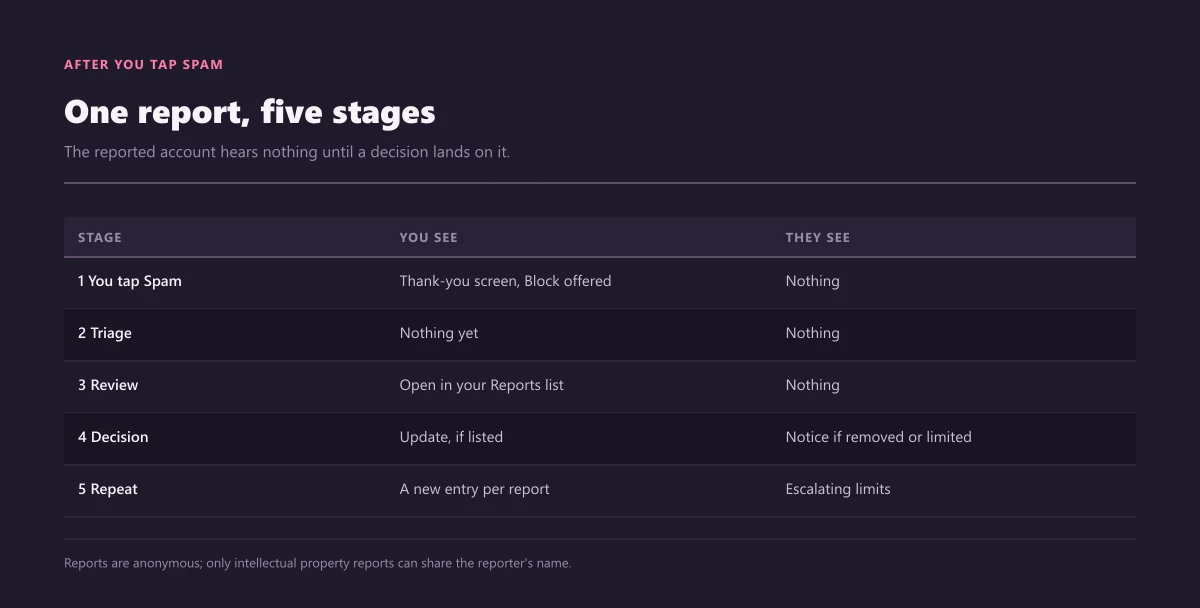
Five stages. The reported account hears nothing until a decision lands on it.
What happens when you report spam on Instagram is mostly invisible, which is why people report again. The report joins what Instagram's systems already know about that account; a reviewer or an automated check compares it with the rules; then a decision follows. What happens if you report spam on Instagram and the account is clean is simply nothing: the report is closed as no violation, and the account is not told.
| Stage | What happens | What you see | What the reported account sees |
|---|---|---|---|
| You tap Spam | The report is filed against that one account, post, comment or chat | A thank-you screen, often with Block or Restrict offered | Nothing |
| Triage | Automated systems check it against signals they already hold on that account | Nothing yet | Nothing |
| Review | A system or a reviewer compares the item with the spam rules | The report sits in your Reports list as open | Nothing |
| Decision | Removed, restricted, or left up as not breaking the rules | An update in Reports, when that report type is listed | A notice if something was removed or limited |
| Repeat | Every later report on the same account adds to its history | A new entry per report | Escalating limits, then a disabled account |
What happens when you report an Instagram account as spam and it is found to break the rules depends on its history. A first offence often means removed posts or limits on following and messaging; a long record ends in a disabled account. You can follow your reports under Profile, Menu, Help, then Reports, as Instagram's page on checking your reports explains, though not every report type is listed there. If you reported an account and want to know whether it was banned or only blocked you, checking whether a reported account was banned walks through the signs.
If I report spam on Instagram, is it anonymous?
Yes. The account is never told who reported it. Intellectual property reports are the exception.
If I report spam on Instagram is it anonymous? Instagram's help pages say reports are anonymous, except when you report an intellectual property violation, where your name and contact details can be passed to the account owner. A spam report is not one of those, so the spammer learns nothing about you, even if the account is removed.
Two things can still give you away. Blocking is visible to the blocked account if it looks for you, and if you are the only person a spam account messaged, the timing of its removal is a clue. Neither tells it you reported. To report as spam Instagram style from a second account adds nothing either: reports are weighed on what the item shows, not on how many arrive.
Does spam reporting work on Instagram?
Yes, but your report is a small share of the work. Most spam is found before anyone presses the button.
Does spam reporting work on Instagram? The EU's DSA Transparency Database, where Meta files each moderation decision for EU users, gives a rough answer. From 1 to 20 October 2026, Instagram filed 5,528,555 decisions. Of those, 5,376,991, about 97%, were made on content found by automated detection, and only 3,371 came from formal notices under the law's Article 16. Scams alone accounted for 755,892 decisions.
Those figures do not count every in-app report, but the pattern is plain: spam is mostly removed by systems, and a user report does two things inside that system. It flags an account the filters missed, and it adds weight to one they were already watching. That is why, when reporting Instagram spam, a single accurate report is worth filing and the tenth report of the same account is not. An Instagram spam report is a signal, not a vote, and the same holds for any Instagram report spam button you press.
So report Instagram spam the first time you see it, from the place it appeared, and then let it run. Instagram's Community Guidelines set the line: no artificial likes, follows or shares, no repetitive content, no misleading links.
Reporting spam on other apps
The same rule everywhere: one accurate report from the right place, on each app's own form.
Spammers rarely stay on one app, and the accounts that flood your comments often run on X, Telegram and WhatsApp too. Each has its own route: reporting an account on X, reporting Telegram groups and channels, and on Facebook, taking down an account, Page or post through the same Meta systems. The promise of report bots does not change from app to app either; we tested the claims for report bots aimed at X, Telegram report bots, WhatsApp mass report bots, Snapchat report bots, manual Snapchat report waves, TikTok mass report bots and YouTube report bots.
Waves aimed at the wrong target do real damage, as creators found when YouTube channels were banned after mass reporting. Gaming and streaming platforms write the same warning into their rules for Discord servers and Kick channels. And when the spam points to a lookalike website, the site itself goes to its host and registrar, which a domain takedown handles.
Sources
- Instagram Help CenterReport something on Instagram
- Instagram Help CenterCheck the status of your reports
- Instagram Help CenterFollowers flagged for review
- Instagram Help CenterCommunity Guidelines
- European CommissionDSA Transparency Database, Instagram, 1 to 20 October 2026
Frequently asked questions
How do I report spam on Instagram?
Open the account, post, comment or chat, tap the three dots or press and hold the item, choose Report, then It's spam. For an account, choose Report account first.
Can you report bots on Instagram?
Yes. Report a bot as a spam account from its profile. If it follows you, remove it from your Followers list first, then report it.
What happens when you report an Instagram account as spam?
Instagram reviews it against its spam rules. If it breaks them, posts can be removed, the account limited or, after repeat offences, disabled. If not, the report is closed and nobody is told.
If I report spam on Instagram, is it anonymous?
Yes. Instagram does not tell the account who reported it. Only intellectual property reports can share your name and contact details with the account owner.
Does spam reporting work on Instagram?
Yes, for accounts the filters missed. Most spam is removed by automated detection before anyone reports it, so one accurate report counts and repeat reports of the same account add little.
Where can I see the spam reports I made?
In the app, go to your profile, the menu, Help, then Reports. Not every report you make is listed there.