Telegram group and channel reporting · app steps, takedown addresses, the EU form and admin bans
How to report Telegram groups and channels: the button, the addresses, and what happens after
Most people who ask us about a Telegram group already tried the Report button once and heard nothing back. This page lays out every route Telegram actually reads, in the order we would use them, as checked on 19 October 2026.
To report a Telegram group, open its info page, tap the three-dot menu and choose Report, then pick the closest reason. For single posts, long-press the message and report that instead. Illegal material can also go to abuse@telegram.org with t.me links. Moderators read reports; volume and bots change nothing.
How to report Telegram groups from each app?
From the group's own info page. The same menu reports a channel, and a long-press on a post reports just that post.
Telegram's FAQ answer on illegal content says every official app has a Report button, and the steps differ only by device. Whole-group and single-message reports sit in different places:
| App | Whole group or channel | One message |
|---|---|---|
| Android | Open the group, tap its name, then the three-dot menu, then Report | Tap the message, then Report |
| iPhone and iPad | Open the group info, tap the … button, then Report | Press and hold the message, then Report |
| Desktop, macOS, Web | Open the info panel, the three-dot menu, then Report | Right-click the message, then Report |
To report a telegram channel, use the same steps: the channel's profile carries the identical menu. After Report, the app asks for a reason. That list is sent by Telegram's server rather than built into the app, so it can change between visits and can ask a follow-up question before it accepts the report.
Pick the message route when a few posts are the problem, because messages.report carries the IDs of the posts you chose. A whole-group report through account.reportPeer carries a reason and an optional comment but no posts at all, so write the comment as if the moderator has never opened the group. A public group can be reported without joining; a private one only from inside.
What counts as banned content on Telegram?
Less than people expect. The terms target spam, scams, violence and illegal material in publicly visible places, not opinions.
Telegram's Terms of Service are four lines long. Users agree not to send spam or scam users, not to promote violence or post illegal pornographic content on publicly viewable channels and bots, and not to do things illegal in most countries, with child abuse, drugs, firearms and forged documents named as examples. That short list is most of what people mean by telegram banned content.
Two words in it matter for a report. "Publicly viewable" means the rules bite hardest on public channels, bots and groups that anyone can open. And the FAQ is plain that Telegram blocks terrorist channels but "will not block anybody who peacefully expresses alternative opinions". A telegram violations group, in the sense moderators act on, is one that shares stolen personal data, sells illegal goods, runs fraud or posts abuse material; a group that is rude about you rarely qualifies.
Searches for banned content telegram rules often turn up long unofficial lists. Treat those as guesses. If a post fits none of the four lines, a copyright or privacy route usually fits better than a general report.
Which Telegram reports go outside the app?
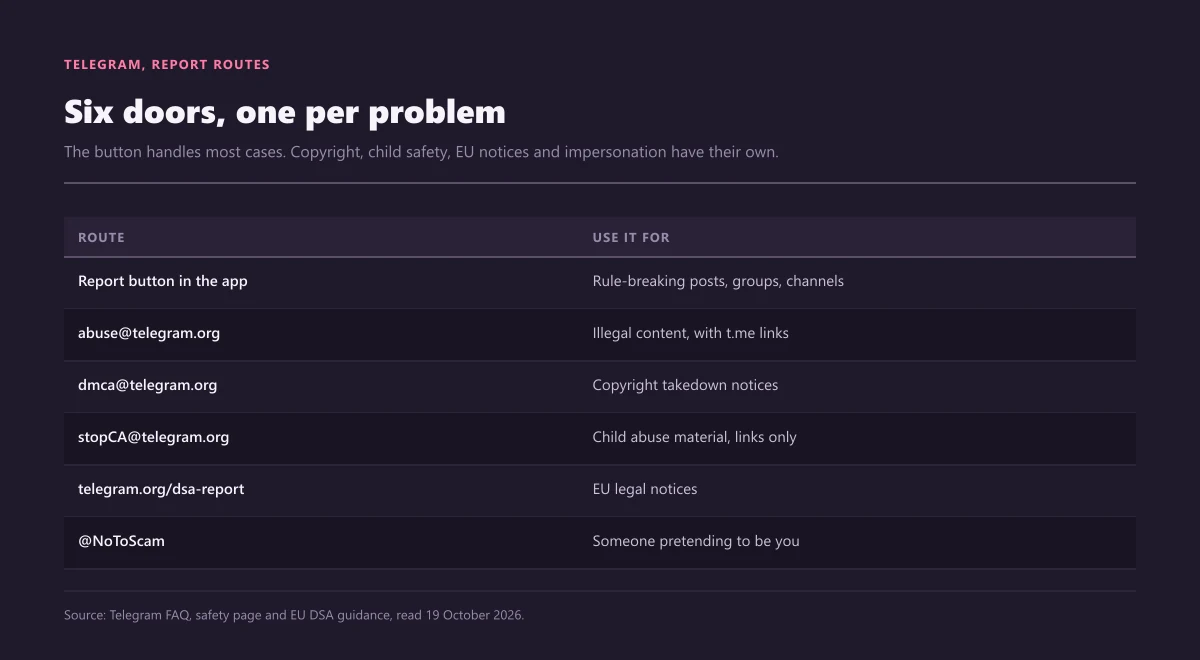
Five addresses and accounts handle what the button handles badly: bulk illegal content, copyright, child safety, EU legal notices and impersonation.
The Report button is the default, but some cases need a paper trail. The FAQ names abuse@telegram.org as its automated takedown address and asks for links to the content, and the safety page lists stopCA@telegram.org beside it for child abuse material.
| Route | Use it for | What to include |
|---|---|---|
| Report button in the app | Any rule-breaking post, group or channel | Pick the closest reason; add a comment |
| abuse@telegram.org | Illegal content, by email | Include t.me/… or @ links to each item |
| dmca@telegram.org | Copyright: your course, film, photos, software | A takedown notice naming the work |
| stopCA@telegram.org | Child sexual abuse material | Links only; never forward the material |
| telegram.org/dsa-report | Users in the EU | Name, contact details and a clear explanation |
| @NoToScam | Someone pretending to be you | Only for impersonation of the reporter |
The EU Digital Services Act page adds a warning worth reading before anyone files in bulk: Telegram may suspend the processing of notices from someone who repeatedly sends manifestly unfounded ones. One clear notice keeps its weight; a stream of weak ones loses it.
A client of ours spent a week tapping Report on a channel that reposted their paid lessons and got nowhere. When we filed one copyright notice to the dmca address instead, with twelve t.me links and the course's sales page, the posts were gone within days. The button had been the wrong door, not a broken one.
What does Telegram do after you report a channel?
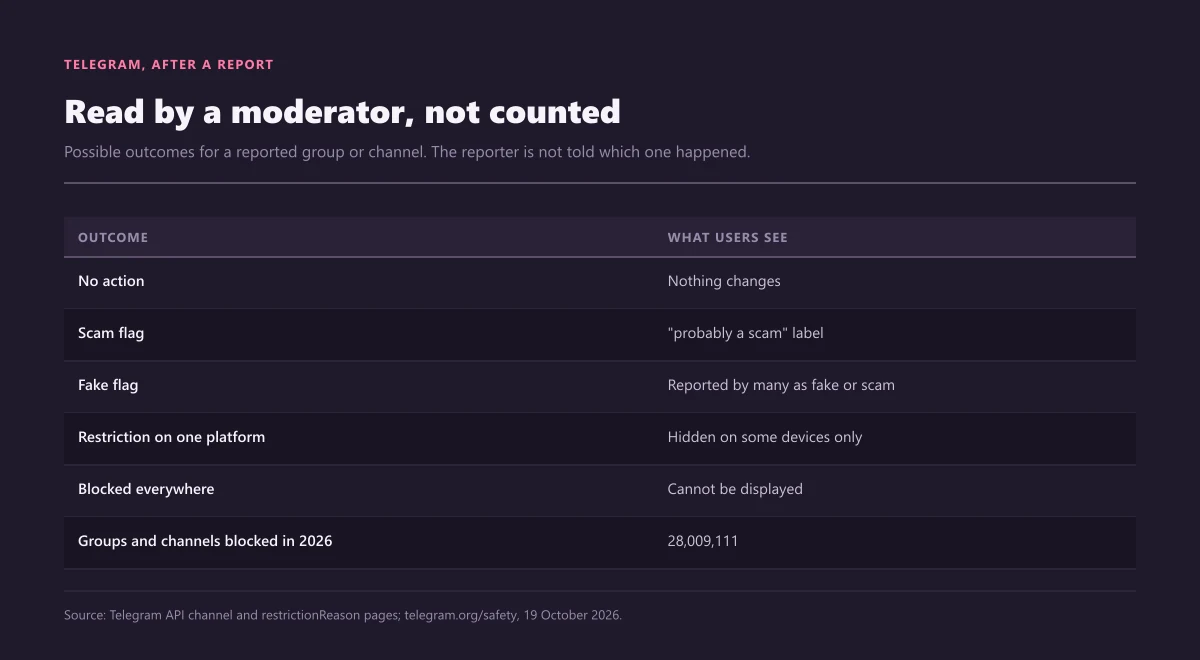
A moderator looks at it. The outcomes range from nothing, to a scam or fake label, to the channel going dark on some devices or everywhere.
Reports reach moderators, not a counter. Telegram's spam FAQ says even group admins' spam reports are "checked by human moderators". The channel object in the API shows the outcomes that follow: a scam flag shown as "probably a scam", a fake flag for a channel "reported by many users as a fake or scam", or a restriction with a reason and platform. A restriction can apply to one platform only, which is why a channel can vanish on iPhone and stay open on Android.
On telegram banning channels at scale, the safety page showed 28,009,111 groups and channels blocked in 2026 when we read it on 19 October, 455,559 of them for child abuse material. Most of that comes from Telegram's own detection, so a quiet response to your report is normal; you are not told the result.
Instagram works the same way, and what reporting someone on Instagram actually does shows the same silence. For how platforms pick targets, see what triggers an Instagram ban and the pattern behind an Instagram ban wave.
Do Telegram mass reporting tools or GitHub report bots work?
No. Telegram's report methods are user-only, the Bot API has no report call, and the GitHub search returns mostly empty or unrelated code.
A telegram mass reporting tool, a telegram mass report bot free download, a telegram channel ban tool or a telegram channel ban script all promise the same thing: that enough reports force a ban. The API pages for account.reportPeer and messages.report both say "Only users can use this method", so a telegram channel report bot in the literal sense cannot exist, and an auto report telegram channel service is just accounts doing it by script.
That script is the risk. Telegram's API terms say unofficial clients are automatically put under observation and that accounts used for flooding or spamming can be banned forever. The accounts running the campaign are the ones that fall.
The telegram report bot github results tell the same story. The best-known real one, MasterGroosha/telegram-report-bot, is a moderation helper that lets members flag a message to a group's own admins; it never contacts Telegram. When we sorted every mass report telegram github result, only 43 of 586 repositories even claimed to send reports, as our breakdown of the Telegram mass report bot repos shows. Fake GitHub tools are also a known malware route: Check Point traced a network of ghost accounts pushing infected repositories in 2024.
The same holds on Instagram: our trace of Instagram mass reporting offers and our test of an Instagram reporter tool found the same empty promise.
What is the real ban method when the group is yours?
If you are an admin, you ban the member yourself. Telegram only needs to step in when the problem is a group you do not control.
Most searches for a telegram group ban method come from admins with a spammer inside. Admins with the ban right remove the member from the member list or a message's menu. The Bot API rule behind it says a banned user cannot return through invite links unless unbanned first, and a ban set for more than 366 days or under 30 seconds counts as permanent. Moderation bots use the same call.
- Delete the posts and ban the account from the group.
- Report the account's messages as spam before deleting them if they are scams, so moderators see the content.
- Turn on slow mode or join approval if the same wave keeps coming back.
- If a copy of your group or channel is impersonating you, report that channel and write to @NoToScam.
For a telegram channel ban method against a channel you do not run, there is no shortcut beyond the routes above: the right reason, the right address and evidence a moderator can read in one pass.
Same people on Instagram: where do the guides go?
Groups that leak or scam on Telegram often run an Instagram account too. The honest routes there look much the same.
Start with how an Instagram account really gets banned and how to report a fake Instagram giveaway or business page. If the trouble lands on your own account, read how to avoid an Instagram ban, what a disabled account notice on Instagram means and the "we restrict certain activity" message. To get back in, see how to get your Instagram account back and recovering a disabled account after an appeal.
Handle scammers on Telegram often sell Instagram names too, and banning a holder does not free a name. Check names with the Instagram username checker or an Instagram name checker, read why Instagram says a username is taken when it looks free and why a handle shows as not available, and see what is realistic for 4-letter Instagram handles, rare usernames, an inactive Instagram handle or names listed for sale.
Sources
- TelegramTerms of Service
- TelegramSpam FAQ, moderator review
- Telegram APIaccount.reportPeer
- Telegram APImessages.report
- Telegram APIchannel constructor, scam and fake flags
- Telegram APIrestrictionReason
- Telegram Bot APIbanChatMember
- Telegram APIObtaining api_id, terms for unofficial clients
- Check Point ResearchStargazers Ghost Network, 2024
Frequently asked questions
Can I report a Telegram group without joining it?
Yes, if the group is public. You can open it from a link, use the info page menu and choose Report. A private group can only be reported by someone inside it.
Does the group owner know who reported them?
Telegram's apps show the group no reporter names, and Telegram sends you no result either. An EU notice under the Digital Services Act is different, because the form asks for your name and contact details.
How many reports does it take to ban a Telegram channel?
There is no number. Moderators review what the report shows, and Telegram warns that repeated unfounded notices can be ignored. One report with links and a clear reason does more than many empty ones.
Is there a free Telegram mass report bot that works?
No. Telegram's report methods can only be used by user accounts, the Bot API has no report call, and scripted accounts risk a permanent ban under Telegram's API terms.
Where do I report copyright on Telegram?
Send a takedown notice to dmca@telegram.org naming your work and listing the t.me links of each copy. Telegra.ph pages carry their own Report Page link as well.
What if a Telegram channel is pretending to be me?
Report the channel from its info page with the impersonation reason, then write to @NoToScam, which Telegram reserves for people whose identity a scammer is using.