Own account · Account Status warnings, follow limits, third-party apps, shadow bans, strikes, ban length and reversals
How to avoid being banned on Instagram: the warnings that come first, and the habits that never earn one
Most advice on staying unbanned is a list of folklore numbers. On 3 October 2026 we went to the record instead: Instagram's help pages, Meta's enforcement pages, and every account decision Instagram filed in the EU for September 2026.
To avoid being banned on Instagram, keep one secured account per person, grow it by hand, skip apps that ask for your password, and read Account Status after any removal. Hand-run accounts usually get warnings first: a removed post, lost recommendations, locked features. Fixing those early is how you stay off the disable list.
Who actually gets banned on Instagram?
Mostly accounts that no one person stands behind. The system is tuned to catch those, so that's where avoiding a ban starts.
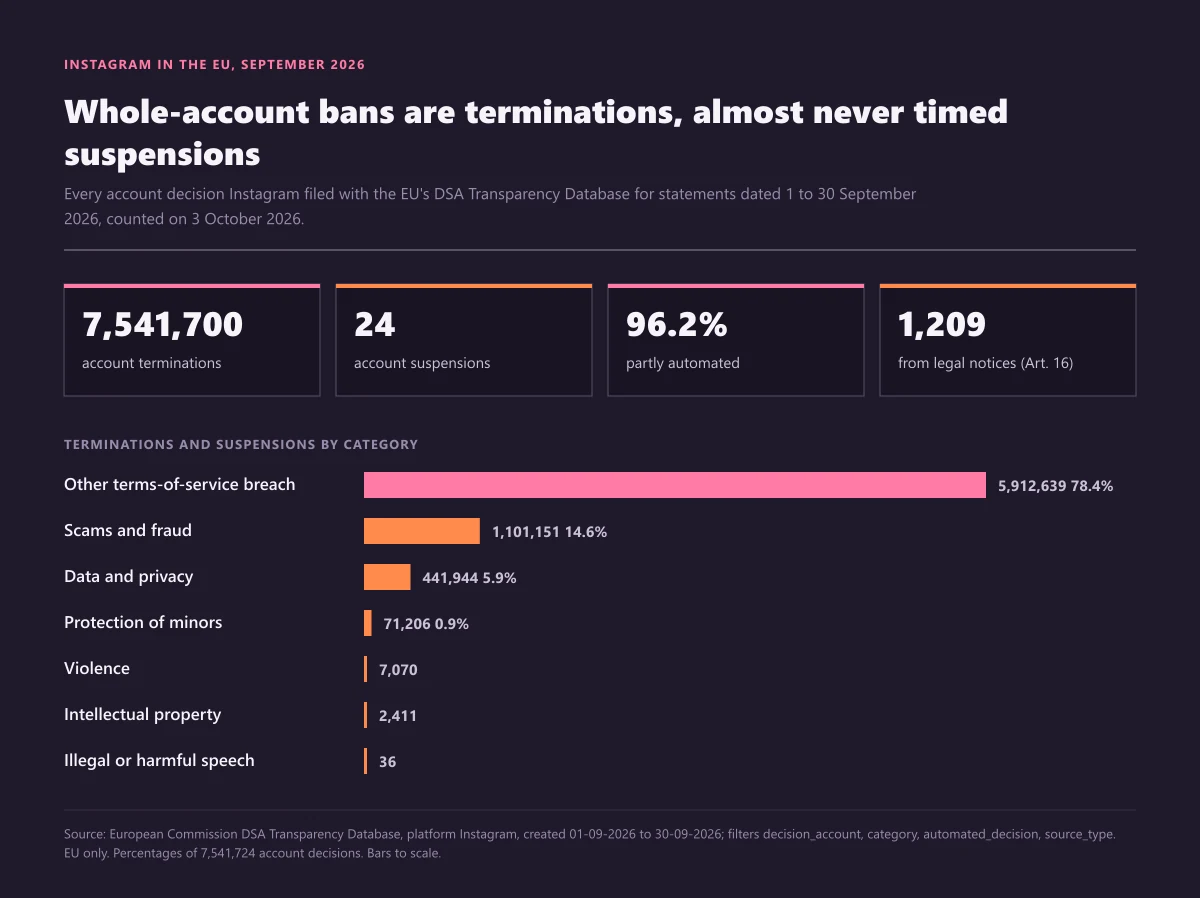
Under the EU's Digital Services Act, Instagram files a statement for its moderation decisions in the EU with the European Commission's DSA Transparency Database, which anyone can search. On 3 October 2026 we counted Instagram's filings dated 1 to 30 September 2026. There were 11,221,242 of them, and 7,541,700 were account terminations. Account suspensions, the timed kind that ends on a date, came to 24.
We had expected that last figure to run into the thousands. It didn't, and it changes how the rest of this page reads: when Instagram acts against a whole account, it almost never files a pause. It files an ending.
The same count shows who does the acting. Most terminations were filed under a catch-all for breaking Instagram's terms, 5,912,639 of them or 78.4%, followed by scams and fraud at 1,101,151 and data and privacy violations at 441,944. Intellectual property accounted for 2,411 and illegal or harmful speech for 36. Of all 7,541,724 account decisions, 7,540,506 came from Instagram's own detection and 1,209 from legal notices sent under Article 16 of the Digital Services Act. Automation touched nearly all of them: 7,255,975 (96.2%) were marked as partly automated, and 285,749 (3.8%) were made without it.
So being banned on Instagram, in the sense the platform records it, nearly always means termination, and nearly always starts with Meta's own systems rather than with a report from another user. Those systems hunt for accounts made in bulk, run by scripts, sold on, or built to scam. The practical way to avoid an Instagram ban is to look, at every point the system checks, like what you are: one person running one account by hand. Our breakdown of the five things that set off an Instagram ban covers the triggers themselves; this page is about staying clear of them, and about reading the warnings Instagram gives before it acts.
What does Instagram show you before it disables an account?
Usually several things, spread over weeks, on one screen most people never open: Account Status.
Instagram's help page on checking your Account Status puts the rule in one line: If you repeatedly post content that is removed for going against our Community Standards, you may lose access to your account.
The word that matters is repeatedly. Most disables of real, hand-run accounts arrive at the end of a trail, and the trail is visible if you know where to look. The exception is the severe end: Meta's page on disabling accounts, updated 17 July 2025, says some violations are serious enough to end an account the first time.
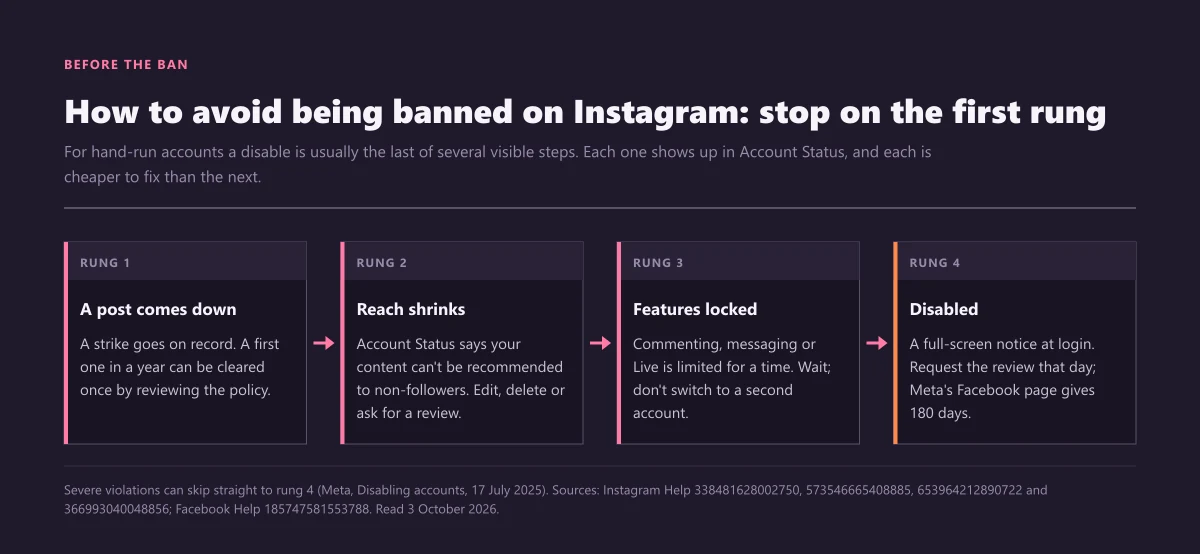
Here is the trail, roughly in the order it appears, as Instagram's help pages and announcements described it on 3 October 2026.
| What you see | Where it shows | What it tells you | What to do that day |
|---|---|---|---|
| A post, reel or story removed | A notification, then Account Status under Removed content | A violation is on record and counts as a strike | Read the rule it names and delete anything that looks like it |
| An offer to remove the strike | Account Status, on a first removal within a year | You can clear it once a year by reviewing the policy | Use it only if the post was an honest mistake |
| Your content isn't recommended | Account Status, for professional accounts | Posts can't reach non-followers in Explore, Reels or Search | Edit or delete the flagged posts, or ask for a review |
| Features you can't use | Account Status | Commenting, messaging or going live is limited for a time | Wait it out; don't use another account to do the blocked thing |
| Restricted for data scraping | A notice when you open the app | An app or script is acting through your login | Change the password, remove the app, turn on two-factor |
| Disabled | A full-screen notice at login | The account is off until a review says otherwise | Request the review from that screen, the same day |
Read that table from the top and the advice writes itself: the earlier the row, the cheaper the fix. A deleted post costs nothing. A feature limit costs a week of not commenting. A disable can cost the account. If you only remember one habit from this page, open Account Status after any notification from Instagram that mentions a removal, and once a month even when nothing has happened.
How do I avoid getting banned on Instagram? Eight habits, most important first
Lock the login, keep one honest identity, grow by hand, and read your own record. The rest is detail.
- Lock the login before anything else. Turn on two-factor authentication and never type your password into anything that isn't Instagram or Meta. An account that's taken over gets judged on what the intruder posts, and a hijacked profile that suddenly pushes crypto or giveaway spam looks, to an automated system, exactly like a scam account.
- Run one account per identity, under your real age. Instagram's Terms of Use require you to be at least 13, bar impersonation, and say you can't use the service if Meta previously disabled your account. A second profile made to dodge an old ban is a ban waiting to happen. If someone else is wearing your name, getting an impersonator taken down protects you better than copying their tactics.
- Post what you made or have the right to use. The same Terms let Meta disable accounts that repeatedly infringe other people's intellectual property. Re-uploaded films, other creators' clips and logos are a slow-building risk, and the reverse case, someone lifting your work, has its own route in our guide to reporting stolen content.
- Grow by hand. Meta's spam policy, last updated 26 June 2024, bans
selling, buying, or exchanging for engagement, such as likes, shares, views, follows, clicks
. That covers bought followers, and it covers groups that swap likes too. - Act at a human pace. Follow, like, comment and message in sittings, not in marathons, and never paste the same comment or DM down a list. Copy-paste outreach is the pattern the spam rules describe.
- Read Account Status once a month. It's the one screen where Instagram tells you, in its own words, whether anything has been removed and whether the account is in trouble. Section two explains what to look for.
- When one post comes down, take down its twins. If a reel was removed, the near-identical reel you posted the next day is probably next. Removing it yourself costs a post; leaving it can cost another strike.
- Audit connected apps twice a year. Remove any tool you don't use, and anything that ever asked for your password rather than sending you to Instagram's own login screen. Section five sorts the safe ones from the risky ones.
Is there a way to avoid an Instagram ban with tricks?
None of these habits involves a trick, and that's deliberate. Every hack sold as a way to avoid an Instagram account ban, from rotating devices to warming up accounts with scripts, is itself one of the signals the systems look for. Usernames sit under the same rule: Meta's spam policy also bans buying or selling accounts and other platform assets, so claiming an inactive username through Instagram's own process is the only safe way to get a handle someone else is sitting on.
How many follows per day before Instagram bans you?
Instagram publishes one hard number, and it isn't per day: nobody can follow more than 7,500 accounts in total.
That cap is on Instagram's help page about how many people you can follow, which says Instagram doesn't allow anyone to follow more than 7,500 people
and presents the limit as a way to cut spam. Accounts already above 7,500 got there before the rule existed. Try to pass it now and you get an error message, not a ban.
No daily figure appears anywhere in Instagram's help pages. The ones you see quoted on growth blogs and forums are guesses built from people's own error messages, and they disagree with each other because there isn't one number to find. Meta's spam policy explains why: it targets actions taken at very high frequencies
, and then adds that Meta may restrict accounts acting at lower frequencies when other signs of spam or inauthenticity are present. A brand-new account that follows 80 strangers in an hour and unfollows them two days later can look worse than an old account that follows 200 people it actually interacts with.
So the useful answer is about pattern, not quantity. Follow people you'd plausibly know or want to hear from, in short sittings. Don't run follow-for-follow cycles. Don't unfollow in bulk the day after a follow spree. And if Instagram stops you mid-session with an error, treat it as a temporary limit on that action: stop for the day rather than retrying, and certainly don't hand the task to an app. Messages work the same way. Instagram's page on message limits says they exist to stop messages people may not want, such as spam, and that you may not be able to send more for a period of time, with no number attached.
Does using third-party apps get you banned on Instagram?
The ones that ask for your password, or act for you, can. The ones that go through Meta's own login screen generally don't.
Instagram's Terms of Use forbid creating accounts or accessing or collecting information in an automated way without Meta's permission. That clause is the one most growth apps break. Instagram drew the line publicly on 19 November 2018, when its announcement on reducing inauthentic activity said it would start removing inauthentic likes, follows and comments from accounts that use third-party apps to boost their popularity, and that those accounts would get an in-app message saying so.
The enforcement side has a name now. Instagram's help page on accounts restricted for data scraping lists the trigger as Your account is automating access to or collecting information in an automated way without our permission
, and names handing your username and password to an app that offers likes or followers as a common way in.
| Kind of tool | How it connects | Where the rules put it | Ban risk |
|---|---|---|---|
| Meta Business Suite and Meta's own apps | Meta's own login | First-party, built for this | None from the tool itself |
| Scheduling and analytics tools for professional accounts | Meta's permission screen, no password typed into the tool | Allowed access through Meta's official interface | Low, as long as you post within the rules |
| Follower, like and view growth services | Your username and password | Bought engagement under the spam policy, automated access under the Terms | High, and the engagement gets stripped anyway |
| Auto-follow, auto-like and auto-DM bots or browser extensions | Your session or your password | Automated access and high-frequency actions | High: the data-scraping restriction exists for these |
| "Who unfollowed me" and profile-viewer apps | Usually your password | Unauthorised collection of information | High, plus a real chance of losing the account to the app |
| Mass-report bots and panels | Many accounts, scripted | Automation and misuse of reporting | High for whoever runs or buys them |
If you've already used one of the risky kinds, fix it before Instagram does: change the password (Instagram's scraping page notes this logs out every device), remove the app from your connected apps, check recent login activity for sessions you don't recognise, and turn on two-factor authentication. Then stop using it. An account that quietly stops the automation gives the systems nothing new to find.
How can I avoid a shadow ban on Instagram?
Stay inside the Recommendations Guidelines, which are stricter than the rules for staying on the app, and check your eligibility instead of guessing.
Instagram doesn't use the phrase shadow ban. What people mean by it, posts that stop reaching anyone beyond their followers, maps onto something Instagram does document: recommendation eligibility. On 7 December 2022 Instagram added a check to Account Status so accounts could see whether their content can be recommended to non-followers in places like Explore, Reels and Feed Recommendations
, according to its Account Status announcement. An update on 25 April 2023 extended the check to Search and Suggested Accounts. Instagram's page on recommendation eligibility says professional accounts can see it, and warns that being eligible doesn't guarantee being recommended.
The rules behind it are Instagram's Recommendations Guidelines, which hold accounts to a stricter standard for reaching people who didn't choose to follow them. Content that's fine to post can still be ineligible: promotion of regulated products such as tobacco or alcohol, weight-loss products and cosmetic surgery, unoriginal posts repurposed from elsewhere with only minor edits, long captions that have nothing to do with the post, coordinated comment networks, and anything fact-checkers rated false. Whole accounts lose eligibility for a recent Community Standards violation, for buying engagement, or for repeatedly posting that kind of content.
So the way to avoid a shadow ban on Instagram is mostly to avoid those categories, and to post your own work rather than re-cuts of other people's. If your reach drops, switch to a professional account if you aren't on one, open Account Status and look at the recommendation check before you change anything else. If a post is flagged, edit or delete it, or ask for a review if you think the call was wrong. One more thing the EU data shows: in September 2026 Instagram filed 3,226 statements for demoted content against 3,675,946 for removed content. Reduced reach for borderline posts mostly doesn't appear in that database, so no public count tells you how common it is. Your own Account Status is the only reliable reading.
How do I avoid an Instagram account ban after getting a warning?
Treat the next twelve months as probation. A warning means a strike is on record, and strikes are what a disable is built from.
Find out exactly what was flagged. Open Account Status and read the removed item and the rule it names. People who skip this step tend to repeat the same post in a slightly different form, which is the quickest way to stack strikes.
Use the first-strike removal if you qualify. Instagram's help page on removing a first-time strike says you may be able to clear a strike if it's the first time content was removed for breaking the Community Standards within the past year. The path is Settings, then Account status, then Removed content and messaging issues, then Removed content, then Request review. You'll be asked to review the policy, the post stays down, and you can't use the option again for a year. Meta's page on removing strikes through policy education, updated 30 April 2025, says more than 340,000 Instagram users had started the exercise.
Clear out the near-duplicates. If one reel was removed for, say, a copyrighted soundtrack or a regulated product, the others like it are next in line. Delete them yourself.
Slow everything down for a while. A warned account that keeps following, commenting and messaging at full speed gives the spam systems a second reason to look at it.
Mind the calendar. Meta's counting strikes page says strikes on Instagram, as on Facebook, drop off after a year. A clean year after a warning takes you back to where you started.
Disagree through the button, not around it. If you think the removal was wrong, request the review from Account Status. Opening a second account, or getting friends to repost the removed content, turns one disputed strike into several clear ones.
How long does an Instagram ban last?
A feature limit lasts days and says so on screen. A disable lasts until a review reverses it, and if it isn't reversed it becomes permanent.
Instagram doesn't publish a timetable. The well-known ladder of one-day, three-day, seven-day and thirty-day restrictions comes from Meta's restricting accounts page, and that page, updated 12 November 2024, says that although Meta counts strikes on both apps, those timed restrictions apply only to Facebook accounts. For Instagram, the length of a feature limit is whatever Account Status tells you under the features you can't use.
Whole-account bans are a different shape, and the EU filings show how different. In September 2026 Instagram filed 7,541,700 account terminations in the EU and 24 account suspensions. A timed account ban, the kind that ends on a known date, is close to absent from what Instagram records. A disabled account is either brought back by a review or it isn't.
For the review itself, Instagram's own disabled accounts page prints no deadline. Meta's Facebook page on suspended or disabled accounts, which covers the same Accounts Centre system, gives 180 days to appeal, after which the account is permanently disabled. If your own screen shows a different counter, trust the screen. Either way, the answer to how long an Instagram ban lasts is mostly in your hands for the first few days: request the review straight away.
Can you get permanently banned from Instagram, and is it reversible?
Yes, and sometimes. A lost or missed review is final inside Meta; in the EU a certified outside body can still overturn it.
Meta's Facebook help page uses the word permanently for the stage after a lost or missed review, and says no further review is possible then. Instagram's Terms of Use add the part people forget: you can't use Instagram at all if Meta previously disabled your account for breaking the law or its policies. A fresh account opened after a permanent ban is exposed from its first day.
Reversals do happen, mostly early. Meta's Instagram transparency report for January to June 2026 counts 7,816,585 complaints in the EU against account suspensions and terminations, and 2,838,533 of them were reversed, about 36%. In the EU the Digital Services Act also lets users take a decision to a certified out-of-court body such as the Appeals Centre Europe, which takes Instagram cases up to six months old. Outside the EU, after a lost review, a court is the only route left.
Recovery has its own guides: the 180-day timeline for a permanently disabled account, what's left after an appeal is denied and the five suspension screens and what each one means. Paid "unban" sellers can't reach any of these decisions, as our look at unban services sets out. And not every locked account is a ban: an account that's been memorialised after its owner died is closed to logins for a different reason, with different rules.
Someone says they'll get your account banned
A threat to mass-report you is mostly noise. A threat that comes with a demand is a crime, and it has its own report route.
Reports don't work as votes. Meta's page on how it prioritises content for review ranks cases by severity, virality and the likelihood of a violation. The number of reports isn't one of its factors, which is why mass-reporting an Instagram account so often does nothing to an account that follows the rules, and why nobody can honestly tell you how many reports it takes to delete an account. Reviewers look at the content. If yours is clean, a pile of reports leaves it clean.
The people selling the threat know this. Our page on mass-reporting offers, traced to what they actually do comes to the same point: bots, APKs and panels sell volume, and volume decides nothing. The same goes for ban-as-a-service listings, the mass report bots passed around on GitHub and Telegram, spam report bots, the report apps, bots and panels sold as a package, and the so-called Instagram reporter tools. Running any of them breaks Meta's rules on automation, so the person most at risk of a ban is the one who buys.
A threat with a price attached is different. If someone wants money, more images or a favour in exchange for not reporting you or not leaking something, that's extortion: keep the messages and report the extortion through Instagram's own route, and to the police. A fake account set up to frighten you is covered in reporting impersonation used for blackmail. Threats of violence and doxxing, an account that keeps following you around the app, and bullying and harassment each get their own guide, because the right report differs.
A common worry is whether reporting the person back will tip them off. It won't name you: Instagram's reports are anonymous to the account reported, as our page on whether Instagram tells you who reported you explains, and what the reported person actually sees is covered separately.
Report what breaks the rules, and keep your own account out of it
Reporting a genuine violation never puts your account at risk. Retaliating with fake reports, bought tools or a second account does.
The safe pattern is one accurate report per problem, filed from inside the app at the level where the problem sits. A single post goes through the post report menu; an abusive reply through the comment report; a story or a whole page through the story and page report; a profile through the profile report flow. Fake shops and rigged prize draws have their own categories, covered in reporting a giveaway or business account and reporting a scam or fraud account, and a profile pretending to be a real person goes through the fake account report. Where a copy of you is the problem, impersonation reports and DMCA notices do different jobs.
After that, wait. What a report does once it's filed and how to tell whether the account was banned explain the follow-up; whether to aim at the post or the whole account and how an account takedown works end to end cover the bigger cases.
Searches like how to get someone banned on Instagram, how to get someone's Instagram deleted, deleting someone else's account, banning an account permanently and reporting an account until it's disabled all land on the same answer: only a real violation, shown through the official route, removes an account, and our guides say so plainly. The same holds for a full account takedown and for the threads collected in what Reddit says about taking down a page.
Instagram Ban Service works on that side of the problem. When an impersonator, scammer or harasser is breaking Instagram's rules, we prepare the case and file it through Instagram's official channels; we don't touch accounts that follow the rules, and we can't shield an account from its own violations. Our index of Instagram guides lists every route, and the contact desk takes a profile link if you want a case looked at.
Sources
- Instagram Help CentreCheck your Account Status on Instagram
- Instagram Help CentreHow many people you can follow: the 7,500 cap
- Instagram Help CentreLimits on direct messages
- Instagram Help CentreWhy your account has been restricted for data scraping and what you can do
- Instagram Help CentreRemove a first-time strike from your Instagram account
- Instagram Help CentreRecommendation eligibility on Instagram
- Instagram Help CentreRecommendations Guidelines
- Instagram Help CentreAbout disabled Instagram accounts
- Facebook Help CentreSuspended or disabled accounts: the 180-day appeal window
- InstagramTerms of Use
- Meta Transparency CenterSpam policy, last updated 26 June 2024
- Meta Transparency CenterDisabling accounts, updated 17 July 2025
- Meta Transparency CenterRestricting accounts, updated 12 November 2024
- Meta Transparency CenterCounting strikes, updated 23 April 2025
- Meta Transparency CenterCreating opportunities to remove strikes through policy education, updated 30 April 2025
- Meta Transparency CenterPrioritising content for review
- Meta Transparency CenterInstagram DSA transparency report, 1 January to 30 June 2026
- Appeals Centre EuropeOut-of-court dispute settlement for Instagram decisions
Frequently asked questions
Does Instagram warn you before banning your account?
Usually. Instagram's Account Status help page says that in most cases you get a warning before losing access. Severe violations are the exception: Meta's page on disabling accounts says some are serious enough to end an account the first time.
Is there a safe number of likes or comments per day on Instagram?
No published one. Instagram's only hard number is the 7,500 cap on accounts you follow. Meta's spam policy says it may restrict accounts acting at lower frequencies when other signs of spam are present, so patterns count for more than totals.
Can other people's reports get my Instagram account banned?
Not by volume. Meta ranks reports for review by severity, virality and likelihood of a violation, and the count isn't one of its factors. A report leads to a review of your content; if the content breaks no rule, nothing happens to the account.
Do strikes on an Instagram account ever go away?
Yes. Meta's counting strikes page says strikes drop off after a year. A first strike within a year can also be cleared early through Account Status by reviewing the policy, though the removed post stays down and the option returns only a year later.
Will buying followers get my Instagram account banned?
It can, and it rarely works anyway. Meta's spam policy bans buying engagement, Instagram has removed inauthentic follows from accounts using growth apps since November 2018, and its Recommendations Guidelines stop recommending accounts that buy likes.
Is it safe to use a scheduling tool for Instagram?
Generally, yes, if it connects through Meta's own login or permission screen and never asks you to type your Instagram password into it. Meta Business Suite is Meta's own. A tool that wants your password is the risky kind.
Why was my Instagram account restricted for data scraping?
Instagram's help page says the restriction follows automated access or information collection without its permission, often through an app given your login. Change your password, remove the app, check login activity and turn on two-factor authentication.
How long does an Instagram action block last?
Instagram prints no fixed duration. Account Status lists the features you can't use. Meta's 1, 3, 7 and 30-day restriction ladder is often quoted, but Meta's own page says those timed restrictions apply to Facebook accounts only.