How to report an Instagram story, page, post or DM — and stay anonymous
Reviewed 8 August 2026 · 3,979 words · 16 min read
The exact Report control for every surface Instagram has, what happens after you file, and why the number of reports changes nothing.
How to report an Instagram story: open it, tap the three dots in the corner, choose Report, then pick the rule it breaks. Screenshot it first — a story self-deletes after 24 hours. Reporting stays anonymous on every surface, and the number of reports never decides the outcome.
If a story, DM or fake page aimed at you genuinely breaks Instagram's rules, send it over and we will file it through official channels — real violations only, never a legitimate account.
- Instagram states that the number of times something is reported does not decide whether it is removed
- A story deletes itself 24 hours after posting, so evidence has to be captured before it expires
- Reporting is anonymous on every ordinary surface; copyright and trademark claims are not
- Meta ended support for end-to-end encrypted Instagram DMs on 8 May 2026
- Report decisions appear in Settings, Help, Support Requests, Reports — where a further review can be requested
How do you report an Instagram story before the 24-hour clock runs out?
How to report an Instagram story: tap the three dots on the story while it is playing, choose Report, then pick the rule it breaks. The control sits in a corner of the screen, and Instagram has moved it between the top right and the bottom right across app builds, so check both corners before deciding it is missing.
- Capture the story first. A screenshot or screen recording that shows the @username and the on-screen time is the only version of it that will still exist tomorrow.
- Open the story and hold your finger on the screen so it stops advancing to the next frame.
- Tap the three dots, then Report.
- Choose the reason that matches the actual harm: impersonation, scam or fraud, bullying or harassment, hate speech, sale of illegal or regulated goods, and so on.
- Work through the follow-up prompts. Several categories branch into a second screen, and that branch decides which review queue your report joins.
The clock is what defeats people. A story deletes itself twenty-four hours after it is posted, and filing a report does not freeze it. If the reviewer opens your case after it has gone, there is nothing on the screen to judge. Stories are where throwaway threats and one-shot scams land precisely because they disappear, which makes your own copy worth more here than on a permanent post.
Instagram publishes its own walkthrough for flagging a story, post or profile in the Help Center. Follow it, but treat the capture step as non-optional. If the story is aimed at you personally rather than at nobody in particular, read the harassment and impersonation routes further down before you pick a category.
What if you cannot see the story — private account, Close Friends, or a story about you?
You cannot report a story you cannot open. Three situations produce that dead end: the account is private and you do not follow it, the story went out to Close Friends only, or somebody told you about a story concerning you that you never saw. Each has a route, and none of them involves getting into the account.
If the profile is private, report the profile itself and describe what you were told. A reviewer with access can look at what you cannot. If you were blocked, do not build a second account to get back in — evading a block is its own breach, and it hands the other side a counter-report.
Close Friends stories are narrower still. Only the people on that list see them, so the person who told you about it is the one holding the evidence, and the one who can report it inside the app while it is live. Ask them to capture it with the handle and time visible, and ask them to file their own report as a viewer.
For a story about you that has already expired, the account-level report is what remains. Describe the pattern, attach whatever the witness captured, and say plainly what rule it broke. Knowing how to report an Instagram story is only half of it; knowing what to do when the story has gone is the other half.
What is the right way to report direct messages or DMs on Instagram?
To report direct messages or DMs on Instagram, open the chat, press and hold the single message, and tap Report. Instagram lets you flag one message rather than the whole thread, which keeps the reviewer's attention on the line that actually breaks a rule instead of a hundred lines of noise around it.
- Screenshot the thread before you touch anything, including the sender's handle at the top of the screen.
- Press and hold the offending message and choose Report, then the matching reason.
- For a sustained problem, back out and report the whole conversation, or open the sender's profile and report the account.
- Block the sender afterwards. Reporting and blocking are separate actions and one does not perform the other.
Do this before you delete the chat or leave the group. A conversation you have already wiped from your side is far harder to escalate, and impossible to screenshot. Phishing links, fake brand collaborations and crypto doubling offers all move through this same flow, and so does the opening move of a sextortion script.
When the messages start demanding money or threatening to publish images, reporting inside the app is no longer the whole answer; our walkthrough on how to report Instagram extortion, step by step sets out the parallel police route and the order to do things in.
What can Meta actually see in a DM now that encrypted chats have ended?
Instagram retired its opt-in end-to-end encrypted chat mode on 8 May 2026, so ordinary direct messages are no longer encrypted between sender and recipient. In practice that means a reviewer handling your report is not limited to the screenshots you upload — the message itself sits in a form Meta's systems can inspect.
This matters for one reason. Under the old opt-in encrypted mode, a report about an encrypted chat gave the reviewer very little beyond what the reporter chose to send. Now the flagged message and its surrounding context are reviewable material. Expect the person handling your case to see more than the single line you highlighted, which is an argument for reporting the message that carries the threat rather than the one that merely reacts to it.
Does Instagram notify the sender when you screenshot a story or a DM?
Instagram does not notify anyone when their story is screenshotted. It does notify the sender when you screenshot a disappearing photo or video sent in a chat, and when you screenshot inside vanish mode. That split is the single most useful thing to know before you start collecting evidence against somebody.
| What you are capturing | Is the other person told? | Practical move |
|---|---|---|
| Story | No notification | Screenshot or screen-record it well inside the 24 hours |
| Post, Reel or comment | No notification | Capture the item and copy its link |
| Ordinary text DM | No notification | Screenshot the thread with the handle visible |
| One-time-view photo or video in a chat | The sender is alerted | Photograph the screen with a second device |
| Anything sent in vanish mode | The sender is alerted | Photograph the screen with a second device |
The second-device method is not a trick, it is just a camera. Point another phone at the screen and film it. You lose image quality and gain something more useful: the sender never learns that you started keeping records, which matters enormously when the person on the other end is escalating and would react to being caught.
Treat all of this as current behaviour rather than a permanent guarantee. Meta has changed what triggers a screenshot alert before, and can again. If the material is serious, check what the app tells you on a test chat with a friend before you rely on it.
How do you report a message request without accepting the chat?
A message request can be reported and blocked from the request screen itself. You do not have to accept it, reply to it, or move it into your main inbox. Readers routinely accept a threatening request out of instinct and give away their tactical position in the same tap.
Accepting a request changes what the sender can see. Read receipts start working, your activity status becomes visible to them in the thread, and a person running an extortion script now knows the message landed and roughly when you are awake. Silence is information you should be able to withhold.
- Open your inbox and go to Requests.
- Screenshot the request, including the sender's @username.
- Use the report control on the request screen and pick the category that fits.
- Block the sender, and only then delete the request if you want it gone.
Post, Reel or comment — which Report option do you actually need?
To report a post or a Reel, tap the three dots above it, choose Report, and pick the violation. Comments work differently: press and hold the comment and use the menu that appears. Each flags that one item, not the account behind it, unless you deliberately step up to the profile.
To report an Instagram page — the profile as a whole rather than one piece of content — open the profile, tap the three dots at the top and choose Report. That is the right move when the account exists to scam, harass or impersonate, because it puts the pattern in front of the reviewer instead of one isolated post that may look survivable on its own.
Getting this level right is most of the skill. A single stolen photograph, a fake giveaway or a hateful caption belongs at post level. A serial offender belongs at account level. Our guide to how to get someone banned on Instagram: violation, evidence, and the right route goes deeper on choosing between the two.
Then match the category to the harm as tightly as you can. The picker offers reasons including impersonation, scam or fraud, hate speech, bullying or harassment, and sale of illegal or regulated goods, and your choice routes the case to the team trained on that breach. A mismatched category is a quiet, common reason that a sound report stalls.
Where is the Report button on Notes, broadcast channels, collabs and story stickers?
Instagram has added surfaces faster than most guides have updated. Notes, broadcast channels, collab posts, story stickers and reshared stories each carry their own report entry point, and none of them sits where the post-level three dots sit. Here is where to look on each.
| Surface | Where the report control lives | What gets reviewed |
|---|---|---|
| Note (the short text above your inbox) | Open the Note from the inbox and use the report option on it | The Note text, and the account if you step up |
| Broadcast channel | Press and hold an individual channel message, or open the channel details and report the channel | One message, or the channel as a whole |
| Collab post (two accounts credited) | Three dots above the post | The post; report each credited account separately if both are involved |
| Story sticker or link sticker | Three dots on the story carrying it | The story, with the sticker or destination described in your report |
| Reshared story (your post in someone else's story) | Three dots on their story | Their reshare, not your original |
| Live video | Three dots during the broadcast | The live session while it is running |
Link stickers are worth a separate line. When the harm is the destination rather than the picture — a phishing page, a cloned shop, a fake investment sign-up — say so in the free-text box. How to report an Instagram story sticker is not a distinct flow; it is the ordinary story report with the malicious link spelled out for the reviewer.
How do you report a fake Instagram page impersonating you?
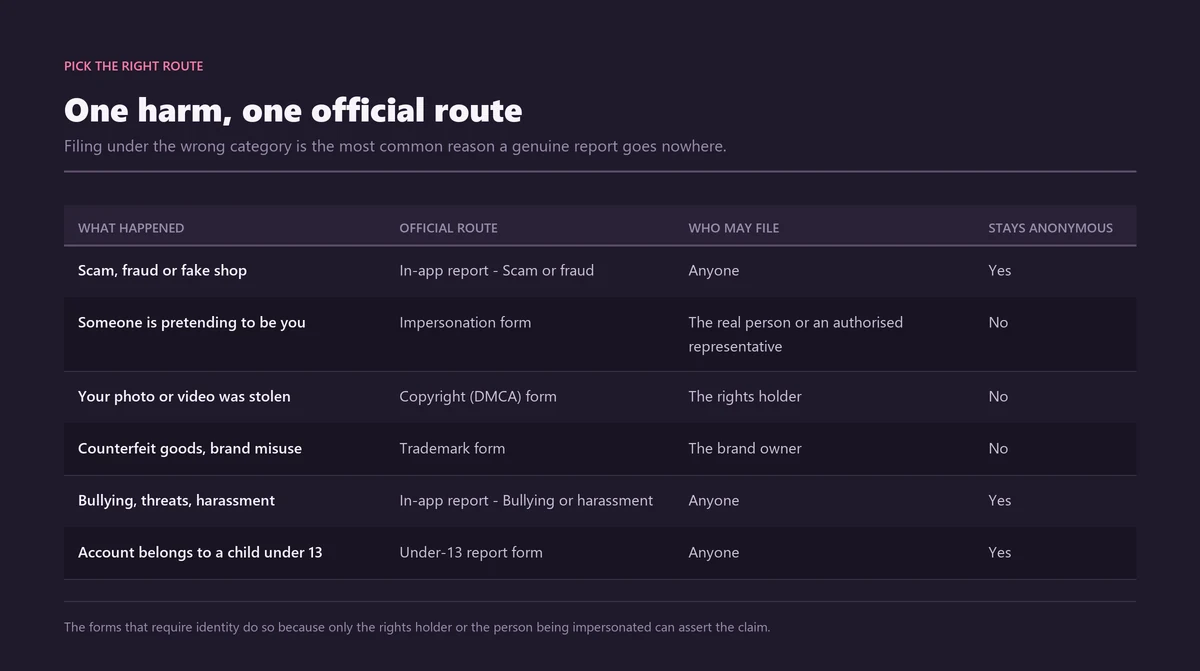
To report a fake Instagram page impersonating you, use the dedicated Instagram impersonation form rather than the three-dots flow. Only the impersonated person or an authorised representative may file it, and it asks for a photograph of government-issued identification so Instagram can tell which of the two accounts is the genuine one.
That identification step is exactly why an ordinary in-app report so often goes nowhere on impersonation. Without it, a reviewer looking at two similar profiles has no way to decide which one is the copy. The form lives in the Instagram Help Center and works whether or not you are logged in.
A fake that is not pretending to be any specific person — a bot farm, a knock-off shop, an anonymous clone — takes the ordinary fake-account or scam report instead, which anyone can file. Reporting on behalf of someone else, including a friend, a relative or a person who is not on Instagram at all, has its own dedicated flow.
The scale behind this is not imaginary. Meta says it removed 10.9 million accounts linked to criminal scam centres across Facebook and Instagram during 2025 (Meta Newsroom). Where the impersonation has turned into threats or demands for money, the Instagram impersonation report: the form, photo ID, and reporting blackmail covers the evidence pack that case needs.
How do you tell the clone from the real account before you file?
Confirm it is an impersonation before you report. Filing against a genuine account wastes your evidence and your credibility. The usual signals: a handle registered recently, a following count wildly out of step with the engagement, no verification where the real person carries one, and a profile photograph that turns up elsewhere under a reverse image search because the faker lifted it.
Once you have reported it, close the door behind you. Claim the lookalike handles nobody has taken yet, consider a verification badge so followers can tell the difference at a glance, and set an alert on your own name so the next clone surfaces early rather than after it has messaged half your followers.
Is reporting an Instagram story or page anonymous?
Yes. Anonymous reporting is the default on every ordinary surface — story, post, comment, DM, profile. Instagram states that no information about the reporter is sent to the account that was reported (Instagram Help Center). There is no switch to find, and no setting you can forget to turn on.
So how to report an Instagram story anonymously is a question with a slightly deflating answer: you already are. The account holder may work out that something was removed, and may guess who objected, but the guess comes from the content, never from Instagram. Following each other changes nothing.
One carve-out is worth knowing before you file anything. Intellectual property claims — copyright and trademark — are not anonymous. Instagram passes your name and contact details to the party you reported so they can respond or file a counter-notice (Instagram, intellectual property reporting). If that exposure is unacceptable, an IP claim may be the wrong instrument for your situation.
| Surface | How the report starts | Anonymous? |
|---|---|---|
| Story | Three dots on the story, then Report | Yes — capture it first |
| Post or Reel | Three dots above the post, then Report | Yes |
| Comment | Press and hold the comment, then Report | Yes |
| Direct message | Press and hold the message, then Report | Yes — block the sender as well |
| Profile or business page | Three dots on the profile, then Report | Yes |
| Impersonation of you | Impersonation form, with photo identification | Yes — you stay hidden from the faker |
| Copyright or trademark | Intellectual property form | No — your details go to the other party |
How do you report an Instagram account if you are logged out or have no account?
You do not need an Instagram account to report a violation. Instagram maintains a set of logged-out report forms reachable from its Help Center without signing in, covering impersonation, scams, harassment, child safety and other Community Guidelines breaches. They open in any browser, on a phone or a desktop, and no sign-in prompt appears.
You supply the offending @username and the same dated evidence a logged-in report would carry. Two situations make this the only door available: you deleted your own account and a fake of you is still trading on your name, or you have never used Instagram and a relative is being impersonated there.
If your aim is removal of the account rather than one piece of content, the routes differ by who you are and what the account did — how to get someone's Instagram deleted: the four official routes sets out which of them is open to a third party.
What is the EU "report as unlawful" route, and how does it differ?
In the European Union, a second lane sits beside the ordinary Community Guidelines report: flagging content as illegal under the Digital Services Act. The two are not the same. One asks whether Instagram's own rules were broken; the other asks whether a law was, and it comes with obligations Meta owes you in return.
File under the illegal-content lane and you should receive a statement of reasons explaining what was decided and why. That decision can then be challenged through Instagram's internal complaint system, through a certified out-of-court dispute settlement body, or in court. A Community Guidelines report gives you no comparable paper trail.
Use the unlawful lane when the content is genuinely unlawful where you live — defamation, threats, non-consensual intimate images, criminal fraud — not as a way to add weight to a routine complaint. Choosing it for ordinary rudeness will not speed anything up and it clutters a lane that exists for serious material.
What happens after you report, and where does the decision show up?
Your report goes into a review that mixes automated classifiers with human moderators measuring the item against the Community Guidelines. The outcome lands in Settings, under Support Requests, in the Reports section — the part of the app almost nobody is told about, and the only place a decision is recorded.
- Open Settings, then Help, then Support Requests.
- Choose Reports to see what you flagged and what was decided.
- Open the individual entry. A declined report often carries a Request a Review option that sends it to a different reviewer.
- Screenshot the decision. It is the reference number for anything you escalate later.
Instagram documents this flow on its page on checking the status of something you have reported. Depending on the breach, a reviewer can remove the single item, restrict what the account can do for a period, or disable the profile for severe or repeated violations. What those states actually mean is set out in reporting an Instagram account: what disable, delete and ban actually mean.
Meta says 92% of the scam adverts it removed in 2025 were caught before anyone reported them (Meta Newsroom). Your report earns its keep on what automation cannot read: context, a scam aimed at one named person, a pattern spread across several posts and weeks.
What if Instagram does not remove the content you reported?
A declined report is not the end of it. Find the decision in Support Requests, use Request a Review where it is offered, and make the second attempt materially better than the first. Instagram only removes what genuinely breaks a rule, so borderline material routinely survives a first look.
What makes a re-review land is new information, not repetition. Name the specific guideline. Add the dated capture the first reviewer never saw. Show the pattern rather than the single item — three posts across a fortnight read very differently from one screenshot with no context around it. Instagram sets the route out on its page on reported content that was not removed.
- Point to the exact rule, in Instagram's own wording, rather than asserting that something is obviously unacceptable.
- Attach captures with the handle and time visible.
- Report the account as well as the item when the account is the actual problem.
- Where the content is unlawful rather than merely against the rules, use the EU illegal-content lane if you are in scope, and report it to the police regardless.
Persistent breaches by the same account are a different problem from one bad post, and the honest picture of what does and does not make enforcement stick is in how to ban an Instagram account permanently, and what actually makes a ban stick.
Does the number of reports decide whether an account gets banned?
No. Instagram states that the number of times something is reported does not determine whether it is removed (Instagram Help Center). The report count myth — that three flags, or ten, or a hundred, will trigger an automatic deletion — is the most durable piece of misinformation in this subject.
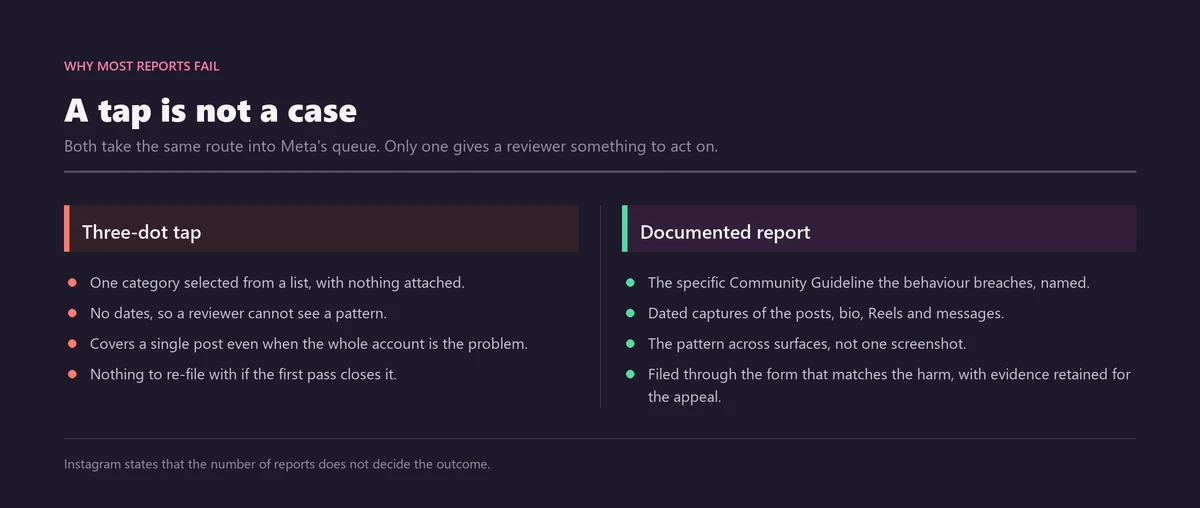
A report is judged on what it proves, not on how many people sent it.
No threshold has ever been published, for the straightforward reason that no threshold exists. Numbers circulating on forums and in tool marketing are invented. Ask how many reports it takes to delete a profile and you have asked the wrong question; ask whether the content breaches a specific guideline and you are finally asking the right one.
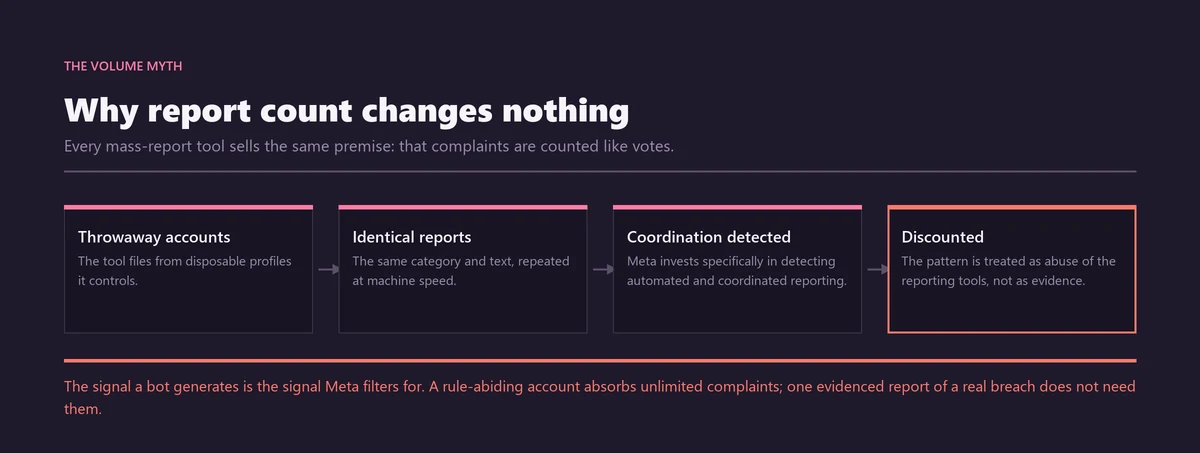
This is why report panels, automated flag bots and paid pile-ons change nothing. Duplicate and coordinated flags get discounted, and a false campaign can mark the organiser as the abuser. The related question of who can actually remove an account is answered honestly in how do you delete someone else's Instagram account, and who actually holds that power.
One accurate report, in the correct category, with dated evidence and a named guideline, does more work than any volume campaign. If you are unsure whether what happened to you crosses the line, describe the situation to us and we will tell you plainly whether it is a genuine violation worth filing — and say so when it is not.
Sources
- Instagram Help CenterHow do I report a post or profile on Instagram?
- Instagram Help CenterReport a message or stop someone from contacting you on Instagram
- Instagram Help CenterReport an account impersonating you on Instagram
- Instagram Help CenterReport an account impersonating someone you know
- Instagram Help CenterIntellectual property: copyright and trademark reporting
- Instagram Help CenterDoes the number of reports affect whether content is removed?
- Instagram Help CenterReport something if you do not have an Instagram account
- Instagram Help CenterCheck the status of something you have reported to Instagram
- Instagram Help CenterWhat to do if content you reported was not removed
- Instagram Help CenterEnd-to-end encryption on Instagram
Frequently asked questions
Does the person know if you report their Instagram story?
No. Reporting is anonymous on stories, posts, comments, DMs and profiles alike, and Instagram does not tell the account holder who filed. Following each other makes no difference. The one exception is a copyright or trademark claim, where your name and contact details are passed to the other party so they can respond or counter-notify.
Can you report an Instagram story after it has expired?
It is much weaker once the 24 hours are up, because the story has deleted itself and a reviewer has nothing left to open. Capture it before it expires, with the handle and the time visible. If it has already gone, report the account instead and describe the story, its date and the rule it broke.
Does reporting an account stop the person contacting you?
No. A report goes to Instagram's review team and does nothing to the person's ability to message you. Reporting and blocking are separate actions, so do both: report the message or the profile first, then block. Blocking is silent — Instagram does not tell the other person that you have done it.
Does Instagram notify you when someone screenshots your story?
No. Instagram sends no notification when someone screenshots a story, a post or an ordinary DM. It does alert the sender when you screenshot a one-time-view photo or video sent in a chat, or anything in vanish mode. Where an alert would tip the sender off, film the screen with a second phone instead.
Where do I check if my Instagram report was actioned?
Open Settings, then Help, then Support Requests, and choose Reports. Each entry shows what you flagged and what was decided. Declined entries often carry a Request a Review option that sends the case to a different reviewer. Screenshot the decision. A logged-out report never appears here, so keep your own record of it.
Can you report someone on Instagram without an account?
Yes. Instagram keeps logged-out report forms in its Help Center covering impersonation, scams, harassment, child safety and other Community Guidelines breaches, and they work without signing in. Supply the offending @username and your dated evidence. The trade-off is that the outcome will not appear in an in-app Support Requests inbox.
I run a business — can I report a profile copying my brand?
Yes. If a profile is pretending to be your business, the impersonation report is the right route and an authorised representative can file it with proof. If the account copies your name or logo, the trademark form fits better; for lifted product photographs, use the copyright form. Matching the form to the harm stops it stalling.
Will a wave of reports get an account banned faster?
No. Instagram states that the number of times something is reported does not decide whether it is removed. Coordinated waves are detected and discounted, and organising one can get your own account actioned instead. A single report in the correct category, with dated evidence and a named guideline, does more than thousands of empty ones.
How do I report a fake account impersonating a friend or family member?
You can report it on their behalf. Instagram runs a dedicated flow for accounts impersonating someone you know, including people who are not on Instagram or cannot report it themselves. Give the impersonated person's details, the fake @username and your evidence. A full identity claim may still need identification from the person being copied.