How to report an Instagram account, and what disable really means
Reviewed 8 August 2026 · 4,062 words · 17 min read
The official routes for reporting a profile, the four states people call disabled, and what to do when Meta takes down an account that is yours.
To report an Instagram account, open the profile, tap the three-dot menu, choose Report and pick the exact rule it breaks. Instagram judges the violation, not the number of reports. Impersonation uses a separate form that asks for photo ID. Disabled means Meta acted; deactivated and deleted are things you do yourself.
If a fake, scam or harassing profile is still live after you reported it, send us the handle — we file through Instagram's official forms, on genuine violations only.
- Instagram's Help Center states the number of times something is reported does not determine whether it is removed.
- Deleting your own account starts a 30-day grace period; logging back in during it cancels the deletion.
- Impersonation reports must come from the person being copied or an authorised representative, with government-issued photo ID.
- Meta publishes no review-time commitment for reports or appeals; the widely repeated 24 to 48 hour figure is unofficial.
- EU users who lose Meta's internal appeal can escalate free of charge to Appeals Centre Europe, a certified DSA Article 21 body.
What does it mean to disable an Instagram account?
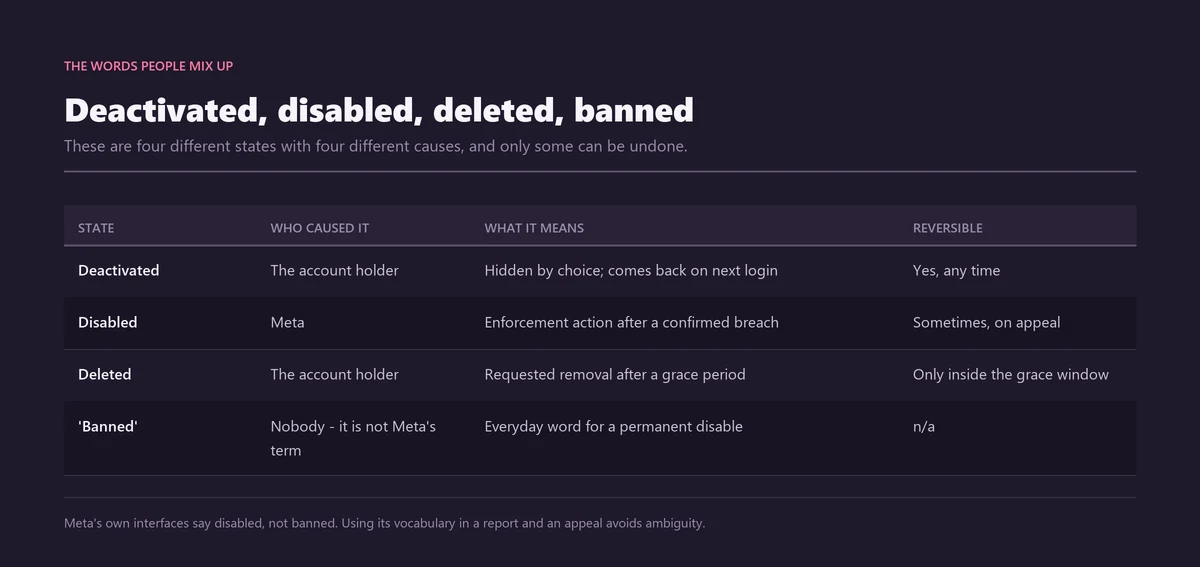
Three unrelated events share the word "disable". You can deactivate your own profile, which is a reversible pause. You can delete it, which becomes permanent once a grace period expires. Or Meta can disable an account as an enforcement decision after a rule breach. Only the third has anything to do with reporting.
Working out which one you mean saves hours. Someone trying to get a scam profile removed needs the reporting route. Someone staring at a "your account has been disabled" screen needs the appeal route. The two share a vocabulary and almost nothing else, which is why so much advice on this subject reads as though it were written about a different problem entirely.
So state the limit plainly. You cannot disable an Instagram account that belongs to someone else. No setting grants it, no payment buys it, and any tool that claims otherwise is selling a fiction. What you can do is report an Instagram account accurately, with evidence attached, and let a human or automated reviewer make the call. Everything below follows from that division of labour.
How do you report an Instagram account, post or business page?
Report the smallest thing that genuinely breaks a rule, using the Report control attached to that thing. Profiles, posts, reels, Stories and individual comments each carry their own menu. The category you pick matters more than anything else you do, because it routes the case to the queue that can act on it.
- Open the exact surface that causes the harm — the profile itself if the whole account is fake, or the single post, reel, Story or comment if the problem lives in one item.
- Tap the three-dot menu. On a profile it sits at the top right; on a post it sits above the image; on a comment, press and hold instead; on a Story, the menu appears at the bottom.
- Choose Report, then work down to the category that names the actual breach: scam or fraud, hate speech, bullying, pretending to be someone else, sale of restricted goods, or self-harm content.
- Add free-text detail whenever the flow offers it. Two sentences describing the pattern, plus the profile URL, give a reviewer context that a dropdown label cannot carry on its own.
- Screenshot before you submit, not after. Scam accounts delete their own posts quickly, and a report you cannot evidence later is much harder to escalate.
One wording point trips people constantly. Instagram has personal profiles and professional or business accounts; it does not have Facebook-style Pages. Reporting a "page" therefore means reporting that business profile through the same three-dot menu, or through a commerce-specific flow if the complaint is about a product listing. Instagram's own walkthrough sits in its Help Center guide to reporting a post or profile.
Commercial complaints have their own logic. A rigged prize draw, a shop that never ships, or a paid promotion hiding an advertising relationship may belong to a consumer regulator as much as to Instagram, and the split is set out in our guide to reporting an Instagram giveaway or business account through the right channel. For a single Story or grid post, the per-surface walkthrough in reporting an Instagram Story or post shows where each button hides.
Scale explains why the category matters. Instagram passed 3 billion monthly active users in September 2025, according to CNBC, and the Meta Transparency Center recorded roughly 1.4 billion fake accounts actioned in the fourth quarter of 2024 alone. At that volume the first pass over your report is automated, and an automated pass reads the label you chose.
Why did reporting the post not remove the account?
Because a post-level report can only ever remove that post. Instagram enforces at two separate levels: content-level actions delete, hide or restrict a single item, while account-level actions suspend or disable the whole profile. Moving from the first level to the second needs either accumulated violations or a violation serious enough to skip the ladder.
This is the honest answer to the most common complaint about reporting: "I reported them and nothing happened." Something often did happen. The reel came down, or a caption was covered by a warning screen, and the account carried on. That is the system working as designed, not a report being ignored.
It also explains why the target you choose sets a ceiling on the outcome. Report an Instagram account as a whole only when the profile itself is the violation — a cloned shop, a fake giveaway, a romance-scam persona built to defraud. If a broadly legitimate account posted one abusive comment, the comment is the violation, and the account is not going anywhere.
Bulk spam is the exception that proves the rule. Networks of throwaway accounts are usually detected and removed by classifiers long before a user report reaches a queue, which is why the tools sold for this job add nothing — a point unpacked in our piece on the Instagram spam report bot myth and how spam accounts really come down.
How do you report a fake or impersonation Instagram account?
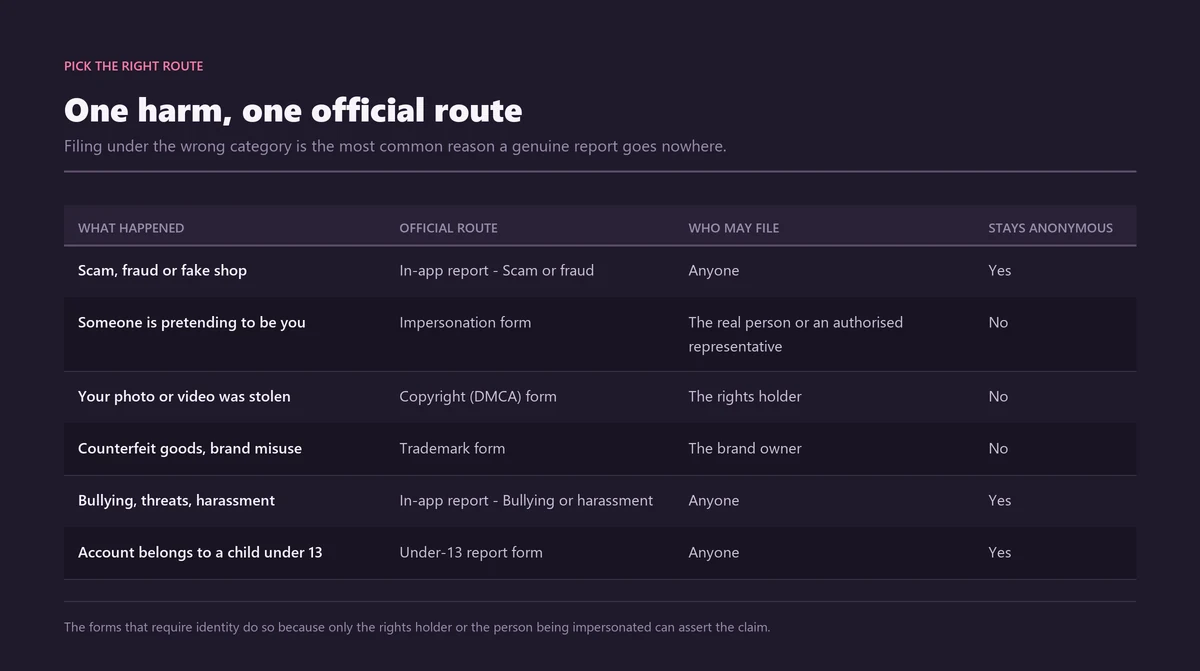
Impersonation has a dedicated route that sits outside the in-app Report button. If a profile is pretending to be you, your business, or someone you are legally authorised to represent, file through Instagram's impersonation report form. It asks for a photo of government-issued ID, because Meta will only act for the person being copied.
That authorisation rule is the single reason most impersonation reports fail. A friend flagging a clone of your account is filing as a bystander, and a bystander cannot prove whose face is being stolen. The person depicted has to file, or a documented representative has to file on their behalf, through the Instagram impersonation report form.
Two details are worth getting right before you open the form. Have the impostor's exact @username, not a screenshot of a display name, because display names change in seconds. And decide what you are claiming: an impersonation of a person, an impersonation of a business, or a trademark or copyright complaint about stolen logos and photographs. Those are different forms with different evidence and different outcomes.
Where the clone has moved from copying you to threatening you — demanding money, threatening to send images to your contacts — the case stops being a simple impersonation and needs a different order of operations, set out in our guide to the impersonation form, photo ID and reporting blackmail. If the impostor has taken the handle itself, the recovery options are covered in how to claim an Instagram username back. Unsure which form fits? Describe the account to us and we will tell you which route applies, including when the answer is that none of them do.
How many reports does it take to disable an account?
No number exists. Instagram's Help Center states that "the number of times something is reported doesn't determine whether or not it's removed" — what decides the outcome is whether the content breaks a rule. One precise, evidenced report can remove a clearly violating account. A thousand vague ones remove nothing at all.
The question people actually type into a search box is how many reports to disable an account, and the reason it has no answer is structural. Reports are inputs to a review, not votes in a poll. A reviewer, or a classifier, compares the reported content against a written policy. Adding duplicate complaints does not change what the policy says.
A report is a piece of evidence handed to a reviewer, not a ballot cast in an election.
Account history quietly tilts the odds. An established profile with years of clean history and a real audience is harder to action than a three-week-old account with a stolen avatar and a link to a payment page. The same report lands differently depending on what it is aimed at, which is another way of saying that severity and evidence drive removals.
Volume-based products therefore fail by design. Whether it is sold as a mass report campaign against an Instagram account, an Instagram mass report bot, or a subscription Instagram reporter tool, the mechanism is the same and it dead-ends in the same place: coordinated identical reports are detected and discounted, and the pile-on can mark the reporters as the abusers. Many of these tools also want your login, which is the actual product.
Meta's own numbers show where enforcement really comes from. In a newsroom update published on 11 March 2026, Meta said it removed more than 159 million scam adverts during 2025 and took down 10.9 million Facebook and Instagram accounts linked to criminal scam centres, and that 92% of the scam adverts came down before any user reported them. Individual reports matter for the cases classifiers miss — not as a lever you can pull harder.
How do you check what happened to a report you filed?
Instagram keeps a log of your own complaints. When you report an Instagram account, the case appears under Settings, then Help, then Support Requests, then Reports, with a status attached. Instagram documents this on its Help Center page on checking the status of something you reported. Most people never look, and read the silence as a report vanishing.
The statuses are not self-explanatory, and the difference between two of them is the whole argument.
| Status | What it actually means | What you can do next |
|---|---|---|
| In Review | The report is queued or being assessed. No decision has been made. | Wait. Filing again creates a duplicate, not a priority. |
| Action Taken | The content or account was found to breach a policy and something was removed or restricted. | Screenshot the outcome in case the behaviour restarts on a new handle. |
| No Action Taken | The report was reviewed and declined. It was read; the reviewer did not find a policy breach. | Use "Request a Review" once, adding the context the first report lacked. |
| Nothing listed | The report was filed from a logged-out web form, which does not appear in this log. | Keep your own copy of the confirmation email or reference number. |
"No Action Taken" is the status that causes the most anger and the most misunderstanding. It does not mean nobody looked. It means somebody looked and disagreed with you, which is a different problem and needs a different response: better framing, clearer evidence, or the recognition that the account is unpleasant rather than against the rules.
Requesting a review is worth doing once, and once only. Write it as though the reviewer has never seen the account: what it is doing, which rule that breaks, and the dates and URLs that prove it. Repeat submissions add queue noise and nothing else.
Does Instagram tell someone you reported them?
No. Report an Instagram account, post or comment and your identity is never shown to the person you reported, including after enforcement action lands. The reviewer sees your report; the reported account sees a notice about its own content. The one exception is a formal intellectual-property claim.
File a copyright or trademark notice and your name and contact details may be passed to the other side, because the law gives them a right to respond and counter-notify. That is the price of using a legal route rather than a Community Guidelines report, and it is worth knowing before you choose the copyright form over the impersonation one.
People often confuse two protections here. Blocking hides someone from you and you from them; it changes your experience and does nothing to their account. Reporting asks Meta to assess the account against its rules and changes nothing about what you can see. In an active harassment case you usually want both, in that order, plus the safety steps in our guide to reporting an Instagram stalker without escalating the situation.
How do you deactivate or delete your own Instagram account?
Both live under Settings, then Accounts Centre, then "Account ownership and control". Deactivating hides your profile, posts, comments and likes until you sign back in. Deleting removes the account permanently once a 30-day grace period runs out. Instagram documents both on its help page for deleting or deactivating an account.
The deactivate vs delete Instagram decision comes down to one question: do you want the account to be able to come back? If the answer is "maybe", deactivate. Deactivation has no expiry date, costs nothing, and is undone by logging in. If the answer is a firm no, delete — and understand that the door closes.
| State | Who triggers it | Reversible? | How you undo it |
|---|---|---|---|
| Deactivated | You | Yes, at any time | Log back in; the profile reappears as it was |
| Deleted | You | Only inside the grace window | Log in within 30 days to cancel the deletion |
| Disabled | Meta, as enforcement | Sometimes, by appeal | Request a review of the decision from the notice |
| "Banned" | Nobody — it is not a Meta term | Depends what is meant | Find out which of the three above actually happened |
Two practical limits catch people out. Deactivation can only be used roughly once a week, so it is not a switch you can flip on and off at will. And because deletion erases everything, request a copy of your data through "Download Your Information" before you start — Meta says compiling that archive can take up to 30 days, so begin it well ahead of the deletion itself.
Locked out of the account you want to remove? Reset the password by SMS or email first, or sign in through a linked Facebook account. If every recovery method is gone, you have to prove ownership through Meta's account-recovery flow before you can delete anything, because deletion is a privileged action on a live session.
Which clock is running: 30 days, no expiry, or an appeal window?
Four separate timers get conflated in almost every article on this subject, and confusing them costs people their accounts. One belongs to self-deletion, one to deactivation, one to data removal and one to appeals. Only two of them have a published length, and only one of them is a true deadline.
| Clock | Applies to | Published length | What happens when it runs out |
|---|---|---|---|
| Deletion grace period | An account you chose to delete | 30 days (Instagram Help Center) | Deletion becomes irreversible for you and for Meta |
| Deactivation | An account you chose to pause | No expiry | Nothing — it waits until you log in |
| Content removal | Posts on a deleted account | Up to 90 days (Instagram Help Center) | Copies in backup storage are cleared |
| Appeal window | An account Meta disabled | Not published as a single figure | The in-app review option can disappear; act immediately |
The appeal row is the one to take seriously. Meta does not publish one universal deadline for requesting a review, so the only safe assumption is that the option in front of you now may not be there next week. Read the notice, use the review link it contains, and do it the same day.
In the European Union there is a floor underneath that. The Digital Services Act requires large platforms to keep an internal complaint route open for at least six months after a content or account decision, which is set out in the European Commission's overview of the Digital Services Act. That is a legal minimum for EU users, not a promise about how quickly anyone answers.
How do you recover a disabled Instagram account?
Which recovery route applies depends on how the account went dark. A deactivation reverses with a single login. A self-initiated deletion reverses only inside the 30-day grace period. An account Meta disabled for a suspected violation needs a formal appeal, and that is the only one where the outcome is genuinely uncertain.
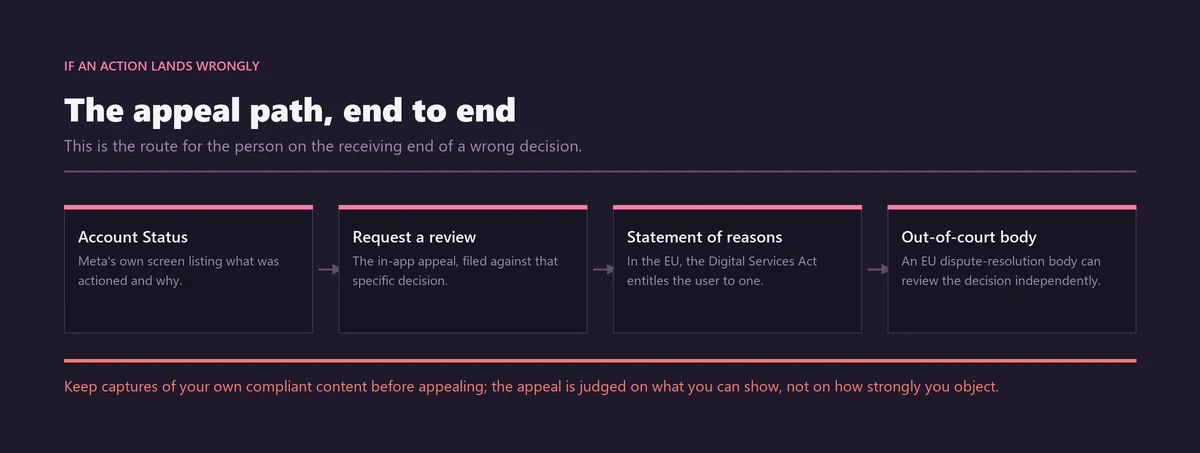
For an enforcement disable, the flow starts on the notice itself. Tap "Learn More" and then "Request Review" — older screens read "Disagree with Decision" — and supply the username, the full name on the account, and the email or phone number attached to it. Instagram's Help Center page about disabled accounts covers the eligibility rules.
Identity checks are common at this stage and they are not what people expect. Rather than a passport scan, Meta usually asks for a video selfie, or a photograph of you holding a handwritten confirmation code it generates on screen. If the account was hacked before it was disabled, the cross-app Meta Account Recovery Hub handles Facebook, Instagram and Threads in one flow.
Submit once, then leave it alone. Four avoidable mistakes account for most drawn-out recoveries:
- Sending repeat appeals. Each new submission creates a fresh ticket rather than moving the old one up a queue.
- Writing an angry or accusatory message. A calm paragraph of fact reads better to whoever opens it.
- Creating a replacement account while the appeal is live. That can read as ban evasion and damage the case you are making.
- Leaving a dead email address or an old phone number on the account, so the confirmation code never reaches you.
Why do some accounts get disabled permanently with no strikes?
Because Meta runs two parallel systems. There is a strike ladder, where warnings and restrictions escalate as violations accumulate, and there is a separate "one and done" route where a single violation Meta classes as egregious removes the account immediately. An account can be permanently disabled without ever reaching a strike threshold.
That taxonomy became public in an unusually direct way. In June 2026 the Oversight Board decided its first account-level case, upholding Meta's permanent disabling of an Instagram account with more than 70,000 followers over posts that placed a bullseye graphic over a female journalist's face. The Board agreed with the outcome and criticised the machinery around it.
Its findings are the useful part. The Board identified systemic human-rights concerns in how account-level enforcement works, said Meta fails to give banned users meaningful assistance in understanding what happened, and recommended that Meta consolidate its scattered account rules into a single transparent resource explaining how "regular", "severe" and "egregious" violations differ. The case was announced on 20 January 2026 and decided in early June 2026, as reported by TechCrunch on 4 June 2026.
For anyone appealing, the practical reading is this: if the disable came without warning, do not assume an error. Check whether the content touched a category Meta treats as egregious, because the argument that "I never had a strike" is not the defence it sounds like.
What can an EU user do when Meta rejects the appeal?
Escalate outside Meta. Under the Digital Services Act, Meta must give an affected user a "statement of reasons" when it restricts or disables an account, and a user located in the European Union who loses Meta's internal appeal can take the case free of charge to a certified out-of-court dispute settlement body.
The body covering Facebook, Instagram and Threads is Appeals Centre Europe, certified under Article 21 of the DSA. Its decisions are not binding on Meta in the way a court order would be, which is a real limitation. What they do is produce an independent written assessment of whether the platform applied its own rules correctly — evidence you did not previously have.
Its early caseload says something about the scale of the problem. According to the Appeals Centre Europe transparency report covering April 2025 to March 2026, account suspensions were the single largest complaint category, with more than 4,600 cases from Facebook, Instagram and Threads users; Meta supplied relevant evidence in fewer than 100 of them, and the Appeals Centre disagreed with the platform's original decision in 59% of cases.
Two things follow for a reader outside the EU as well. First, if a report feels needlessly hard to file, that impression is documented by a regulator rather than imagined. Second, keep your own evidence, because the appeal flow may not give you anywhere to put it.
What happens to the @handle after an account is disabled or deleted?
Assume it does not come free. Meta publishes no timetable for releasing a username from a disabled or deleted account, and there is no queue you can join to be handed one when it lapses. Planning a rebrand around a handle you expect to inherit is planning around an event nobody has committed to.
This matters most in impersonation cases, where the impostor is squatting on the name a business trades under. Getting the fake profile removed and getting the handle are two separate outcomes, and only the first is something a report can achieve. The realistic routes — a trademark claim, a request to an inactive account holder, or accepting a variant spelling — are compared in our guide to the honest ways to claim an Instagram username.
If the account you want gone is a clone lifting your photographs rather than your name, the copyright angle is often faster than the impersonation angle, because a copyright claim rests on documents you own rather than on identity verification. That comparison is set out in how a cloned Instagram profile is actually removed.
When does a reported Instagram account become a police matter?
The moment the behaviour stops being a rules problem and becomes a crime: fraud that took your money, sextortion, credible threats, stalking, or anything involving a child. A platform report and a police report are not alternatives. File both, on the same day, because they achieve different things.
Report an Instagram account and, at best, the harm stops on one platform. Only law enforcement can pursue the person behind it, compel disclosure, or recover money. Waiting to see whether a report works before going to the police loses you the days when the evidence is freshest and the payment trail is warmest.
Use the official channel for your country. In the United States that is the FBI's Internet Crime Complaint Center; in the United Kingdom, Action Fraud; in India, the National Cyber Crime Reporting Portal and its 1930 helpline. For a non-consensual intimate image, the free hash-matching service at StopNCII.org blocks the image across participating platforms without you having to send the image anywhere.
Build the evidence before the account disappears: screenshots showing the @username and the full profile URL, the dated messages in context, transaction references, and an archived copy of the page. Extortion in particular has an order of operations worth following exactly, which is why we set it out separately in how to report Instagram extortion, step by step.
Where a case is genuinely a Community Guidelines or legal violation and you would rather not assemble it alone, that is the work we do through official channels only — see the full set of Instagram reporting and takedown solutions, or read how an honest Instagram ban-as-a-service engagement is scoped before you commit to anything.
Sources
- Instagram Help CenterReport a post or profile on Instagram
- Instagram Help CenterReport an account that is impersonating you
- Instagram Help CenterWhy report counts do not determine whether content is removed
- Instagram Help CenterCheck the status of something you've reported to Instagram
- Instagram Help CenterDelete or deactivate your Instagram account
- Instagram Help CenterAbout disabled Instagram accounts
- Meta Transparency CenterCommunity Standards Enforcement Report, Q4 2024
- Meta NewsroomMeta's 2025 scam enforcement update, 11 March 2026
- Appeals Centre EuropeTransparency report, April 2025 to March 2026
- Government of IndiaNational Cyber Crime Reporting Portal
Frequently asked questions
What is the difference between disabling and deleting an Instagram account?
Deactivating is your own reversible pause: the profile disappears until you sign back in. Deleting is your own permanent removal, final once the 30-day grace period ends. A disable is Meta's enforcement action against a suspected rule breach, which you may be able to appeal. One word, three completely different outcomes and three different routes back.
How long does Instagram take to review a reported account?
Meta publishes no answer, and that is the honest position. There is no service level for report reviews, so any specific figure — the widely repeated 24 to 48 hours, for example — is somebody's guess reprinted until it sounded official. Straightforward breaches such as spam tend to clear faster than context-heavy cases like harassment. Track yours under Settings, Help, Support Requests.
Can you see who reported your Instagram account?
No. Reports are anonymous, and the account holder is never shown who filed one, even after enforcement action. The exception is a copyright or trademark notice, where your name and contact details may be passed to the other party because the law gives them a right to respond or counter-notify. Choose the form accordingly.
How many reports does it take to get an Instagram account deleted?
There is no threshold. Instagram's Help Center says the number of times something is reported does not determine whether it is removed; whether it breaks a rule does. Coordinated identical reports are detected and discounted, and a pile-on can mark the reporters as abusers. One evidenced report against a genuine violation beats a thousand empty ones.
Can a disabled Instagram account be recovered after 30 days?
The 30-day clock belongs to deletions you started yourself, not to enforcement. If you deleted your account, day 31 is final. If Meta disabled it, there is no 30-day rule at all: the account may be recoverable through a review request, or permanently gone, depending on which policy it breached. Read the notice you were given.
What is the difference between blocking and reporting on Instagram?
Blocking changes your experience: the account can no longer see or contact you, and you stop seeing it. Reporting changes nothing you can see and asks Meta to assess the account against its rules. Blocking is instant and certain; reporting is neither. In an active harassment case, block first, then report, then keep the evidence.
Does Instagram tell you why your account was disabled?
You get a notice, though how much it explains varies. In the European Union the Digital Services Act requires Meta to issue a statement of reasons when it restricts or disables an account. In its June 2026 account-level decision, the Oversight Board criticised Meta for failing to give banned users meaningful assistance in understanding what happened.
Does Instagram warn you before disabling an account?
Often, but not always. Meta runs a strike ladder where warnings and restrictions escalate with repeated violations, and a separate route where a single violation it treats as egregious removes the account at once. That second route needs no prior strikes, which is why an account can vanish with no warning at all.
Can I report an Instagram account if I do not have an account?
Yes. Instagram's web report forms and its impersonation form both work while logged out, so you can flag a clone, a scam shop or an abusive profile without signing up. The in-app three-dot Report button needs a login, and reports filed logged-out will not appear in Support Requests, so keep your own reference.