Instagram spam report bot: why report volume removes nothing, and what does
Reviewed 8 August 2026 · 3,964 words · 16 min read
A spam report bot fires complaints from throwaway accounts and changes no outcome. Here is what Instagram's systems actually respond to, and how to use them.
An Instagram spam report bot removes nothing. Meta states that the number of times something is reported does not decide whether it comes down; a confirmed breach of the spam or authenticity rules does. One documented report through the official in-app route achieves everything a bot pretends to, without risking your login.
Send us the spam or bot account flooding your comments, DMs or follower list and we will match its behaviour to the rule it breaks — genuine violations only, official channels.
- Instagram states that the number of times something is reported does not determine whether it is removed.
- Meta removed more than 159 million scam ads in 2025, with 92 per cent actioned before any user reported them.
- Report status is visible under Profile, Menu, Help, Support Requests: In Review, Action Taken or No Action Taken.
- Removing, unfollowing or blocking followers too quickly can trip an action block on your own account.
- Meta publishes no review-time commitment for abuse reports, so any fixed hour figure is invented.
What counts as spam on Instagram?
Spam on Instagram is repetitive or automated activity built to manipulate reach rather than take part in anything. Meta's Spam Community Standard bars content designed to deceive, mislead or overwhelm people in order to artificially increase viewership, and separately bars buying, selling or trading accounts and manufacturing fake engagement.
That definition matters more than it looks, because it is behavioural. A reviewer is never asked whether an account annoyed you. They are asked whether its pattern of posting, following, commenting or messaging matches a rule Meta has written down. Working out what counts as spam on Instagram is really working out which of your complaints has a rule behind it, and which is just irritation.
Day to day it takes a handful of familiar shapes.
- Follow-farms that follow several hundred accounts an hour and unfollow them the next day.
- Comment bots stamping the same line under thousands of posts, usually some variant of "great page, DM me".
- Direct-message bots pushing crypto doublers, counterfeit shops, fake sponsorship offers or resold tickets.
- Bought followers, likes and views, which Meta treats as inauthentic engagement and strips out on its own schedule.
- Link blasts: the same shortened URL dropped into replies, Story mentions and bios across a network of handles.
Spam vs scam vs fake account: which report reason fits?
The three overlap, and the label you choose decides which queue your report lands in. Spam is mechanical noise. A scam is spam with a payload, working you toward losing money or credentials. A fake account is one built on a borrowed or invented identity, which becomes impersonation the moment it copies a real person.
Getting the spam vs scam vs fake account distinction right is not pedantry. It is the difference between a complaint graded by a classifier in under a second and a complaint that reaches a form with a documentary standard behind it. Most reports that "go nowhere" were filed under the wrong heading.
| What you are looking at | The giveaway | Where it goes |
|---|---|---|
| Spam or bot | Mass follows, canned comments, repeated link drops | In-app report, "It's spam" |
| Scam or fraud | Fake shop, giveaway con, phishing or investment DM | In-app report, "Scam or fraud" |
| Fake account | Stolen photos, invented person, no genuine history | In-app report, "Fake account" |
| Impersonation | A copy of you, your business or a public figure | Dedicated impersonation form, filed by the person copied |
| Counterfeit goods | Your logo or product listed for sale by someone else | Trademark form, or Brand Rights Protection if enrolled |
When one profile is several of these at once, lead with the most serious breach you can actually evidence, and report the specific offending post as well as the account. A reviewer who can confirm the violation in seconds is what moves a case forward. A reviewer who has to go hunting usually closes it.
How do you tell if an Instagram account is a bot?
Knowing how to tell if an Instagram account is a bot takes about thirty seconds and saves you filing a report that was never going to land. No single sign proves anything on its own — plenty of real people have no profile photo and a numbered username. It is the cluster that gives a bot away.
- No profile photo, or a headshot that reverse-image-searches to a stock library or somebody else's real account.
- A username padded with random digits or underscores, of the maria_84920x shape.
- A blank or recycled bio: one emoji, one link, or a motivational line you have seen on forty other profiles.
- Follower counts wildly out of step with engagement — thousands of followers, single-figure likes.
- Overnight follower spikes, or a grid that is empty, all reposts, or a wall of near-identical images.
- The same copy-pasted comment appearing under many unrelated posts.
- Activity at every hour of the day and night, with none of the rhythm a human timetable produces.
Three or four of those together is a bot. One on its own is usually a new account, or a private person who reads and never posts. That distinction is the whole discipline of reporting well: you are assembling a case a stranger can verify in seconds, not registering an opinion.
Why does Instagram spam feel worse in 2026?
Because the crude bots have been joined by AI-generated bot accounts: synthetic faces, written-to-order bios, plausible photo grids and entire fabricated personas produced in bulk. The tells that used to be obvious — the stock headshot, the empty feed — are precisely the tells generative tools now paper over.
Two things follow from that, and only one of them is bad news.
The bad news is that visual inspection is weaker than it used to be. An AI-generated bot account can survive a glance in a way a 2019 follow-farm never could. So the behavioural tells carry more of the weight now than the photograph does: the timing, the repetition, the mismatch between audience size and engagement, the identical phrasing across handles.
The good news is that your response does not change at all. The report routes are identical, and report volume still decides nothing. A convincing synthetic persona and a crude script are removed by the same test — a confirmed breach of the spam or authenticity rules. Which is why an Instagram spam report bot is no more effective against an AI persona than against anything else it has ever been pointed at.
Does an Instagram spam report bot actually work, and is it safe?
No, and often no. An Instagram spam report bot fires identical complaints from disposable profiles, which is exactly the pattern Meta's integrity systems are built to detect and discount. It changes no outcome. A large share of the panels selling it also want your login, which is a separate and considerably worse problem.
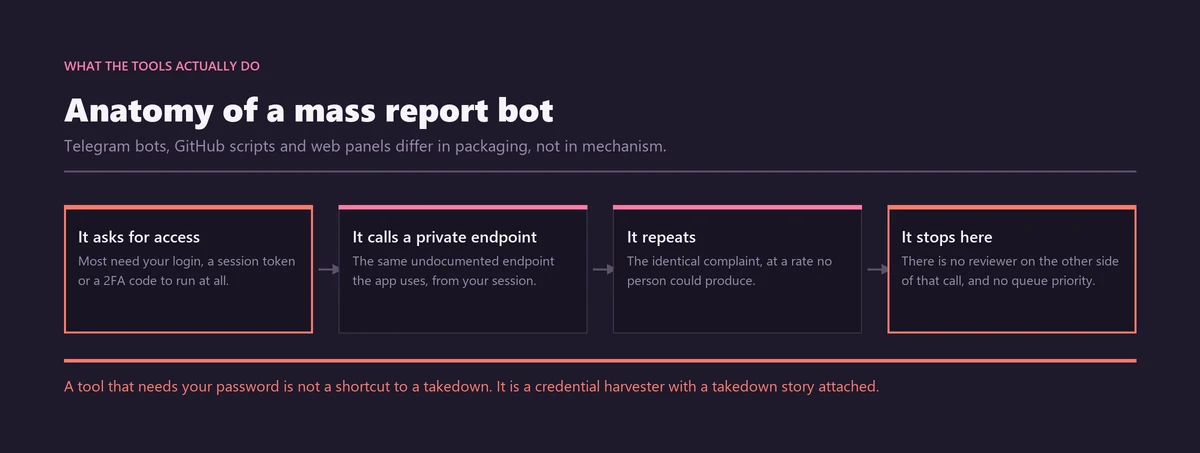
Instagram states the position without hedging. The number of times something is reported does not determine whether it is removed (Instagram Community Guidelines). Reports route content into review; the guidelines decide what happens next. Ten thousand complaints against a compliant account produce the same result as one, which is nothing.
A report is a request for a review, not a vote.
The second failure mode is quieter. Coordinated false reporting is itself a breach of Meta's rules on inauthentic behaviour, so a campaign that does get noticed puts the accounts running it at risk rather than the target. People have lost their own profiles this way.
We have taken these products apart in more detail elsewhere: on whether Instagram mass report bots work or simply steal your login, and on what mass reporting an Instagram account really does to report volume.
How do you report a spam bot account on Instagram?
You report a spam bot account on Instagram through the app's own menu, with no outside tool and no login handover. Open the profile, tap the three-dot menu, choose Report, then pick the reason matching the behaviour. Standard abuse reports stay confidential: the account is never told who filed one.
- Capture the evidence first, with dates visible — the comments, the message thread, the profile, the follower spike. Spam accounts delete, rename and rebrand the moment they sense attention.
- Open the profile, tap the three-dot menu, and choose Report, then Report account (Instagram Help: report a post or profile).
- Pick the reason that fits: "It's spam" for bots and fake engagement, "Scam or fraud" for anything chasing money or credentials, "Fake account" where the identity itself is invented.
- Report the specific offending item as well — a comment, a Reel, a Story, a message — using the same three-dot menu on that item. A report anchored to one piece of content is faster to verify than one aimed at a whole profile.
- Submit once, then leave it. Check the outcome later through Support Requests rather than refiling.
File once and stop. Re-reporting the same account from the same handle adds nothing, and done at volume it starts to resemble the coordinated behaviour Meta discounts. If the harm sits in a single post rather than the whole profile, the route differs slightly, and our guide to getting an Instagram post, photo or Story taken down walks through it.
Why is "spam" the weakest label when you want a specific account gone?
Spam is the most machine-graded policy area Meta runs. A spam report is scored against a pattern, at enormous volume, by a classifier. The routes that reach a form, a named complainant and a documentary standard of proof are the identity and intellectual property ones: impersonation, copyright, trademark and minor safety.
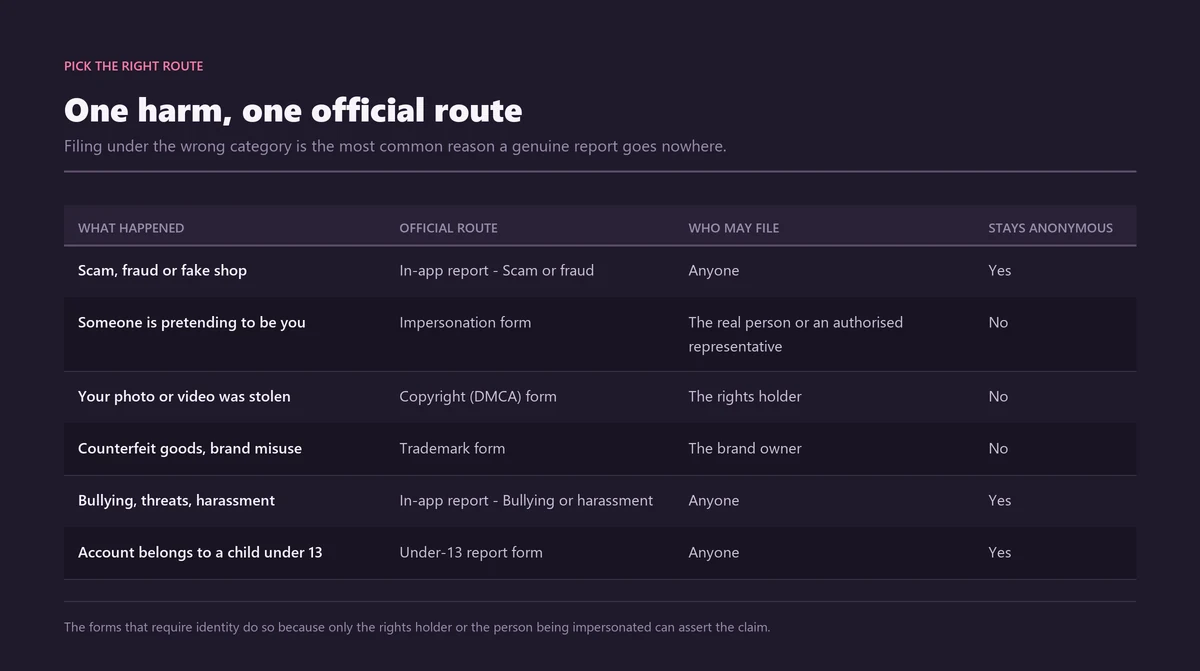
That is not an argument for skipping the spam report. It is an argument for asking, before you file, whether the account is doing something with a stronger label available. Most spam accounts are, because pure spam rarely arrives alone.
| What the account is doing | Stronger route | What that route gives you |
|---|---|---|
| Using your photos and name to look like you | Impersonation form | Filed by the person copied, identity checked, followed up by email |
| Selling counterfeit versions of your product | Trademark report or Brand Rights Protection | Rights-holder route with documentary proof |
| Reposting your photographs or video wholesale | Copyright report | Notice-and-takedown on a confirmed claim |
| Clearly run by someone under 13 | Under-13 report | Account removed if age cannot be confirmed |
| Phishing for your login by DM | Scam or fraud, plus the hacked-account flow if you clicked | Fraud review plus an account-security path |
| Generic comment bot with no connection to you | "It's spam" | Classifier-graded — the weakest of the set |
Choosing between these routes is most of the work, and we set them side by side in our guide to picking the Instagram takedown form that fits the harm. If what you really want is the handle a dormant spam account is squatting on, that is a different problem again, with three honest routes to an Instagram username and no shortcut through the spam queue.
How do you stop spam bots from targeting your account?
Reporting is the wrong first move when you are in the middle of a wave. Instagram's built-in filters cut the volume immediately, without waiting for anyone to review anything. Hidden Words, Limits, Restrict and Moderation Assist each solve a different part of the problem, and all of them sit in your own settings.
Hidden Words filter
The Hidden Words filter screens comments and message requests containing words, phrases and emoji you would rather not see, drawing on both Instagram-maintained lists and a custom list you write yourself. Filtered items move to a hidden folder instead of being deleted, which matters: your evidence survives, and you can still open, review and report anything in there later (Instagram Help: hide comments or message requests).
Restrict and Limits
Restrict and Limits are the two tools worth learning by name. Restrict silences an account quietly — its comments on your posts become visible only to it, and it is never notified. That avoids the retaliation loop a block sets off, where the operator simply reappears under a fresh handle within the hour.
Limits is the wave tool. It temporarily throttles comments and message requests from accounts that do not follow you, or that only started following you recently, which is precisely the population a spam surge is drawn from. Turn it on for the duration and off afterwards.
Moderation Assist
Moderation Assist filters by rule rather than by word: hide anything containing a link, anything from an account below a follower threshold, anything from an account created in the last few weeks. It is the closest thing Instagram offers to legitimate automated spam handling, and it works only on your own posts — which is the point.
How do you remove fake or spam followers on Instagram?
You can remove fake or spam followers on Instagram straight from your own list: open Followers, tap the three dots beside the account and choose Remove. Instagram sends no notification, so there is nothing to be nervous about. In some cases it surfaces suspected spam followers itself and offers to clear them in a batch.
Removing a follower is not the same as blocking. The account can find you again and follow again; removal simply takes it off your list and, if you are private, out of your posts. For bot followers that is usually enough, because nothing behind them is checking (Instagram Help: remove potential spam followers).
Avoid follower-cleaner and "audit" apps altogether. They want your login, they operate the same way the report panels do, and handing credentials to a third party is the single most common route to a hijacked Instagram account. A short manual sweep, repeated occasionally, beats every tool promising to scrub your list in one tap.
Why did your Instagram follower count drop overnight?
Almost always because Meta removed inauthentic accounts in bulk, not because you were penalised. Meta clears fake and bot accounts on its own schedule, and a sweep registers on your side as an unexplained overnight fall. Nothing happened to your account. Something happened to theirs.
In early May 2026 a large sweep of this kind was widely reported by creators and trade press, who described drops of roughly two to five per cent for ordinary accounts and thirty to sixty per cent for accounts that had bought engagement. Treat those ranges as creator-reported estimates rather than facts: Meta issued no formal statement about the sweep and has published no figure, so nobody outside the company knows its real size.
The morning after, the useful move is to check engagement rate rather than follower count. If likes and comments held steady while the number fell, you lost accounts that were never engaging in the first place, and your reach was already being calculated without them. That is a hygiene event, and a good one.
The exception is worth naming plainly. If a large fraction of your list vanished, that is a signal about where those followers came from. Accounts that have bought engagement sit in the blast radius of every sweep, which is one more reason a growth service is a long-term liability rather than a shortcut.
How do spam accounts actually come down at scale?
Overwhelmingly through Meta's own detection rather than user reports. Classifiers flag patterns across the whole network, periodic sweeps clear inauthentic accounts in bulk, and fraud intelligence shared with banks, other platforms and law enforcement feeds the same systems. Your report is one weak signal added to a machine that mostly finds spam by itself.
The published numbers make the point better than any argument. Meta says it removed more than 159 million scam ads during 2025, and that 92 per cent of them came down before anyone reported them, alongside 10.9 million Facebook and Instagram accounts linked to criminal scam centres (Meta Newsroom, March 2026).
The same announcement set out an expanded, AI-assisted scam-detection push running into the FIFA World Cup 2026 — aimed at fake ticket sales, fraudulent travel packages, impersonation and bogus gambling and immigration services — and described work through the Global Signal Exchange and the Fraud Intelligence Reciprocal Exchange, two schemes that pool fraud signals across companies rather than leaving each platform to spot everything alone.
On scale, Meta's Q3 2025 integrity reporting put fake accounts at roughly 4 per cent of more than three billion monthly users, and Instagram enforcement precision above 87 per cent (Meta Transparency Center, integrity reports). Precision here means the share of removal actions that were correct — not the share of spam caught.
None of this makes reporting pointless. It reframes what your report is for. It matters most when the account is doing something specific to you that no classifier can see from outside: impersonating you, using your photographs, targeting you by name. That is the gap a report fills, and it is exactly the gap an Instagram spam report bot cannot touch, because a bot has no evidence to attach.
How do you check whether Instagram acted on your spam report?
Instagram keeps a status view for everything you have reported, and almost nobody looks at it. Open your profile, tap the menu, then Help, then Support Requests. Each report carries a status — In Review, Action Taken or No Action Taken — and a refusal can be pushed back with Request a Review.
- Go to your profile, open the menu, choose Help, then Support Requests (Instagram Help: check the status of something you've reported).
- Open Reports to see what you filed, when, and where each case has got to.
- In Review means it is queued or being assessed. Leave it alone; refiling resets nothing and helps nothing.
- No Action Taken means a decision was made and it went against you. Use Request a Review and, where the interface allows, add the context the first pass missed.
- In the EU and EEA, a refusal comes with a statement of reasons, and you can take the decision to a certified out-of-court dispute settlement body under Article 21 of the Digital Services Act.
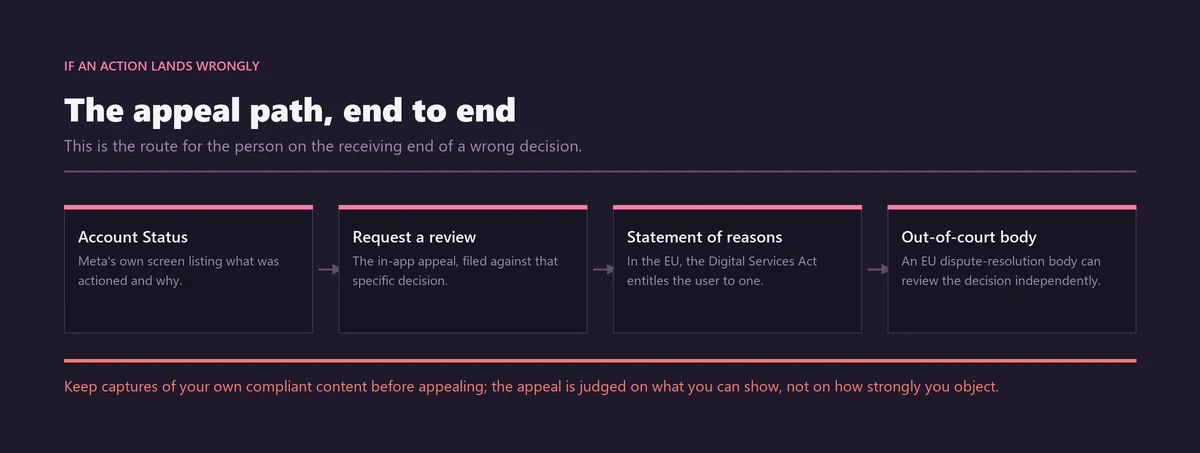
"Action Taken" also covers more than deletion. Enforcement is graduated: a single piece of content removed, a warning applied to the account, features restricted for a period, and permanent disabling reserved for severe or repeated breaches. A spam account that keeps posting after your report may well have been actioned in a way you cannot see from the outside.
This is why so much of the internet insists Instagram ignores reports. Often it did not ignore anything — it reviewed the case and disagreed, silently, and nobody went back to look. On timing, there is no answer worth trusting: Meta publishes no service-level commitment for abuse reviews, and any site quoting you a fixed number of hours has invented it.
Is there any legitimate automation for handling Instagram spam?
Yes, but it is narrow, and none of it reports other people's accounts on your behalf. Two things are genuinely real: Meta's Brand Rights Protection tool for enrolled rights holders, and the Instagram Platform comment moderation API, which lets a business hide or delete comments on its own posts programmatically.
Brand Rights Protection is for organisations with a registered trademark. Once enrolled, it lets a rights holder search for and report misuse of their intellectual property across ads, Marketplace, Shops, Instagram accounts and posts, and it surfaces automatically detected matches against reference images you supply (Meta Business Help: about Brand Rights Protection). It is a rights-owner tool, not a general reporting tool.
The comment moderation API is narrower still. A professional account can use it to read, hide, delete and reply to comments on media it owns, and to switch comments off entirely (Meta for Developers: comment moderation). That is genuinely useful if you run a busy business account and want link-bearing comments hidden automatically. It cannot report anyone.
What does not exist, at any price, is an interface letting a third party file abuse reports against accounts they have no relationship with. That is the gap every Instagram spam report bot claims to fill, and none of them does, because the gap is deliberate. We sort the working products from the fiction in our review of which Instagram reporter tools are real and what actually removes an account.
If you are weighing up a paid service, our breakdown of what an Instagram ban service actually sells, what it costs and where it falls down is the unvarnished version, and the rest of our Instagram reporting guides cover the individual routes. What a competent case handler adds is not access or influence — nobody has either. It is documentation: identifying the rule that has been broken, gathering proof a reviewer can confirm quickly, and filing through the route with the strongest standard behind it.
If you would rather hand that over, tell us about the profile — the @username, what it is doing, and whatever you have already captured. We work genuine Community Guidelines or legal violations only, through Instagram's official channels, and we will not go after an account that has not broken a rule, whatever the reason for asking.
Sources
- Meta Transparency CenterSpam — Community Standards
- Instagram Help CentreCommunity Guidelines
- Instagram Help CentreReport a post or profile on Instagram
- Instagram Help CentreHide comments or message requests you don't want to see on Instagram
- Instagram Help CentreCheck the status of something you've reported to Instagram
- Instagram Help CentreRemove potential spam accounts from your followers
- Instagram Help CentreAbuse, spam and scams
- Meta Transparency CenterIntegrity Reports, Q3 2025
- Meta Business Help CentreAbout Brand Rights Protection
- Meta for DevelopersComment Moderation — Instagram Platform
Frequently asked questions
Does an Instagram spam report bot actually remove spam accounts?
No. It fires identical complaints from disposable profiles, which is the exact pattern Meta's integrity systems detect and discount. Instagram states that the number of times something is reported does not determine whether it is removed. A single documented report against a genuine spam account achieves everything the bot claims to, and many of these panels also ask for your login.
How do I stop spam bots from following and messaging me on Instagram?
Use the built-in filters before you report anything. Hidden Words screens comments and message requests by word, phrase or emoji and moves them to a hidden folder. Limits temporarily throttles interaction from accounts that do not follow you or followed you recently. Restrict silences a specific account without notifying it, avoiding the retaliation a block often triggers.
What happens when you report an Instagram account for spam?
The report goes into review and is judged against the Community Guidelines, not against how many people filed it. Outcomes are graduated: content removed, a warning applied, features restricted for a period, or the account permanently disabled for severe or repeated breaches. Standard spam reports stay confidential, so the account is never told who reported it.
How long does Instagram take to remove a reported spam account?
There is no published answer. Meta commits to no service-level agreement for abuse reviews, so any site quoting a fixed number of hours has invented the figure. Straightforward cases can be actioned quickly; ambiguous ones sit longer or move through warnings first. Volume does not speed anything up. Check Support Requests rather than refiling.
Why did I lose followers on Instagram overnight?
Almost always because Meta removed inauthentic accounts in bulk. A sweep shows up on your side as an unexplained fall, but nothing was done to your account. Check engagement rate rather than follower count: if likes and comments held steady, you lost followers who were never engaging. A very large drop suggests bought followers.
Should I report a spam account or just block it?
Do both, in that order, and add Restrict if you would rather not signal anything. Reporting is the only action that can lead to the account being removed; blocking only protects you and is visible to the operator, who often returns under a new handle. Restrict silences an account without notifying it at all.
Can I automate reporting spam comments on my own Instagram posts?
You can automate moderation, not reporting. The Instagram Platform comment moderation API lets a professional account read, hide, delete and reply to comments on media it owns, and Moderation Assist filters by rule inside the app. Neither files abuse reports against other accounts, and no legitimate interface exists that does.
How do I check whether Instagram acted on my spam report?
Open your profile, tap the menu, choose Help, then Support Requests. Each report shows In Review, Action Taken or No Action Taken. A No Action Taken decision can be challenged with Request a Review, and in the EU and EEA it can then go to a certified out-of-court dispute body under Article 21 of the Digital Services Act.
Is reporting a spam account on Instagram anonymous?
Standard abuse reports are confidential. Instagram does not tell the account who reported it, whether or not the review results in removal. Copyright and trademark reports are the exception: Meta passes the rights owner's name, email address and complaint details to the person reported, so weigh that before choosing an intellectual property route.
How do you report spam comments and DMs on Instagram without a tool?
Most spam arrives as comments and message requests rather than whole accounts, and each surface has its own controls already in the app. You can report spam comments and DMs on Instagram from the same three-dot menu you use on a profile. Hiding, deleting and reporting are three separate actions with three different effects.
Comments
Press and hold a comment, or swipe it on mobile, to reach all three. If the same operation keeps returning under fresh usernames, describe that pattern in the report rather than swatting one comment at a time — a report that names a repeating network is more useful than six identical reports about six handles.
Message requests
For a spam DM, open the message, tap the sender's name at the top, then choose Report and Block. Blocking stops that handle specifically. Message requests from accounts you do not follow can sit unopened indefinitely; there is no obligation to read them and no penalty for ignoring them.
Do not reply to a spam DM to ask it to stop. A reply confirms a live human reads that inbox, which makes your handle more valuable to the operator, not less. Never open links promising prizes, payments, verification or account recovery, which are the bait almost all of these messages are built around.