Instagram reporter tool: the official toolkit, and what report bots cannot do
Reviewed 8 August 2026 · 3,664 words · 15 min read
The phrase covers two unrelated products. This page takes the abuse-reporting half: every official Instagram route, what evidence each demands, and where third-party report tools dead-end.
The only Instagram reporter tool that works is the one Meta built: the in-app Report control and the official web forms for impersonation, copyright, trademark and under-13 cases. They act on genuine Community Guidelines or legal breaches, never on report volume. No third-party bot has a reporting endpoint, because none exists.
If an account is impersonating you, running a scam, or harassing someone, send the profile link and dated screenshots and we file it through Instagram's official forms — real violations only.
- Meta states the number of times something is reported does not determine whether it is removed.
- Instagram's documented Platform API covers comment moderation on your own media only; there is no abuse-report endpoint.
- Meta Brand Rights Protection is the one official bulk reporting tool, and it requires at least one registered trademark in good standing.
- Report outcomes appear under Profile, Menu, Help, Support Requests as In Review, Action Taken or No Action Taken.
- DSA Article 22 trusted-flagger status is granted by national Digital Services Coordinators in all 27 EU member states and cannot be bought.
Does "Instagram reporter tool" mean analytics or abuse reporting?
It means two unrelated things, and the search results mix them together. Most pages ranking for Instagram reporter tool sell marketing-analytics dashboards that turn follower counts and reach into a client-ready PDF. A smaller group are abuse-report scripts. This page covers the second meaning only: reporting an account that is breaking the rules.
If you came for the analytics kind, you want a reporting dashboard from the Whatagraph, Improvado, Porter Metrics or Vaizle class of product. Nothing here charts engagement or builds a monthly client report. Close the tab and go back to the results; you will lose nothing.
If you are here because someone is running a fake shop with your photographs, cloning your profile, or messaging your followers with threats, this is the right half of the query. The awkward part is that most of what ranks for your half is code repositories with names like "instagram reporter tool, 100% work". They do not work, and the sections below set out exactly where they stop.
Is there an official Instagram reporter tool?
Yes, and it is already installed on your phone. Instagram's Report control sits behind the three-dot menu on every post, profile, comment, Story and direct message. Tap it, choose a reason, submit. That is the official Instagram reporter tool: no download, no subscription, no password handed to a stranger.
Standard abuse reports stay confidential. The account you flag may see an enforcement decision, but never a name. That confidentiality is the biggest practical advantage the built-in route holds over any third-party wrapper, because a wrapper needs your logged-in session to act and the built-in control does not.
What the Report button will not do is decide the outcome by counting. This is the point where most people's mental model of Instagram moderation is simply wrong, and it is the assumption every volume-based product is sold on.
That single sentence disposes of an entire product category. If you want the arithmetic spelled out, our breakdown of whether report volume actually bans an Instagram account walks through what Meta's systems do with a burst of near-identical complaints, and why the burst is usually the thing that gets noticed.
Which official Instagram reporting tools cover which problem?
Seven official routes cover almost every case. The in-app Report flow handles ordinary abuse. Impersonation, copyright, trademark and under-13 cases each have a dedicated web form, and several of those work while you are logged out. Choosing the right route is what decides whether a report gets actioned.
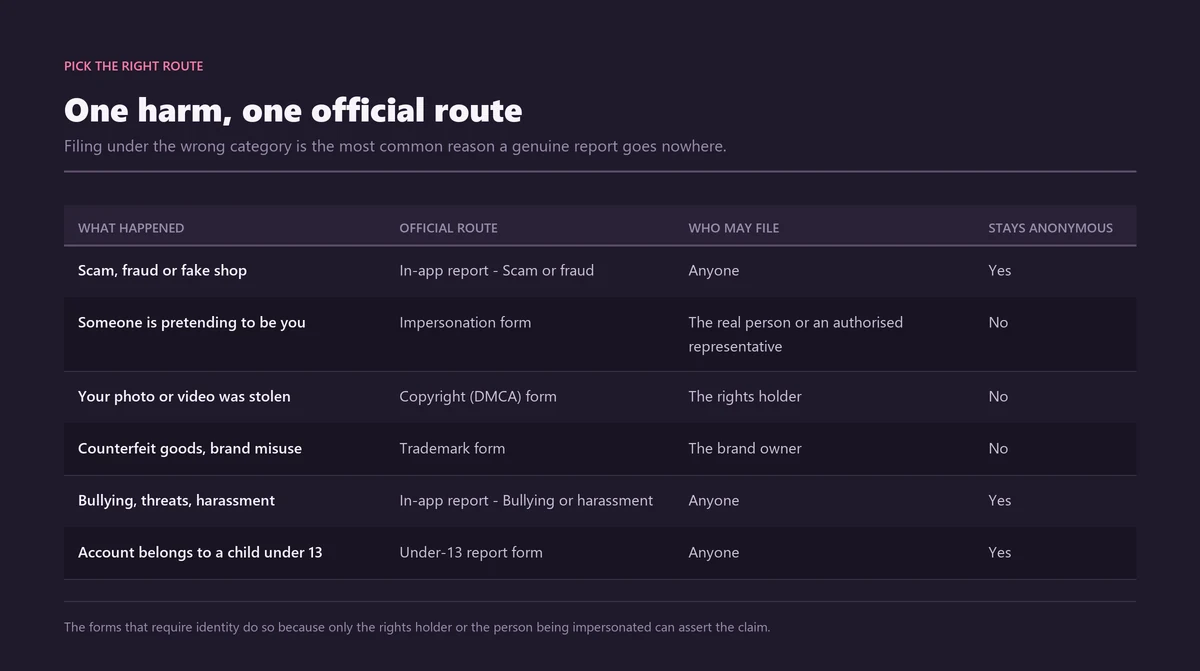
| What has happened | Official route | What it demands | Works logged out? | Anonymous? | Realistic outcome |
|---|---|---|---|---|---|
| Spam, scams, hate speech, bullying, nudity | In-app Report, three-dot menu | The post or profile itself | No | Yes | Content removal, a warning, a feature limit, or disable on severe or repeat breaches |
| Someone is impersonating you | Impersonation form, help.instagram.com/contact/636276399721841 | A photo of your government ID | Yes | No | The cloned profile is removed if the match is verified |
| Your photo or video reposted without permission | Copyright form, help.instagram.com/contact/552695131608132 | Proof you own the work; your name and email reach the poster | Yes | No | Content removal; repeat strikes can disable the account |
| Your brand name or logo is being misused | Trademark form, help.instagram.com/contact/230197320740525 | Registration number and territory | Yes | No | The infringing post, listing or profile element is removed |
| The account holder is under 13 | Under-13 form, help.instagram.com/contact/723586364339719 | The username, and nothing else | Yes | Yes | Account disabled if the age cannot be verified |
| Your own account was hacked and is posting scams | instagram.com/hacked | Access to your registered email or phone | Yes | Not applicable | Recovery, unknown sessions removed, two-factor enabled |
| Ongoing harassment you want silenced quickly | Hidden Words, Restrict, Limits | Nothing beyond your own settings | No | Yes, and silent to the other side | Their comments and messages are filtered without a review queue |
Two details decide whether a route fits. The first is anonymity, which is split down the middle. In-app reports and the under-13 form keep you hidden. Intellectual-property claims do not: the copyright and trademark forms pass your name and email to the person you reported, and the impersonation form asks for photo ID, which Instagram says it deletes within 30 days.
The second is eligibility. Only the impersonated person, or a parent or authorised representative, may file an impersonation report. Only the rights holder or their agent may file a copyright or trademark claim. If a clone account is wearing your name and face, that is your route and nobody else's, and our walkthrough of the Instagram impersonation form, the photo ID it requires, and reporting blackmail covers what to attach.
Can you report an Instagram account without having an account yourself?
For several routes, yes. The impersonation, copyright, trademark and under-13 forms are ordinary web pages that submit without a login, which matters if you deleted your account to get away from the person you are now reporting. The in-app Report flow is the exception: it lives inside the app, so it needs a signed-in account.
How do you report an Instagram account, step by step?
Capture the evidence, pick the exact violation, file once through the route that matches it, then track the decision under Support Requests. It takes a few minutes and no outside software. Order matters more than speed, because a report a reviewer can confirm at a glance is the one that gets actioned.
- Screenshot first, with the date and the @username visible in frame. Offenders delete posts the moment they sense a report, and nobody can review a description of something that has gone.
- Decide whether the whole account breaks a rule or only one item. The three-dot menu on a single post reports that post; the menu on the profile reports the account. Where both apply, file both.
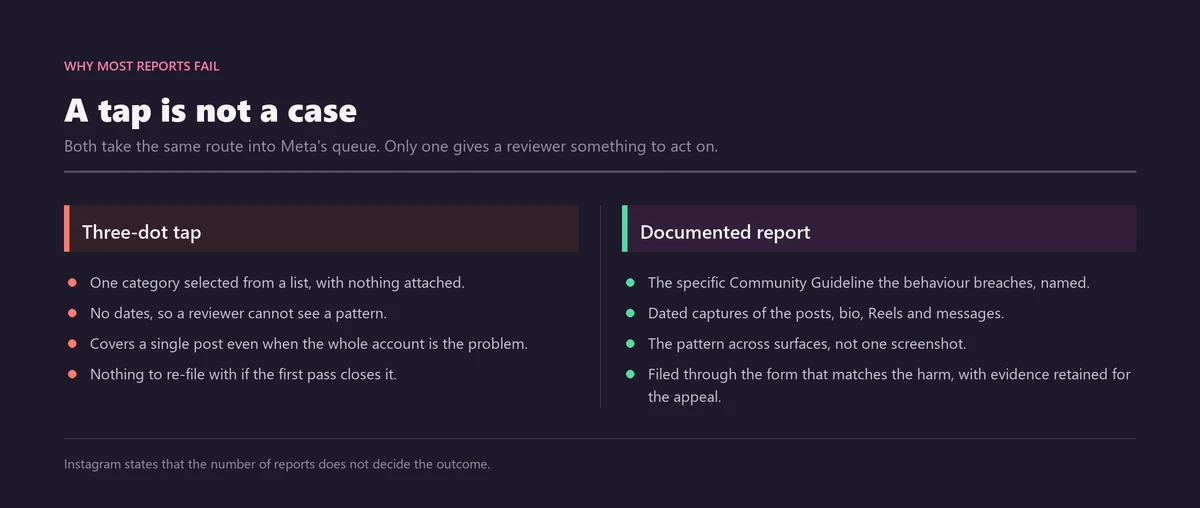
- Choose the precise reason rather than the fastest label. "Scam or fraud" and "Pretending to be someone else" go to different review queues, and a mislabelled report puts your evidence in front of reviewers who are not looking for it. A fake shop can also be flagged under the seller and product option.
- If the case fits a dedicated form, use the form instead of the in-app tap. Forms accept attachments and free text; a tap sends a category and nothing else.
- Submit once. Refiling the same complaint from a second profile adds no weight and starts to resemble the coordination Meta discounts.
- Track the outcome under Profile, then Menu, Help, and Support Requests, and use Request a Review if the decision looks wrong.
There is no official countdown after you submit. Blatant phishing and obvious nudity tend to move fastest because automated classifiers can corroborate them. Ambiguous harassment sits longer, because a human has to read a thread and form a judgement about context.
How do you check the status of a report you made?
Instagram keeps a reporter-side status page. Open your profile, tap the menu, choose Help, then Support Requests. Every report you have filed shows one of three states: In Review, Action Taken, or No Action Taken. Unfavourable outcomes carry a Request a Review option that sends the case back for a second look.
Most people never open it, which is why so many believe their reports disappear into nothing. They do not disappear. They are logged, and the log is the only honest way to tell whether a route worked. Instagram documents this at "Check the status of something you've reported to Instagram" (Instagram Help Center).
Request a Review is worth using properly. A second review is not a repeat of the first; it is a chance to add the context the original report lacked. If your first attempt was a bare tap with no explanation, that is exactly why it came back as No Action Taken.
Does the Instagram API let you report content?
No. The documented Instagram Platform surface covers comment moderation on media the authenticated user owns: replying to comments, deleting them, hiding and unhiding them, and switching comments off. There is no abuse-report endpoint anywhere in Meta's published developer documentation, so nothing in the official API can flag somebody else's account.
That matters because "files reports through the official API" is the standard claim on paid reporting panels. Since the documented API offers comment moderation on your own media and analytics endpoints and nothing resembling abuse reporting, whatever the panel is doing is not API access.
It is a script driving a logged-in session. Either yours, handed over at signup, or one bought from somebody whose credentials were stolen earlier. That is the entire mechanism, and it is also the entire risk.
Can you report Instagram content in bulk through an official tool?
One official bulk tool exists, and it is not open to the public. Meta Brand Rights Protection lets rights holders search Facebook and Instagram for infringing material and file claims in volume, segmented by Copyright, Counterfeit, Impersonation and Trademark, with filtering and bulk management across them. Access is gated behind a registered trademark.
The eligibility gate is the part that stops most people, and it is worth reading before you spend an afternoon on an application:
- A personal Facebook account, used to submit the application.
- An active portfolio in Meta Business Suite, tied to the business that owns the mark.
- At least one registered trademark in good standing. A pending application does not qualify.
- A clean intellectual-property compliance record, meaning no history of abusive or rejected IP claims.
Meta has since widened what the tool accepts. Businesses can now report scam adverts that misuse their brand name even where there is no direct trademark or copyright infringement, which closed a long-standing gap where a fraudster used a brand's name in ad copy without touching the logo (Meta Business Help Center: About Brand Rights Protection; Apply for Brand Rights Protection).
Do auto report and mass reporter tools for Instagram actually work?
No. Sold as an Instagram auto report tool, an Instagram mass reporter tool, an Instagram report bot tool, an Instagram spam report tool or a mass reporting tool for Instagram, the engine underneath is identical: bulk complaints fired from disposable profiles. Three separate mechanisms stop it, and one of them can get you actioned instead.
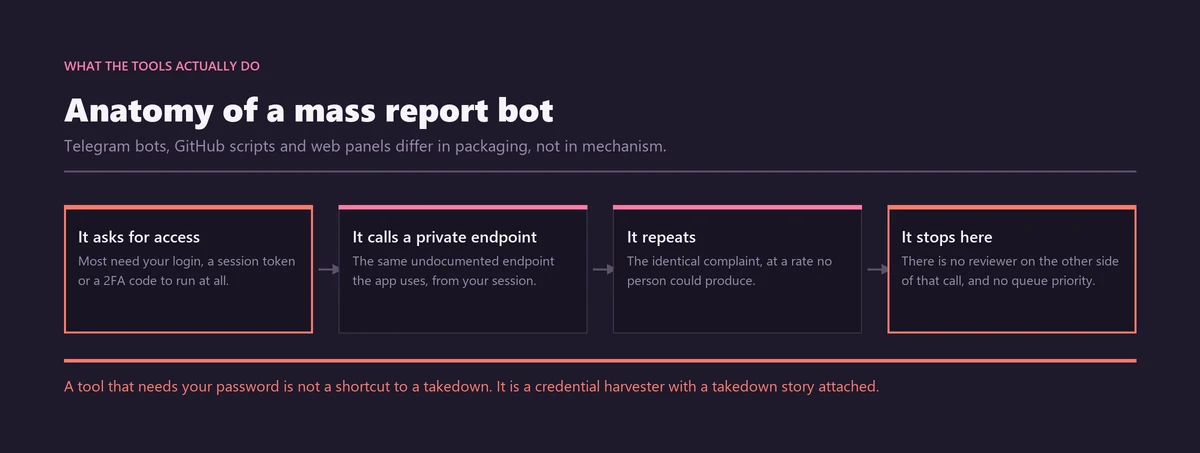
First, volume is not a vote. Because report count does not determine removal, a hundred thousand complaints against a compliant profile produce the same result as none: nothing. There is no threshold to cross and no queue to overwhelm.
Second, coordinated false reporting is itself a breach of Meta's Inauthentic Behavior policy. The flood is discounted, and the accounts producing it are the ones exposed to enforcement. People buy a mass report instagram account tool expecting to remove somebody and end up handing Meta a clean signal about themselves.
Third, automating access breaks Instagram's Terms of Use, which prohibit unauthorised and automated collection or interaction. That is before you consider what happens to the credentials you supplied.
A report is evidence handed to a reviewer, not a vote counted by a machine, which is why one documented complaint outperforms a thousand identical ones.
The market gives itself away too. The most-starred repositories rot within a release cycle, because Instagram's endpoints move and nobody maintains a free script for long. A "100% work" badge on a repository whose last commit predates several app updates is a marketing line, not a status report. Our longer examination of whether an Instagram mass report bot works or simply steals your login traces where each version fails.
How do you vet a third-party Instagram reporter tool before touching it?
Seven questions settle it in about a minute. If a tool fails any of the first two, stop reading and walk away, because what is at risk is your own account rather than an afternoon. This checklist still works if you have already found a repository or a Telegram panel and simply want to know what you are looking at.
- Does it want your Instagram username and password, or a session cookie? That is a request for account takeover dressed as a feature.
- Does it ship with proxy lists, or ask you to supply your own? Proxies exist to disguise coordination. A legitimate route has nothing to disguise.
- When was the last commit or update? Instagram's app and web endpoints change constantly, and a repository untouched for six months is a broken script with a confident README.
- Does it promise a success rate, a report threshold, or a takedown deadline? None of those numbers are published by Meta, so any figure quoted is fabricated.
- Does it instruct you to create throwaway accounts? That is the coordination signal, written into the setup guide.
- Does it name the specific Community Guideline it is reporting under? Genuine reporting starts from a rule. Bots start from a target.
- Does it charge before showing you what it actually submits? Every official form is free and shows you each field before you send it.
Junk comments and fake follower farms are the case people most often reach for a bot on, and it happens to be the case where the official route works best, because the behaviour itself is what Meta's automated systems are built to catch. Our piece on how Instagram spam accounts really come down sets out what to report and what to ignore.
Can reporting alone get an Instagram account banned?
Not on its own. Reporting opens a review; it is not a ban switch, and no Instagram report ban tool changes that. Most successful reports end in a content removal, a warning, or a feature limit. Permanent disable is reserved for severe breaches and for accounts that keep accumulating them.
Meta's Q3 2025 integrity data reported enforcement precision above 87% on Instagram and above 90% on Facebook. Less than 1% of content posted across both apps was removed for a policy breach at all, and less than 0.1% was removed incorrectly (Meta Transparency Center, covered by Social Media Today, December 2025). Read that as a system fairly confident about the calls it makes, which cuts both ways.
A genuine breach with evidence attached has a real chance. A compliant account you happen to dislike does not, however many people you recruit. If a full removal is the goal, the workable routes are a documented impersonation or intellectual-property claim, or the evidence-led approach set out in our guide to matching a violation to the right official route and our explanation of what actually makes an Instagram ban permanent.
What tools does Instagram give the person being targeted?
Four, and they work without involving a reviewer at all. Hidden Words filters comments and message requests containing terms you choose. Restrict quietly sidelines one person. Limits shuts out accounts that are new or do not follow you. Moderation Assist applies rules automatically as conditions change.
- Restrict hides that person's comments from everyone except themselves, and diverts their messages to a separate request folder. They are not notified, which is the point: it removes the audience without triggering escalation.
- Hidden Words filters comments and message requests containing words or emoji you nominate, plus a default list of offensive terms.
- Limits temporarily restricts interaction from accounts that recently followed you or do not follow you at all, which is the specific shape of a pile-on.
- Moderation Assist applies rule-based comment filtering, so you are not manually triaging during a spike.
These are worth reaching for before a report, not after. A report asks somebody else to make a decision on a timescale you do not control. These four change your own experience immediately, and they leave the evidence intact for a report you file later.
How does the EU's "report illegal content" route work?
Inside the European Union, Instagram must offer a notice-and-action mechanism separate from the ordinary Report button. Article 16 of the Digital Services Act covers content that breaks EU or national law rather than only the Community Guidelines, and Article 17 entitles you to a written statement of reasons when a decision is taken.
It is slower and more formal than tapping Report, and that is the trade. For genuinely unlawful material, defamation in some jurisdictions, illegal sales, certain forms of harassment, it carries legal weight the in-app flow does not. The statement of reasons is also logged to the European Commission's public DSA Transparency Database, which creates a record outside Meta.
If the decision goes against you, the DSA gives EU users a further step: a certified out-of-court dispute settlement body can review the platform's call. That is a genuine appeal path, not a customer-service loop, and it exists nowhere else in the reporting system.
What is a trusted flagger, and can you become one?
A trusted flagger is an organisation whose notices a platform must treat as a priority. Status is granted under Article 22 of the Digital Services Act by a national Digital Services Coordinator, and one exists in each of the 27 EU member states. It is awarded on demonstrated expertise, not sold, and individuals cannot hold it.
The framework is still being finalised. The European Commission opened a targeted consultation on draft trusted-flagger guidelines on 29 May 2026, with the feedback window originally set to close on 26 June 2026 and later extended, and the final guidelines are expected to be adopted in the second half of 2026 (European Commission).
Meta separately runs a voluntary Trusted Partner Programme for civil-society organisations and researchers, which predates the DSA and is not the same thing. Both are institutional. Neither has a consumer tier, a price list, or an application anyone can fill in on a Tuesday afternoon.
When should you escalate beyond Instagram's tools?
When money has moved, when a child is involved, or when the conduct is a crime in its own right. Instagram can remove an account. It cannot recover funds, issue an injunction, or prosecute anybody. Report to the platform and to the relevant authority in parallel rather than one after the other.
Money first. In the United States that means reportfraud.ftc.gov; in the United Kingdom, reportfraud.police.uk, the City of London Police service that replaced Action Fraud in December 2025. The scale is not hypothetical: the FTC recorded $2.1 billion in reported losses to scams that began on social media in 2025, roughly eight times the 2020 figure, with Instagram among the platforms named most often (FTC data spotlight, April 2026).
Anything touching a child's safety goes to specialists before anything else. Report child sexual exploitation to NCMEC's CyberTipline and to the police, never to Instagram alone (NCMEC).
Sextortion sits in its own category because the pressure is immediate and the instinct to pay is strong. Our step-by-step guide to reporting Instagram extortion and preserving what you need covers what to save before you block. If you would rather hand the filing to someone who does it daily, you can send us the profile link and your screenshots, and we will match the breach to the exact rule it breaks and file it through Instagram's official forms. Genuine Community Guidelines or legal violations only. We do not report accounts that are following the rules, and we have no influence over Meta's decision.
Where else should you look?
The routes on this page are general. Several situations have their own evidence requirements, their own forms, and their own realistic outcomes, and getting those details wrong is the usual reason a report fails. These walkthroughs from the solutions library cover the harder cases in detail.
- Instagram mass report bot: whether they work, or just steal your login
- Mass reporting an Instagram account: does volume ban anyone?
- Instagram spam report bot: how spam accounts genuinely come down
- The Instagram impersonation form, photo ID, and reporting blackmail
- How to report Instagram extortion, step by step
- Violation, evidence, and the right route to a ban
- What makes an Instagram ban stick permanently
Sources
- Meta for DevelopersComment Moderation, Instagram Platform documentation
- Meta Business Help CenterAbout Brand Rights Protection
- Meta Business Help CenterApply for Brand Rights Protection
- Meta Transparency CenterIntegrity Reports, Third Quarter 2025
- InstagramCopyright infringement report form
- Federal Trade CommissionReported losses to scams on social media eight times higher than 2020 (April 2026)
- National Center for Missing & Exploited ChildrenNCMEC releases new data: 2024 in numbers
- City of London PoliceReport Fraud (the service that replaced Action Fraud)
Frequently asked questions
Is there an official Instagram reporting tool?
Yes. Instagram's Report control is the official tool, and it is built into the app rather than downloaded. It sits behind the three-dot menu on every post, profile, comment, Story and direct message. Alongside it, Meta hosts dedicated web forms for impersonation, copyright, trademark and under-13 cases, several of which submit without a login at all.
What is the difference between an Instagram reporting tool and an Instagram report bot?
A reporting tool is Meta's own machinery: the in-app Report control and the official forms, which put evidence in front of a reviewer. A report bot fires identical complaints from disposable accounts. Meta states that report count does not determine removal, so the bot adds volume without adding weight, and the coordination behind it is detectable.
Can you report an Instagram account without having an account yourself?
For several routes, yes. The impersonation, copyright, trademark and under-13 forms on help.instagram.com are ordinary web pages that submit without a login, which matters if you deleted your own account to get away from the person you are reporting. The in-app Report flow is the exception, because it lives inside the app and needs a signed-in account.
Does the Instagram API let you report content?
No. The documented Instagram Platform surface covers comment moderation on media the authenticated user owns, meaning replying, deleting, hiding and unhiding comments and switching comments off, plus analytics endpoints. Meta's published developer documentation contains no abuse-report endpoint. Any panel claiming to file reports through the official API is driving a logged-in session instead.
How do I get access to Meta Brand Rights Protection?
You apply through the Meta Business Help Center, and the gate is strict. You need a personal Facebook account to apply, an active portfolio in Meta Business Suite, at least one registered trademark in good standing, and a clean intellectual-property compliance record. A pending trademark application does not qualify. It is built for rights holders, not individuals reporting harassment.
How do I check the status of a report I made on Instagram?
Open your profile, tap the menu, choose Help, then Support Requests. Each report you have filed shows In Review, Action Taken, or No Action Taken. Where the outcome went against you, a Request a Review option sends the case back for a second look, which is worth using to add the context the first report lacked.
Is there a free mass report instagram account tool that works?
No free mass report instagram account tool reliably removes anyone. The scripts fire complaints from throwaway profiles that Meta's systems discount as coordination, they break whenever Instagram changes an endpoint, and many demand your login. The alternative costs nothing anyway: one documented report through the correct official form or the in-app Report control.
What is a trusted flagger, and can I become one?
A trusted flagger is an organisation whose notices a platform must prioritise. Status comes under Article 22 of the Digital Services Act from a national Digital Services Coordinator, and one exists in each of the 27 EU member states. It is awarded on demonstrated expertise, never sold, and individuals cannot hold it. Anyone offering paid priority access is lying.
Should a reporter tool ever ask for my Instagram login?
No. Instagram's guidance is that any app asking for your username and password to act on your behalf is breaking its Terms. Whoever holds those details can post as you, message your followers, or lock you out. Official routes never need a password, because you are already signed in or the web form works without an account.