Report mechanics·Comments, outcomes and the faster controls
How to report a comment on Instagram, and what the report actually does
Almost every guide to this stops at the moment you tap Report. Instagram's own Help Centre carries one sentence past that point, and it contradicts what most of those guides tell you just happened.
You report a comment on Instagram from the comment itself: open the comments, open the options on that comment, choose Report, then pick the reason it breaks the rules. That comment then disappears from your view. Instagram states plainly that this does not mean it was removed.
How do you report a comment on Instagram?
Report the comment, not the profile above it. Instagram publishes the route as five steps, and there is a detail in that page worth knowing before you go hunting for device-specific advice: Meta lists Android App, Instagram Lite, iPad, iPhone, Computer and Mobile Browser as separate options on the article, then gives one set of instructions for all of them.
- Open the comments on the post. Instagram's wording is "Click Comments below the post". The report control belongs to the comment, so opening the commenter's profile instead takes you to a different form with a different outcome.
- Bring up the options on the comment you mean. On a computer, "Hover over to the comment that you want to report", then "Click Options below the comment". In the apps the same control sits behind the three-dot or Options handle on the comment row.
- Choose Report. Nothing is sent yet. What appears next is the screen that decides everything.
- Pick the reason that matches what the comment did. "Select an option for why the comment is abusive and then follow the on-screen instructions." Spam, hate speech, bullying or harassment, a scam, false information: the category you choose is the policy a reviewer will test the comment against, so a near-enough category is a wasted report.
- Decide about the account behind it. Meta's page ends by noting that "after you've reported a comment, you can also choose to restrict or block the person whose comment you reported". Those two act immediately; the report does not.
Reporting comments on Instagram works the same way on a post, a Reel and a live video, because the comment row is the same component in each. Story replies and direct messages are a different surface with a different control, which is covered in the walkthrough on reporting a Story, post or DM. If you want the whole official toolkit rather than this one route, the Instagram reporter tool page maps every form Meta actually operates.
One habit is worth building before you tap anything. Capture the comment first, with the username, the post and the date visible in the same frame. The moment you file, the comment leaves your screen, and the reason it leaves is the subject of the next section.
What happens when you report a comment on Instagram?
Two separate things happen, and only one of them is visible to you. Instagram's Help Centre states it in a single sentence: "After you've reported a comment, you'll no longer see it, but this doesn't mean that the comment was removed by Instagram."
Read that twice, because it is the sentence the ranking guides leave out. Filing changes your view of the thread instantly. It also files a request into a review queue whose result arrives later — or never arrives at all. Those two are unrelated, and the first masquerading as the second is why so many people believe reporting works better than it does. Ask anyone who reported a comment last week whether it came down and they will usually say yes, because from where they are standing it did.
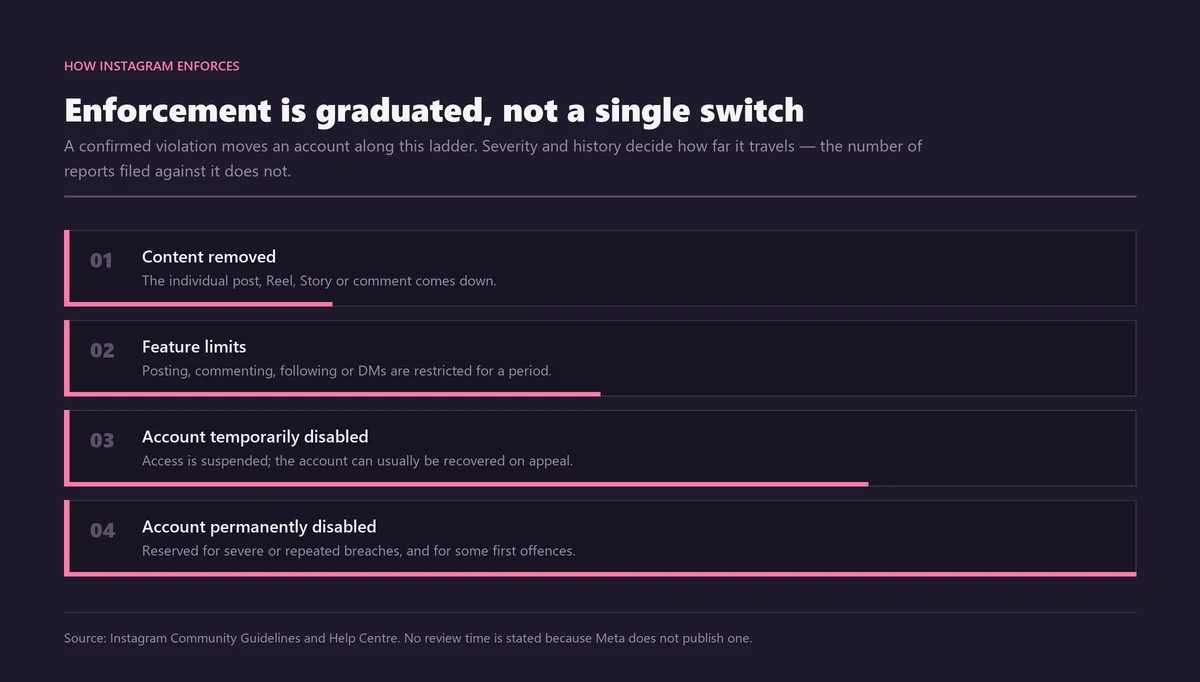
What happens if you report a comment on Instagram and a reviewer agrees with you is straightforward: the comment comes off the post for everyone, and the account collects a mark against the policy it breached. Severity and history decide whether that mark ever becomes anything more, and a single confirmed comment breach on an established account sits at the bottom of a long ladder — which is why the numbers people repeat about report counts collapse under any inspection. Meta's own line on volume is worded for Facebook rather than Instagram, and our page on how many reports it takes to delete an account takes that wording apart properly. Short version: nothing in the system counts arrivals.
The person on the other end may hear about it, and this is the second thing most guides get wrong. Meta operates a help article called Notifications about hurtful comments or content on Instagram, which says: "If a comment or post that you shared on Instagram is reported by others, you may receive a notification letting you know that it may have been hurtful to others." The same page adds that this notification "doesn't affect your account status or recommendation status". So the popular claim that they will never know is wrong, and the opposite fear, that a single report puts a strike on someone's account, is wrong too. They may be told their content was flagged. Nothing about their standing changes on that alone.
Then there is the outcome nobody advertises, which is silence. In August 2024 the Center for Countering Digital Hate ran the experiment properly: it collected 1,000 abusive comments aimed at the Instagram accounts of ten female officeholders, reported every one of them through the app, and came back a week later. Instagram had acted on 7% of them, leaving 93% in place, including comments referring to rape, injury and death. Two hundred and twenty-one came from accounts that had already targeted the same women. Meta's response, reported by NBC News, was that it had not seen the study before publication, would review the examples, and that not all offensive comments are violations. Both halves of that are worth holding on to. Reporting is worth doing and it is not a remedy you can rely on, which is why the rest of this page is about the controls that do not depend on a reviewer agreeing with you. If the account behind the comments is the real problem, what actually gets an account banned is a different question with a different answer.
Can you report a comment on Instagram that someone left on your own post?
Yes, and it is usually the wrong first move. Any comment you can see, you can report: on your own post, on a stranger's post, under a Reel, in a live video. The question worth asking is whether reporting is the control you want, because on your own post you hold a better one.
Instagram puts it plainly on the same help page: "If someone leaves an inappropriate comment on your post, you can delete it." Deleting is yours and it is final. Reporting is a request to Meta, and Meta decides. On a post you own, filing a report and then waiting is choosing the slower instrument over the faster one, and you can do both anyway: delete the comment so it is gone, then report the account if the behaviour is a pattern rather than a bad afternoon.
Reporting a comment somebody left on another person's post is the case where a report really is all you have. You cannot delete it, hide it or restrict its author on someone else's thread. If the account behind it is the actual problem, the profile-level route in the guide to reporting an account and what disable really means is the one that can produce a removal, and questions about ending an account altogether belong with who holds the authority to delete someone else's account. A comment report cannot reach that far.
Instagram comment moderation: which control actually fits
This whole subject is one question wearing several hats. People arrive wanting the same thing, which is this comment gone without a fortnight of waiting, and they reach for whichever word they already know for it: moderation, filtering, hiding, blocking, reporting. Instagram gives you seven separate controls, and only one of them is a report.
| Control | What it does to the comment | Who decides | Does the commenter notice? |
|---|---|---|---|
| Report | Leaves your view; may or may not be removed for everyone | Meta, after review | Possibly, via a hurtful-content notice |
| Delete (your post only) | Gone from the post for everyone, immediately | You | Only if they look |
| Hide manually | Visible to you and its author, nobody else | You | No |
| Hidden Words filter | Auto-hidden before you read it, held in a folder | You, by word list | No |
| Restrict | Their future comments visible only to them until approved | You | Not directly |
| Limits | Pauses interaction from accounts you have not chosen | You, temporarily | No |
| Block, or comments off | Stops the account, or the whole thread, commenting | You | Yes, in effect |
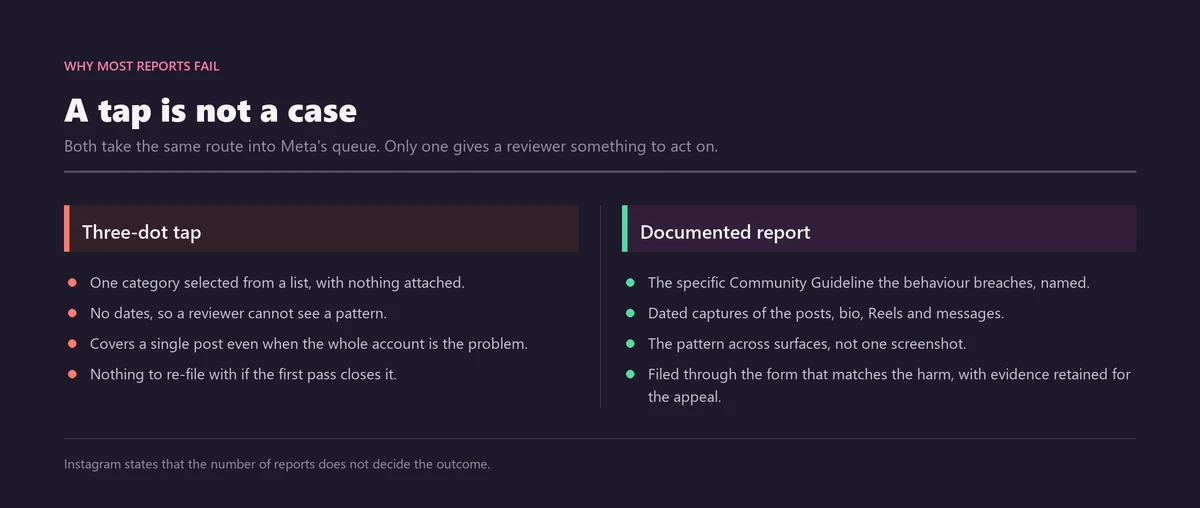
Read the third column first. Six of the seven put the decision in your hands and take effect the moment you press them; the report is the only one that hands the decision to somebody else. That is not an argument against reporting. Reporting is how a genuine breach gets recorded against the account and how a pattern becomes evidence later, and Instagram Ban Service files them for exactly that reason. It is an argument against reporting instead of acting, which is the mistake we see most often on accounts that have been under pressure for weeks.
In practice, on a post you own: act first, file second. Delete or hide the comment so it stops doing damage, capture it before you do, then report it so the breach is on record. Where the comments are automated rather than personal, the teardown on what actually removes spam comments covers the filters that scale to that.
Does the commenter find out you reported them?
Not who you are. Instagram's rule on the same report page is one line: "Your report is anonymous, except if you're reporting an intellectual property infringement." A comment report is a Community Guidelines report, so the exception almost never applies to it; the detail of when it does is unpacked on our page about whether Instagram tells you who reported you.
Most of the confusion here comes from mixing up two different notifications. Meta may tell someone their content was reported. Meta does not tell them by whom. Those are compatible statements, and reading the first as the second is what produces the anxious threads about being found out.
If even that feels too public, Restrict is the quiet option. Instagram's page on restricting someone says their "new comments on your posts will only be visible to that person", that you can tap See comment to read it and then "Approve" it, delete it or ignore it, and that "you won't receive any notifications for future comments from that person". Nothing at all is sent to the restricted account. For a colleague, a relative or a customer you would rather not confront, that is a better tool than a report and a great deal better than a block.
How many comments can you report at once?
One at a time. No bulk control, no multi-select, no batch queue.
Asking three friends to file the same comment adds nothing to its chances either. What you can do is report several comments individually and, more usefully, report the account once with the whole thread documented. The pages on whether report volume ever works and on what mass report bots actually do cover why the tools sold for this are, at best, wrappers around a free button.
What can you do when Instagram leaves the comment up?
Ask for a second look, and do it on the decision rather than by filing again. Meta runs a help article titled what to do if Instagram didn't remove content that you reported, and it is the most useful page in this whole subject. "When you request a review, we'll revisit the content and review it once more," it says, and your report "will be reviewed again by Instagram, usually within 24 hours".
That 24 hours is the only review time Meta publishes anywhere, and it belongs to the second pass. The 24-to-48-hour figure repeated across the tutorials for a first review has no source at Meta at all. Refiling the same report from the same account, or from three more accounts, restarts nothing. The review request is a different mechanism, and it is the only one that has ever changed an outcome.
Inside the European Union and the EEA there is a further step, and it has teeth that the in-app flow does not. Under the Digital Services Act a notice gets you a statement of reasons, and a refusal can go to a certified out-of-court dispute settlement body. The European Commission's own figures give a sense of the scale: since 2024 EU users have appealed over 165 million content moderation decisions through platforms' internal mechanisms, with almost 30% reversed. In the first half of 2025 alone, out-of-court bodies reviewed over 1,800 disputes about content on Facebook, Instagram and TikTok and reversed the platform in 52% of closed cases. Over the same six months platforms reported more than 9 billion moderation decisions, 99% of them taken proactively rather than in response to anyone's report.
Sit with that last number for a second, because it reframes the whole exercise. Almost everything Instagram removes, it removes without being asked. Your report is a minority route into a system that mostly polices itself, and when it fails the appeal is where the leverage is. If the comments are one symptom of an account that needs to come down entirely, the routes are set out in getting an Instagram account taken down, the evidence bar for each form in which form and what proof a takedown needs, and what makes a removal stick in banning an account permanently.
When a comment problem becomes an account problem
There is a line where reporting comments one at a time stops being the right tool, and most people cross it weeks after they should have. Repetition is the signal. One offensive comment is a comment. The same account returning to your posts, or eleven accounts arriving on one evening with the same phrasing — that is a pattern, and patterns are filed against the account under a named policy with the thread attached as evidence.
We changed how this desk works because of that gap. Early on we filed comment by comment, the way the app invites you to, and the reports came back with nothing useful attached to them: each one had been judged alone, on its own merits, stripped of the twenty around it that made it frightening. Instagram Ban Service now captures the full thread with timestamps before anything is filed, and files once, against the account, under the policy the pattern actually breaches. We cannot promise that changes a verdict. It does mean there is something to appeal with when the answer is no, which single-comment reports rarely leave you.
Where the pattern lands decides the route. Threats to publish images belong with the first-hour plan for Instagram extortion, not with a comment report. A profile using your name and face to answer your customers is an impersonation matter, handled through the impersonation form and its photo ID requirement, and if the outcome frees up the handle itself, claiming an Instagram username explains the three narrow routes that exist. Comments driving people to a fake shop or a fake competition are covered in reporting a giveaway or business scam. And when the goal is the removal of everything that account posted rather than one thread, the honest options are laid out in what "deleted" really means route by route.
How this desk handles a comment case
Send the post link, the usernames, and screenshots with the date visible. We read the thread before we read your summary of it, because the category we file under has to survive a reviewer who will see only what we attach. Instagram Ban Service files and escalates the report through Instagram's official forms; Instagram makes the decision, and no one outside Meta can overturn it.
We decline cases where the comments are rude rather than rule-breaking, where the target is a rival business with no breach to point at, and where what is really wanted is a legitimate account off the platform. That is not caution for its own sake. A report that misdescribes what happened is discounted the moment a reviewer opens it, and it burns the account you filed from. If you are weighing what the paid market around this actually sells, the cost, legality and con behind ban-as-a-service is worth ten minutes before you spend anything.
If you take one thing from this page, take the order: capture, then act with the control you already hold, then report so the breach is on record, then request the review if the answer comes back wrong. Reporting first and waiting is the sequence that leaves people three weeks later with a thread still up and no evidence left. The full set of routes sits on the solutions index, the wider service is described on the Instagram Ban Service home page, and a case can be opened through the contact page or either handle at the top of this page.
Sources
- Center for Countering Digital HateAbusing women in politics, August 2024: 1,000 abusive comments reported through the app, 93% still online a week later
Frequently asked questions
If I report a comment, does it get removed from my own page?
It leaves your view immediately, which is why people assume it was deleted. Instagram is explicit that these are not the same thing. The comment can still be sitting on the post for everyone else while your own screen shows it gone, and nothing on your side tells you which of the two you are looking at. On a post you own, delete it instead and be certain.
Can you undo a report on Instagram?
No withdraw control exists for a report you have already sent, and once it is in the queue it stays there. What you can still change is your own side of it: unhide the comment on a post you own, or add a review request when a decision comes back wrong.
Can I report my own comment on Instagram?
There is no reason to. You can delete anything you wrote yourself, on any post, at any time, and deletion is final where a report is only a request. People usually ask this after being told a comment of theirs was reported, and the useful move there is to read the notice Instagram sends rather than to file anything.
Does reporting a comment affect the person's account?
Not by itself. A confirmed breach can remove the comment and, with severity or repetition, move the account along Instagram's enforcement ladder. But Meta states that a hurtful-content notification alone does not change account status or recommendation status, so one report on one comment is a long way from an account consequence.
How long does Instagram take to review a reported comment?
Instagram publishes no turnaround for a first review, and the 24 to 48 hours quoted all over the web has no Meta source behind it. The one time figure Meta does publish applies to a second look: when you request a review of a decision, it says the content is reviewed again, usually within 24 hours.
Can I report a comment on Instagram without an account?
Not through the in-app control, which needs you signed in to reach the comment. Instagram's standalone web forms are the logged-out route, and they cover impersonation, intellectual property and under-age accounts rather than individual comments. A comment inside a private account is unreachable to a stranger either way.
Does reporting a comment work on Instagram in a web browser?
Yes, and the wording Instagram publishes for the route is the browser wording: open the comments, hover on the comment, click Options, then Report. Mobile browser and the desktop site both carry the control. The single set of steps Meta gives covers phone apps, iPad, Instagram Lite and computers alike.