Reporting · a whole account, profile or page
How to report an Instagram account, profile or page, and tell whether it worked
You reported the scam posts one at a time, and the profile behind them is still taking payments. There is a reason for that. A post report asks a reviewer to judge one upload; an account report asks what the whole profile is for, whose identity it wears and who is running it, and that question only gets asked when you file at account level.
To report an Instagram account, open the profile, tap the three dots at the top right, choose Report and pick the option about the account itself. Instagram then offers three account-level reasons: posting content it shouldn't be, pretending to be someone else, or possibly being under 13. On a computer, the same menu sits under Options beside the username.
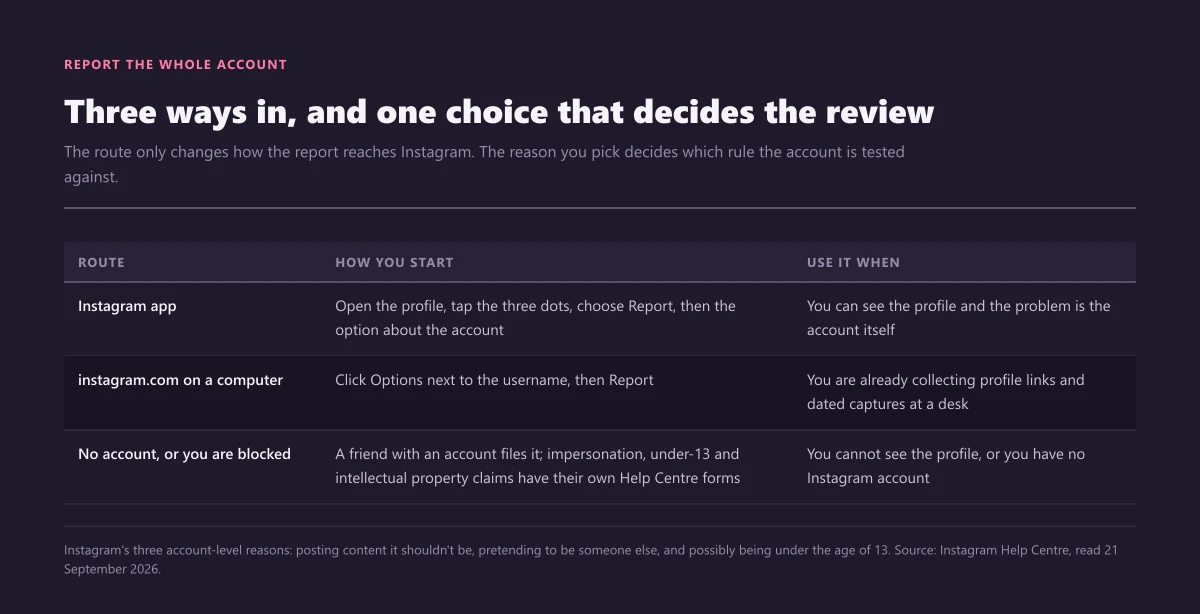
How to report an Instagram account from the app or a browser
File from the profile, not from a post on it. The account menu is the only place Instagram offers reasons that describe a whole account, and those reasons are what point the reviewer at the right rule.
- Open the profile. Tapping the username on a post or story gets you there, and so does searching the handle in Explore.
- Tap the three dots at the top right of the profile. On instagram.com in a browser, click Options next to the username instead.
- Choose Report, then the option that concerns the account rather than one post, story or comment.
- Pick the account-level reason that matches what the profile is, and answer the follow-up questions Instagram shows for it.
- Before you press submit, capture the profile with the handle and the date on screen, because a profile that notices attention can empty its grid and a reviewer cannot weigh what has gone.
Instagram lists three account-level reasons, in its own words: It's posting content it shouldn't be
, It's pretending to be someone else
and It may be under the age of 13
. Almost everything a whole account can do wrong lands under one of those three, and the next section maps them onto real situations.
When the Instagram Ban Service desk re-read the Help Centre for this page on 21 September 2026, we saw two things that most walkthroughs still get wrong. The account-report steps are published once for every device, in desktop wording, so the labels in your app can differ slightly from the article. And the screen for tracking what you reported now sits under Profile, Menu, Help, Reports and violations, Reports, rather than behind the Support Requests label that older guides describe.
Search report Instagram account
and most results stop at the menu, which is the easy part. If the harm really lives in one upload, the post-level flow in the guide to reporting a single post fits better. An abusive reply belongs in the comment report.
Which account reason matches what you are looking at?
Choose the reason that describes the account's identity or purpose, because that is the one thing a post report can never carry to the reviewer.
| If the problem is | File it as | Why that choice |
|---|---|---|
| One post, Reel or story breaks a rule, and the rest of the profile is ordinary | A report on that single item | The reviewer judges the upload in front of them |
| Nearly every upload pushes the same scam, spam or harassment | Account report: posting content it shouldn't be | The pattern only shows when the whole profile is reviewed |
| The profile copies you, your client or your company | Account report: pretending to be someone else, or the impersonation form | Identity belongs to the account, not to any single post |
| The profile is run by a child under 13 | Account report: may be under the age of 13, or the under-13 form | Age is judged on who operates the account |
| A fresh profile keeps contacting someone who blocked the last one | Account report on the new profile, with captures of the old one | Meta's Account Integrity rules cover accounts made to reach a person who blocked them |
Impersonation has a catch that stops bystanders cold. Instagram acts on those reports only from the person being copied or someone authorised to represent them, and the form asks for a photo of government ID. A catfish wearing a stranger's photographs therefore usually gets reported under the first reason, as a scam or fraud, and the fake account report guide sorts out who may file what. If the clone has also parked itself on a handle you wanted, recovering the name is a separate job covered in claiming an Instagram username.
The under-13 reason comes with a regulator's verdict attached. On 29 April 2026 the European Commission said in preliminary findings under the Digital Services Act that Instagram's tool for reporting under-13 users took up to seven clicks to reach and lacked proper follow-up once a child was flagged, and it put the share of under-13s using Instagram and Facebook in the EU at around 10% to 12%. Meta can still answer those findings, and a final decision could carry a fine of up to 6% of worldwide annual turnover. For a reporter the lesson is practical: when the account plainly belongs to a child, go straight to the dedicated form instead of hunting through the app.
The last row surprises people. Meta's Account Integrity policy, last updated on 28 May 2026, lists accounts created to contact a user that has blocked an account
as violations in their own right, next to accounts opened to dodge an earlier removal. Report the replacement as an account and keep the captures that tie it to the old one. The pattern is the evidence.
Reporting without an account, from behind a block, or inside a group chat
You can still report a profile you cannot see; the route just runs through another person or through a form. Instagram's Help Centre advice for people without an account is short: ask a friend who has one to report the content from the Report link beside it, and supply as much detail as you can, including links and screenshots.
A block hides the profile from you, not from Instagram. It is easy to assume the door has closed when two are still open: the friend who can still see the account, and the logged-out forms for claims that only you can make.
Pages are accounts too. A meme page built to mock one classmate, a fan page recycling somebody's photographs, a shop profile collecting deposits for goods that never ship: all of them go through the same account menu. Storefront fraud has enough twists of its own to need a separate walkthrough on the Instagram giveaway or business page.
Group chats are where the account logic stops. Instagram's Help Centre page on messages and chats is explicit that you cannot report entire group chats, only the messages, photos, videos and people inside one. So capture the worst messages first, then report them and the member sending them from inside the chat, and leave the group afterwards if you want to. Instagram reviews the latest messages of a reported conversation, which is one more reason to report while the thread is still intact.
What does a banned Instagram account look like from the outside?
Usually like a dead link. The profile address returns Sorry, this page isn't available
and the handle tends to vanish from search, which tells you the account is out of view but not why.
Instagram's own wording is that a disabled account will no longer be visible to others
, per its page on disabled accounts. For anyone checking on a report, that is exactly the problem: a deactivated account, a deleted one and a renamed one produce the same blank page.
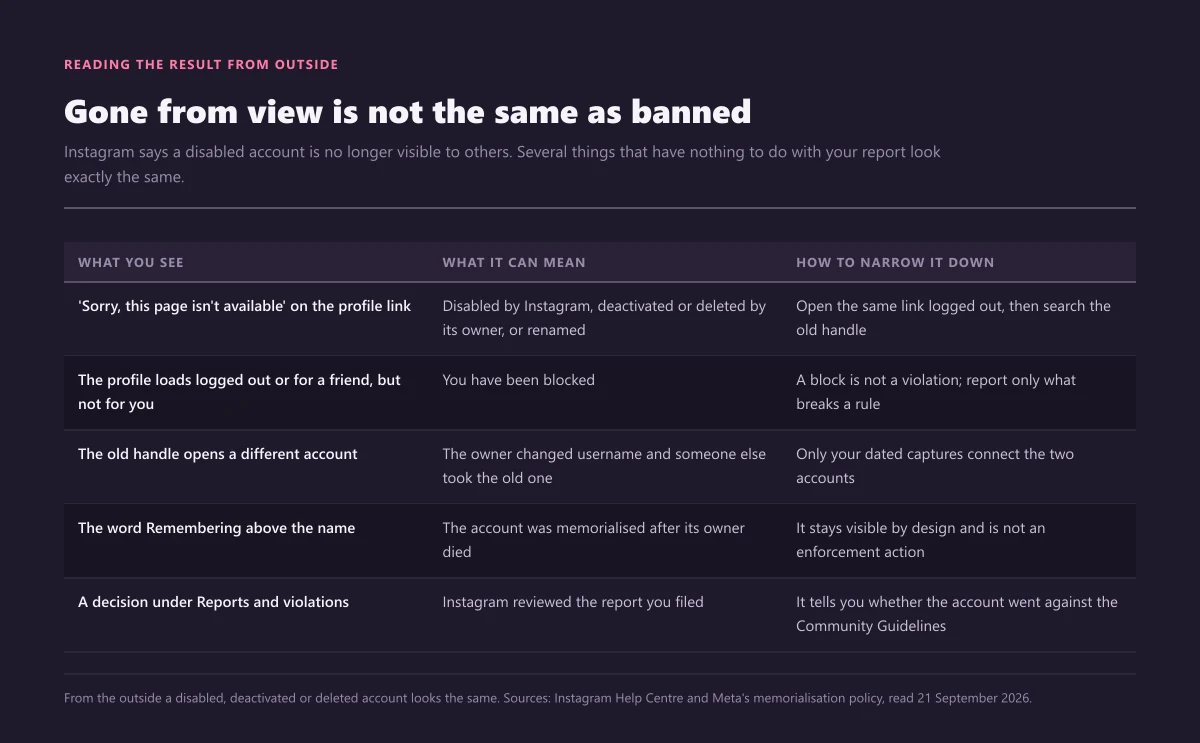
So how do you know if an Instagram account is banned rather than hidden, renamed or blocking you? Run three checks, in this order. Open the profile link in a private browser window while logged out; if it loads there, the account exists and has probably blocked you. Search the old handle next, and if a different profile answers, the owner renamed and somebody has since taken the name. Then open your own report under Reports and violations, where Instagram says it will tell you whether the account did or did not go against its Community Guidelines. That third check is the only one written for you, and it is the one people skip.
One look-alike deserves its own line. A profile showing the word Remembering above the name has been memorialised after its owner died, and it stays visible on purpose, so a memorialised Instagram account is neither live nor banned. The range of outcomes a report can produce, from a warning up to a disable, is set out in what reporting actually does.
Then there is the banned Instagram account viewer. No such tool can show a profile Instagram has stopped serving to everyone, because nothing is left for it to fetch. A site offering one can only work with what you hand it. Treat any that asks for your Instagram login as a phishing page, and rely on the captures you took before filing.
How to know if your Instagram account is banned, and how to fix it
Instagram tells the owner at login. A disabled account shows a message when you try to sign in, and from that moment the profile is gone for everyone else, which makes the login screen the quickest way to know if your Instagram account is banned rather than glitching.
For anything short of a disable, read Account Status. It lists removed posts, stories and comments, the features you can no longer use and a button to request a review, and Instagram warns on the same page that repeated removals can cost you the account. On a computer it sits under More, Settings, then Account Status below More info and support.
People asking how to know if your Instagram account got banned after an argument usually suspect a revenge report. One report cannot ban anybody, but fabricated complaints are real: Malwarebytes reported on 10 September 2026 that criminals were filing fake copyright complaints until Instagram suspended the target, then demanding a ransom to withdraw them. One account holder paid $50 in cryptocurrency. Meta told the BBC it restored the affected content after reviewing the accounts.
A notice saying you were banned for account integrity on Instagram points at one specific Meta policy, the one covering automated accounts, accounts that keep breaking the rules and accounts made to get around earlier removals. That is why a replacement account opened after a disable can backfire: a new profile run by the same person can be removed as evasion. Wrongful disables do happen. In June 2025 TechCrunch reported a wave of users saying they had been banned without breaking any rule, with a Change.org petition past 4,000 signatures and no on-record statement from Meta.
To fix a banned Instagram account, log in and follow the on-screen instructions to ask for a review, which is the route the Help Centre gives. Keep proof of your own compliant posts ready. Never hand your password to an unban service.
Do report bots and account ban tools work?
They cannot deliver the one thing they sell, because Instagram weighs what a report proves, not how many copies of it arrive.
Meta's Help Centre says the number of reports does not decide whether something comes down, and the arithmetic behind that is unpacked in how many reports it takes. The contract you accepted with Instagram goes further. Its Terms of Use forbid interfering with the service, including by making fraudulent or groundless reports or appeals
, and they ban creating accounts or collecting information in an automated way
without Instagram's express permission.
A bot can change how often an unproven claim arrives. It cannot change what the claim proves.
That puts every Instagram account ban tool in the same position. A GitHub script sold as an Instagram bot report account service, a panel run over Telegram, a spam report Instagram account bot working from throwaway profiles: each breaks those two clauses before a single report lands, and each needs accounts, sessions or somebody's login to run at all. European law points the same way, since Article 23(2) of the Digital Services Act requires platforms to suspend, after a warning, the processing of notices from people who frequently send manifestly unfounded ones. Only Meta can ban an Instagram account, and nothing sold outside Meta changes that.
There is a legitimate reading of these searches as well. Anyone trying to report Instagram account bot activity, meaning a profile that is itself automated and spraying comments or DMs, should file an account report under posting content it shouldn't be and say plainly that the account is automated. Account Integrity lists accounts created or used through automated means, such as scripting
as a violation. The only reporter tool that works is Instagram's own set of menus and forms, compared side by side in the Instagram reporter tool breakdown.
Can you get someone's Instagram account or page deleted, and how fast?
You can get it reviewed. Deletion is rarer than people expect, because the usual penalty for a violating account is a disable, which takes it out of view without erasing it.
Whether you typed how to get someone's Instagram account deleted, how to get someone's account on Instagram deleted or the looser how to get someones account deleted off Instagram
, the mechanics do not change. Instagram acts on a violation it can confirm, not on a request to remove a person, and the same holds for anyone asking how to get someone's Instagram profile banned. Two routes do end in deletion. When Instagram cannot verify that whoever runs an account meets the minimum age, it deletes the account, and verified immediate family can ask for a dead person's account to be removed instead of memorialised. Both are explained, with the proof each one needs, under deleting someone else's account, and the wider set of routes is compared in getting someone's Instagram deleted.
Speed is where the honest answer disappoints. Instagram publishes no deadline for reviewing an account report, and the record on scam reports is poor. A lawsuit filed in April 2026, citing a 2023 internal Meta document first reported by Reuters, claims users submit about 100,000 valid fraud reports each week and that 96% are ignored or incorrectly rejected, according to TechPolicy.Press. Meta's answer to the original reporting was that it had cut user reports of scam ads by 58% over 18 months and removed more than 134 million pieces of scam ad content in 2025 up to that point. Both are claims from interested parties, not settled findings.
What does move a case is severity and fit. A credible threat, a doxxed address or a child at risk goes to the police as well as to Instagram, and the guide to threats and doxxing sets out which form each harm belongs in. The guide to every official takedown route collects the rest in one place. So the question of how to get someones Instagram account deleted fast has one honest answer: file the right account report once, with evidence attached, and go outside Instagram when the law is involved.
What goes into an account report before we file it
Instagram Ban Service asks for four things before anything is filed, and a password is never one of them:
- the profile link or @username, captured with the date showing;
- a sentence or two, in your own words, on what the account is doing;
- uncropped screenshots of the posts, bio or messages that prove it;
- whether you are the person targeted or filing for someone else, since several routes accept only the first.
From there the desk matches the behaviour to one named rule, chooses the account reason or form that carries it, and files once. Instagram Ban Service prepares and submits the report through that route; Instagram makes the decision, and nobody outside Meta can promise what it will be. We turn away accounts that have broken no rule, rivals someone simply wants gone, and anything that would mean getting into another person's login. If you would rather have the case built for you, send the username to the case desk, or read the other reporting guides first.
Filing it yourself works too. Start with the account report, choose the reason that describes the account rather than your anger, attach nothing you could only get by logging into someone else's profile, and skip every bot. Send it once, then read the verdict under Reports and violations before you think about filing again.
Sources
- Instagram Help CentreHow to report something on Instagram if you don't have an account or can't see it
- Instagram Help CentreReport a message or chat on Instagram, including the rule on entire group chats
- Instagram Help CentreAbout disabled Instagram accounts: visibility and asking for a review
- Instagram Help CentreCheck your Account Status on Instagram
- Meta Transparency CentreAccount Integrity policy, updated 28 May 2026
Frequently asked questions
Can you report an Instagram group chat?
Not as one item. Instagram's Help Centre says reports on a group chat attach to the messages, photos, videos and people inside it, never to the chat as a whole. Capture the worst messages, report them and the member sending them from inside the chat, and leave the group once the reports are in.
Will the account I report find out it was me?
Not from Instagram. Its reports are anonymous unless you are reporting an intellectual property infringement, where your name and contact details can reach the account holder so they can respond. Photo ID sent with an impersonation report goes to Instagram, not to the profile you reported. The exceptions are set out in what Instagram tells the reported account.
Can reporting someone get my own account in trouble?
An honest report cannot. Instagram's Terms of Use forbid fraudulent or groundless reports, and Meta's Inauthentic Behavior rules count misusing the reporting system to harass or silence someone as a violation, so the risk sits with coordinated or knowingly false reporting. One accurate report under the right reason carries no penalty.
Is there a banned Instagram account viewer that works?
No tool can show a profile Instagram has stopped serving to the public, because nothing is left for it to load. Pages advertising a viewer can only use what you give them, so keep your Instagram login away from every one of them.
How many reports before Instagram bans an account?
There is no number to hit. Meta's Help Centre says the count of reports does not decide whether something is removed. One accurate report under the right reason gets the same review as a thousand identical ones, and a coordinated pile of identical ones can count against the people sending them. Put the effort into evidence, and report each account once.
How do you report an Instagram account on a computer?
Open the profile on instagram.com, click Options next to the username, choose Report and then the option about the account. The same three account-level reasons appear as in the app. A computer is the easier place to copy profile links and take full-screen captures, so it suits cases that need evidence.
Where can you see what happened to an account you reported?
In the app, go to your profile, open the menu, then Help, Reports and violations, and Reports. Instagram posts its decision there, saying whether the account went against its Community Guidelines, and for many report types you can request another review from the same screen. Read that answer before you file the same account again, and refile with new evidence.