Bereavement routes·Freezing a profile, removing it, or deciding in advance
What a memorialized Instagram account is, and who may request one
Almost every guide to this still says Instagram has no legacy contact, the way Facebook does. Two live Meta help pages now describe one, plus a setting that deletes your profile instead.
A memorialized Instagram account is a profile Meta has locked after being shown proof its owner died. Remembering appears beside the name, nobody can log in, and it drops out of surfaces like Explore. Anyone can request it with an obituary link. Only immediate family can ask for deletion.
What happens to an Instagram account when someone dies?
Nothing, until a person tells Meta. The profile stays exactly as its owner left it: posts up, followers intact, still turning up in the suggestion carousel and still attached to whatever birthday the account was registered with. No inactivity timer runs in the background, and Instagram has no way of learning about a death on its own.
That silence is the part families are unprepared for. Someone has to file, and until they do, an Instagram account after death behaves like any dormant account belonging to a living person who has simply stopped posting.
When a request does arrive, the profile moves into one of two states. Memorialization freezes it under a Remembering label and keeps it visible to the people who already followed it. Removal erases it — and Meta treats that as final. A third possibility exists only where the account holder made a choice before they died, which almost nobody does.
Volume makes this less exceptional than it sounds. Instagram passed 3 billion monthly active users in September 2025, and the only large study to model the arithmetic, by Carl Öhman and David Watson at the Oxford Internet Institute, found that a minimum of 1.4 billion Facebook users will die before 2100 even if the network never gains another sign-up, rising past 4.9 billion if growth continues. No equivalent figure exists for Instagram. The accounts of the dead are becoming ordinary infrastructure, and the request forms are still built for exceptions.
Two other outcomes get confused with these and are neither. An account Meta disables for breaking the rules is a different state with a different appeal path, unpacked on the guide to what disable actually means. And the five separate things people call a deleted account are separated properly in the walkthrough on which removal route fits which situation.
What changes on a memorialized account, and what stays frozen?
The lock is the point. Meta's help page carries the sentence that matters in five words: "No one can log in to a memorialised profile." Not the family, not the executor, not a friend holding the password, not Instagram's own support staff on request.
Everything the person put there stays put. Where no legacy contact was appointed, Meta lists what cannot be changed afterwards: the photos or videos added to the profile, the comments on those posts, the profile's privacy settings, and the current profile photo, followers or people the person follows. A private account stays private, so the followers who could already see it keep seeing it and nobody else gains access. Posts do not become public because someone died.
Visibility narrows in one direction only. In Meta's wording, memorialized profiles "don't appear in certain places on Instagram, such as Explore", which is the mechanism that stops a dead friend appearing in a recommendation strip. The profile is still there at its own address for anyone who goes looking.
Instagram Remembering: the word that appears above the name
Meta's Transparency Center describes the label in one line: "Once memorialized, the word 'Remembering' appears above the name on the person's profile so that the account is now a memorial site." That page is worth noticing for a second reason. Memorialization sits inside Meta's published policies rather than in a separate bereavement department, which is why the request travels the same rails, and meets the same reviewers, as every other report the platform receives.
Usernames freeze along with everything else. Memorialized accounts keep their usernames and Meta releases them to nobody, which is the wall that the guide to claiming a taken Instagram handle runs into repeatedly.
How to memorialize an Instagram account, step by step
You do not need the account, the password, or a relationship with the person. Meta's entry article is blunt about who may ask: "If a friend or someone you know has passed away, you or their family can request that their Instagram profile is memorialised."
- Find the profile and copy its exact address. Memorialization applies to one profile at a time. A Threads profile linked to the same person is handled separately, and Instagram accounts belonging to the same person that are not linked in Accounts Centre each need their own request.
- Get a link to an obituary or a news article. This is the whole evidentiary bar for memorialization. Meta asks for "proof of death, such as a link to an obituary or news article", and a funeral home's online notice satisfies it. No certificate is required at this stage.
- Open the memorialization request form. Meta hosts it at help.instagram.com/contact/452224988254813, linked from the deceased-person help article rather than from anywhere inside the app.
- Fill it in and send it. You give the profile, your relationship to the person, and the proof link. There is no case number and no status page, so nothing to chase afterwards.
- Watch the profile, not your inbox. The word Remembering appearing above the name is the confirmation. That is the only signal most families ever receive.
Spelling trips people up here — and it is worth thirty seconds. British-English help pages write memorialised and American ones write memorialized, so a search that returns nothing is often a spelling mismatch rather than a missing page.
What the Instagram memorialization request form asks for
Very little, and that is the honest headline. The Instagram memorialization request form wants the profile, your relationship, and one working link. It asks for no certificate, no identification, and no evidence that you are related to anybody. The removal request in the next section asks for considerably more, and the gap between those two evidentiary bars is the single most consequential fact on this page.
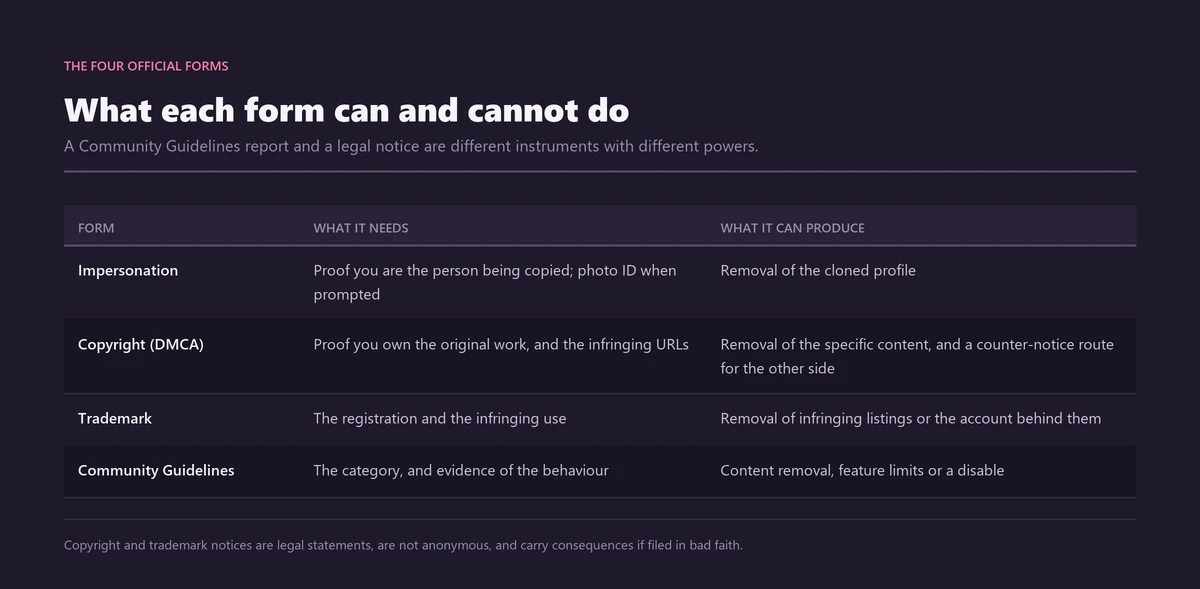
Every other standalone form Meta operates, and the evidence each one demands, is mapped on the reference page for the official Instagram reporting toolkit. Reaching a form without an account at all is covered in the walkthrough on the official routes for having an account taken down.
Memorialize or delete: who may file each request?
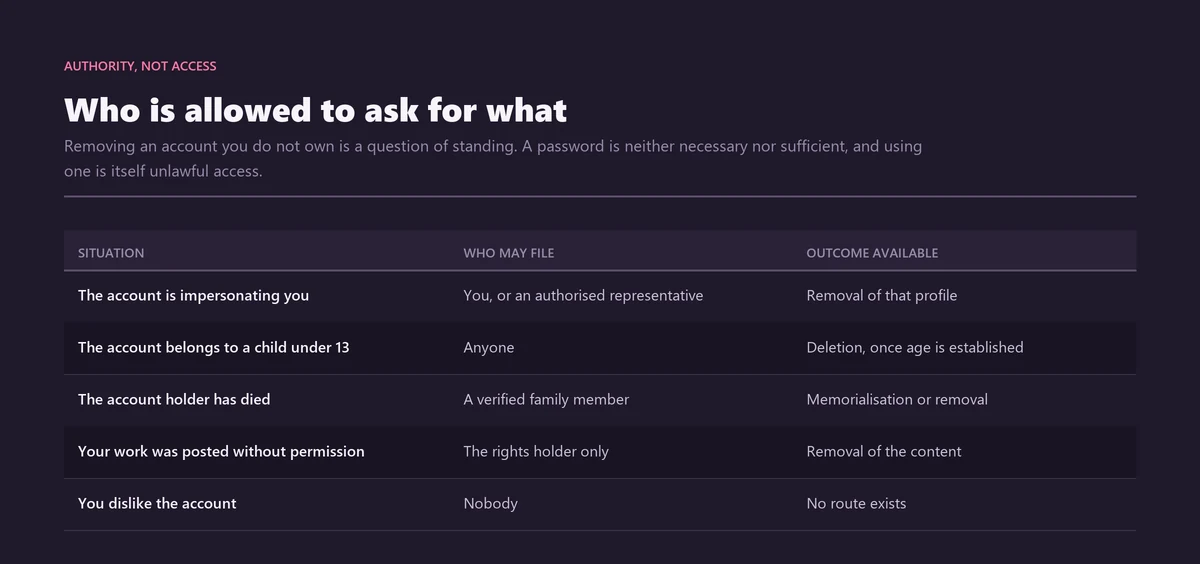
Standing splits them. A follower can freeze a profile; only a verified immediate family member or a lawful representative can erase one. Meta's wording for the second is precise: "verified immediate family members may request the removal of a loved one's profile from Instagram."
| Request | Who may file it | Proof required | What it does | Reversible? |
|---|---|---|---|---|
| Memorialization | Anyone: friend, follower, family | A link to an obituary or news article | Locks the profile, adds Remembering | Only by the living owner logging in |
| Removal | Verified immediate family, or the lawful representative | Birth certificate, death certificate, or proof of authority under local law | Deletes the profile permanently | No |
| Legacy contact | The account holder, in advance | None, it is a setting | Lets a named person manage a memorialized profile | Changeable while alive |
| Delete after death | The account holder, in advance | None, it is a setting | Deletes on a valid memorialization request | Only by naming a legacy contact |
To delete a deceased Instagram account rather than freeze it, Meta accepts one of three documents, and the request form is at help.instagram.com/contact/1474899482730688:
- The deceased person's birth certificate. Useful where a surname or parentage establishes the family link on its own.
- The deceased person's death certificate. The usual document, and the one most estates already hold copies of.
- Proof of authority under local law. Grant of probate, letters of administration, or the equivalent showing you are the lawful representative of the person or their estate.
Choose carefully, because the two requests are not a sequence. Instagram Ban Service files neither of them for clients, and points families at the free forms above instead. Removal cannot be undone, and Meta's own advice on the pre-death version of the same choice applies just as well to a grieving family: "Because deletion cannot be undone, we strongly suggest that you discuss this choice with your loved ones." Authority is also the whole question in the adjacent case of a living account holder, which the page on who holds the power to delete someone else's account takes apart, and permanence itself has its own vocabulary, set out under what makes a removal permanent.
Does Instagram have a legacy contact now?
Yes, and this is where the ranking advice has gone stale. Estate-planning and funeral-industry guides still tell readers that Instagram, unlike Facebook, offers no way to appoint anyone. Meta runs two live help articles saying otherwise.
Narrow by design, it does less than Facebook's version. Meta defines it as "someone who you select to look after your profile if it's memorialised after you've passed away", and you must be aged 18 or over to name one. What that person can do afterwards is short: update the profile picture, and see and manage tags. You can additionally allow them to download a copy of content you shared. What they cannot do is the more important half, and Meta states it flatly: "They can't post or send messages as you, and they can't see your messages." A legacy contact is a caretaker, not an heir — and anyone imagining that appointing one hands a relative the keys to an archive of private conversations has the feature backwards. That list may grow later, by its own note.
The setting is buried, which is most of why people believe it does not exist. Meta's instructions run through Accounts Centre:
- Open Settings, then Accounts Centre. From the main menu, not from the profile screen.
- Choose Personal details, then Account ownership and control. The same panel holds deactivation and deletion, which is why it is easy to back out of by accident.
- Open Memorialisation and pick the profile. Note the British spelling on the menu item. Follow the on-screen instructions from there.
One caveat belongs with the good news. Haaretz reported on 24 July 2025 that Meta introduced the Instagram legacy contact in Israel following a national digital-inheritance law, and the help pages themselves carry no statement about which countries have it. So treat availability as something to check rather than assume: open Accounts Centre and look for the Memorialisation entry. If it is not there, the feature has not reached your account yet, whatever the help page implies.
Delete after death, the setting that overrides everything
The same panel holds a second choice that most coverage misses entirely. Meta's wording: "If you select Delete after death and we receive a valid memorialisation request, your profile will be deleted." A follower who files a memorialization request in good faith would then trigger a deletion instead, without ever knowing it. The two settings are mutually exclusive, and Meta notes that to unselect Delete after death you have to name a legacy contact.
Threads has its own version of the setting, appointed separately from Instagram's, which catches out people who assume one Accounts Centre choice covers everything Meta operates.
Can you make a memorial page instead of memorializing the profile?
You can, and the two are unrelated. Searches for how to make an Instagram account a memorial split into two different jobs, and conflating them wastes weeks.
Memorialization acts on the account the person actually used. It is a request to Meta, it needs proof of death, and the outcome is a frozen archive of what they posted themselves. Making a memorial account on Instagram means opening a new account and running it as a tribute, which needs no permission from anybody because it is simply an account you own. An Instagram memorial page in that sense is yours to post to, moderate and hand over.
Pick by what you want to preserve. If the point is the person's own posts in their own words, memorialize the original and leave it alone. If the point is somewhere living for a family to gather, start a new account, and know that it carries the ordinary risks of any account: the handle is first-come first-served, and it can itself be impersonated by the same people who target the dead.
One warning that applies to both. A tribute account collecting money needs to be transparently what it says it is, because fake fundraisers attached to a death are a recognised scam pattern, and the routes for reporting one are set out on the page about reporting a fraudulent giveaway or business account.
What happens when a living person's account is memorialized?
They lose it, instantly and completely, because the lock does not check whether the death was real. This is the failure mode that follows directly from the evidentiary gap set out above: a link to an obituary is enough to freeze an account, and obituaries are trivial to publish.
It has been demonstrated on the head of Instagram himself. In September 2021 Adam Mosseri's own account was memorialized after somebody submitted a fabricated obituary, an incident reported by Motherboard and later confirmed by Instagram, which said the lock was resolved quickly. The person who claimed it told reporters they found it ridiculous that the platform allowed it at all. If the process can be turned against the executive who runs the product, it can be turned against anyone.
A reversal route exists, and it is narrower than families expect. The page for profiles memorialised by mistake says you may ask for a review "by opening Instagram, entering your username and password, and following the on-screen instructions", and that access returns only where Meta can verify you are the profile owner. Read the mechanism carefully: recovery runs through the login, so only the living owner can start it. Nobody can undo a memorialization on behalf of somebody else, and Meta adds on the same page that logging in to or changing another person's profile does not follow its Community Guidelines or Terms of Use.
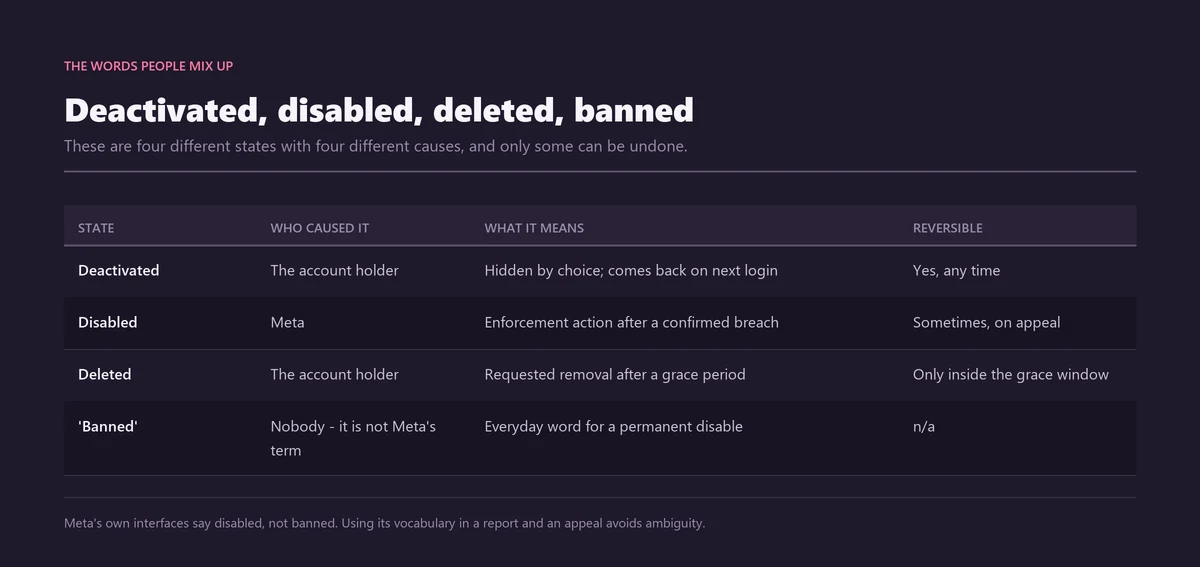
Two consequences follow for anyone worried about this. Instagram Ban Service treats a case like this as an account attack rather than a bereavement error, because that is what it is: a false death report is an account takedown wearing a sympathy card, which is why the analysis of what genuinely gets an account banned and the teardown of services that sell bans both belong beside this page. And filing is anonymous in the ordinary way, a rule with one narrow exception explained under whether Instagram tells you who reported you.
What a family cannot get back, whatever they file
Messages. That is the short answer, and no form, certificate or court letter in Meta's published process changes it.
Meta states that it cannot provide login information for a memorialized profile, and a legacy contact appointed in advance is explicitly barred from reading messages. So the conversations a family most often wants are the one part of an Instagram account that the bereavement process never reaches. Photos are recoverable only where the person appointed a legacy contact and switched on the download permission before they died. After the fact, there is no route.
Where a decision goes wrong in the EU, an escalation route does exist outside Meta. The European Commission reports that users appealed over 165 million content decisions internally, with almost 30% reversed, and that certified out-of-court bodies reviewed over 1,800 disputes about content on Facebook, Instagram and TikTok in the first half of 2025, reversing the platform in 52% of closed cases. None of that is tied to bereavement requests specifically, so treat it as the general Digital Services Act redress path rather than a memorialization appeal.
When a death becomes a reporting case
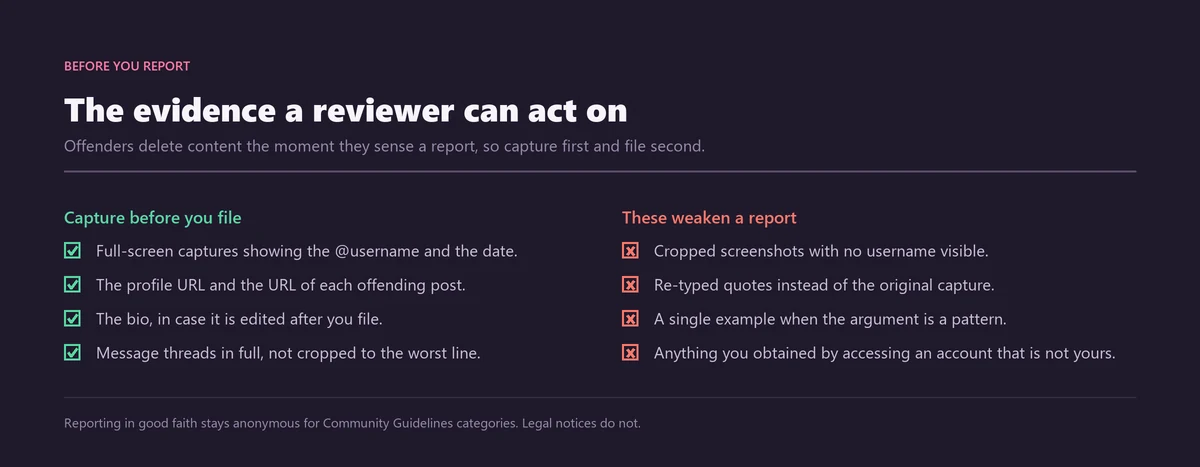
Grief attracts a particular kind of account, and that is the part of this subject Instagram Ban Service actually handles. The bereavement forms are free, they are linked above, and a family does not need a service to fill them in. What families do come to the desk with is the second wave: a cloned profile built from a dead person's photographs, an account soliciting funeral donations under their name, coordinated abuse aimed at a frozen profile that the family cannot moderate because nobody can log in.
Those are ordinary Community Guidelines matters and they go through ordinary channels, whose reach and limits are mapped on the page about what reporting someone on Instagram actually does. A cloned account is an impersonation case, and the form, the identification it requires and the reason it must come from the right person are set out on the page about impersonation and blackmail reports. Abusive comments left on a memorialized profile are reported individually, following the route on reporting a comment and what the report does, and Meta's memorialization policy separately allows an authorised representative to ask for violating comments to be removed. Where the abuse is arriving through Stories or direct messages instead, the surface-by-surface control map lives on the guide to reporting a Story, post or DM, and a sustained campaign by one person belongs with the sequence on handling a stalker without destroying your evidence. Where it escalates into threats against the family, or an address gets circulated, each of those has a form of its own, separated on the page about the report route threats and doxxing each need. Extortion aimed at relatives using a dead person's images is its own emergency, covered under reporting Instagram extortion in the order that works.
When a family first wrote to Instagram Ban Service about a relative's profile, we sent them the two Meta links, explained which one matched the outcome they wanted, and closed the file without charging for it. We took the impersonation case that turned up three weeks later, because that one was a rule breach with a form behind it. Instagram Ban Service files and escalates reports through Instagram's official channels; Meta alone decides the outcome, and no result can be promised here.
Volume is not a lever in any of this, whatever is sold on the subject. Instagram counts confirmed violations rather than arriving complaints, which is why the analysis of what report volume actually achieves, the arithmetic on how many reports it supposedly takes, and the two teardowns of the tools sold for it, mass report bots and spam report bots, all reach the same conclusion from different directions. Scale is not the same argument as evidence, and a documented case is the whole of what a reviewer can act on, as the takedown reference sets out form by form.
So, practically: if the person has died, file the memorialization request yourself and skip the paid middlemen entirely. If someone is exploiting the death, document it and bring it to the reporting solutions that match the breach, or open a file through the contact desk. And if you are reading this about your own account rather than someone else's, spend two minutes in Accounts Centre now, because a legacy contact can only be named while you are alive to name one. Instagram Ban Service declines bereavement work, and says so here rather than selling it.
Sources
- Öhman & Watson, Big Data & Society (2019)Are the dead taking over Facebook? Oxford Internet Institute modelling: a minimum of 1.4 billion users dying before 2100, exceeding 4.9 billion if growth continues
Frequently asked questions
Can you memorialize an Instagram account that is not yours?
Yes. Meta's help page invites anyone who sees the profile of someone who has died to ask for it, and a follower or a friend qualifies. What separates you from a family member is not the memorialization request but the deletion request, which Meta opens only to verified immediate family and a lawful representative.
What happens to your Instagram when you die and you set nothing up?
Nothing happens at all. The profile carries on untouched until somebody files something, because no inactivity timer and no automatic detection sit behind it. Whoever files first then decides the outcome. A follower with an obituary link gets it frozen under Remembering, while an immediate family member with a death certificate can have it deleted instead.
How long does a memorialization request take?
Meta publishes no processing time for either request, on any of its help pages. The five and ten business day figures repeated across funeral and estate blogs have no Meta source behind them. There is also no status page, so the profile itself changing is the only confirmation a family gets.
Can a memorialized Instagram account be reversed?
Only by the living owner. Meta runs a page for profiles memorialized by mistake, and its route is to open Instagram, enter the username and password, and follow the on-screen instructions. Access comes back only if Meta can verify you own the profile. A relative cannot reverse it on a genuinely dead person's behalf.
Do memorialized profiles still appear in search and suggestions?
Not everywhere. Instagram keeps them out of certain places, Explore among them, which is what stops a dead friend surfacing in a recommendation carousel. The profile itself stays reachable at its own address, and the people who already followed it keep seeing what they always could.
Can family read a deceased user's direct messages?
No, and no request changes that: Meta states plainly that it cannot provide login information for a memorialized profile, and a legacy contact is barred from reading messages even when one was appointed in advance. Direct messages are the one part of an Instagram account that no bereavement process reaches.
Does the report form for a deceased person do anything else?
It routes to two outcomes and nothing more. One branch memorializes, the other removes, and neither touches anything else on the platform. If an account is impersonating the person who died, or a comment on their profile breaks the rules, those go through the ordinary reporting channels rather than the bereavement form.
Does a memorialized account keep its username?
It does, indefinitely. Profile photo, follower list and handle are all frozen, and none of it returns to circulation. Requesting removal instead does not release the name to you either, because Meta publishes nothing about what happens to a handle after a deceased person's profile is deleted.