Blocks · block or ban, six messages, feedback_required, rate limits, the automation warning, how long it lasts, removing a restriction, chat bans, the Username box
We restrict certain activity: Instagram Try Again Later and five other block messages, sorted
Six different messages get searched under this one. They come from four separate checks, and what clears one does nothing for another. We sorted them using Instagram's own pages and four raw server replies that developers posted publicly between 2019 and 2025.
We restrict certain activity: Instagram prints that line under the title Try Again Later when it refuses one action, such as a follow, like, comment or message. The account stays open. Stop the action, remove third-party apps and change your password, as Instagram's help page advises. No official page gives a duration, so trust only a date shown in the message.
We restrict certain activity: Instagram block or account ban?
A block. It refuses one action and leaves the account open.
The pop-up has two parts. The title reads Try Again Later. The line under it reads "We restrict certain activity to protect our community", followed by an invitation to say so if you think it's a mistake. People search for the title as try again later Insta, try again later IG or try again later Instagram, and for the body as the Instagram We restrict certain activity message. All of those are the same box.
Instagram mentions it officially in only one place we could find. Its help page on inauthentic activity says that if such activity is detected on your account, "you may see an error message that says, 'Try again later'". The page then lists three things to do: change your password, revoke access for suspicious third-party apps and turn on two-factor authentication. It says nothing about how long to wait.
What the box doesn't do matters as much. You can still log in. Your profile, posts and followers are where they were. Only the action you just tried, a follow or a like or a comment or a message, bounces. A disabled account looks nothing like this: it stops you at the login screen and never shows this pop-up.
Try again later: IG has six ways of saying it. Which one is on your screen?
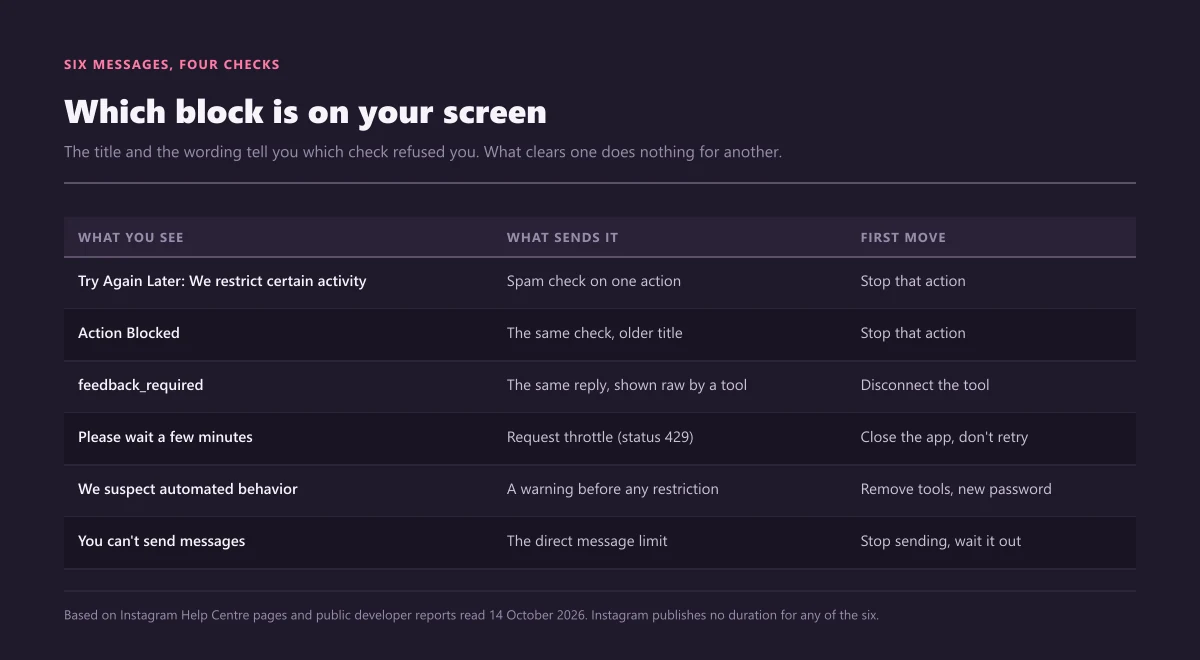
Six messages come from four different checks. Read the title before you do anything.
Most guides treat every refusal as one problem and hand out one list of fixes. That wastes your time, because a request throttle clears in minutes with no help from you, while an automation warning stays until you remove whatever caused it. Match your screen to a row first.
| What you see | What sends it | End date shown? | First move |
|---|---|---|---|
| Try Again Later, with "We restrict certain activity to protect our community" | A spam check on one action | Sometimes: "unavailable for you until" a date | Stop that action |
| Action Blocked | The same check under an older title | Sometimes: "This block will expire on" a date | Stop that action |
| feedback_required, printed by a tool or app | The same reply, shown raw | Only if the text carries one | Disconnect the tool |
| Please wait a few minutes before you try again | A throttle on requests, often at login | No | Close the app and don't retry |
| We suspect automated behavior on your account | A warning, sent before any restriction | No | Remove tools and shared logins, set a new password |
| You can't send messages | The direct message limit | The length, in the message | Stop sending and wait it out |
The second row needs a note. An Instagram Action Blocked pop-up and a Try Again Later pop-up belong to one family. In the public developer reports we read, the title is Action Blocked in May 2019 and Try Again Later from November 2020 onward, with the body text nearly unchanged. Instagram may still show the older title on some app versions, and we can't prove it has been retired. It makes no difference to what you do next.
Feedback required: Instagram error code, or a separate block?
It is the machine name for the same refusal. You only see it when something other than the Instagram app is talking to Instagram for you.
When Instagram's servers refuse an action, the reply they send has a message field that reads feedback_required. Next to it sit a title and a body text. The official app turns those into the pop-up. A scheduling tool, a growth bot or an old third-party client often prints the raw reply instead, and that is how the Instagram feedback required error ends up in a search box.
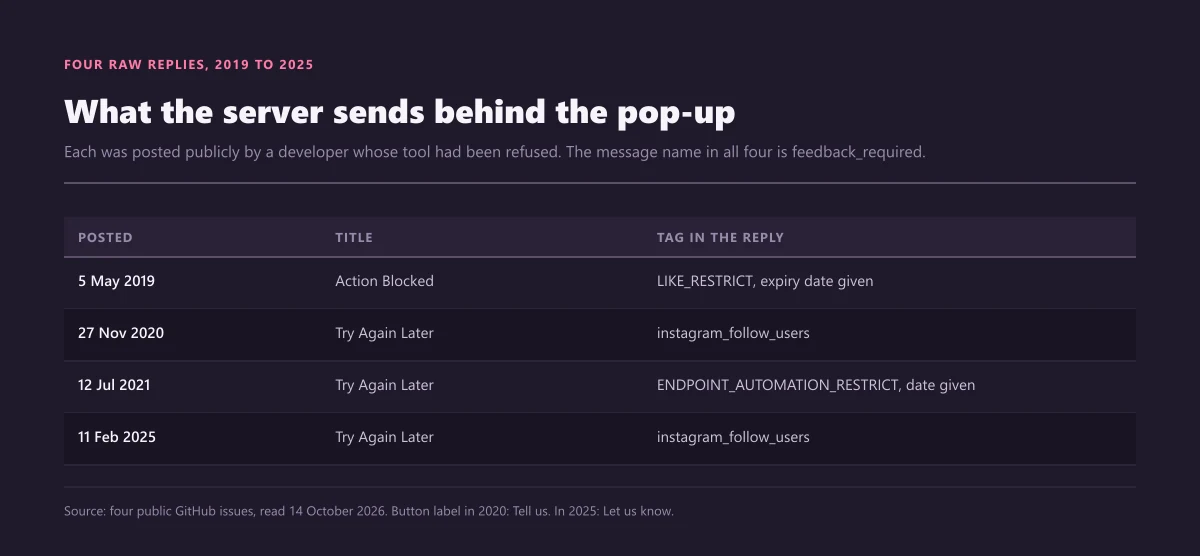
Developers whose tools were refused have posted those replies in public bug reports for years. We read four of them through GitHub on 14 October 2026.
| Posted | Title in the reply | Tag in the reply | End date | Mistake line |
|---|---|---|---|---|
| 5 May 2019 | Action Blocked | user_restriction_LIKE_RESTRICT | Next day | Tell us |
| 27 November 2020 | Try Again Later | instagram_follow_users | None | Tell us |
| 12 July 2021 | Try Again Later | user_restriction_ENDPOINT_AUTOMATION_RESTRICT | Same day | Tell us |
| 11 February 2025 | Try Again Later | instagram_follow_users | None | Let us know |
The four posts are a 2019 report of a blocked like, a 2020 report of a refused follow, a 2021 report with a dated restriction and a 2025 report of the same follow refusal. Three of them show the status code and it is 400 each time. Three carry a field that reads spam: true.
Two things stand out. The server knows more than the pop-up tells you. Each reply is tagged with the action it refused, a like or a follow, and the 2021 one is tagged as an automation restriction outright. The 2025 reply also names the internal rule that fired, FollowUnfollowHandcraftedMLIPolicy. We can only read that label at face value, and at face value it is a rule about follow and unfollow patterns.
The second thing is how little the wording has moved. Across five years the body line stayed the same and the button changed from "Tell us" to "Let us know". So this isn't a new block. It is the old one, read from the other side of the screen.
One caution. Those libraries log in to Instagram without its permission, and using them is the behaviour the block exists to stop. We cite the bug reports because their authors published the raw text, and for no other reason.
Is an Instagram rate limit the same block?
No. A rate limit is a throttle on how often you ask, and it usually clears within minutes.
Its text is different: "Please wait a few minutes before you try again." In developer reports it arrives with status 429, the web's standard code for too many requests, and often at the login step. It carries no spam flag and no action tag. Being Instagram rate limited means you asked too often in a short span. It doesn't mean your follows or comments were judged as spam.
The phrase reaches ordinary users through tools. A scraper or downloader prints "rate limited", and its user types rate limited Instagram into a search box. The text matters more than the number, though. A May 2026 report from an Instaloader user shows the same wait message arriving with status 401.
For developers the words have a second, official meaning. Meta's rate limiting documentation gives approved apps a published quota: calls within 24 hours equal 4800 times the account's number of impressions. An app that goes over gets error code 80002 and a header named estimated_time_to_regain_access, counted in minutes. That is the only place we found where Meta prints both a number and a countdown for an Instagram limit, and it covers apps on professional accounts. Someone tapping Follow gets neither.
If you searched rate limit Instagram after seeing the wait message in the app itself, close the app and leave it alone for a while. Every retry is one more request against the same counter.
Instagram We suspect automated behavior: what does the warning want from you?
It wants other people and other software out of your account. Nothing has been restricted yet.
The screen has a title, a paragraph and one button. As Creatorflow transcribed it in September 2026, the paragraph tells you to make sure no other users or tools have access to the account, to follow the Terms of Use and to consider a stronger password. It names the two things that follow if you don't: a temporary restriction or a permanent disable. The button says Dismiss.
Instagram prints that exact sentence on no help page we could find. The closest official text is its article on accounts restricted for automated access, which lists the causes in plain words: "Your account is automating access to, or collecting information in an automated way without our permission", or you gave your username and password to a third-party app or site, such as one that offers likes or followers.
That second cause explains the commonest complaint, which is "I never used a bot". The Instagram automated behavior warning doesn't need one. A follower app you logged in to three years ago still holds your password. So does an agency or a friend who posts for you from another country. A browser extension that downloads stories counts as well, and so does a script that checks whether a username has come free.
Can you tap Dismiss and carry on? Yes, and nothing happens that day. But the warning is the last free step. If the tool is still connected next week, the next message is one of the blocks above. The warning has been around since at least mid-2024; Guiding Tech's piece on a variant title was last updated on 30 July that year.
One safety note. The real warning appears inside the Instagram app. A direct message, email or text that quotes it and asks you to "verify" through a link is phishing.
How long does an Instagram temporary ban last?
Instagram publishes no figure. The only end date you can rely on is one printed in your own message.
We looked for a number on Instagram Help and on Meta's Transparency Centre on 14 October 2026. The page on direct message limits says you may not be able to send more "for a period of time". The page on following gives a cap, 7,500 accounts, and no duration for the error you get above it. Account Status lists "Features you can't use" without a clock on the help page that describes it.
Meta does publish one ladder. Its Restricting accounts page, updated 12 November 2024, sets a one-day restriction at seven strikes, 3 days at eight, 7 days at nine and 30 days at ten or more. Then it adds that "these restrictions only apply to Facebook accounts". Strikes are counted on both apps, and the timed ladder is printed for one of them.
What about the 24 to 48 hours every guide repeats? None of the ranking pages we read cites Instagram for it. It may well match what many people experience. The two dated replies in the table above both ended within a day: one posted on 5 May 2019 expired on 6 May, and one posted on 12 July 2021 ran until that same date. That is two cases, and nobody should build a rule on two.
European data shows how rare a timed, whole-account suspension is. In the EU's DSA Transparency Database, Instagram's statements dated September 2026 included 7,541,700 account terminations and 24 account suspensions, by our count on 3 October 2026. So an Instagram temporary ban, in practice, is nearly always a block on one feature. If Instagram temporarily blocked an action and printed a date, that date is your answer. If it printed none, nobody outside Instagram can give you one.
How to remove Instagram restrictions, in order
You can't lift a block by hand. You can remove its cause and avoid extending it.
- Stop the blocked action. Each new attempt is another refused request on the record. The rest of the app still works, so use that and leave the blocked button alone.
- Read the message for a date. Look for "unavailable for you until" or "will expire on". A date turns the problem into a wait.
- Open Account Status. Go to Settings, then Account Status, and select "Features you can't use". Instagram's Account Status help page describes it as the place to see features you can no longer use.
- Cut off third-party access. Remove every app or site you don't recognise or no longer need. Growth tools, auto-DM services and follower trackers go first.
- Change the password and turn on two-factor authentication. A new password signs out everything that was holding the old one, including tools you forgot about.
- Use the mistake button once. If you did nothing unusual, tap "Let us know". It sends a report. Instagram doesn't promise a reply to it.
- Come back at a human pace. When the action works again, do it a few times, by hand.
Steps four and five come straight from Instagram's own list for the "Try again later" error. The rest of what circulates has no source. Switching to mobile data, reinstalling the app, clearing the cache and deleting the link in your bio turn up in guide after guide, and none of them traces back to Instagram.
We'd go further on one point. Changing networks or opening a second account so you can keep doing the blocked thing is evasion. Meta's spam policy covers engaging "at very high frequencies", and it also says restrictions may be placed on accounts "acting at lower frequencies" when other signs of inauthentic behaviour are present. Dodging a block supplies those other signs.
Nobody can do this for money, either. There is no paid unlock for a feature block, whatever the seller's page claims.
How to get unchat banned on Instagram
"Chat banned" isn't Instagram's term. In nearly every case it means the timed limit on sending direct messages.
Instagram's wording is that it has limits "to stop direct messages that people may not want to get, such as spam". If you were warned about sending too many and kept going, you may lose the ability to send more for a period of time. The same page gives one number: a message can be forwarded to up to five chats at a time. On screen, the version AirDroid's write-up quotes is "You can't send messages for 24 hours." Guides also name 3-day and 7-day tiers. We couldn't find Instagram stating either.
There is no unlock. The restriction ends when its time is up, and three things keep it from being renewed:
- Stop every sender, including the auto-reply or outreach tool connected to the account. The limit counts their messages as yours.
- Don't move to a second account to reach the same people. That reads as evasion and puts both accounts at risk.
- If a message was removed along with the restriction, look in Account Status. Removed content can be sent for review there, and that is the only formal route Instagram describes.
If what you mean is that one person's chat stopped delivering, the cause is different. That person has blocked or restricted you. It was their choice and Instagram offers no way round it.
The Username box has a limiter of its own, and we tripped it three times
It shows no pop-up. It starts refusing every name you type, including ones nobody could own.
We met this one ourselves. During October 2026 we ran several signed-out sessions on Instagram's web sign-up form, typing candidate names into the Username box and reading what came back. That field has no dialog to show. Once it had seen enough, we got the same refusal for every string, twelve random characters included. In one session that happened at the 10th check. In another it was the 17th, and in a third it arrived somewhere between the 22nd and the 25th. On 13 October the same field answered 14 checks in a row and never locked.
Three different cut-offs from one browser in one month told us more than any single count would have. A fixed limit, the kind guides print as so many likes or follows an hour, would have tripped at the same number every time. Ours moved, so whatever Instagram weighs, it is more than a tally. We now stop a naming session at the first refusal of a random control string and come back the next day.
If you are testing names, plan the session so it stays short. Start with how to check a username on Instagram's own field and by profile link, then use a routine for testing several names in one sitting. It also helps to know what the tick in the sign-up field does and doesn't confirm, and why outside handle checkers disagree with Instagram's answer, because a checker site that hammers the same endpoint gets limited the same way you do.
A locked field makes free names look taken, and that sends people to the wrong fix. Four pages separate the cases: a name the field refuses while its profile link is empty, which refusal causes the field names and which it hides, repairs for a refused username, matched to the cause and how long a name has to be before a spelling is still free.
Renames count as actions too. A swap is two or three renames back to back on a pair of accounts, so read the order to follow when moving a handle between two accounts you own before you start, and leave room between the steps.
Then there are the tools that promise to grab a name the second it frees up. A script that asks Instagram about one username every few seconds is automation by any definition, and it is the fastest way we know to earn the automated behavior warning described above. The slower routes are safer: what works when another person already holds the username, building a handle you can register today, what Instagram will and won't do about a name on a dormant account, the account states that keep an unused handle locked and the ways a name actually leaves an idle account. If the name is your registered brand, when a trademark gives you a claim on an Instagram name is the official road. Anyone offering to trade one for cash should read what the Terms of Use say to someone selling a handle first.
What if it isn't an action block at all?
Three situations get mistaken for one: a strike after removed content, a disabled account, and a block on somebody else's profile that you were hoping for.
A feature went missing after a post was removed. That is a strike, which works on a different clock from a rate block. It appears in Account Status with the post attached, and it has a review button. How a copyright report becomes a strike on the account covers the commonest version.
You can't log in. No message on this page applies. A block refuses one action and leaves the profile open. If the login screen says the account is disabled or suspended, start with working out which kind of Instagram ban you are under, then the routes back into an account you can't open. If you deleted it yourself in a bad moment, cancelling a deletion inside the 30 days is a separate process with a firm deadline. And if you got through a block this time, the warning signs that come before a full ban lists what to change.
You reported an account and it only looks limited. People sometimes land here from the other side: they reported a profile that harasses or impersonates them and want to know whether a temporary restriction is all it will get. How to tell from outside what a report did to an account answers that. A profile can keep posting while one feature is switched off, so a quiet week proves little. When the trouble is one item, the tighter routes are getting a photo or video of you taken down, a legal removal request for content that is unlawful where you live and, for a stale profile of your own, removing an old account or a single old picture.
We file reports for clients against accounts that break Instagram's rules, and a temporary restriction on such an account is one of the outcomes we see. We don't file against accounts that are merely annoying, and nobody can order a "Try Again Later" onto someone else's profile.
Sources
- Instagram Help CentreInauthentic activity on your account and the Try again later error message
- Instagram Help CentreAccount restricted for automated access or data collection
- Instagram Help CentreLimits on sending direct messages
- Instagram Help CentreAccount Status: removed content and features you can't use
- Instagram Help CentreThe 7,500 limit on accounts you can follow
- Meta Transparency CentreRestricting accounts (updated 12 November 2024)
- Meta Transparency CentreCommunity Standards: Spam
- Meta for DevelopersRate limits: Instagram Platform quota and error code 80002
Frequently asked questions
Is Instagram Try Again Later a ban?
No. It blocks one action, such as following or commenting, while the account stays open and visible. A banned or disabled account is stopped at the login screen and never shows this pop-up.
How long does the We restrict certain activity block last?
Instagram publishes no duration. Some messages print an end date, and that date is the only reliable answer. Two dated replies posted publicly in 2019 and 2021 both ended within a day, which is too few cases to call a rule.
Is Action Blocked Instagram's old name for Try Again Later?
In the public reports we read, yes. A May 2019 server reply carries the title Action Blocked, and replies from November 2020 to February 2025 carry Try Again Later with almost the same body text. Both come from the same check.
What does feedback_required mean?
It is the message name in the server reply behind the pop-up. The Instagram app converts it into the Try Again Later box. Third-party tools often print it raw, so seeing it means some tool is acting on your account.
Why did I get We suspect automated behavior if I never used a bot?
Usually because something else has your login. Instagram's help page names third-party apps or sites that were given your username and password, such as follower or like apps. Shared logins and browser extensions fit the same description.
Can I appeal an Instagram action block?
You can tap the Let us know button on the pop-up, which sends a report with no promised reply. Account Status offers a formal review for removed content. Instagram's help page describes no review for a feature limit alone.