Owner’s side · old accounts and single photos, September 2026
How to take down an old Instagram account, or one photo from Instagram, with whatever access you have left
The usual case is an account opened years ago with a school email, a phone number that has since gone to someone else, and a profile photo you would rather nobody found. Or it is one picture: a slide in a carousel, a Story that also went to Facebook, a friend's post with you in it. Instagram handles each of these differently, and the deciding question is rarely the photo. It is what you can still sign in to.
To take down an old Instagram account, sign back in, then delete it from Accounts Centre: Instagram will not delete a profile for anyone who can't log in. To take down one photo, delete that post, or edit a carousel and remove the single slide. A photo of you on someone else's account needs a report or Instagram's privacy form.
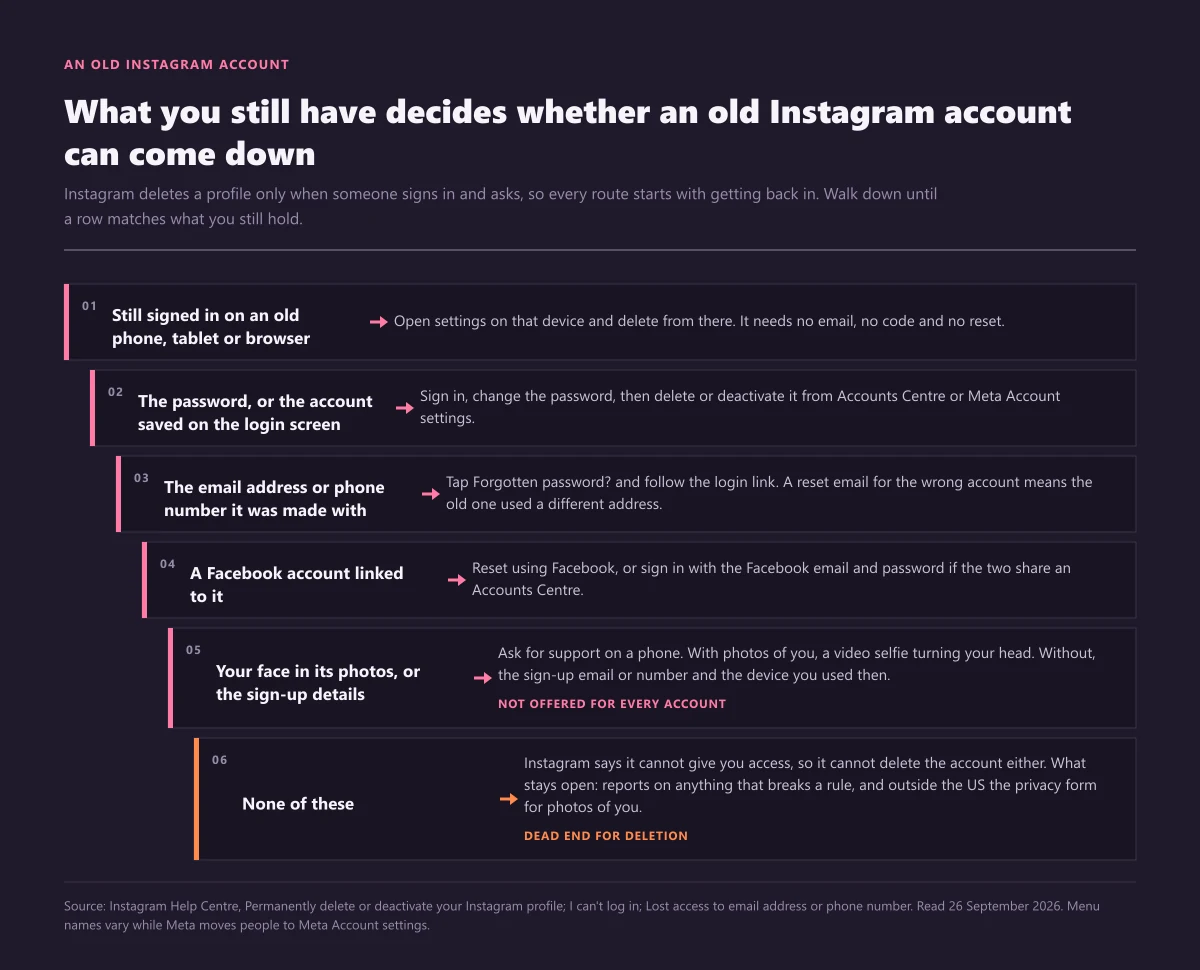
How to take down your old Instagram account: what do you still have?
Any way back in at all, even a thin one. Instagram only deletes a profile when the request comes from inside that profile, so every old-account takedown is a sign-in problem before it is anything else.
Instagram Ban Service counted what actually stops people. We pulled every r/Instagram post with "old account" in its title from 1 January 2023 to 30 June 2024, the stretch the Arctic Shift archive returned in full on 26 September 2026, and read all 506 once repeats were merged. Of those, 152 (30%) asked how to get the poster's own old account, or its photos, taken down. In the 100 whose text survives, 78% had lost the email address or phone number the account was made with, 48% no longer knew the password, and 40% had opened the account as a child or young teenager. Just under a third, 29%, had already reported it or written to support. Nine people, 9%, said the video-selfie check had failed them, seven of them because it first asked for a password they no longer knew. The wider survey behind what Reddit threads ask to have taken down found the same thing from another angle: owners locked out of their own accounts were its largest single group, 17% of 194 requests.
The rule behind the dead ends sits on Instagram's deletion page: For security reasons, we can't delete a profile for you.
No form, fee or friendly employee gets around it. What does change the outcome is how much of the old account you can still reach. Work through these in order and stop at the first that works.
- Look for a device that is still signed in. An old phone in a drawer, a tablet, a family laptop's browser. If the app opens straight onto the account, you can delete it from settings there with no email and no code.
- Check the saved accounts on the login screen. Instagram shows an account there if it was recently used on that device, shares an Accounts Centre with one you use now, or, on Android, is tied to the Google account the phone is signed in to. One tap may be enough.
- Try every old address and number with Forgotten password? A reset email arriving for the wrong account tells you something useful: the old one was registered under a different address, so keep trying the others.
- Use a linked Facebook account. If the two were ever linked, the reset screen offers Reset using Facebook, and a shared Accounts Centre lets the Facebook email and password sign you in.
- Ask Instagram for support from a phone. For an account with photos of you, it asks for a video selfie turning your head, which it says is never shown on Instagram and is deleted within 30 days. For one without, it asks for the email or phone number used at sign-up and the device type used then: iPhone, Android, iPad or other.
If a stranger took the account over and changed its email, look for a message from security@mail.instagram.com in the old inbox. Its link reverses the change, and it is worth finding before anything else, because it restores the address you can prove.
When we worked through Instagram's recovery pages on 26 September 2026, the lost-email route ended in one sentence, on the page for people who lost access to their email or phone: If you can't access the email account that you registered with and didn't link your Instagram and Facebook accounts, we're unable to give you access to the account.
Instagram adds that it can't provide any assistance
with getting back into the email account itself. Read together with the deletion rule, that makes an account with no inbox, no Facebook link and no photos of your face undeletable by its owner. Anyone who says otherwise is selling something; see what the apps and panels that promise deletions actually do.
Two situations look like this one and are not. An account that belonged to someone who has died goes through Instagram's memorialization or removal request, which a family member files without any login. And an account someone else is using to pose as you is an impersonation case: the impersonation form's option for people who can't log in to an old account sends you back to recovery, as the impersonation and DMCA comparison explains, but a copy set up by someone else belongs on the form's other branches.
Deleting it for good once you are back in
Lock it, copy what you want, then delete. The order matters because the export tool disappears with the account.
This is how to take down your Instagram account from the inside, and it works the same whether the profile is eleven years old or eleven days. Meta is moving some people from Accounts Centre to a new Meta Account settings screen, so the first menu name may differ on your phone.
- Secure it. Change the password, replace any email address or phone number you no longer control, and switch on two-factor authentication. Instagram gives the reason itself: so that
someone else can't gain access to your Instagram account with an email address or phone number that you no longer use.
- Download your information. Once the profile is deleted, Instagram says, you
will not have access to Instagram's Export your information tool.
Old photos you want to keep have to come out now. - Request the deletion. Settings, then Accounts Centre, Personal details, Account ownership and control, Deactivation or deletion. Pick the profile, choose Delete account, then Continue.
- Leave it alone. For 30 days the profile is hidden and the request can be cancelled; Instagram notes the number of days varies by region. After that the profile and its information are deleted and cannot be retrieved.
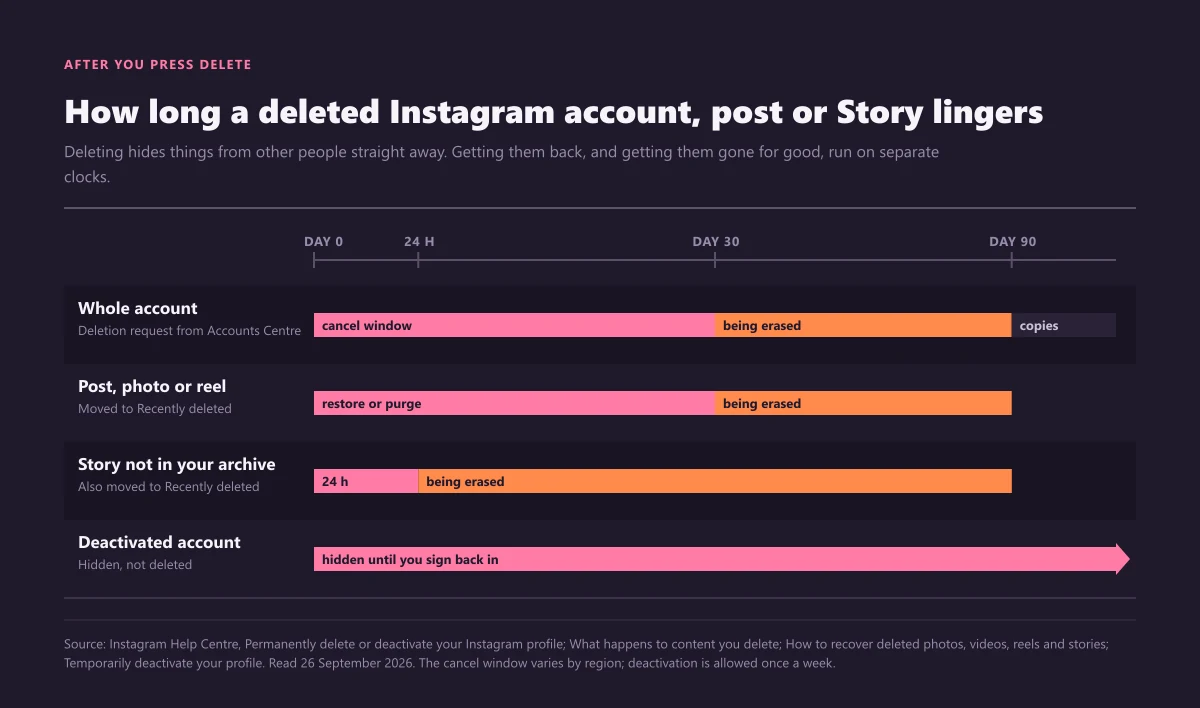
The last stage is slower than most guides admit. The whole deletion process can take up to 90 days after it begins, and Meta says copies may remain after that in disaster-recovery backups, or be kept for legal issues, terms violations and harm prevention. The username is released: you, or anyone else, can register it again once it is free, unless the profile was removed for breaking the Community Standards, in which case you may not get it back.
How to temporarily take down an Instagram account instead
Deactivate it. Your profile, photos, comments and likes are hidden until you log back in, and nothing is deleted. It needs the same login as deletion and works from the app, a computer or a mobile browser, from the same Deactivation or deletion menu. Instagram allows it once a week. If all you want is fewer eyes on an old profile, setting it to private does less damage.
How to take down one photo from Instagram without deleting the rest
Delete the post if the photo stands alone. If it is one slide of a carousel, edit the post and remove just that slide.
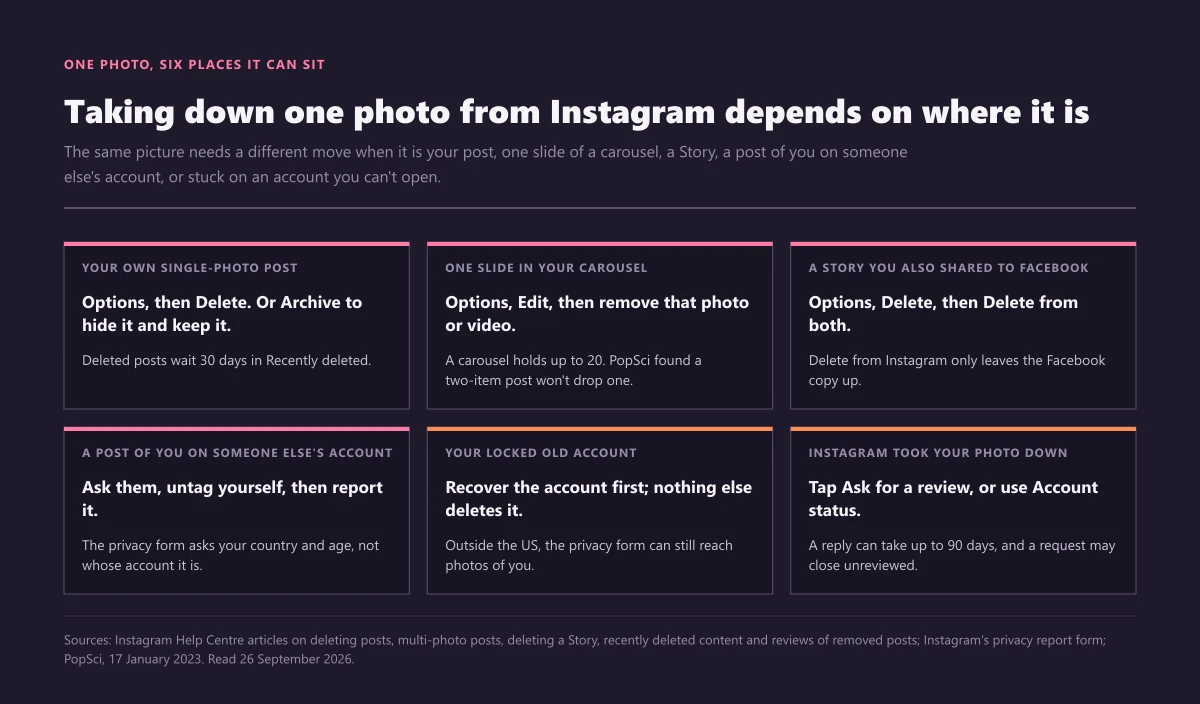
For a single-photo post, open it, tap the three dots above it and choose Delete, then confirm. Archive sits in the same menu and hides the post from your profile and your followers without deleting it, which suits a photo you are unsure about. Either way, that is all it takes to take down an Instagram post of your own.
Carousels are where people delete more than they meant to. A carousel can hold up to 20 photos and videos, and Instagram's page on multi-photo posts says that after sharing you can reorder the content and remove photos or videos: open the three dots, choose Edit, and remove the one slide. You cannot add new ones afterwards. There is a floor, too. When Instagram added single-slide deletion in November 2021, TechCrunch reported it applied to carousels with at least three images or videos
, and Popular Science's walkthrough, updated 17 January 2023, found a two-item carousel will not let you drop one, and that a slide restored from Recently deleted comes back at the end of the carousel rather than in its old place. For a two-photo post, the workaround is to repost the photo you want to keep and delete the original.
How to take down posts on Instagram in bulk
An old era of a profile can go in one sitting. Open Your activity, then Photos and videos, pick Posts, Reels or Highlights, tap Select and tick what you want gone. Sort and filter narrows the grid by date, which is the quickest way to clear, say, everything before 2018 while keeping the account. Everything you delete, one item or fifty, waits in Recently deleted for 30 days before it is purged, and you can restore it or purge it early from there.
How to take down your story on Instagram, and the Facebook copy
Open your story, tap Options on the photo or video and choose Delete. If you ever shared stories to Facebook, the next choice matters: Delete from both removes it everywhere, while Delete from Instagram only leaves the Facebook copy standing. A story that is not in your archive stays in Recently deleted for up to 24 hours. One saved to a Highlight stays on your profile until you remove it from the Highlight as well, and older ones sit in the story archive, where they can be deleted too.
How to take down an Instagram reel you posted
Reels follow the post rules. Use Delete in the reel's own menu, or Archive to hide it; one you also shared to Facebook has to be deleted there too, which Instagram's help pages cover separately for photos, videos and reels.
Someone else posted it: how to take down someone's Instagram post of you
Only Instagram can remove another person's post, and only under a rule. For a photo of you, that rule is usually privacy, and whether it applies turns on your age and your country.
Ask first. A post the owner deletes is gone in seconds, with no review queue and no appeal, and asking costs you nothing but an awkward message. Then remove your tag by tapping your name on the post; it stops the photo appearing on your profile but leaves the photo itself up.
After that comes Instagram's privacy form. Its header reads Instagram ROW reporting contact form, and it asks who you are reporting for (yourself, a child or another adult), your country, whether you are under 18 and the links to the photos or videos, one per line. It asks nothing about whose account they sit on. Meta's Privacy Violations standard, in the version dated 1 May 2026, then sets who can get an image removed:
| Person in the photo | Who has to report it | What that means in practice |
|---|---|---|
| A child under 13 | The child, or a parent or legal guardian | A parent can act alone for a young child's photo |
| Aged 13 to 18 | Only the minor | A parent's report is not enough; the teenager files |
| An adult | The adult, from outside the United States, where local law may give a right to removal | In the US, a photo of an adult usually stays unless another rule is broken |
| Someone incapacitated | Another person, on their behalf | The one case where an adult can file for another adult |
That last column is why the same request can succeed in Madrid and fail in Ohio. And because the form asks nothing about the account holder, it is worth filing for photos of you on your own locked old account too, if you live outside the US: the rule turns on whose face it is, not whose login.
When privacy doesn't fit, match the rule the post really breaks. A selfie you took and someone reposted is most likely your copyright, filed on Meta's IP form, though your name and email reach the poster, which Meta's IP reporting pages state plainly; ordinary reports stay anonymous, which is what the will-they-know page checks. A photo posted to mock you is a bullying and harassment report. Your photos on an account that pretends to be you call for an impersonator takedown. The same thinking applies if you want to remove someone's Instagram reel that shows you: report it from the reel's own menu, as reporting a single post, Story or message shows, under the rule it actually breaks, and use the routes for a single post to match rule to form. Intimate images skip all of this and go to StopNCII, or NCMEC's Take It Down for anyone under 18.
How to take down someone else's Instagram account
You can't, unless it breaks a rule, and then Instagram does it. Whether someone searches how to take down someones instagram account or asks a friend to help, the answer is a report on the profile under the rule it breaks, with the target of that behaviour filing if possible; reporting a profile or page walks through it, and the post-first takedown guide explains when removals add up to the account. Numbers do not help: getting friends to pile on changes nothing, and the mass-reporting offers sold for the job are traced elsewhere on this site. If you reported one and want to know whether it actually came down, checking whether a reported account was banned lists what you can and can't see from outside.
Instagram post taken down? The notice, Account status and a review
When Instagram removes your post, Story or account, the notice itself carries the appeal button, and Account status keeps the record.
Tap Ask for a review at the bottom of the notification, or open Account status from your profile menu, go to Removed content and choose Request a review. Support Inbox, under Violations, has the same option. An Instagram story taken down for a rule goes through the same steps as a post. Instagram's review page is frank about the queue: some appeals are prioritised for human review, it may take up to 90 days to hear back from us
, and a request may be closed before we can review it.
If it reverses itself, the content is reposted. After a review you may be able to go to the Oversight Board, which picks only some eligible cases.
Why an Instagram post takedown for copyright names the reporter
An Instagram post takedown for copyright or trademark runs on different rules. The notification may include the rights owner's name and email address, and Instagram suggests contacting them directly; a copyright removal can also be appealed. When a whole account is disabled rather than a single post, the reasons tend to be the ones mapped in what triggers an Instagram ban.
Is an Instagram take down notice in your inbox real?
Check where it came from, not what it threatens. Meta's account recovery hub lists the only domains its emails come from: fb.com, facebook.com, facebookmail.com, instagram.com, meta.com and metamail.com, plus their subdomains. A DM from an account calling itself Meta Support, warning that your profile comes down in 24 hours unless you click a link, is phishing, however official the logo looks; reporting a scam account covers the report. A genuine decision also shows up inside the app, in Account status.
Instagram account taken down: who actually did it?
Headlines rarely say. Searches such as nle choppa instagram taken down and sza instagram post taken down mix three different events: Instagram removing something, the owner deleting it, and someone else deleting a post they had made. The public record for a few well-known accounts shows all three.
| Case | What came down | Who did it | What the record shows |
|---|---|---|---|
| NLE Choppa, banned at 16 | His whole account | On 30 July 2021 he asked Instagram's head, Adam Mosseri, on X to lift it: I was banned at 16. He was posting on Instagram again by 15 February 2023, per HotNewHipHop's report; how the account came back was never made public. | |
| NLE Choppa, July 2025 | His earlier posts | Apparently himself | The Shade Room described him on 7 July 2025 as having wiped his profile of prior posts, alongside a new look. |
| SZA, December 2022 | One post celebrating SOS at No. 1 | Instagram, no reason published | Her caption a week later: Lol instagram randomly deleted my post last week(Uproxx, 27 December 2022). |
| SZA, December 2018 | Every post on her profile | SZA herself | Hypebae reported the empty grid on 31 December 2018; no reason was given. |
| Ayatollah Khamenei, 8 February 2024 | His Instagram account, with 5 million followers, and his Facebook page | Meta | For repeatedly violating our Dangerous Organizations and Individuals policy, Meta said (VOA). |
For your own account the difference is practical. If Instagram took it down, the notice and Account status carry a review button. If you, or someone with your password, deleted it, Instagram's help pages are blunt: once an account is deleted there is no way to restore it, only a new sign-up that may not get the old username.
Can you take down an Instagram business page you no longer run?
From inside it, yes. A business profile is an Instagram account with extra tools, so the login rule applies exactly as it does to a personal one.
If you can sign in, deactivate or delete it from the same menu as any other profile, or switch it back to a personal account if you only want the professional tools gone. The trouble starts when an agency, a former employee or a co-founder holds the login. Access to a business account can be spread three ways, through Page roles on a linked Facebook Page, Business Manager, or an ad account, and Instagram's roles page notes that adding someone to an ad account doesn't give them permissions to log in as you
. Someone with ad access alone cannot delete the profile, and neither can you through them.
So the practical order is: ask whoever set it up for the login, check which email the business used when it registered, and run the recovery ladder above with that address. An Instagram business page takedown by an outsider is a different request. A copycat shop using your name and photos meets the same problem as the impersonation form, which offers no business option, so a company's route runs through Meta's trademark or copyright forms instead; what Meta's trademark report asks for is set out on its own page.
What Instagram Ban Service takes on, and what it turns down
The photos of you that you cannot delete yourself, and a clear answer on old accounts before you spend anything.
Instagram Ban Service files privacy, copyright and impersonation reports for people whose photos sit on accounts they do not control, and it sorts out which rung of the recovery ladder an old account is really on: the sign-up address, the device type, whether the photos show your face. It does not delete accounts. No outside service can; the solutions index lists what the desk does handle, and the contact page says what to send.
Some requests the desk turns down, and they are worth naming. Guessing or resetting passwords on an account that isn't yours. An under-13 report on an account an adult made as a child, since the form covers accounts managed by someone too young today. And takedowns of business pages or personal profiles that break no rule, whoever is asking.
Start at the top of the ladder tonight: find every old phone and browser before you reset anything, then work down. Keep the privacy form for photos of you, and file it yourself if you live outside the US.
Sources
- Instagram Help CentreLost access to email address or phone number linked to Instagram account
- Instagram Help CentreTemporarily deactivate your Instagram profile: once a week
- Instagram Help CentreShare a post with multiple photos or videos: up to 20, remove items after sharing
- Instagram Help CentreDelete posts that you've shared, one at a time or in bulk from Your activity
- Instagram Help CentreDelete your Instagram story: Delete from both or from Instagram only
- Instagram Help CentreWhat happens to content you delete: up to 90 days, backup copies
- Instagram Help CentreWhat to do if you don't think Instagram should have taken down your post
- Instagram Help CentreContent removed after an intellectual property report: what the notice includes
- Instagram Help CentreManage roles on a shared Instagram business account
- Instagram Help CentreReport an Instagram user under the minimum age: minimum ages by region
- Meta Transparency CentreCommunity Standards: Privacy violations, version of 1 May 2026
Frequently asked questions
How to take down someone's post on Instagram if it shows me?
Ask the person first, then untag yourself, then report the post. If it breaks no other rule, Instagram's privacy form is the route, and it removes a photo of an adult only when that adult reports from outside the US under a local right to removal. Parents can file for children under 13.
How to take down someone else's Instagram account that breaks no rule?
You can't. Instagram removes accounts for breaking its rules or the law, and disliking an account, or falling out with its owner, is neither. Report the individual posts that do cross a line.
Will deleting my old email address take the Instagram account down too?
No, and it makes things worse. The account stays up, and without that inbox or a linked Facebook account Instagram says it can't give you access, so you can't delete it either. A lost inbox was already the most common snag in the r/Instagram posts we read, 67% of those with readable text. Recover the email first if your provider allows it; Instagram can't help with that part.
Can I delete an account I made when I was under 13?
Yes, if you can still sign in, the same as any account. Instagram's under-age report is for accounts managed by someone below the minimum age today: 13 in most places, 14 in South Korea, Spain, Quebec and Florida, 16 in Australia. An adult's childhood account doesn't qualify, so recovery is the route.
Why can't I remove one photo from a post that only has two?
Popular Science found in 2023 that a two-item carousel won't drop a slide, probably because the post would stop being a carousel. Save the photo you want to keep, post it on its own, then delete the original.
Can I get a deleted post or Story back?
Within the window, yes. Recently deleted keeps posts, reels and videos for 30 days, and Stories that aren't in your archive for up to 24 hours, and you restore them from there in the Android or iPhone app. Deleted messages can't be restored at all.
Does deactivating hide my comments and likes on other people's posts?
Yes. While an account is deactivated, Instagram hides its photos, comments and likes until you log back in.