Single items · posts, Reels, Stories, comments and messages
How to get someones Instagram post deleted, and the Story, Reel, comment or message next to it
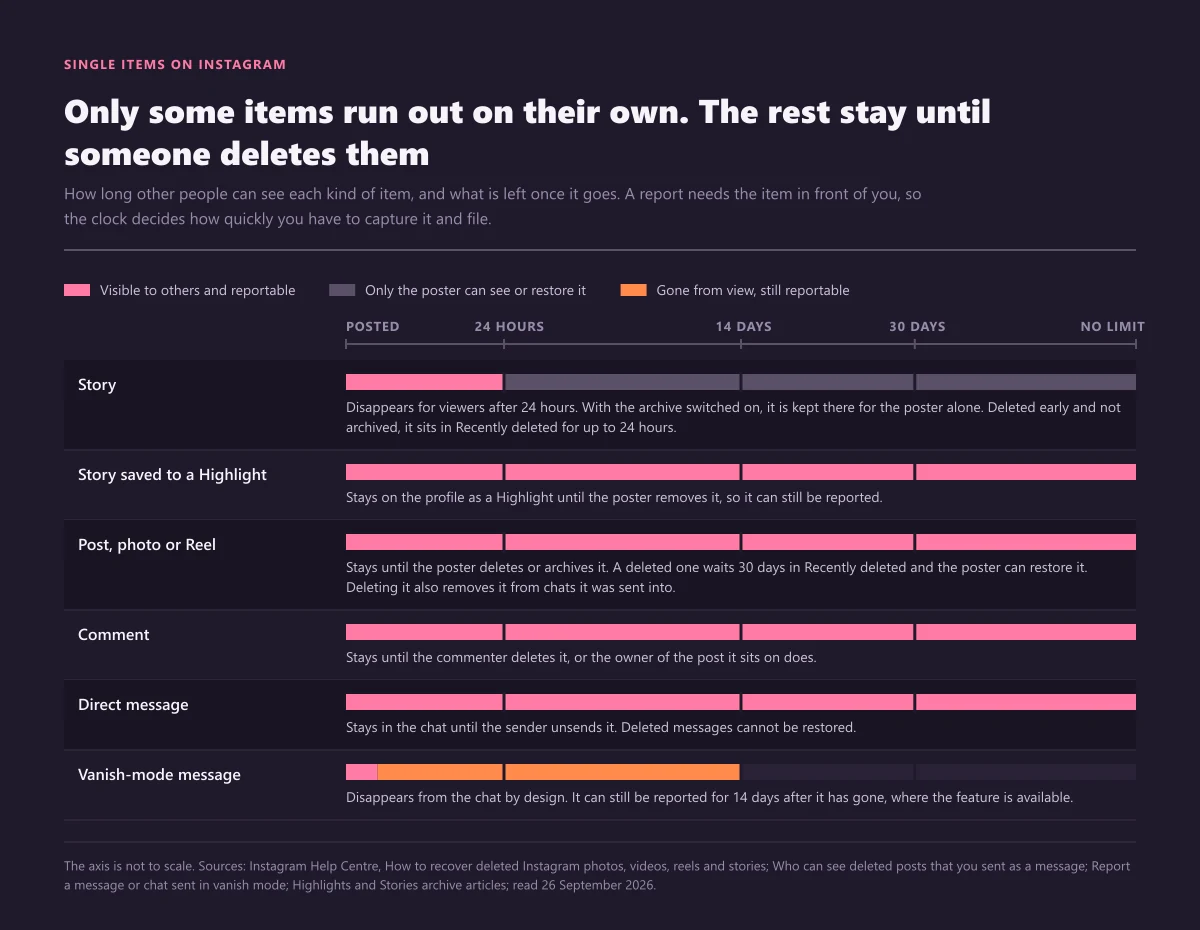
No one outside Instagram can delete a post someone else made: not a friend, not a paid panel, not a solicitor's letter on its own. Two parties can, the person who posted it and Instagram. This page is about getting Instagram to act on one item at a time, because a Story, a Reel, a comment and a direct message each keep the Report control in a different place, and each disappears on a different clock.
Only the person who posted it or Instagram can delete it. To get Instagram to act, report the item itself: Options on a post or Reel, the icon at the top of a Story, tap and hold on a comment or message, then pick the rule it breaks. Copyright, privacy and defamation claims have their own forms.
How to get someones post deleted on Instagram when only two people can delete it
Get the person who posted it to delete it, or get Instagram to remove it after a report. There is no third delete button, however the offer is worded.
Instagram's terms let Meta remove anything it believes breaks its rules or the law, and the account holder can delete their own posts whenever they like. That is the whole list. Whether the search reads how to get someones picture deleted on Instagram or how to get someones picture on Instagram deleted, the practical question is which of those two you can move. Of the 194 takedown requests in Instagram Ban Service's count of r/Instagram threads, 39 were about a single post, photo, video or comment rather than a whole account.
Asking the poster costs nothing and needs no rule to be broken. For an unflattering group photo or an old joke it is often the only route that exists. It also tells them you have seen the post, so capture it before you ask, and skip the request altogether when the post is a threat or part of a harassment campaign.
Instagram, for its part, reviews the single item you point it at. Where that control sits, and what else can make the item disappear before anyone reviews it, depends on what kind of item it is:
| Item | Where Report sits in the app | What else can make it go |
|---|---|---|
| Post or photo | Options, above the post | The poster deletes or archives it. A deleted post waits 30 days in the poster's Recently deleted folder and can be restored. |
| Reel | Options, in the bottom right of the reel | The same as a post. A remix is a separate item with its own menu. |
| Story | The icon at the top of the photo or video, then Report | It expires for viewers after 24 hours, unless the poster saves it to a Highlight. |
| Comment | Tap and hold the comment | The commenter deletes it, or the owner of the post it sits under does. |
| Direct message | Tap and hold the message | The sender unsends it. A reported chat gets up to 30 recent messages reviewed. |
| Message request | Inside the request, which you can view, delete or report | You delete it without replying. |
Volume changes none of this. Instagram's Help Centre says the number of times something is reported does not decide whether it comes down, which is why the mass-reporting offers traced on this site fail even when they are not outright scams. Apps that promise to delete a post have no button that Instagram lacks either, and report apps, bots and panels all end at the same Report menu. The six official routes for a post, from that menu to the legal forms, are compared in the post-reporting guide.
Which items does Instagram remove before anyone reports them?
Nudity and gore, almost always. Insults, harassment and hate, far less often than two years ago: between April and June 2026, a third of those removals began with somebody's report.
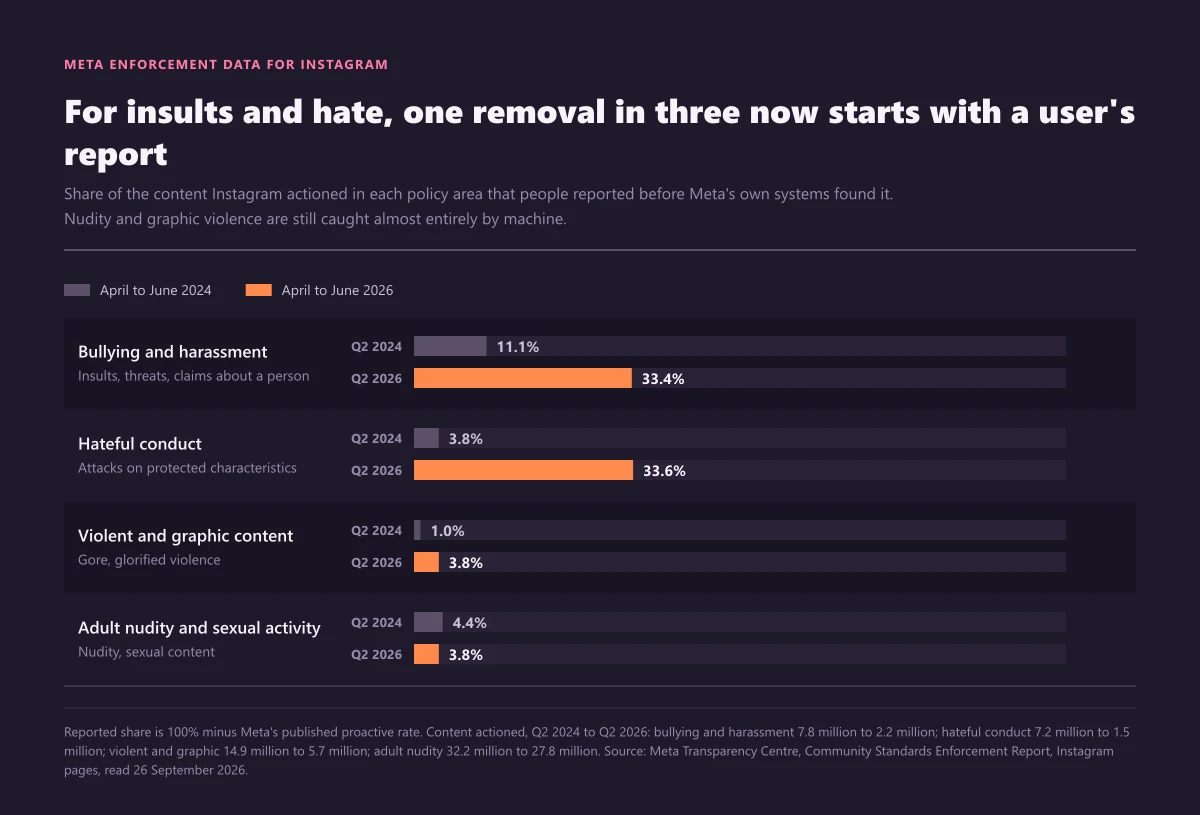
Meta publishes a proactive rate for every policy area: the share of the content it acted on that its own systems found before any user reported it. On Instagram between April and June 2024, 88.9% of bullying and harassment removals were proactive, and so were 96.2% of hateful conduct removals. For April to June 2026, the Community Standards Enforcement Report puts the two figures at 66.6% and 66.4%. Turned round, the share that started with a person tapping Report went from about one in nine to one in three for bullying, and from under one in 25 to one in three for hate.
The totals fell at the same time. Instagram actioned 7.8 million pieces of bullying and harassment content in the second quarter of 2024 and 2.2 million in the second quarter of 2026. Working from those two published figures, Instagram Ban Service puts roughly 870,000 of the 2024 removals down to user reports, and roughly 730,000 of the 2026 ones. Removals that began with a report held close to steady. Meta's own sweep is what shrank, from about 6.9 million items to about 1.5 million.
That was announced. On 7 January 2025 Joel Kaplan wrote that Meta would keep its automated systems on illegal and high-severity violations, and that for less severe ones it would rely on someone reporting an issue before we take any action
, according to Meta's announcement. Its bullying page gives the other reason: the behaviour is highly personal by nature
, which makes it hard for software to spot.
The contrast is the useful part. Adult nudity removals on Instagram were 95.6% proactive in the second quarter of 2024 and 96.2% in the second quarter of 2026; violent and graphic content went from 99.0% to 96.2%. A nude image or a gore clip is usually gone before most people have found the menu. A post calling a named classmate a liar, a slur left in the comments or a Story mocking someone's body can stay up until somebody reports it, and for that kind of item the single report is most of the enforcement there is. Which insults count for a private person and which only for a public figure is set out in the harassment reporting guide.
How to report an Instagram story anonymously, before it runs out
Open the Story, tap the icon at the top, tap Report and choose the reason. The account you report is not told who filed, unless the report is an intellectual property claim.
- Open the Story while it is still up. Photos and videos shared to a Story disappear from Feed, the profile and Direct after 24 hours, unless the poster adds them to a Highlight.
- Record it before you do anything else, with the username, the time label and every frame in view. The report hands the reviewer the Story itself; your recording is what you still have if it expires or gets deleted.
- Tap the icon at the top of the photo or video, then Report. On a computer the option reads Report inappropriate.
- Choose the reason that describes what the Story does, then follow the on-screen steps to the end.
Every Instagram report page carries the same promise: the account you reported won't see who reported them. The exception is intellectual property, where your name and email can travel to the poster. In a quarrel between two people, the timing of a removal can still give you away. What reporting does and does not reveal goes through those cases.
How to report a story on Instagram once it has gone from view
Not from the Story itself. When the 24 hours pass, viewers lose the menu along with the Story. Two things keep a route open. A Story saved as a Highlight stays on the profile until the poster removes it, and it reports like a live one. Meta's defamation reporting form asks whether the content is a Story, a Highlight or content you cannot access, so it takes items you can no longer see.
Blocked, or left off a Close Friends list? Instagram's advice for people who can't see the content, or have no account, is to ask a friend who can see it to report it. One trap: a poster who deletes a Story from their archive removes it from every Highlight too.
Can you remove a defamatory Instagram story once the 24 hours are up?
Sometimes, through Meta's defamation form, which accepts Stories and content you can no longer see. Where you live decides whether Meta will act on it at all.
Instagram defines defamation as a false statement of fact that harms someone's reputation, and warns that local law can make its form unavailable where you are. The defamation reporting form accepts filings only from the injured party or someone authorised to act for them, such as a lawyer. It asks for the country whose law you rely on, up to ten URLs or a box for having none, and, for each item, the specific statements you believe are defamatory and why. For anything that is not a comment, it asks whether it was a Story, a Highlight or content you cannot access. Court orders and other evidence are optional attachments, and the form ends with an electronic signature. Filing does not oblige Instagram to restrict anything.
In the United States that is close to the end of the road. Section 230 of the Communications Decency Act stops a platform being treated as the publisher of what its users post, and in Hassell v. Bird, decided on 2 July 2018, the California Supreme Court held that a court could not order Yelp to take down reviews already found libellous in a case Yelp was not part of. The judgment binds the poster, who can be ordered to delete. For a Story that is usually moot within a day, so the recording matters more than the order.
England and Wales set two limits that matter here. Under section 1 of the Defamation Act 2013, a statement is not defamatory unless it caused or is likely to cause serious harm to the claimant's reputation. And under section 4A of the Limitation Act 1980, a claim must be brought within one year. A Story that lasted 24 hours still starts that year the day it went up.
What does an EU legal notice against a defamatory Story need?
Four things, under Article 16 of the Digital Services Act: why the content is illegal, exactly where it is, who is sending the notice, and a statement that it is made in good faith.
That notice carries weight the in-app menu does not: the platform has to confirm it received the notice, then tell you what it decided and how to challenge the decision. Instagram received 388,783 such notices between January and June 2026, according to the DSA transparency report Meta published on 28 August 2026, and 118,589 of them sat in the category covering defamation and other illegal or harmful speech. Meta acted on 1,820 notices that half-year on the basis of the law and on 66,327 on the basis of Instagram's own terms. File the legal notice, and report the Story in the app under bullying or harassment as well, because most notices Meta acted on were settled under its own rules rather than the law. The forms for each legal claim are compared in the guide to taking down a post, then the account.
How to report an Instagram direct message, a request or a whole chat
Tap and hold the message, tap Report, choose a reason and submit. To send Instagram the conversation around it, report the chat from the username at the top instead.
For one message, open the conversation, tap and hold the message, tap Report, select a reason and tap Submit report; on a computer, hover over it and click Options. For the whole one-to-one conversation, tap the person's name at the top of the chat, then Options, then Report; group chats don't show that option. The difference is bigger than it looks. Instagram's message reporting page says it reviews up to 30 of the most recent messages in reported conversations, and that deleted, unsent or edited messages could be included if the whole chat or a message next to them is reported.
That line answers the sender who unsends everything the moment they are caught. Unsending takes a message out of view for everyone in the chat, not out of a review of the chat around it. Report the chat rather than the profile, too: Instagram says the team that reviews profiles has no access to direct messages.
Requests and groups follow narrower rules. A message request can be viewed, deleted or reported from the requests folder without replying to it. In a group chat you can report individual messages, photos, videos and people, never the group as a whole. A scam pitch arriving by DM has its own set of reasons, covered in reporting a scam or fraud account.
Vanish mode has its own window. A message sent in vanish mode can still be reported for up to 14 days after it disappears, even though you can no longer see it, and past that point the report won't include it. When you do report, Instagram says the messages will be decrypted and sent securely from your device
to its help team. The same article warns the feature may be unavailable in Europe. End-to-end encrypted Instagram chats, a separate option, stopped being supported on 8 May 2026.
What happens when you report an Instagram Reel to remove it?
The same review a post gets: the Reel is weighed against the reason you pick. Only the menu moves, to Options in the bottom right of the reel.
Not interested sits in the same menu and is not a report. It only tells Instagram to show you fewer posts like that one. A remix is its own item, posted from its own account, so report the version that breaks the rule, or both versions if both do. Footage lifted from your own Reel is a copyright claim, which only you or someone acting for you can make. Where a reviewer lets a reported Reel stay, Instagram says it may still use the report to show similar content lower in Feed. That is not removal, and nobody should sell it to you as one.
How to report someone on Instagram for using your photos
Choose the route by what the photo is. Your own work goes to the copyright form, a photo of you to the privacy form, and an account pretending to be you to the impersonation form.
A photo you took is yours to claim, and only the rights holder or an agent can file. The price is disclosure: an intellectual property report can pass your name and email to the poster, who can then answer with a counter-notice. A photo that shows you but was taken by someone else is not your copyright, and the steps for that case, from asking the poster to the privacy form, are laid out in taking down one photo of you. Instagram's privacy form is reserved for people reporting a violation of their privacy concerning their image or video, and Meta's rules remove such images of adults only where local law outside the United States gives that right; children under 13 can be reported by a parent. When the account is using your photos to pass itself off as you, the impersonation form is the right door, and the impersonation-or-copyright comparison shows what each one reaches.
Name the harm to the person in the picture. A report that describes only what the picture shows can be read as a different policy.
An Oversight Board decision of 23 June 2026 shows why. Two users reported an eight-second, AI-generated Instagram video of a real woman as pornography. According to the Board's decision, the report was not prioritised for human review, a later appeal to Meta wasn't either, and Meta ended up only restricting the video to adults. The Board overturned that and required removal under the rule on non-consensual intimate imagery. For an intimate image of you, that is the reason to pick, and StopNCII can block copies before they spread. For a copy account built from your photos, work through the impersonator takedown sequence.
When the post you reported is still up
Read the decision, not your feed. A comment you report disappears from your screen whether or not Instagram removed it.
Instagram's comment page says so plainly: once you report a comment you won't see it, and that does not mean it was removed. The decision sits in the app under Help, then Reports and violations, then Reports, and on the web under Support requests. Not every report shows there. A declined item usually offers a review, and in the EU a certified out-of-court body can look at it after that. Reading what the outcome screen means is covered in checking whether a report worked. Single removals also add up, which is how an Instagram ban gets triggered for the account behind them. Whether that account was later banned, rather than deactivated or renamed, is a separate check, walked through in telling whether an account was banned.
What Instagram Ban Service asks for before it files on one item
The item, captured with its clock showing, and the rule it breaks. Without the capture, an expired Story or an unsent message can't be shown to anyone.
- Post or Reel: the link (Send, then Copy link) and a screenshot showing the username and the date.
- Story: a screen recording from the profile picture through every frame, with the time label visible.
- Comment: a screenshot of the comment together with the post it sits under, and that post's link.
- Message: a recording that scrolls the conversation with the username at the top. Keep the chat; deleting it on your side helps nobody.
- Anything already expired or unsent: the date you saw it and what it said, written down that day.
When we re-read the Help Centre pages behind that list on 26 September 2026, we saw one line that set the order we now give for message cases. The vanish-mode article lets a report reach messages for 14 days after they vanish, and the ordinary message page lets a reported chat carry unsent messages with it. So for a message, the report comes first and the case file second: file inside the window from your own phone, then send us what you captured.
Instagram Ban Service files the report or the form that fits the item and follows the decision through; Instagram alone decides whether the item comes down. Requests about posts that break no rule, however unwelcome, are turned down. If the account keeps posting after one removal, move from the item to reporting the profile itself. Capture today, report the item under the rule it breaks, and send the capture through the contact desk, or browse the full list of reporting guides first.
Sources
- Instagram Help CentreReport someone's reel: Options in the bottom right of the reel
- Instagram Help CentreReport a story: the icon at the top of the photo or video
- Instagram Help CentreA story added as a Highlight stays visible until it is removed
- Instagram Help CentreDeleting a story from the archive also removes its Highlight copy
- Instagram Help CentreReport the chat, not the profile: the profile team has no access to direct messages
- Instagram Help CentreReport a message or chat sent in vanish mode: the 14-day window
- Instagram Help CentreUnsend a message in a chat
- Instagram Help CentreMessage requests: view, delete or report a request
- Instagram Help CentreEnd-to-end encrypted messaging no longer supported as of 8 May 2026
- Instagram Help CentreReport a problem: technical issues, shake to report and optional logs
- Instagram Help CentreRecover deleted photos, videos, reels and stories: the 30-day and 24-hour windows
- Instagram Help CentreDeleted posts also disappear from Direct conversations
- Instagram Help CentreReporting content you can't see or without an account: ask a friend
- Instagram Help CentreCheck the status of reports you've made
- Instagram Help CentreAbout defamation and how to report it
- Meta Transparency CentreCommunity Standards Enforcement Report, Instagram: bullying and harassment, Q2 2024 to Q2 2026
- Meta Transparency CentreCommunity Standards Enforcement Report, Instagram: hateful conduct
- Meta Transparency CentreCommunity Standards Enforcement Report, Instagram: adult nudity and sexual activity
- Meta Transparency CentreCommunity Standards Enforcement Report, Instagram: violent and graphic content
- Meta Transparency CentreInstagram DSA VLOP transparency report, January to June 2026, published 28 August 2026
- legislation.gov.ukLimitation Act 1980, section 4A: one year for defamation claims
- legislation.gov.ukDefamation Act 2013, section 1: serious harm
- Legal Information Institute47 U.S. Code section 230
Frequently asked questions
Is Report a problem the way to report an Instagram message?
No. Report a problem, under Help in your profile menu, is Instagram's bug reporter. You shake the phone or tap Report problem, and it sends details of your device and account, plus logs if you allow them, about a broken feature. For an abusive message, tap and hold the message itself and choose Report.
If the poster deletes the post after I report it, is it gone for good?
Not necessarily. A deleted post, photo, video or Reel waits in the poster's Recently deleted folder for 30 days, and they can restore it from there. A Story that wasn't archived stays for up to 24 hours. Keep your capture until the 30 days are over.
Can I report one photo inside a carousel post?
Instagram's Help Centre describes reporting the post as a whole, from Options above it, and gives no step for a single slide. Report the post under the rule that the photo breaks. Where a form gives you room to explain, say which slide it is, counting from the first.
Can a friend report someone's Instagram story if I'm blocked?
Yes, and it is Instagram's own advice for anyone who has been blocked, has no account or otherwise can't see the content: ask a friend who can see it to use the Report option. Their report is anonymous to the poster, as yours would be.
How long does Instagram take to act on one reported item?
Instagram publishes no deadline for in-app reports. The nearest figure is in its EU transparency report for January to June 2026, where legal notices that led to action were acted on after a median of 28.89 hours. Notices it declined are left out of that median, so the figure flatters the wait.
Should I report the post or the whole account?
Report the post when one item is the problem, because the reviewer judges what you point at. Add the account when most of what it posts breaks the rules or it exists to impersonate or target someone.
Can I report a Story I only saw in someone else's screenshot?
Not with the Report button, which needs the Story itself. Ask whoever took the screenshot whether it is still live or saved to a Highlight, and report it there. For defamation, Meta's form has an option for content you cannot access and an optional field for evidence, where the screenshot can go. Ask for the original file, not a cropped repost, and check that the poster's handle and the time label are both in the frame.