Usernames · the rename order, the 14-day figure, transfers, swap services and copycats
How to swap Instagram usernames in three renames, and what the 14 days really covers
Swapping two handles is three renames done in the right order. This guide gives the order, the menu names and the one moment a name can slip away, checked against Instagram's help pages on November 21, 2026.
How to swap Instagram usernames comes down to three renames: park account A on a spare name, give B the name A released, then give A the name B released. Instagram decides whether each change goes through, and a big account's change may wait for review. No Instagram help page sets a 14-day hold on usernames.
Can I swap usernames on Instagram between two accounts?
Yes, you can swap the usernames of two accounts you can log in to. Instagram has no swap button, so the exchange takes three ordinary renames.
Each rename is a normal username change. Instagram's help page on editing profile information says a new username takes effect right away if nobody holds it. Accounts with a wide reach can face a review before the new handle shows. Followers may get a notice too.
That review line matters more than any timer. During a swap, one name sits unclaimed between steps. If the second account's change is held for review, the free name stays open longer than you planned, and anyone can type it in.
Instagram decides whether each change goes through. Nobody outside Instagram can push a name onto an account or keep one free for you.
Instagram Ban Service is an independent content reporting and takedown service that prepares reports for Instagram's own forms, while Instagram decides every outcome. A swap between your own accounts needs none of that. Our part starts only when a swap goes wrong and a copycat takes the released name to pose as you.
Here is the split. You make every rename yourself, from your own logins. We draft the impersonation report and gather what backs it up, and Instagram reviews it and rules. We can't reserve, move or recover a username for anyone.
Which of these situations is yours?
| Your situation | What works | Who acts |
|---|---|---|
| Both accounts are yours | Three renames in a fixed order, shown below | You |
| The name you want is on a friend's account | The same order, done together while both of you are online | You and your friend |
| The name is on a stranger's active account | Ask the owner or pick another name; see getting a taken username | The owner |
| The name sits on an account that looks unused | No swap is possible; see inactive usernames | The holder or Instagram |
| A copycat took your old name and poses as you | An impersonation report | Instagram reviews it |
How do you swap two Instagram usernames, step by step?
Use three renames: park A on a spare name, move A's old name to B, then give A the name B gave up.
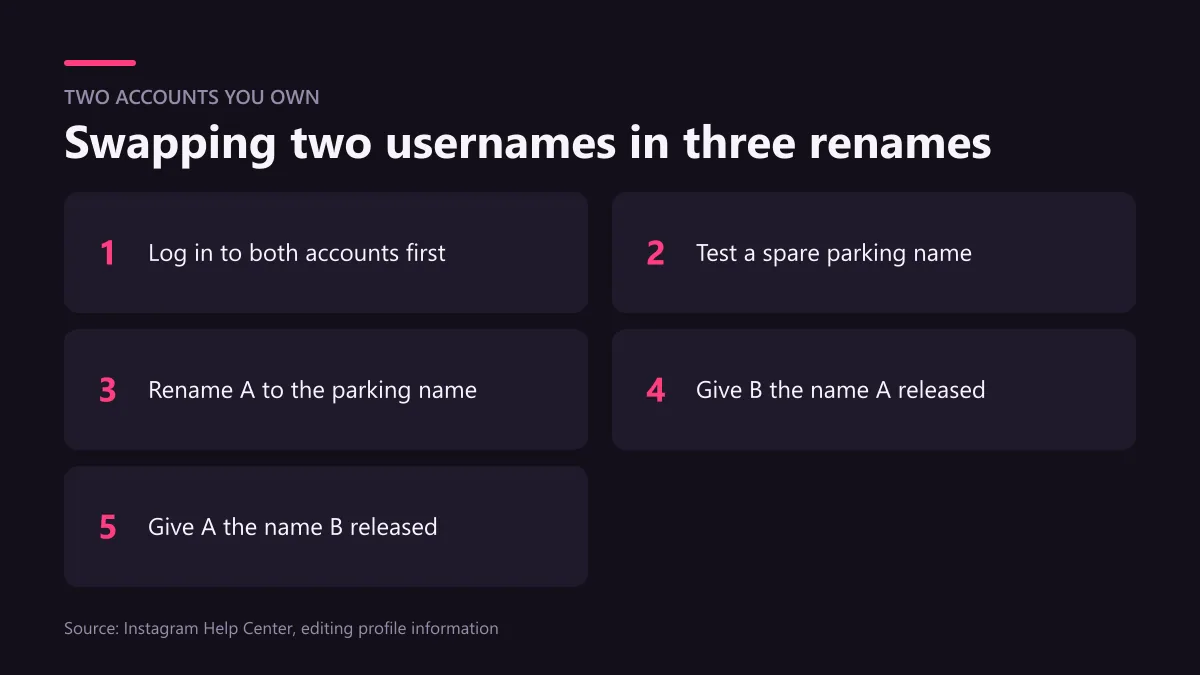
This is how to swap Instagram usernames when both logins are yours. Log in to both accounts on one phone before you start. One phone can stay signed in to as many as ten Instagram accounts, so you never log out midway.
Next, pick a parking name. Choose something long and dull, like the handle plus a few digits. Type it into account A's username field to see that it's free, but don't save yet. A separate guide to checking a username explains what that green tick does and doesn't prove.
- On account A, open Settings, tap See more in Accounts Center, then Profiles. Choose account A.
- Tap the username, enter the parking name and tap Done. A's old name is now free.
- Switch to account B at once. Open Profiles, choose B, enter A's old name and tap Done.
- Switch back to A, enter B's old name and tap Done.
- Open both profiles in a browser to confirm the change, then update your bio links.
On a computer the path is shorter. Click your profile picture, then Edit profile, type the new username and click Submit, as the same help page lays out. Your posts, followers and messages stay where they are. Only the names change places.
Why won't Instagram let me swap the names?
When account B's rename is refused, stop and put A back on its original name while it's still free. Instagram's page on reusing past usernames lets you return to a name you held before, as long as nobody new has claimed it. Then pause and try the swap again later. Typing the same name over and over won't change the answer.
A refusal can also mean the change is waiting for review on a large account. In that case Instagram says it will notify you when the review ends. Leave the name parked until then.
How to trade Instagram usernames with a friend
The order is the same when each account has a different owner, but timing gets harder. Both people need to be online together, because the gap between steps is where a name gets lost. Agree who releases first and stay on a call.
For example, take a hypothetical pair. Dana holds harborloom and Lee holds harborloom.studio. Lee parks on a spare name, Dana saves harborloom.studio, and then Lee saves harborloom.
Keep money out of it. Under Instagram's Terms of Use, nobody may trade an account or any piece of it for payment or hand it over, and the handle counts as a piece. The Terms don't say whether a free swap between two owners counts as a transfer. A paid one plainly does.
Where does the Instagram username 14 days figure come from?
The 14-day figure belongs to a different field: Meta publishes it for verified profile names, and no help page applies it to usernames.
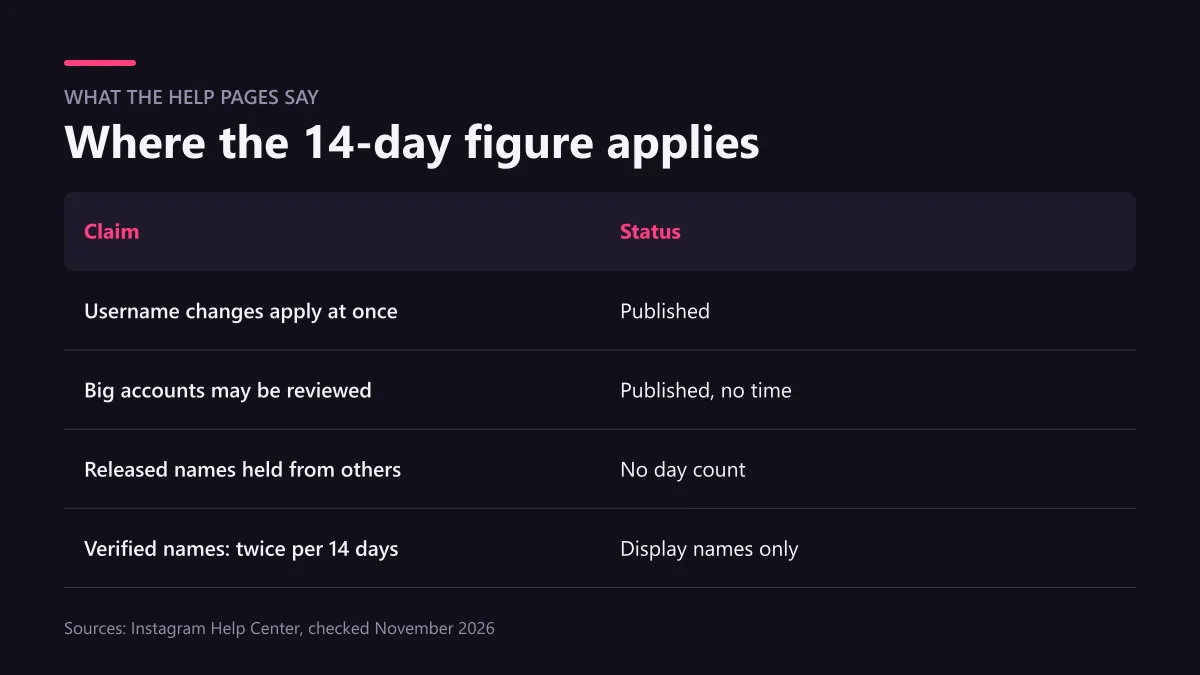
Every profile shows two different labels. One is the handle after the @ sign. The other is the display name above your bio. Meta's page on profile names for Meta Verified creators says a verified name can change twice every 14 days on Instagram. Facebook allows one change every 60 days. That is the only 14-day count on a Meta help page as of November 2026.
The username pages say something softer. Instagram's page on past usernames names two cases where an old name can't come back. Someone new may now hold it, or Instagram may have recently taken it off another person's live account. Neither case comes with a number of days.
So the 14 days quoted on forums is a limit on display names that people apply to handles. A hold on recently released names guards against strangers grabbing a handle. The wording points at other people's accounts, so a swap between your own accounts shouldn't trip it. Instagram doesn't explain how it links two accounts to one owner.
Swap Instagram usernames 14 days apart? What each page says
| Claim | Where it is written | Status in November 2026 |
|---|---|---|
| A username change applies at once if the name is free | Profile information help | Published |
| A big account's username change may be reviewed | Profile information help | Published, no time given |
| A recently released name can be refused to others | Past usernames help | Published, no day count |
| Verified names change twice per 14 days | Meta Verified name rules | Published, display names only |
| Swaps must wait 14 days | Forum threads and video titles | Not on any help page checked |
Can you bypass 14 days Instagram username limits?
No setting or trick skips a hold, because the hold runs on Instagram's side. Videos that claim a bypass show either the display name, which has its own limit, or a rename where no hold applied. If a username is refused mid-swap, return it to the account that released it and try later.
Keeping both accounts in the same Accounts Center is a sensible precaution before you start. It isn't a published rule, and no help page promises it helps.
How to transfer Instagram username to another account: is it allowed?
You can't move a username straight across. The account holding it must release the name, and the other account then saves it.
Instagram has no transfer tool in settings, and its rules shut out deals. The Terms of Use say it in one line, under what you can’t do:
“You can’t attempt to buy, sell, or transfer any aspect of your account (including your username).”
The same Terms let Instagram swap out a handle that breaks another party's rights or copies another user.
Between your own accounts, a move is half a swap. Rename the old account first. Then, within seconds, claim the released handle from the account that should keep it. For example, a hypothetical bakery moving from a personal profile to a new business profile renames the personal account, then claims the old handle on the business account seconds later.
So, can I transfer my Instagram username to another account? Yes, when you control both, by releasing and then claiming it. When the name sits on someone else's account, only they can release it. A request to Instagram won't move it. Paying for it puts both accounts at risk under the Terms, as the page on usernames listed for sale explains.
Transfer Instagram handle requests: what can support do?
Instagram's help pages describe no route where support hands a handle from one account to another. Support can review a report about a name that breaks the rules, such as one that copies a brand or poses as a person. That leads to a takedown of the copy, not a transfer. Nothing in the Terms promises the freed name to the person who reported it. Instagram Ban Service can prepare such a report from your evidence, and Instagram rules on it.
Can someone tell your account swapped names?
Yes, a swap leaves a trace. Instagram's About this account panel shows a count of former usernames, though not the old names themselves (as of September 2026). After a swap, both profiles show one more change, and curious followers can see it.
Instagram username swap service or swapper bot: what does each one do?
An Instagram username swap service runs the same renames for you, using your logins. An Instagram username swapper is a script that tries to claim a name the moment it frees.
Both need access you shouldn't hand over. A service asks for your password or a session code. Instagram's Terms of Use bar anyone from gathering or requesting another user's login credentials. Marketplace sellers add escrow and insurance wording, but the account that breaks the Terms is yours. Instagram can still change the name later.
A swapper bot is automation aimed at the username field. The same Terms ban bots and scripts that open accounts or pull data from Instagram unless Meta has said yes in advance. A rename bot runs on your login without that permission, which is the automated access the Terms rule out. It also can't beat a hold, because the hold is set on Instagram's side.
Swap bots belong to the same family as the Instagram mass report bot: a paid script selling a result only Instagram can grant. The pitch for buying a name works the same way, as our walkthrough on buying an Instagram username shows.
What does Instagram Ban Service decline, and why?
- Running a swap or a bypass with your password. We never ask for logins, codes or session files.
- Buying, selling or brokering a handle. The Terms bar it, and the buyer's account carries the risk.
- Reporting an account only to free its name. Holding a name first breaks no rule.
- Promising to skip Instagram's review. Nobody outside Instagram can do that.
What if the person who took your old name poses as you elsewhere?
A copycat on your released name can be reported as impersonation. Instagram's impersonation help page routes it through Report on the copycat's profile. Choose to report the whole account, then the reason saying it poses as someone else. Your evidence is what review reads.
Other apps judge a copied handle by their own rules; for X, start with matching the account to an X removal route.
Sources
Each rule above links to one of these seven Instagram help pages.
- Instagram Help CenterEditing your name, username and profile picture
- Instagram Help CenterReusing a past username
- Instagram Help CenterTerms of Use, what you can't do
- Instagram Help CenterProfile name rules for Meta Verified creators
- Instagram Help CenterAdding and switching between accounts
- Instagram Help CenterWhat About this account shows
- Instagram Help CenterImpersonation reports
Frequently asked questions
Can I swap usernames on Instagram without a spare third name?
No. Two accounts can't hold the same username at the same moment, so one of them has to step aside to a spare name first. That spare is the parking name, and it only needs to be free for the few seconds the swap takes. Pick something long and unlikely, such as the handle plus a few digits, and check it in the username field before you save anything. The full order is three renames: A moves to the parking name, B takes A's old name, and A takes B's old name. Each change uses the normal username field in Accounts Center or under Edit profile on a computer. Instagram applies each change at once if the name is free. A large account's change may first go to review, and Instagram says it notifies you when that ends. If one step is refused, put the released name back on the account that gave it up before trying again.
Can I transfer my Instagram username to another account I don't own?
Not without the owner. A username moves only when one account releases it and another saves it, so you need control of both. There is no transfer button, and Instagram's Terms of Use keep every part of an account, the handle too, out of trades. Between your own accounts the move is simple. Rename the holding account, switch over, and claim the name on the second account at once. Keep both accounts signed in on one phone, so the name isn't left open while you log in. If the name sits on someone else's account, the choice is theirs. Instagram won't move it on request, and paying for it puts both accounts at risk under the Terms. A copycat that took your old name and poses as you is a separate case: that is an impersonation report, reviewed by Instagram.
Swap Instagram usernames 14 days apart: is that wait required?
No published rule makes you wait 14 days between the renames in a swap. The "Instagram username 14 days" rule people search for traces back to a different field. Meta's help page on Meta Verified creators says a verified profile name, the display line above the bio, can change twice every 14 days on Instagram. Instagram's username help pages give no day count at all. What they do describe is a hold on a name Instagram recently took off someone else's live account, so strangers can't grab it. Read plainly, that hold shouldn't apply when both accounts in the swap are yours. Instagram doesn't say how it decides two accounts share an owner, so keeping both in the same Accounts Center is a sensible step. If a rename is still refused, return the name to the account that released it, which Instagram allows while nobody new has claimed it, and try later.
Is there a trick to bypass 14 days Instagram username holds?
No. A hold on a released username is enforced on Instagram's side, so no app setting, browser switch or third-party tool can lift it. Some videos that promise a bypass show the display name rather than the username, and the display name has its own change limit. Others show a rename that worked only because no hold applied to that name in the first place. If your username change is refused partway through a swap, stop typing. Put the name back on the account that just released it, since Instagram's page on past usernames allows that while nobody new holds it. Then try the swap again later. Avoid any service that asks for your password to get round a hold. Instagram's Terms bar gathering other users' passwords and running bots without Meta's consent, and the account that breaks those Terms is yours.
Is an Instagram username swap service safe to use?
It carries real risk, and none of it falls on the seller. A swap service needs your login or a session code to run the renames, and Instagram's Terms of Use bar anyone from requesting another user's credentials. A paid swap or a handle sale also runs into the Terms clause that keeps accounts and their parts, handles included, off the market. An Instagram username swapper, the bot version, adds a second problem. The Terms ban scripts that reach Instagram unless Meta has agreed first, and a rename bot runs without that consent. Escrow and insurance language on marketplace listings protects the payment, not your account. If both accounts are yours, the three renames take a couple of minutes and need no help. If the name belongs to someone else, only that owner can release it.
How to trade Instagram usernames with a friend: who goes first?
Trading safely comes down to timing: use the same three-rename order and do it at the same time. Both of you should be online, logged in and on a call, because the gap between steps is the only moment a third person can take a name. Agree in advance who releases first and what the parking name will be, and check that it is free. For example, take a hypothetical pair: Dana holds harborloom and Lee holds harborloom.studio. Lee parks on a spare name, Dana saves harborloom.studio, and Lee then saves harborloom. Keep money out of the exchange. Instagram's Terms of Use keep accounts and their handles out of any sale, and a payment turns a swap into one. Afterwards, each account keeps its own posts and followers, and the About this account panel shows one more former username on each profile.
How to transfer Instagram username to another account: will support do it?
No. No help page describes support shifting a handle between accounts, and the Terms rule out transfers. Nobody at Instagram will transfer Instagram handle ownership on request. A move always comes back to the same step: the holder releases it and the other account saves it. Support can act on a name that breaks the rules. The Terms let Instagram replace a handle that breaks someone's rights or copies another user. A brand owner can report a handle that copies a trademark, and a person can report an account posing as them. Those reports lead to action on the copy, not a transfer, and nothing promises the freed name to the person who reported it. If someone is posing as you on your old handle, Instagram Ban Service can prepare that impersonation report from your evidence, and Instagram decides the outcome.