Usernames · the short version, the profile URL, a six-name test, the username field, refused or taken, checker tools, step by step, your own account, next moves
How to check Instagram username availability: open the profile address, then confirm in the username field
A blank profile page and a free username are not the same thing. Instagram shows one identical screen for a name nobody holds, an account that's deactivated or removed, and a name it won't issue at all, so one check is never enough.
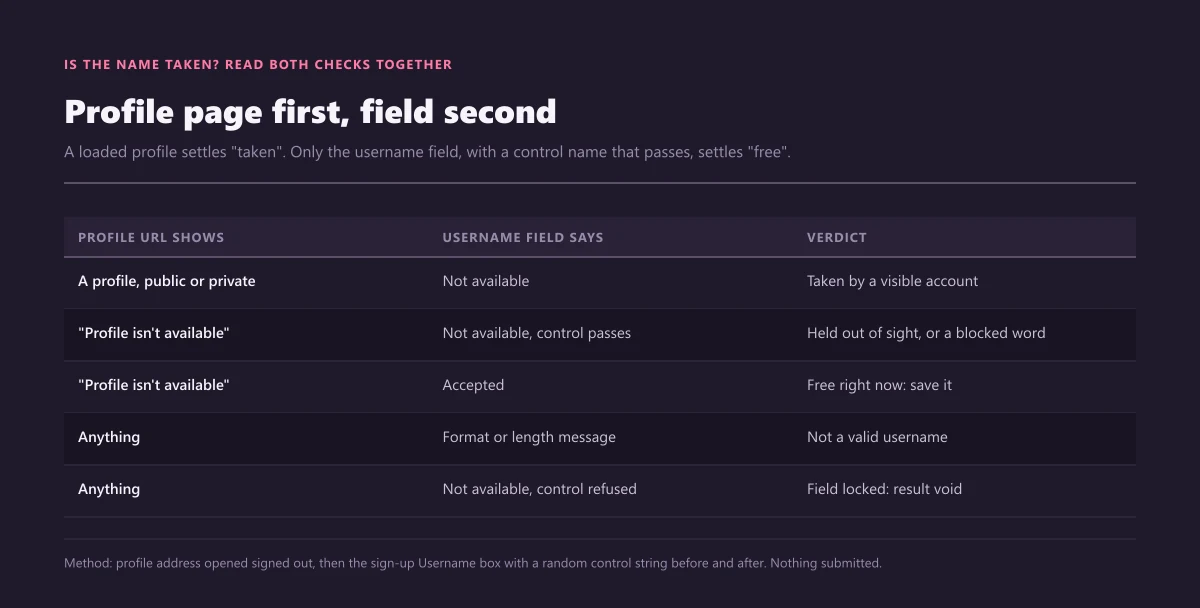
How to check Instagram username availability: open instagram.com/ plus the name. A loaded profile means taken. If it says "Profile isn't available", type the name into a username field, then a random control string. Name refused while the control passes means held; both accepted means free.
How to check Instagram username availability, in short
Two checks, in this order: open the profile address, then type the name into a username field with a control name straight after it.
How to check Instagram username availability comes down to two questions that people tend to merge. The first is whether an account is visibly using the name. The second is whether Instagram will let you register it. A profile page answers the first, and only the username field answers the second. They agree when a live account holds the name, but they often disagree when no profile shows.
The profile address is instagram.com/ plus the name. If a profile with posts and followers loads, the name is taken and you can stop. If the page says "Profile isn't available", you've learned less than it seems. That one screen covers a name nobody has ever registered, an account its owner deactivated, one in the middle of being deleted, and one Instagram removed. It also shows for names Instagram won't hand out at all.
That is why the second check exists. Type the name into a username field, either the sign-up form or Edit profile, and submit nothing. Then type twelve random letters and digits. If the random string is accepted and your name is refused, something holds your name. If both are accepted, the name is free at that moment. If both are refused, the field has stopped answering and the result means nothing. That is how to see if an Instagram username is available with Instagram's own tools, and no outside site can see more than this. Once you know a name is held, the eight states a held name can be in explains what each one allows.
Is this Instagram username taken? Start with the profile URL
A loaded profile is proof the name is taken. A missing profile is proof of nothing.
When people type "is this username taken instagram" into a search bar, most guides send them to the profile address first, and that part is right. It's the fastest way to check if Instagram username is taken by a visible account. It works signed out, it never locks, and it can't confuse a refusal with a registration. If the page shows a grid of posts, a follower count or "This account is private", someone holds the name.
The trouble starts when nothing loads. Signed out, Instagram now shows the same screen for every profile it won't display: "Profile isn't available. The link may be broken, or the profile may have been removed." We loaded it on 9 October 2026 for an invented string, for a famous handle whose account no longer appears, and for a name with "instagram" inside it. All three gave the same words, the same "Sign up for Instagram" button and the same bare page title. In the page source, the two we measured came to about 630 KB each, with the plain title "Instagram". natgeo's live profile came to about 734 KB and carried the account's name in its title.
Instagram's own Help Centre explains one of the hidden cases. A temporarily deactivated profile's "photos, comments and likes will be hidden until you reactivate it by logging back in", and the owner can only deactivate once a week. Nothing on that page says the username is released while the account sleeps, and in practice it isn't. An account with a pending deletion request is normally hidden as well, and the request takes 30 days to become final. A profile removed for breaking the rules looks the same indefinitely. Our guide to telling a banned account from one that is just hidden covers the outside signs, and whether Instagram deletes accounts that have gone quiet covers names held by profiles that still load but stopped posting years ago.
One more limit: the profile address checks usernames, not display names. The bold name above a bio can be anything and is shared by thousands of accounts, so what a display-name search can and can't tell you is a separate question from whether a handle is free.
Both checks, six names, one night in October
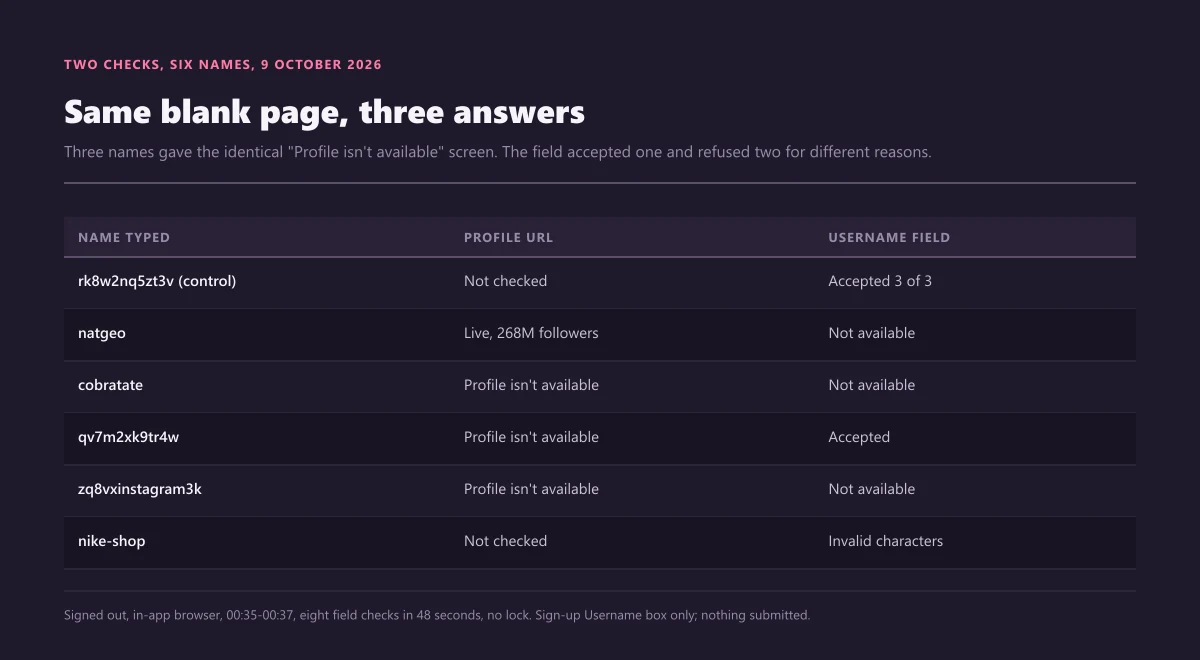
The profile page gave three identical blanks. The username field split them into one free name and two held ones.
To show how to know if an Instagram username is taken when the profile page won't say, we ran both checks on the same names. The test ran on 9 October 2026 from 00:35 to 00:37, in the in-app browser, signed out. We typed into the Username box of instagram.com's sign-up form only and submitted nothing. Each check fires a validation request that comes back SUCCESS or VALIDATION_ERROR, and we logged that alongside the message on screen. The control string rk8w2nq5zt3v went first, fifth and last.
| Name typed | Profile URL, signed out | Username field | What it means |
|---|---|---|---|
| rk8w2nq5zt3v (control) | Not checked | Accepted, three times out of three | The field was answering for the whole run |
| natgeo | Live profile, 268 million followers | "The username natgeo is not available." | Taken by a visible account |
| cobratate | "Profile isn't available" | "The username cobratate is not available." | Held by an account that no longer shows |
| qv7m2xk9tr4w | "Profile isn't available" | Accepted | Free at that moment |
| zq8vxinstagram3k | "Profile isn't available" | "The username zq8vxinstagram3k is not available." | Refused for the word inside it, not held |
| nike-shop | Not checked | "Usernames can only include numbers, letters, underscores and periods. Try again." | Not a valid username at all |
Rows three to five are the point of the test. Their profile pages were word for word the same, but the field treated them three different ways. The invented string passed. The well-known handle was refused in the same words as natgeo, so an account still holds it even though nothing displays. The string with "instagram" in it was refused too, although nothing has ever been registered there. In our 6 October test, every name containing "instagram" was refused while the same strings ending in "insta" passed, and no Help Centre page states that rule.
Eight field checks in 48 seconds didn't lock the field this time; the control passed at the end. That isn't always so. On 5 October, in our 34-name run through the same sign-up box, random strings started coming back refused after a burst. The same day, a signed-out handle test refused all eight names, including invented ones. Two days later, a length probe on short names locked the field after 22 to 25 checks for about 11 minutes. Without a control, any of those runs would have looked like a list of taken names.
How to check if Instagram username is available in the username field
Use the field you'd actually rename from, follow every name with a control, and stop at the first sign of a lock.
If you're working out how to check username availability instagram style, from inside the app rather than a website, there are two fields, and they answer the same question.
- Signed in: Accounts Center, then Profiles, then your profile, then Username. On the web or in the app, Edit profile reaches the same field. Instagram's help page on profile information says that if your account "reaches a lot of people", a username change "may need to be reviewed"; otherwise it "will change immediately if available". The field flags a refused name before you save, so you can test without changing anything.
- Signed out: the Username box on the sign-up form at instagram.com/accounts/emailsignup/. It validates as you leave the box, before any email or phone number is checked, so typing into it registers nothing.
Both fields apply the same format rules and both can lock after a burst of checks. The signed-in field is the better test of how to see if instagram username is taken from your own account's point of view, for one reason. When you try to switch back to a name you used before, Instagram's help page lists two conditions: the name "hasn't been taken by a new person", and it "hasn't been recently removed from an active Instagram account that you don't own". The second condition means a name another account changed away from recently can be refused to you even though nobody holds it.
The control habit matters more than which field you use. Why every availability check needs a control name shows a refusal flipping to a pass once the field settled, and asking Instagram's own field instead of a third-party site walks through the signed-in route screen by screen. A result counts only if a random string passes right before or after it.
Is this username taken on Instagram, or only refused?
"Not available" covers at least five situations, and only one of them is another account sitting on the name.
Instagram uses one sentence for most refusals: "The username [name] is not available." It doesn't say why. Here is what we've seen behind that sentence and its two siblings across six tests between 4 and 9 October 2026.
| What the field says | Control name | Most likely reason | Is it taken? |
|---|---|---|---|
| "The username X is not available." | Passes | An account holds it: live, private, deactivated, mid-deletion or removed | Yes |
| "The username X is not available." | Passes | A blocked word inside it, such as "instagram" | No, but you can't have it |
| "The username X is not available." | Also refused | The field has locked after too many checks | Unknown; come back hours later |
| "Usernames can only include numbers, letters, underscores and periods." | Any | A hyphen, space, symbol or emoji | No; it isn't a valid username |
| "Choose a username that's under 30 characters." | Any | Over 30 characters | No; it's too long |
The first two rows look identical on screen, which is why a single refusal can't tell you if a name is held. Two things help. First, take the word out: if the string without "instagram", "insta" variants or a brand name passes, the word was the problem. Second, look at the suggestions. A held name usually comes back with suggested variants under it, while a locked field returns none, and that empty list is the tell we logged on 7 October. Every version of the "not available" message, decoded lists the wording each screen uses, and checking which screen showed the refusal matters, because the sign-up form, Edit profile and Accounts Center don't always word it the same way.
A locked field is also a reason not to hammer it from your own account. Rapid repeated actions are the kind of pattern Instagram limits, and the warning signs before an account gets restricted are worth knowing if you plan to watch a name every day. One check a day, plus a control, is plenty.
What does an Instagram username taken checker actually check?
Usually the public profile page, which is the first check above and nothing more. We read nine ranking guides and tools to see what they claim.
On 9 October 2026 we ran three searches, "how to check instagram username availability", "is this username taken instagram" and "instagram username taken checker", and logged every result. Nine of the 27 were doorway pages planted on eight unrelated organisations' subdomains, including a university jobs board and a government staging server. Of the real results, we read nine guides and tools from eight publishers. One more returned 403 and was left out.
| What the page recommends or says | Pages | How it holds up |
|---|---|---|
| Type instagram.com/name into a browser | 7 of 9 | Sound for "taken"; blind to hidden holders |
| Search the name in the app | 7 of 9 | Weaker than the URL: search ranks similar names |
| Try it in the sign-up form | 6 of 9 | Sound, if a control name passes too |
| Try it in Edit profile while signed in | 5 of 9, one more partly | Sound; none of the nine names Accounts Center |
| Use a checker tool | 8 of 9 | Six of the eight point only to the publisher's own tool |
| Warn that a deactivated account keeps its name | 4 of 9, one more partly | Correct, and the main gap in the rest |
| Give a waiting period after a rename or deletion | 5 of 9 | 14 days in four, 14 to 90 in one; none cites a source |
Two findings stand out. First, nothing in the nine cites an Instagram page for any rule. The waiting periods contradict each other: Post Bridge and Zernio say a changed name is held for about 14 days, while PostPlanify and AdaptlyPost say it's released immediately and Blotato says there is "no published timer". Instagram's own pages, read the same day, give no period for renames at all, and 30 days, up to 90, for deletions. Second, the checker tools can't see more than the profile page. Blotato's checker page says outright that Instagram publishes no availability endpoint, so its automatic lookup is "best effort". SocialRails' checker promises instant results, but its own FAQ says it shows "simulated results for demonstration purposes".
So when a site claims to find Instagram username availability in bulk, it's reading public profile pages, and every hidden holder will show up as free. That's how you get a "free" result for a name the field then refuses. What username checker sites can't see tested that gap directly on 4 October. If you check if username is taken instagram style through any outside tool, confirm each "free" result in the field before you plan around it. Never give a checker your Instagram login: a tool that only reads public pages has no reason to ask for it, and how to tell a legitimate Instagram service from a scam applies just as much to "username tools" that ask for a password.
How to check if Instagram username is taken, step by step
Seven steps, about two minutes per name, with nothing submitted and no outside tool.
This Instagram username taken check combines both halves of the test. It works the same for a personal handle, a brand or a name you're hoping to switch to.
- Clean the name first. Use only letters, numbers, full stops and underscores, keep it under 30 characters, and leave out the word "instagram". A name that breaks these rules gets refused whether or not anyone holds it.
- Open the profile address. Go to instagram.com/ followed by the name, signed out or in a private window. A loaded profile, public or private, means taken: stop here.
- Note what a blank page says. "Profile isn't available" means "not displayed", not "free". Write it down and move to the field.
- Type a control into a username field. Use Edit profile or the sign-up form, and type twelve random letters and digits. Submit nothing. If the control is refused, the field is locked; come back in a few hours.
- Type your name into the same field. Accepted means free right now. Refused with suggestions underneath means something holds it.
- Type the control again. If it still passes, the refusal in step 5 is real. If it fails now, the field locked mid-check and step 5 doesn't count.
- Save at once if you want it. Nothing is reserved between a pass and a save. If you're signed in, change the username there and then; a large account's change may be reviewed first.
Repeat once a day at most for a name you're watching. A burst of checks is what locks the field, and a locked field reports free names as taken.
What if the account holding the name is your own?
Often it is: an old profile you forgot, one you deactivated, or one that was disabled or hacked. Each needs a different fix.
A lot of people who check a name find it held by an account they once made. Deactivating that account doesn't free the name; logging back in reactivates it. Deleting it does free the name once the deletion completes, so deleting an old account you can still log in to is the clean route, and taking down an old account you can no longer reach covers the case where the login is gone. If you deleted it recently and want it back rather than its name, recovering a deleted account inside the 30-day window explains what can still be saved.
A disabled or suspended account still holds its name while the decision is under review or appeal, so the name you see refused may be the one on your own locked profile. Recovering a suspended account by reading its screen first, what to do once an appeal has already been refused, the day-by-day path for a permanently disabled account and recovery when the email and phone are both gone cover those states. For lighter restrictions, lifting blocks, limits and disables sorts them by type.
If a hacker took the account and renamed it, your old name may now be free, or saved by someone else in the gap. Hacked account recovery, stage by stage is the first job, and getting an account back after a hack or a ban sets out which route fits which lockout. The Instagram contact routes that actually answer lists who to reach when the automated flows fail. Paid help exists too, and what an unban service can and can't do is worth reading before you pay anyone.
When the answer is taken, three routes stay open
A variant, a wait, or a formal report when the holder is misusing your identity. Buying is the route people ask about most, and the Terms rule it out.
Instagram's help page for a name that "seems inactive" offers a single suggestion: choose "an available version of the username" with "periods, numbers, underscores or abbreviations". That's also how to check available Instagram usernames efficiently. Run your shortlist of variants through the same two checks and save the first one that passes. If the holder is mid-deletion, checking the field around day 30 and again up to day 90 is the only waiting game with a published clock.
Paying for the name is where most searches lead next. Instagram's Terms of Use bar attempts to "buy, sell, or transfer any aspect of your account (including your username)". Why Instagram itself sells no usernames, what actually changes hands when a username is listed for sale and how a paid handle handover works, and where it fails lay out the risk in full.
A formal report is only worth filing when the holder is doing something reportable with the name. If the account on your name poses as you, that's impersonation. If it reposts your work, what a copyright report does to the post applies. If it publishes your photos or videos without consent, removing a picture or video someone posted of you is the route. For a trademark or another legal ground, Instagram's legal removal forms and where each one goes sets out the forms. A single offending post, story or message can be reported on its own through item-by-item reporting. None of these hands the name to you; at best it frees it, and then the first person to save it wins. That's why the two checks above are worth keeping as a habit.
Sources
- Instagram Help CentreWhen you can change your Instagram username to a name you've used before
- Instagram Help CentreWhat you can do if a username is already claimed but seems inactive
Frequently asked questions
How to check if username is taken on Instagram without making an account?
Open instagram.com/ followed by the name in a private window. A loaded profile means taken. If it says "Profile isn't available", type the name into the Username box on the sign-up form, then a random control string, and submit nothing. A pass means free; a refusal while the control passes means held.
How to know if a username is taken on Instagram when the profile won't load?
Use the username field, not the profile page. In our 9 October 2026 test, three names showed the same "Profile isn't available" screen; the field accepted one, refused one held by a hidden account and refused one for containing the word "instagram".
Does a deactivated Instagram account keep its username?
Yes. Instagram's Help Centre says a deactivated profile's photos, comments and likes are hidden until the owner logs back in, and the name stays with the account. The profile page looks the same as a free name, so only the username field shows that it's held.
Are Instagram username checker websites accurate?
They can confirm that a visible profile exists, but they can't see deactivated, removed or blocked names, so their "available" results are unreliable. One checker's own FAQ says it shows simulated results for demonstration. Confirm every "free" result in Instagram's own username field.
Why does Instagram say every username I try is not available?
The field has most likely locked after too many checks in a short time. Type twelve random letters and digits: if that is refused too, nothing you typed was tested. In earlier tests the lock lasted about 11 minutes, sometimes longer, and survived a page reload.
How long after someone changes their Instagram username can I use the old one?
Instagram's help pages give no waiting period. The old name can be refused to you if it was recently removed from an account you don't own, and the previous owner can switch back while nobody else holds it. Check it once a day with a control.
Can I check Instagram username availability in the app?
Yes. Go to Edit profile or Accounts Center, then Profiles, then Username, and type the name without saving. The field flags a refused name before you save, which makes it the most reliable check you can run from your own account.