Owner’s side · deleting an old account, checked 28 September 2026
How to delete an old Instagram account, starting with the one question Instagram asks
Most old Instagram accounts are not lost so much as stranded: a username from school, an email address nobody has opened since 2016, a phone number that now rings someone else. Instagram will delete any of them in a few taps, but only for someone who can sign in, and that one condition decides everything below.
Log in to the old account, open Accounts Centre, then Personal details, Account ownership and control, and choose Delete account. Instagram won't delete a profile for anyone who can't log in, so without the password, first get back in with a reset link, a linked Facebook account or Instagram's video-selfie check.
Which old Instagram account is yours, and is it still up?
Check before you try to delete anything. Plenty of people spend an evening on the wrong profile, or on one Instagram already removed years ago.
Start logged out. Open a private browser window and go to instagram.com followed by the username you think you used. A profile page means the account still exists. A missing-page message means that username is not in use today: the account was deleted, removed or renamed. That last possibility catches people out: an old account renamed years ago still exists under its new handle, so try the names you used later too.
Then search your old inboxes. Every account starts with a "Welcome to Instagram" email, and Meta's messages only ever come from its own domains, instagram.com and facebookmail.com among them. Search each old address for "Instagram" and sort by oldest. The welcome email names the username, and a password-reset email from 2017 tells you which address the account is registered to, which is the single most useful fact you can have before step two.
Last, open Accounts Centre on whatever account you use now. Old profiles once added to it are listed there.
How to delete an old Instagram account you can still log in to
If you can get in, deletion takes a few minutes and works from the app, a computer or a phone browser. Copy what you want to keep first, because the export tool goes with the account.
- Export your information. In Accounts Centre, open Your information and permissions, then Export your information. Instagram's export page says the link can take up to 30 days to arrive by email, and you then have four days to download it from Available downloads. Do this first on any account with photos you might want at 40.
- Open the delete screen. From Settings go into Accounts Centre, and under Personal details open Account ownership and control; the delete option is behind Deactivation or deletion. Pick the old profile, choose Delete account, then Continue and follow the prompts. Some people see Profiles and personal details and a Manage button instead; others are being moved to a Meta Account settings screen. The last step is the same.
- Confirm it. Follow the on-screen instructions to the end; the request only counts once the last screen accepts it. If any step asks for a password you have forgotten, reset it while the old session is still open rather than logging out.
- Then leave it alone. The profile is hidden from other people straight away, and the request can still be cancelled for a period Instagram says
varies by region
. After 30 days the profile and its information are deleted for good.
That is how to delete an old Instagram account permanently. Deactivating is a different thing: it hides the profile, photos, comments and likes until you log back in, deletes nothing, and Instagram allows it only once a week. People who want an old account gone forever and pick Deactivate by mistake find it back the next time a saved login opens the app.
The rule that decides everything after this point sits on Instagram's own deletion page: For security reasons, we can't delete a profile for you.
The request has to come from inside the account. The rest of this page is about the many ways people try to get around that sentence, and the few that actually get them back inside.
Why the delete button on Instagram is never where the guide says: old versions of the delete flow
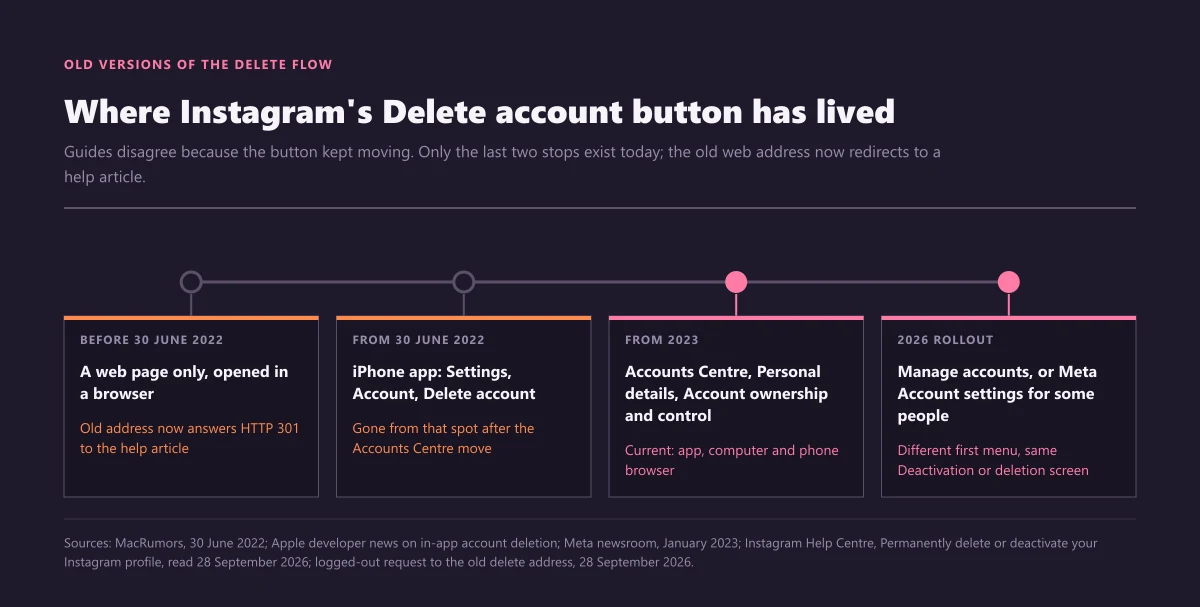
Because it has moved at least three times, and most guides ranking today were written for one of the older homes.
| Period | Where Delete lived | What happens if you follow it today |
|---|---|---|
| Before 30 June 2022 | A web page only. You opened instagram.com/accounts/remove/request/permanent/ in a browser, gave a reason and re-entered the password | That address now answers with a permanent redirect to Instagram's help article, not a form |
| From 30 June 2022 | Inside the iPhone app: Settings, Account, Delete account | Settings has since been reorganised around Accounts Centre, so the option is not in that spot any more |
| From 2023 | Accounts Centre, Personal details, Account ownership and control, Deactivation or deletion | Current on app, computer and mobile browser |
| 2026 rollout | A Manage accounts variant, and for some people Meta Account settings | Different first menu, same Deactivation or deletion screen |
We checked the old web address on 28 September 2026 from a logged-out connection. It returned HTTP 301 to help.instagram.com/139886812848894, the help article itself. Guides still hand that link out as "the delete page", and a reader who follows it lands on a page of instructions instead.
The 2022 change came from Apple. Its App Store rule required apps that let people sign up to let them start deleting the account inside the app too, from 30 June 2022, and MacRumors reported that day that until then Instagram users had to log into a web browser
to delete. Then, in January 2023, Meta began moving personal details and security settings into Accounts Centre, and deletion followed them there.
So if you are working out how to delete an Instagram account on an old version of the app, the quickest fix is not to hunt for the button at all. Update the app, or skip it and use a computer or phone browser: Instagram's help page carries separate Computer and Mobile Browser instructions, and they reach the same screen.
How to delete an old Instagram account without the password, the email, or both
You can't skip the login. You can replace the missing piece, and which one is missing decides how.
You have the email or phone number but not the password
This is the easy one. Tap Forgotten password? on the login screen, enter the address or number, and use the login link Instagram sends. Once you're in, change the password, then follow the steps above. Searching for how to delete an old Instagram account without the password usually ends here, and it takes about as long as making a cup of tea. A phone number alone is enough if the account was registered to that number and it still reaches you; if the number has since gone to someone else, the code goes to them.
You know the password but the email is dead
Sign in from a phone or browser you used with that account before, if one still exists, because a familiar device is less likely to trigger a code to the old address. Once in, go straight to Personal details and replace the old email and phone with ones you control. Then delete. Doing it in that order means the account can't lock you out halfway through.
Neither the password nor the email: no access at all
Two routes remain, and both need proof. If the account was ever linked to Facebook, the reset screen offers Reset using Facebook. If not, Instagram's hacked-account page points to instagram.com/hacked and a step called Request a security code or support from Instagram
. For an account with photos of you, that means a video selfie turning your head in different directions, which Instagram says is never shown on the platform and is deleted within 30 days. For an account without photos of you, it asks for the email or phone number you signed up with and the type of device you used then.
Meta says this works better than it did. Its December 2025 support announcement, updated in March 2026, reports that the relative success rate of hacked-account recovery rose by more than 30% in the US and Canada that year, helped by the optional selfie video. Recovery is the only thing it promises, though. Deletion is still your job once you're back in.
This is also where the offers appear. Sites and Telegram sellers promise to delete an old Instagram account without email or password for a fee, and none of them can, because there is no staff-side switch for them to press. What they actually sell is covered in our look at report apps, bots and panels and in the ban-as-a-service listings checked on this site.
Can you ask or contact Instagram to delete an old account for you?
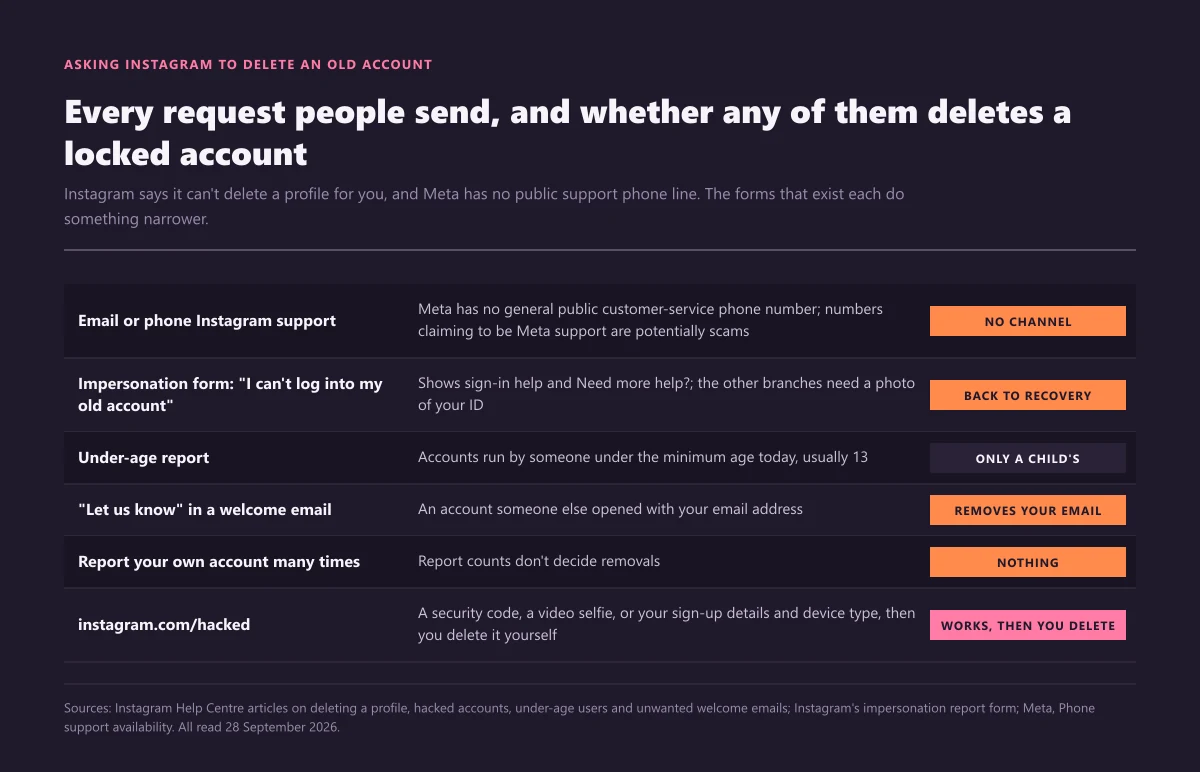
No channel exists for that. There is no email address, no phone line and no form that deletes an account on the word of someone who can't log in.
Meta's page on phone support availability says the company doesn't have a general public phone number available for customer service
, and warns that numbers claiming to be Meta support are potentially scams. The forms that do exist each do something narrower than delete your old account. People usually find that out after filing, so here is what each one is really for.
| What people try | What it is actually for | Does it delete your old account? |
|---|---|---|
| Impersonation form, option "I can't log into my old account" | Sends you to sign-in help: Get help signing in, then Need more help? | No. It routes you back to recovery |
| Under-age report | Accounts run by someone below the minimum age now: 13 in most places | Only for a child's account today, not an adult's childhood one |
| instagram.com/hacked | Getting back in with a code, a video selfie or sign-up details | Not by itself, but it is the route that works |
| "Let us know" in a welcome email | An account someone else opened with your address | No. It removes your email from that account |
| Memorialization or removal request | The account of someone who has died, filed by family | Yes, but only in that case |
| Reporting your own account over and over | Nothing | No. Report numbers don't decide removals |
The impersonation form deserves a closer look, because it is the one most guides send people to. Its first question offers "I can't log into my old account" as a choice, which looks like exactly the right door. When we went through the form on 28 September 2026, picking that option brought up the sign-in help (Get help signing in, then Need more help?) and no field anywhere for asking Instagram to delete anything. The form's other branches need a photo of your ID, and they only act on reports from the person being impersonated or their authorised representative, which is you only if someone else is posing as you. How that form differs from a copyright claim is set out in impersonation reports compared with DMCA notices.
The under-age report is honest about its limit. Instagram's page says We will delete the account if we can't verify
the account is managed by someone old enough, and it is written for accounts children are running today. The minimum age is 13 in most places, 14 in South Korea, Spain, Quebec and Florida, and 16 in Australia. A parent of a nine-year-old can use it. An adult who opened an account at eleven can't, because the account is no longer managed by a child. For a relative who has died, the family route is covered in our memorialized account guide. In the EU and UK, data-protection law adds a right to erasure; the legal removal request page covers that route, and you should expect to prove the account is yours, which brings you back to the same evidence.
Reporting your own profile many times, or paying for it, is the myth that refuses to die. Instagram does not count reports to decide a removal, as the report-count page shows, and it doesn't treat a pile of reports as a deletion request. The mass report bots, spam report bots and reporter tools sold for the job, and the mass-reporting offers we traced, can't delete an account that breaks no rule, yours included. The page on mass reports against an account explains why coordinated reporting backfires on the people who order it.
What if someone else is running your old account now?
Then it is no longer only a deletion problem. An abandoned account with a 2014 password and a dead email is an easy target, and nobody is watching it.
The signs are hard to miss: new posts you didn't make, a changed bio, crypto or "investment" stories, followers getting DMs asking for money or codes. First look in the old inbox for a message from security@mail.instagram.com about a changed email; its link can undo the change. If that fails, recovery through instagram.com/hacked is still the first move, because it is the only one that ends with the account in your hands.
When recovery fails, you stop being the owner in Instagram's eyes and become someone affected by the account. That is a different position, and it has its own reports. Posts pushing fake giveaways or payment schemes are scam content; the scam and fraud account report and the giveaway and business report cover them, and anyone who was actually sent a scam can report what they received. If the hijacker is using your name and face to fool people, the impersonator takedown route applies, and a fake account report fits a profile that pretends to be a different person altogether. A hijacker demanding money to hand the account back is committing extortion, which is covered under reporting Instagram extortion and, where your photos are being used as leverage, impersonation and blackmail reports.
Report the profile once, under the rule it breaks, from the three-dot menu on the profile itself; reporting a profile or page walks through it. The account comes down when Instagram finds the violation, and what a report actually does explains what happens inside that review. For how removals build up into a whole account, getting a post or an account taken down is the post-first view, how an Instagram account gets taken down is the account-level one, and the account takedown overview puts both on one page. The reasons Instagram gives for disabling accounts are listed in what triggers an Instagram ban, and what makes a ban permanent explains why some come back.
A report on a hijacked account won't hand the account back, and it may end in a disabled profile rather than a deleted one. For most people with an old account being used for scams, that is the result they wanted anyway. Your report stays anonymous to the account holder, which whether Instagram tells people who reported them and whether they will know you reported them both check. If you want to see whether it came down, checking whether a reported account was banned lists what shows from outside.
None of this works on an account that is simply old and quiet. Wanting a profile gone, even your own, isn't a violation, and deleting someone else's Instagram account, getting someone's Instagram deleted and getting someone banned all come back to the same requirement: a rule actually broken. The report-and-disable guide is where that requirement is spelled out case by case.
How to deal with an old embarrassing Instagram account you cannot delete yet
Shrink it. Deletion may take weeks of recovery, or never come, but most of the embarrassment comes from a handful of posts and one search result.
If you can get in, even briefly, a few minutes goes a long way. Your activity, then Photos and videos, lets you select posts in bulk and delete or archive them, with a date filter for clearing a whole era. Switch the account to private. Change the display name so it no longer matches a search for your real name, and remove the profile photo. Remove followers you don't know. Then decide whether to delete, and export first if there is anything you'd want back.
If you can't get in, the tools are the ones anyone has against content that breaks a rule. A post on the old account that was always cruel, or that someone else posted about you, may fit bullying and harassment. Someone using the old photos to follow you around online is a stalking report, and your address or school exposed in an old caption fits threats and doxxing. Photos you took, reposted by someone else, belong on the copyright report for stolen content. For one post, one comment or one Story, the reports are reporting a post, reporting a comment and reporting a Story. And if the old account ended up screenshotted in a Reddit thread, the Reddit takedown survey shows how those requests went for other people.
Search engines are the other half. A public Instagram profile can show up when someone searches your name, and it can keep showing for a while after the account is gone. Google stopped offering cached copies of pages in February 2024, which Search Engine Land reported on the day, so there is no cache to clear. Once the profile page is gone, Google's Refresh Outdated Content tool lets anyone with a Google account ask it to recheck the URL, which is usually faster than waiting for a recrawl.
What people asking how to get an old Instagram account deleted had left in 2026
Mostly a login they could no longer finish. We read every r/Instagram post from 1 January to 27 September 2026 that asked about getting rid of an old account of the poster's own.
We pulled all 48,703 posts made to r/Instagram in that window from the Arctic Shift archive, narrowed them with a keyword filter for old accounts and deletion, and read each candidate by hand. 122 were about an old account the poster wanted gone, and 108 still had readable text; the percentages below are of those 108. Reposts were merged, and a code only counts where the post says it outright. Many of these posts were removed by the subreddit's moderators, who send help questions to a weekly thread; the archive kept the text.
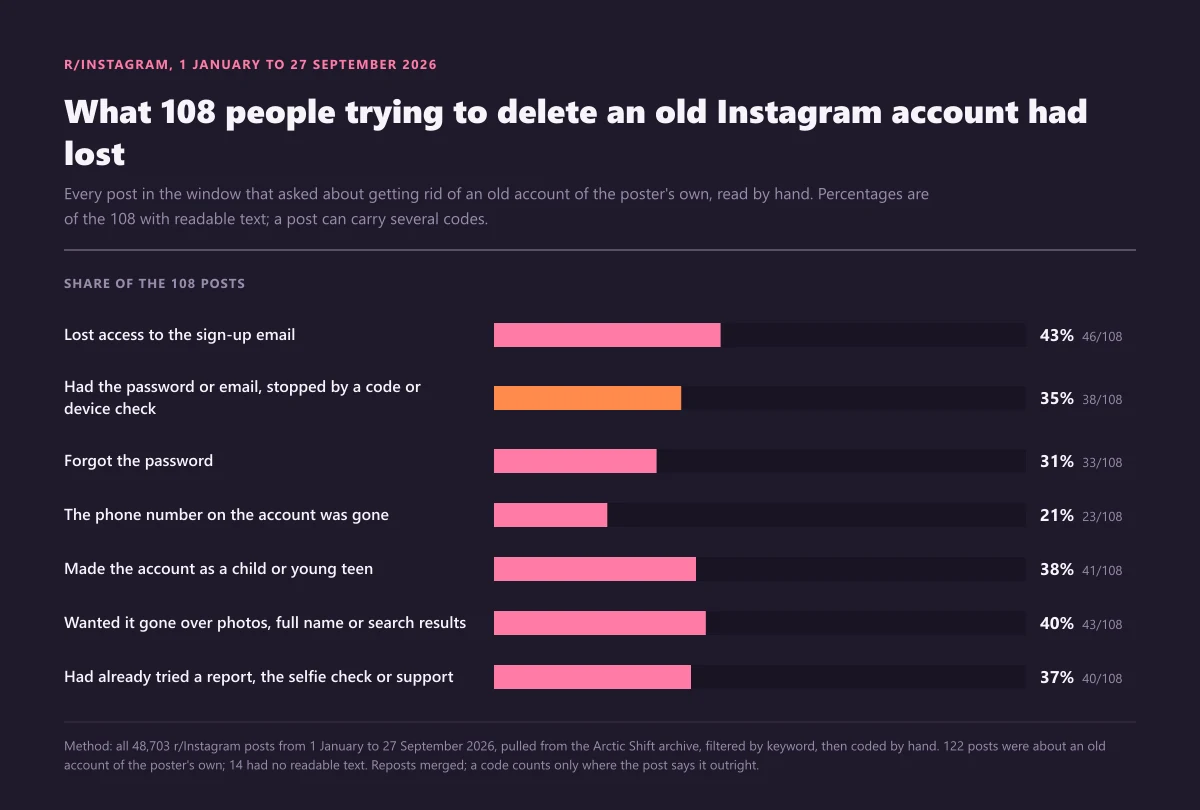
The inbox came first: 43% had lost the email the account was made with, often a Yahoo or Gmail address deleted for inactivity, and 21% no longer had the phone number. The number that surprised us was the next one. 35% had the password or the email and still couldn't get in, because Instagram sent a code to a number they no longer had, or asked them to approve the login on a device they had used before. Nobody keeps the iPhone 5 they had at fourteen. In 2026, knowing the password is not the same as being able to delete the account.
Why they wanted it gone was consistent. 40% named photos of themselves, their full name, a search result, or an employer, school or co-worker who had found it; one found out through a security-sector background check. 38% had opened the account as a child or young teen. And 37% had already tried a report, the video selfie, the impersonation form or Meta's AI assistant without result. At least four had reported their own childhood account as under-13, which fails because the account isn't run by a child any more.
Only 3 of the 108 said deletion worked in the end, each after getting back in. One poster paid a self-described hacker 3,000 rupees and got nothing; two posts in February offered to "get rid of" embarrassing old accounts for anyone who sent a DM. Separately, six posts from May to July described Instagram suspending or removing a long-unused account on its own, the same months as the inactive-account sweep covered in the next section.
What deleting an old account permanently leaves behind
Less than people fear, more than the word "permanently" suggests. The account goes; other people's copies don't.
- Instagram says the deletion process can take up to 90 days after it begins, and that copies may stay in backup storage after that, for recovery from disasters or software errors.
- It may also keep information for legal issues, terms violations or harm prevention, per its page on deleted content.
- The username becomes available again, to you or to anyone else, as long as nobody has taken it and the account wasn't removed for breaking the Community Standards.
- Screenshots, reposts and photos of you on other people's accounts stay where they are. Deleting your account doesn't reach them.
Messages are the grey area. Instagram's help pages don't say what happens to direct messages you sent once your account is deleted. Facebook's equivalent page does: messages you sent may still be visible
to the people who received them. Treat anything you sent from the old account as sitting in someone else's inbox, because Instagram's own unsend page already warns that the people you sent it to may have already seen your message
.
If the handle matters to you, that third point cuts both ways. Once it is free, anyone can register it, including someone who wants to look like you did in 2016. Deleting an old account and re-registering the handle on a new one is a judgement call; how the handle process works is covered on claiming an Instagram username.
One thing people hope for is an inactivity clean-up, and there is one, of a sort. In May 2026, after follower counts dropped across the platform, an Instagram spokesperson told the IANS news agency that this was part of our routine process to remove inactive accounts
, as Telangana Today reported. But Instagram publishes no rule for it. Its inactive username policy page only encourages people to log in and share, with no timeline, and there is no way to put an account forward for the sweep. Plenty of accounts from 2014 are still up. Count it as luck if it happens, not as a plan.
Where Instagram Ban Service fits with old accounts, and where it doesn't
We can't delete your old account. Nobody outside Instagram can. What the desk can do is work out which route you are really on, and handle the reports when the old account is being used against you.
Instagram Ban Service files takedown reports for accounts and posts that break Instagram's rules or the law: a hijacked old profile running scams, an impersonator using your old photos, a post that exposes you. It also checks, before you spend anything, whether an old account is recoverable on what you still have. The full list of solutions shows the cases it takes, and the contact page says what to send.
It turns down requests to guess or reset passwords on accounts that aren't yours, under-age reports for accounts adults made as children, and any takedown of a profile that follows the rules. If your old account is just old, the honest answer is the recovery steps on this page. Start with the inbox search in section one tonight. It costs nothing, and it settles the question the rest depends on.
Sources
- Instagram Help CentreTemporarily deactivate your Instagram profile: once a week
- Instagram Help CentreLost access to email address or phone number linked to Instagram account
- Instagram Help CentreReport an Instagram user under the minimum age
- Instagram Help CentreIf you receive a Welcome to Instagram email but didn't create an account
- Instagram Help CentreWhat happens to content you delete: up to 90 days, backups, legal retention
- Instagram Help CentreThreads and Instagram's inactive username policy
- Instagram Help CentreUnsend a message you sent in an Instagram chat
- Facebook Help CentreWhat happens when you permanently delete your Facebook account: sent messages
- Search Engine LandGoogle Search officially retires cache link, February 2024
- Telangana Today (IANS)Instagram removes millions of fake accounts in Great Purge of 2026, 7 May 2026
- Google Search Console HelpRefresh Outdated Content tool
Frequently asked questions
How long does it take Instagram to delete an old account?
The profile disappears from view as soon as the request goes in. It is deleted for good after 30 days, though the window to cancel varies by region, and Instagram says the whole process can take up to 90 days, with backup copies possibly lasting longer.
Does Instagram delete old accounts that nobody uses?
Sometimes, but you can't count on it. In May 2026 Instagram said removing inactive accounts is part of a routine process, after a sweep cut follower counts across the platform. It publishes no rule or timeline, and there is no way to ask for it, so an account from 2014 can still be up today.
If I delete my old Instagram account, can someone else take the username?
Yes. Once the account is gone, the username can be registered again by you or anyone else, as long as nobody has claimed it first. If the account was removed for breaking the Community Standards, you may not be able to reuse it.
How do I delete an old Instagram account without logging in?
You can't; Instagram says it can't delete a profile for you. What you can do is get back in without the old password: a reset link to the sign-up email or phone, Reset using Facebook, or the support check at instagram.com/hacked. Then delete it from Accounts Centre.
Why can't I find Delete account in my version of Instagram?
Because it moved. It was a browser-only page before June 2022, then sat under Settings and Account on iPhone, and now lives in Accounts Centre under Account ownership and control. Update the app, or open Instagram in a browser and follow the computer steps.
Is a phone number enough to delete my old Instagram account?
Only if the account was registered to that number and it still reaches you. Enter it under Forgotten password?, use the code or login link, and delete from Accounts Centre. If the number now belongs to someone else, the code goes to them.