Account recovery · phone, email, Meta Verified support and fake support lines
How do I contact Instagram for account recovery? The channels that answer, and the phone numbers that don't
Instagram has no help desk you can ring and no inbox you can write to about a lost account. It does have recovery screens, an in-app support hub and a paid agent queue. This guide sorts the real contact points from the fake ones, as Meta's pages read on 2 October 2026.
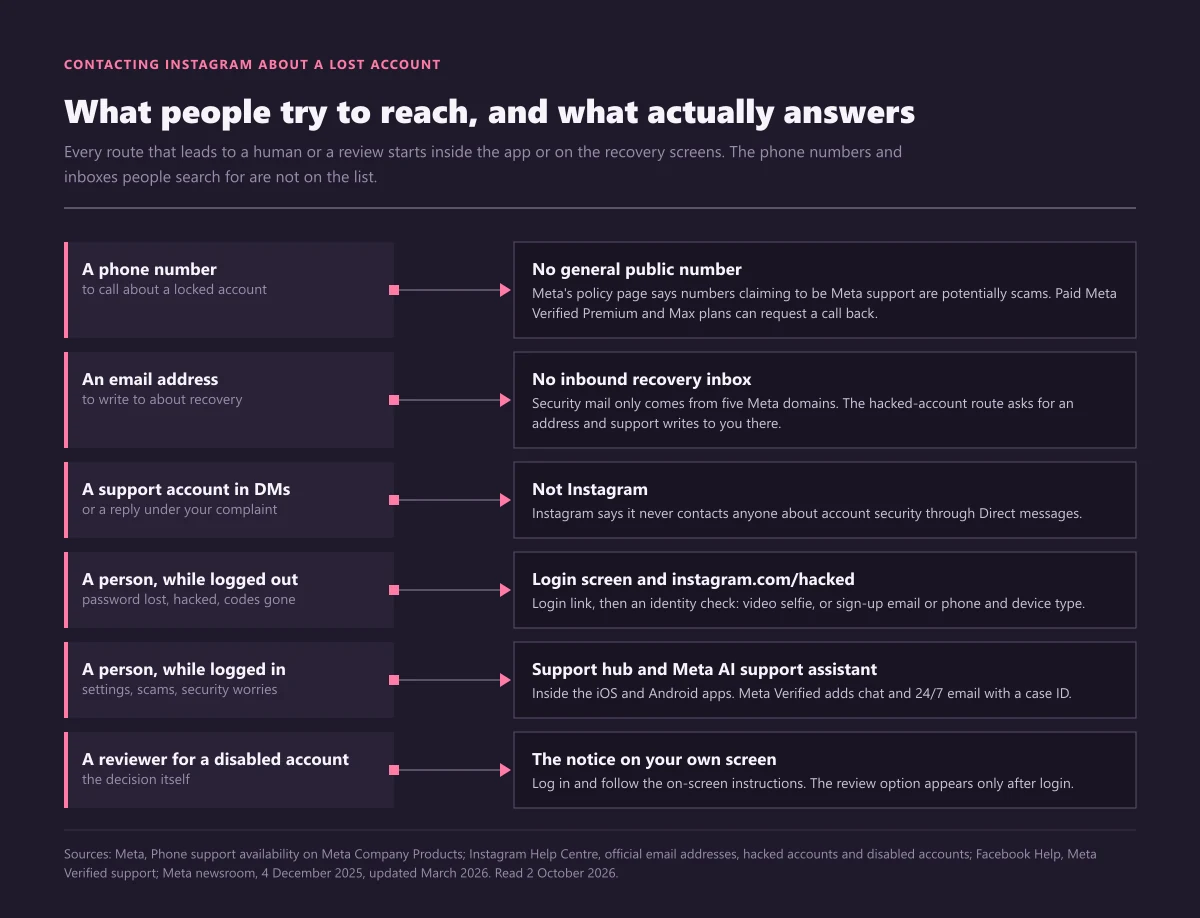
Through the app and its recovery screens, not by phone. Meta says it has no general public phone number for customer service. Locked out, use Forgotten password? or instagram.com/hacked on a phone; logged in, use the in-app support hub. Meta Verified Premium and Max subscribers can request a call back.
How do I contact Instagram for account recovery, and who actually answers?
For most people, a recovery screen answers first. A human reads your case only once you've started from the app, the login page or instagram.com/hacked.
Type the question into a search bar and the results promise hotlines, inboxes and "live agents". Meta's own pages describe something narrower. Contact with Instagram about a lost account runs through three places: the login screen, the hacked-account page, and the support tools inside the app. Each one leads to a different kind of reply.
The login screen is automated. Forgotten password? sends a link to the email address or confirmed mobile number on the account, and the login help page lists the identifiers it accepts. The hacked-account page is where a person eventually gets involved. Instagram's hacked-account article says support can be requested on a mobile device when the login link fails, and Meta's team then writes to an email address you choose. The third place, the support hub, lives inside the Instagram and Facebook apps, which helps most if you can still open them.
That last point catches a lot of people. Nearly every route to a named agent sits behind a working login, including the paid one covered below. If you can't get in, the identity checks on instagram.com/hacked are the only way to a human, and they reply by email, not by phone.
Does Instagram have a number for account recovery?
No public one. Meta says plainly that neither Instagram nor any other Meta product has a general customer-service phone number.
The wording comes from Meta's policy page on phone support availability. It names Facebook, Messenger, Instagram, WhatsApp and the Quest headsets together and says Meta doesn't have a general public phone number available for customer service
. The next sentence is the one to remember: phone numbers claiming to be Meta customer support are potentially scams and should be avoided.
So an instagram account recovery help phone number found on a directory site, a forum reply or a sponsored result isn't Instagram's. The same goes for any instagram account recovery support phone number printed in a video description or pinned in a comment. Meta does leave one opening: it may offer specialised phone support in certain jurisdictions or with certain products or features. For Instagram accounts, the one that is documented is the call-back on the two upper Meta Verified plans, and you can't dial it. You request it from inside the app.
One phone number does matter to recovery, and it's yours. Login links and two-factor codes by text go to the mobile number confirmed on the account. If that number is gone, the fix is a backup code, a second authenticator device or the identity check on the hacked-account page, not a call to anyone. Our page on getting back in without the email or phone on file works through those in order.
Can you call Instagram support for account recovery if you pay for Meta Verified?
Not quite. You can ask to be called, on two plans, from inside the verified account. Nobody publishes a number you dial.
Meta's article on contacting Meta Verified support lists five kinds of help for creator subscriptions. Chat with an agent and 24/7 email come with every plan. Prioritised handling starts at Plus. Phone support, described as Request a call from an agent
, is limited to Premium and Max, and Max adds active monitoring of open cases. The Meta Verified plans page priced those tiers on 2 October 2026 at $14.99, $49.99, $149.99 and $499.99 a month per profile.
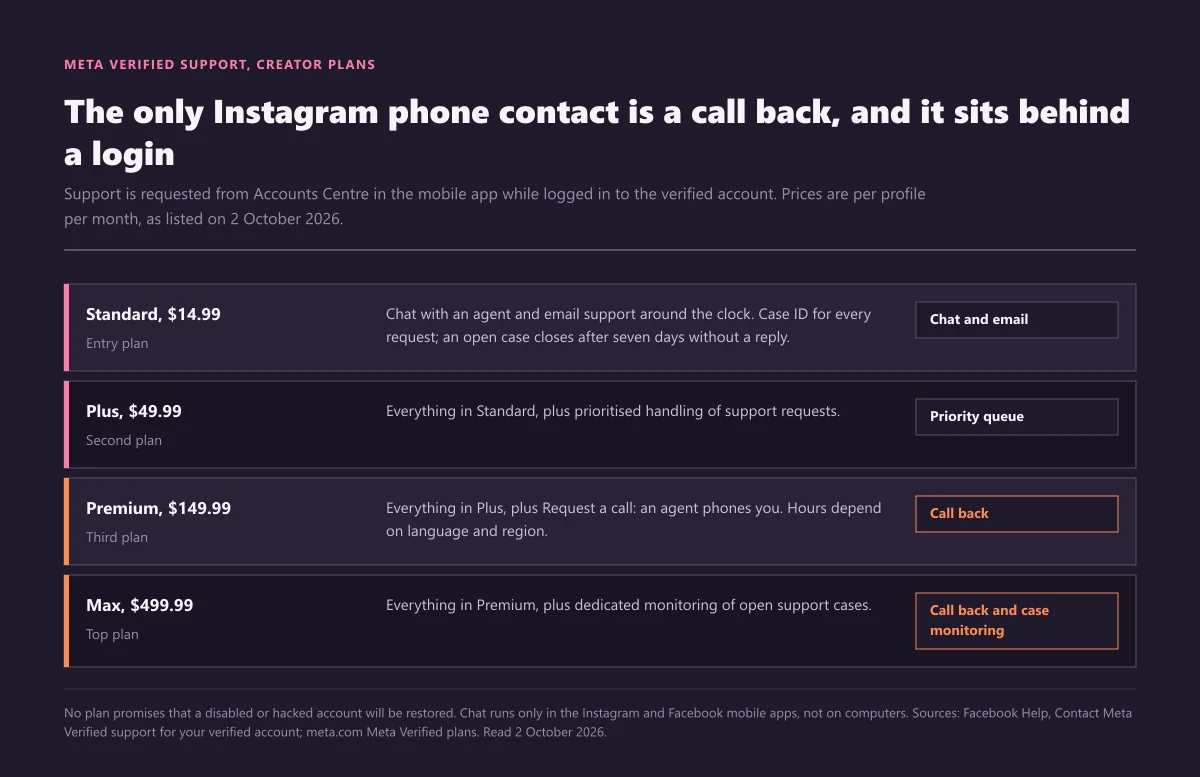
The route to that call-back is short: open the Instagram app and log in to the verified account, go to your profile, tap the menu, open Accounts Centre, then Meta Verified, Get support and Contact support. Depending on plan and issue, the screen offers Chat, Email or Request a call. Chat works only in the mobile apps, not on a computer, and the article warns that support may not load in a mobile browser.
So the paid line can't help with the hardest case, an account you can no longer open. The supported topics do include general account access or security issues, which suits a subscriber who is still logged in on one phone and fighting a hacker on another. For anyone fully locked out, the article points back to the hacked-account guide. When we pulled the article on 2 October 2026, chat and email listed fifteen languages, but nothing was listed after the phone-support label, so check the hours and languages your own Contact support screen shows before planning around a call.
Is any Instagram account recovery phone number free?
Recovery costs nothing. What you can pay for is faster access to an agent, and only through Meta's own subscription.
People searching instagram account recovery phone number free are usually trying to avoid a charge they've already been quoted. Good instinct. The Better Business Bureau's February 2025 scam alert on fake customer-service accounts puts it in one line: You should never have to pay to recover your accounts.
Every route in this guide is free to use apart from Meta Verified, and even that subscription buys a queue position rather than an outcome.
The free tools are the ones Meta builds into the product. The login link costs nothing. So does the video selfie, which Instagram's video selfie page says is reviewed while you wait, with a reset email possible on a pass and a new attempt allowed on a fail. The sign-up details check for accounts without photos of you is free, and so is the review button on a disabled account's notice.
A number that charges by the minute, asks for a gift card, or wants your password before it will "open a ticket" is selling something Meta gives away. We set out the going rates and claims of paid recovery sellers in our check on whether recovery services are legit, and what an unban service can and can't do covers the ones that promise to lift a ban.
Is there an Instagram service number in the USA for account recovery?
No. The US gets the same answer as everywhere else: no public line, and a call-back only through the paid Meta Verified tiers.
Searches for an instagram service number usa for account recovery tend to surface third-party directory pages full of numbers. None of them is a recovery desk, because Meta's phone-support page makes no exception for the United States, and Instagram's help pages send American users through the same login link, hacked-account page and in-app support as everyone else.
What is different in the US is the track record. Meta's account support update, first published on 4 December 2025 and revised in March 2026, says the relative success rate of hacked-account recovery rose by more than 30% in the US and Canada, while new account hacks fell by more than 30% worldwide over the past year. Those gains came from Meta's own checks inside the app.
The US also has the most developed scam-reporting system if a fake support line got money out of you. The Federal Trade Commission's May 2026 imposter-scam alert says it received more than 1 million imposter-scam reports in 2025, with reported losses up nearly 20% to $3.5 billion. Report a fake Instagram support line at ReportFraud.ftc.gov, and call your card issuer the same day if you paid by card.
Is there an Instagram account recovery support email address?
Not one you can write to cold. Meta emails you, from a short list of domains, after you have started a request.
No instagram account recovery support email address is published anywhere in the Help Centre. What Instagram does publish is the reverse: the addresses its security mail comes from. The official emails page lists five sending domains, support.facebook.com, support.instagram.com, facebookmail.com, mail.instagram.com and global.metamail.com, and says Instagram will never contact you about account security through Direct messaging.
Three kinds of email are real. A login or reset link you requested. A message from security@mail.instagram.com sent to the old address when someone changes the email on your account; the hacked-account page points to it as a way to reverse the change. And a reply from Meta's support team to the secure address you gave on instagram.com/hacked, asking for a selfie video or for your sign-up details. Reply inside that thread and nowhere else.
You can check any message against Instagram's own record. Accounts Centre shows the official emails sent in the last 14 days under Password and security, then Recent emails, split into Security and Other. If an email about your account isn't in that list, Instagram didn't send it. The one Instagram address people do find is ip@instagram.com, and it handles copyright claims only. A recovery request sent there won't reach anyone who can unlock an account.
How does Meta's account recovery support work for Instagram?
Meta runs Instagram recovery from Accounts Centre and the in-app support hub, with an AI assistant in front of the human queue.
Meta Instagram account recovery support isn't a separate service. Since Instagram moved into Accounts Centre, security settings, two-factor methods and recent emails sit in the same place as Facebook's. Meta's December 2025 update added a centralised support hub to the Facebook and Instagram apps on iOS and Android. It describes a Meta AI support assistant that helps with reporting scams and impersonation accounts and with resetting passwords, and an optional selfie video to confirm identity during recovery. Help Centre articles now end with a link to chat with that assistant.
The shared account system cuts both ways. If your Instagram and Facebook accounts sit in one Accounts Centre and are allowed to log in to each other, Instagram's login help lets you get into Instagram with the Facebook email or phone and password. That's often the fastest way back for people who linked the two years ago to cross-post. The flip side is that someone who takes over one account can reach the other.
Meta's own figures say the in-app route works more often than it used to, at least for hacks. None of that changes the order for disabled accounts. Instagram's page on disabled accounts says the review is requested by logging in and following the on-screen instructions, and Meta's support hub doesn't replace that button. If an account was taken over first and disabled afterwards, our guide to getting a hacked or banned account back separates the two problems.
Which contact point fits your lockout?
Match what you see on screen to a starting point. Each row also names a contact that looks useful but won't help with that problem.
| What happened | Start here | What Instagram checks | Contact that won't help |
|---|---|---|---|
| Forgot the password, still have the email or phone | Forgotten password? on the login screen | A link sent to the email or confirmed number | Any hotline or support inbox |
| Someone changed the email on the account | The old inbox, then instagram.com/hacked on a phone | The message from security@mail.instagram.com, then your identity | A "recovery agent" who messages you |
| Login codes go to a phone you no longer have | Backup codes, a second authenticator device, or instagram.com/hacked | The code, or a selfie video or sign-up details | Anyone asking you to forward a code |
| Disabled or suspended notice | Log in and follow the on-screen review | The decision, against Instagram's rules | Old appeal-form links, which now land on the Help Centre home page |
| Logged in, but worried about security or a scam | The in-app support hub or Meta AI support assistant | Your account settings and reports | Third-party "support" pages |
| Meta Verified subscriber, still logged in somewhere | Accounts Centre, Meta Verified, Contact support | Your case, under a case ID | A second chat opened before the first is closed |
The disabled row deserves a second look. Our reading of Instagram's suspension screens found that three old appeal forms people still share now redirect to the Help Centre home page. Filling out a copy of one on another site only sends your details to whoever built it. Deleted accounts follow their own clock, set out in recovering a deleted Instagram account.
What should you have ready before anyone at Meta reads your case?
Gather the details once, before you start. A reviewer who asks and waits for a reply is a reviewer whose case clock is running.
- A secure email address that only you can open. The hacked-account route sends every later message there. Avoid the inbox that may have been compromised along with the account.
- The email address or phone number you signed up with. For accounts without photos of you, Meta's team asks for it alongside the type of device used at sign-up: iPhone, Android, iPad or other.
- A phone with a front camera and good light. Accounts with photos of you get the selfie-video check. Instagram says the video never appears on your profile and is deleted within 30 days.
- Your username, exactly. Write down old usernames too, since a hacker may have renamed the account.
- Screenshots of every screen and message. The disabled notice, the "email changed" mail, any message from someone demanding money. The Meta Verified article asks for screenshots or videos in support cases for the same reason.
- The case ID, if you get one. Meta Verified cases carry a case ID number (Meta's example runs to 14 digits) and show statuses such as Received, In progress and Completed.
Two habits keep a case alive. Reply quickly: a Meta Verified case closes automatically if you don't answer the agent within seven days, and a closed case can't be reopened. And keep to one thread, since the same article allows only one active chat at a time. Sending the same request through five channels doesn't move it faster. It mostly creates duplicate cases.
How do you spot a fake Instagram support number or account?
Assume any number, inbox or profile offering "Instagram support" is fake unless you reached it through the app.
The scam follows a pattern the BBB describes well. You post a complaint about a locked account and tag the company. Within minutes, replies arrive from accounts styled as customer support, sometimes several at once. They ask you to move to DMs, then for your phone number, then for a code or a payment. The BBB's advice is to treat several "support" replies to one public post as a red flag, check how old the account is and how many followers it has, and find contact details on the company's real website instead.
A fake usually gives itself away on one of these:
- It contacts you first by DM. Instagram doesn't do that for security matters.
- It gives a phone number. Meta has no general public line.
- It wants your password, a login code or a backup code. Those are the proof of ownership; whoever holds them can take the account.
- It asks for a fee, crypto or gift cards to "escalate". Recovery is free.
- Its emails come from a domain that isn't on Instagram's list of five, or don't appear under Recent emails.
A profile that poses as Instagram's support team isn't just a nuisance to block. Those accounts break Instagram's rules on impersonation and fraud, and they can be reported. Reporting a scam or fraud account covers the money side, taking down an impersonator covers profiles that pose as a person or brand, and the fake account report fits a profile made up from nothing. If the "agent" then threatens to leak your messages or sell your account back to you, move to reporting Instagram extortion or blackmail through an impersonating profile.
What can you do when no channel answers?
Keep the evidence, retry the identity check, and, in the EU, use the complaint rights the law gives you over a disable decision.
Silence after a selfie video or a sign-up details request is common, and it isn't a refusal. Instagram's selfie page lets you submit a new video if the first one doesn't confirm your identity. If you were hacked, retrying from a different phone on a stable connection is worth a go; the hacked page asks for the request to be made on a mobile device. Write down the dates of each attempt. They matter if you later dispute a decision.
In the EU, the Digital Services Act gives users at least six months after a suspension or termination decision to complain through the platform's internal system under Article 20. Article 21 then opens certified out-of-court dispute bodies. Appeals Centre Europe covers Instagram and, under its rules of procedure, charges users no fee at present. These routes review a disable decision. They don't recover a hacked login, which still runs through Meta's own checks.
Instagram Ban Service isn't one of those channels and doesn't recover accounts. The desk handles the takedown side: fake support profiles, impersonators on your name, and hijacked accounts used to scam your followers, filed through Instagram's official channels against accounts that really break its rules. The full set of Instagram guides lists the cases we take on, and our contact page explains what to send. Start with the profile link, and never send a password or code.
Sources
- Facebook Help CentreContact Meta Verified support for your verified account
- Instagram Help CentreReview recent emails sent from Instagram: official sending domains, 14-day list
- Instagram Help CentreIf you think that your Instagram profile has been hacked
- Instagram Help CentreI can't log in: identifiers, Facebook login through Accounts Centre, password reset
- Instagram Help CentreWhy you might be asked to upload a video selfie to confirm your identity
- Instagram Help CentreAbout disabled Instagram accounts
- Federal Trade CommissionNew trends in reports of imposter scams, 7 May 2026
Frequently asked questions
Is there an Instagram account recovery help phone number with a real person on it?
Not a public one. Real people work only through Meta's own tools. Logged-out users reach Meta's team by email after starting a request on instagram.com/hacked. Logged-in Meta Verified subscribers get agent chat and email, and the Premium and Max plans can request a phone call back.
Does the Meta AI support assistant restore Instagram accounts?
Meta says the assistant helps with resetting passwords and reporting scams and impersonation accounts. It doesn't replace the review for a disabled account, which still starts from the notice you see after logging in to Instagram.
Will Instagram call or text me about account recovery?
Instagram sends login links and codes to the email or confirmed number on your account when you ask for them. It doesn't contact you about security through Direct messages, and Meta says phone numbers claiming to be its support are potentially scams.
How long does Meta Verified support take to answer?
Meta publishes no response time. Plus, Premium and Max requests are prioritised, email runs 24/7, and chat and phone hours vary by language and region. A case closes automatically if you don't reply to the agent within seven days.
Can I email support@instagram.com to recover my account?
No. support.instagram.com is one of the domains Instagram sends security mail from, not a published inbox for recovery requests. Write only in reply to a message Meta sent after you started a request, and check that it appears under Recent emails.
Is Meta Verified worth buying to get a hacked account back?
Usually not for a full lockout. Meta Verified support is reached from inside the verified account, so a subscription bought after you lose access can't open that screen, and no plan promises that a hacked or disabled account will be restored.
Can a lawyer or the police contact Instagram for me?
Police and prosecutors use Meta's Law Enforcement Online Request System, which needs a government-issued email address. It handles records and emergencies, not unlocking accounts. Your own recovery still runs through the login screen and instagram.com/hacked.