Account recovery · disabled accounts, lost contact details, lost two-factor codes
How to recover disabled Instagram account without email and phone number: the routes that still work in 2026
Losing the email and phone on an Instagram account is bad. Losing them on an account Instagram has also disabled is worse, because the disabled notice only shows up after you log in. This guide works through both problems in the order Instagram's help pages impose, as those pages read on 1 October 2026.
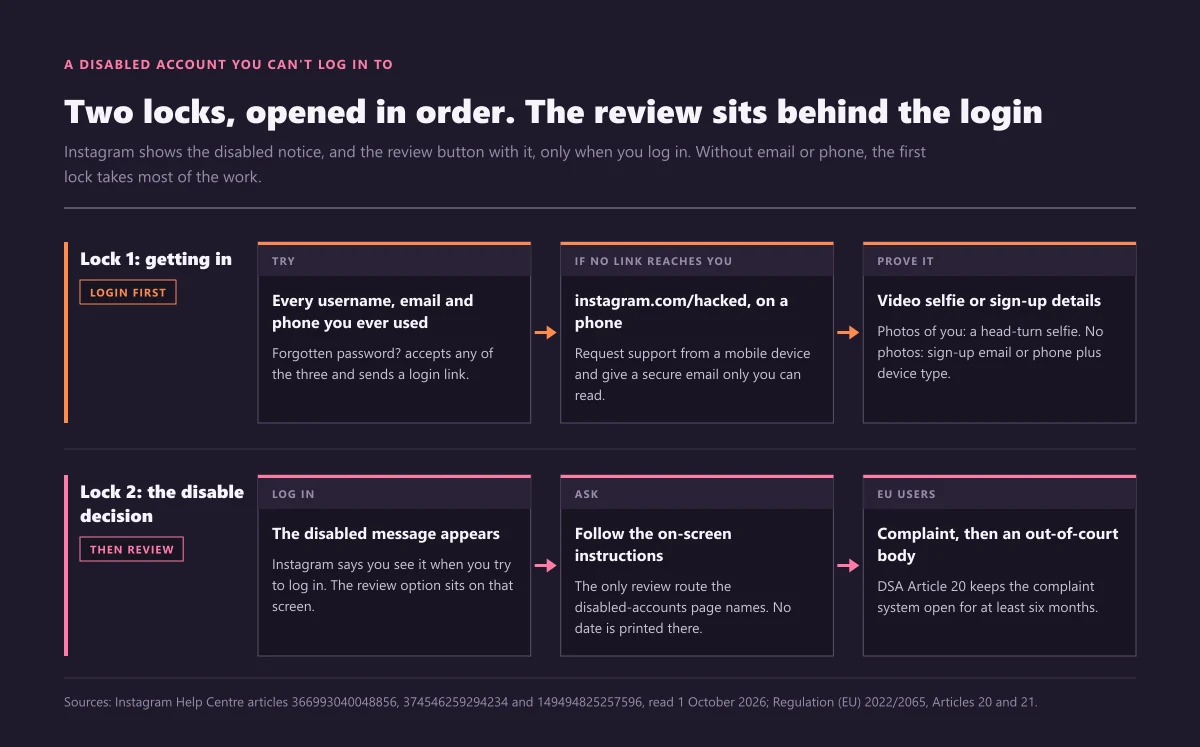
Only by proving ownership another way. Try a device that is still logged in, a Facebook login linked through Accounts Centre, or saved backup codes. Failing those, instagram.com/hacked offers a video selfie or a sign-up-details check. The disabled notice and its review appear only after you log in.
Can a disabled Instagram account be recovered with no email and no phone?
Sometimes. Whether it can depends on getting past the login screen, because the disabled notice and its review option sit behind it.
Two problems are stacked on top of each other here, and most guides treat them as one. The first is the disable itself: Instagram decided the account broke a rule, or, in some regions, that its owner falls in an age range local law keeps off the platform. The second is access. The password is forgotten, or the email address and phone number on file no longer reach you.
Instagram's page on disabled accounts says a review can be requested by logging in to Instagram and following the on-screen instructions
. The same page says the disabled message shows up when you try to log in. So the review lives behind a login, and the login lives behind the contact details you've lost.
That order decides everything below. Anyone working out how to recover disabled instagram account without email and phone number is really asking how to get past the login screen with neither, since the disable only becomes something you can dispute once its notice is on your screen. No public web form shows that notice to a logged-out visitor, and the old appeal links that still circulate don't either.
Most of this page deals with the first lock, getting in, because that is where people without an email or phone get stuck and where Instagram's help pages say least about which step to try first. The second lock, the review itself, has its own section further down.
What do you still have that Instagram can check?
Make a list before you open any form. Each item on it opens one route, and a route you don't qualify for just wastes a day.
Instagram won't take your word that an account is yours. It wants something only the owner would have: a session that never logged out, a linked account, a face that matches the photos, or details from the day the account was made. The table sets each one against the route it opens and what Instagram's own page says about it, as we read those pages on 1 October 2026.
| What you still hold | The route it opens | What the help page says |
|---|---|---|
| A phone, tablet or computer that is still logged in | Change the email and phone from inside the account | Contact details can only be changed once you can reach your profile settings |
| A Facebook account in the same Accounts Centre | Log in on Instagram with the Facebook email or phone and password | Works when the two accounts are allowed to log in to each other |
| Saved backup codes, or the authenticator app on another device | Pass the two-factor step after the password | Backup codes cover codes that can't be delivered |
| Photos of your face on the account | A video selfie, requested through instagram.com/hacked | The video never appears on Instagram and is deleted within 30 days |
| No photos of you, but you know the sign-up email or phone and the device type | An identity check by email from Meta's support team | Asks for the sign-up contact and whether you used an iPhone, Android, iPad or other |
| None of these | No route inside Instagram | Instagram says it is unable to give you access |
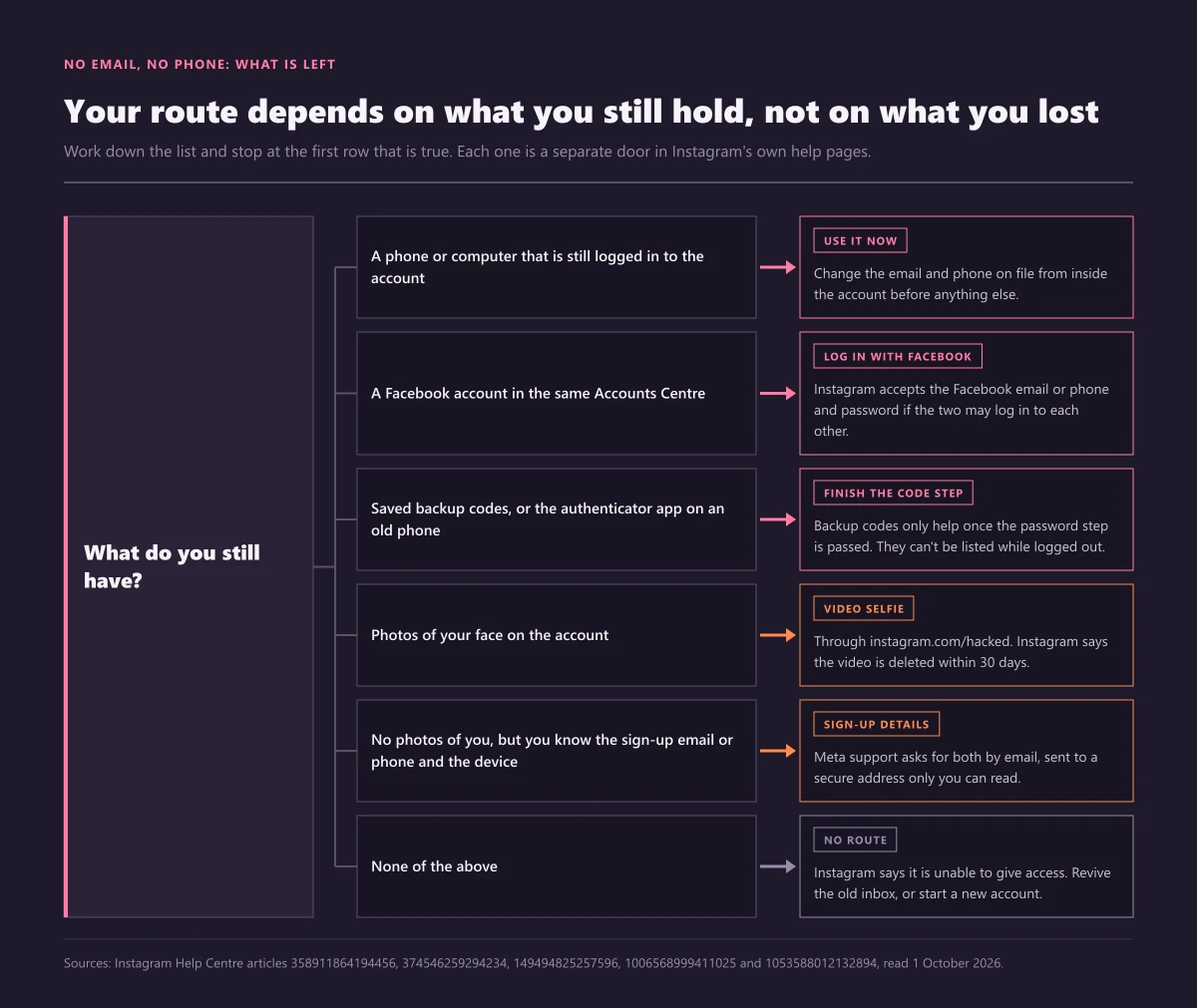
Take the last row seriously. Instagram's page for people who lost access to their email or phone says that if you can't reach the email you registered with and never linked Facebook, we're unable to give you access to the account.
That is the bluntest line in the whole help centre. It applies to a disabled account exactly as it does to a working one, and it's the reason the next sections push so hard on reviving an old inbox and finding a forgotten Facebook link.
Instagram account recovery without phone number or email: the order to try
Start with the steps that need nothing from Meta's staff. Move to the identity checks only once those have failed.
- Try every identifier you have ever used. Instagram's login help accepts a username, a confirmed mobile number, or any email listed on a linked Facebook account. An old work address, a university email, the number you had before switching carrier: any of them may be the one still on file.
- Look for a device that never logged out. An old phone in a drawer, a tablet, a laptop browser. If the app opens, go to Accounts Centre and replace the email and phone. If the account is disabled, that device may show the notice straight away, which moves you on to the review without touching the password.
- Try the Facebook login. From the Instagram login screen, the Facebook email or phone and the Facebook password open the Instagram account when both sit in one Accounts Centre and are allowed to log in to each other. Plenty of people linked the two years ago to cross-post and then forgot about it.
- Request a login link anyway. Tap Forgotten password?, enter the username, and send the link. Even when it goes somewhere you can't open, the screen usually hints at where it went, and that hint tells you which old inbox or number to chase.
- Open instagram.com/hacked on a phone. The hacked-account page says support can be requested
on a mobile device
when the login link doesn't work. Give a secure email address that only you can read; every later message arrives there. - Finish whichever identity check you're offered. Accounts with photos of you get the video selfie. Accounts without get a request for the sign-up email or phone and the type of device used back then.
The search instagram account recovery without number and email mostly describes steps five and six. Steps one to three are the ones people skip, and they're the only ones that don't wait on a reviewer. Instagram's video selfie page is frank about the wait: you won't have access to the account while the video is reviewed, a pass may bring an email with a password-reset link, and a fail lets you record a new one. It adds that refusing the selfie may mean you can't log back in at all.
How to recover a disabled Instagram account without email access, or without the Gmail on file
Often the email isn't gone, only locked. Getting that inbox back is the one fix that makes every ordinary Instagram route work again.
Instagram's lost-access page sends people to their email provider first and says Instagram can't provide any assistance
with the email account itself. Read that as advice rather than a brush-off. An inbox you can open again means the login link lands, the password reset works, and the disabled notice appears on the next login. No selfie, no queue. For anyone asking how to recover disabled instagram account without email, the fastest answer is often to stop treating the email as lost.
Instagram account recovery without Gmail
Google runs its own process. Its page on recovering a Google Account or Gmail says wrong guesses won't throw you out and there is no limit on attempts, so answer what you can and try again from a phone or computer you've used with that account before. It also warns that work or school accounts may need the administrator. If Google gives the mailbox back, request the Instagram login link again. If it doesn't, you're in the instagram account recovery without gmail case proper, and the identity checks in section three are the remaining door.
Outlook, Yahoo, iCloud, work and school addresses
Every large provider has a recovery form, and most ask for an old password, a recovery phone or a list of recent contacts. Work and school addresses are harder. Once an employer or university closes a mailbox, only its IT team can reopen it, and many won't. Disposable addresses used to dodge spam at sign-up usually can't be reopened at all. If the account was registered on one of those, the Facebook link and the photos on the account are worth more than any email form.
One more detail from the lost-access page: an Instagram account created through Facebook uses the Facebook email address, so the inbox to revive may be the one on your Facebook profile, not the one you remember typing into Instagram.
Instagram account recovery without password, and why a disabled account needs one
A forgotten password on its own is a small problem. The reset only fails when it has nowhere to send the link.
Instagram's login help says a password can be reset with an email address, phone number or username, and the link goes to the email or the phone. So instagram account recovery without password is routine while either contact still reaches you. The username by itself doesn't carry the reset; it only tells Instagram which account's contact details to use.
A disabled account adds one twist. People asking how to recover disabled instagram account without password often assume the review can be started from outside, with a form and a description. The help pages describe no such form. The old appeal forms passed around in guides now redirect to the Help Centre home page, as we found when we opened three of them for our guide to suspended-account recovery. The working route is the long one: reset the password or pass the identity check, log in, and let the disabled screen appear.
Two shortcuts skip the password entirely. A linked Facebook login is one. The other is a saved account on the login screen: Instagram says one may appear because the account was recently used on that device or, on Android, because a Google account on the phone is associated with it. A saved account can log in with one tap, though the page warns that in some cases you'll still be asked for the password.
Instagram account recovery without two-factor authentication codes
Two-factor authentication is a lock on top of the password. Losing the phone behind it is why many people with a working password still can't get in.
Instagram's two-factor page lists three ways to receive login codes: an authentication app such as Duo Mobile or Google Authenticator, a text message, and WhatsApp, which only works once the text method is switched on. The code is requested when someone logs in from a device Instagram doesn't recognise. That last detail is the useful one. A device you once marked with Trust this device isn't asked again, so if the old laptop is trusted, log in there first.
For anyone in the instagram recover account no access to code position, the order runs: a trusted device, then a backup code, then a second device you added to the authenticator app, then the hacked-account route. The two-factor page says itself that if you lose access to your phone or email and can't get codes, a backup code is the way in.
Where are the backup codes, and what if the authenticator phone is gone?
Both have answers, but neither answer comes from Instagram once you're logged out.
Where to find your Instagram recovery code
Backup codes live in Accounts Centre under Password and security, then Two-factor authentication, your account, Additional methods and Backup codes, according to Instagram's backup-code page. We read that page on 1 October 2026 expecting a route for people without their codes and found the opposite at the bottom: you must be logged in
to see the list or get a new one. So anyone asking where to find instagram recovery code after being logged out is asking for a list Instagram won't show them. The codes exist only wherever you put them while you were still in.
The same page suggests copying them, screenshotting them or saving them some other way, which tells you where to look: the camera roll and its cloud backup, a password manager note, a notes app, a printed sheet, an old computer's downloads folder. Many photo apps can search text inside screenshots, so a search for "backup" is worth a try. Don't mix these up with the codes a login link or instagram.com/hacked sends. Those go to the email or phone on file, which is exactly what you've lost.
I lost my authenticator recovery code: what still works on Instagram
The complaint "i lost my authenticator recovery code instagram" usually means the phone with the authenticator app is gone. Check other devices before anything else. Instagram's page on two-factor on multiple devices says up to five devices can get codes from an authentication app for one Meta Account, added with a copied key or a QR code. If you set up a tablet or a second phone back then, its app still makes valid six-digit codes.
Next, some authenticator apps back their entries up to a cloud account. If your new phone was restored from a backup, open the app before assuming the codes went with the old handset. Failing both, instagram account recovery without backup code runs through the same identity check as everyone else's: instagram.com/hacked, a secure email, then a selfie or the sign-up details. Nobody at Meta will switch two-factor off for you over the phone. Meta says it doesn't have a general public phone number
for customer service, on its phone support page.
Once you are back in, how does the disabled review work?
Getting in finishes the first lock. The disabled screen starts the second, and it has its own rules.
Log in and read the screen before you tap anything. Instagram says a disabled account shows a message at login, and that a review may be requested through the on-screen steps. The disabled-accounts page prints no deadline. Recovery guides and forum replies repeat a 180-day figure; we found it on none of the Help Centre pages we opened, so trust the date on your own screen over a number copied between websites.
In the EU there is a legal floor as well. Article 20 of the Digital Services Act requires platforms to keep their internal complaint system open for at least six months after a decision like this, free of charge, and Article 21 lets you take the dispute to a certified out-of-court settlement body if the complaint fails.
Two situations have no review to win. If the disabled page's age-range note fits your case, the disable follows local law in your region and isn't a mistake to argue. And if the account was deleted rather than disabled, the page says there's no way to restore it
. Our page on recovering a deleted Instagram account explains how to tell those states apart from the login screen.
As soon as the account works again, fix whatever caused the first lock:
- Replace the email and phone with ones you'll still have in five years. Instagram's lost-access page says both the old and the new address receive a request to confirm or deny the change.
- Move two-factor to an authentication app and add a second device, so one lost phone can't lock you out again.
- Get a fresh set of backup codes. Get new codes cancels the old set, so store the new list away from the phone that makes the codes.
- Link Facebook in Accounts Centre if you use it. The login page shows that link doubling as a spare key.
- Check Accounts Centre and connected apps. The hacked-account page advises removing linked accounts you don't recognise and revoking access for suspicious third-party apps.
Why was the account disabled, and what if someone else is using it?
A review goes better when you know what Instagram thinks happened. And a lost account doesn't always sit quietly while you work on getting it back.
Most disables trace back to the causes set out in what triggers an Instagram ban, and how a ban becomes permanent explains why a few decisions don't reverse. People who wake up disabled often blame a rival with a pile of reports. Volume alone doesn't do it, as our look at report counts shows, and a coordinated mass-report campaign can't take down an account that broke no rule. The paid versions don't change that: we've examined mass-report bots, spam-report bots, so-called reporter tools, report apps and panels, ban-as-a-service sellers and the mass-reporting offers we traced to their sellers.
Instagram won't tell you who reported you, a point covered in whether Instagram names reporters and, from the reporter's side, whether the reported person finds out. What a report actually sets in motion walks through the review a report starts, and how to tell whether a reported account was banned lists what shows from outside. Reports built on real violations are a different matter; reporting an account to get it disabled, getting someone banned on Instagram, removing another person's account and getting someone's Instagram deleted each set out when that is justified. The routes from one post to a whole profile are in taking down a post or an account, how accounts get taken down and the account takedown overview.
If the account, or a copy of it, is being used against you
An account you can't reach can still post. If someone took it over and is messaging your followers, the guide to getting a hacked or banned account back covers the takeover side. If a new profile is posing as you, that fits the impersonator takedown route; a profile invented from scratch is a fake account report, and impersonation reports set against DMCA notices explains which fits when the copy uses your photos rather than your name. Your own pictures reposted without permission go through the copyright report for stolen content.
A copy that asks your followers for money is a scam and fraud account report; one running a fake prize draw is a giveaway or business report. Either starts from the profile's menu, as described in reporting a profile or page. If the person behind it wants payment to hand the account back, that is extortion: see reporting Instagram extortion and impersonation and blackmail reports. Someone using it to track you belongs in the stalking report, posts exposing where you live in threats and doxxing, and abuse aimed at you in bullying and harassment reports.
Single items have their own guides: reporting one post, reporting a comment and reporting a Story. If screenshots of the account spread to Reddit, the Reddit takedown survey shows how those requests went for others. If you give up on the account and want its old handle, claiming an Instagram username explains when a name is released. And if the account belonged to someone who has died, recovery is the wrong route: memorialised Instagram accounts covers what families can ask for.
Who can help you recover a disabled account, and who just wants your codes?
Nobody outside Meta can open either lock. Anyone who asks for your login code or backup codes is trying to open them for themselves.
Recovery sellers find people in comment sections and in direct messages that arrive soon after a public complaint about a lost account. Instagram's page on emails from Instagram says it will never contact you about account security through Direct messages, so a DM offering recovery is not from Instagram. A stranger who asks for a backup code, a six-digit login code or the password of your old email is asking for exactly the proof Instagram uses to decide who owns the account.
The official route has improved. Meta's account support update of December 2025, revised in March 2026, reported new hacks down by more than 30% worldwide and the success rate of hacked-account recovery up by more than 30% in the US and Canada. Those figures cover accounts that still exist and get back in through Meta's own checks. None of them involve a third party.
Instagram Ban Service doesn't recover accounts and never asks for passwords or codes. The desk works the takedown side: an impersonator on your old name, a hijacked account scamming your followers, or reposted photos that break Instagram's rules or the law, filed through Instagram's official channels and only against accounts that really do violate them. The full list of Instagram solutions shows the cases taken on, and the contact page says what to send, starting with the profile link and what access you still have.
Sources
- Instagram Help CentreLost access to the email address or phone number linked to an Instagram account
- Instagram Help CentreWhy you might be asked to upload a video selfie to confirm your identity
- Instagram Help CentreSecuring your account with two-factor authentication: three methods, trusted devices
- Instagram Help CentreHow you can use a backup code on Instagram
- Instagram Help CentreTwo-factor authentication on multiple devices: up to five devices
- Instagram Help CentreEmails from Instagram: no account-security contact through Direct messages
- Google Account HelpHow to recover your Google Account or Gmail
Frequently asked questions
Can Instagram send my login code to a new phone number?
Not while you are logged out. Codes go to the number or authentication app already on the account, and changing the number needs access to your settings. The hacked-account route asks for a secure email address instead and sends the next steps there.
Does the video selfie work if my account has no photos of me?
No. Instagram uses the selfie for accounts with photos of you. For an account without them, Meta's support team asks for the email address or phone number you signed up with and the type of device you used at sign-up.
How long does Instagram keep the video selfie?
Instagram's hacked-account page says the video never appears on Instagram and is deleted within 30 days. If Instagram can't confirm your identity from it, you can submit a new video and it will be reviewed again.
Can I log in to Instagram with my Facebook password if I forgot my email?
Yes, if both accounts are in the same Accounts Centre and allowed to log in to each other. Enter the Facebook email or phone number and the Facebook password on the Instagram login screen. Two-factor authentication may still ask for a code on a new device.
Is there an Instagram phone number or email address that restores accounts?
No. Meta says it has no general public phone number for customer service, and Instagram says it never contacts people about account security through Direct messages. Recovery requests go through the login screen and instagram.com/hacked.
Why does Instagram keep sending the login code to my old number?
Because that number is still on the account. Codes go to the phone or app set up for two-factor authentication, and only someone logged in can change it. Use a trusted device, a backup code or a second authenticator device, or go through instagram.com/hacked.
Can I get new Instagram backup codes without logging in?
No. Instagram's backup-code page says you must be logged in to see the list or get a new one. Once you are back in, Get new codes cancels the old set, so keep the new list somewhere other than the phone that receives your codes.