Facebook take down · your own or someone else's, the route for each, and the Meta link most guides skip
How to take down a Facebook account, Page or post, and what it does to the Instagram next door
Facebook and Instagram share one owner, one rulebook and, for most people, one Accounts Centre. That is why the people who write to us about a Facebook take down usually ask a second question straight away: what happens to the Instagram account linked to it?
How to take down a Facebook account depends on whose it is. Your own: delete it in Accounts Centre, which removes the Facebook profile only, not a linked Instagram. Someone else's: report the profile or use Meta's legal, privacy or impersonation forms. Report counts do not decide removals; a reviewer reads what was posted.
Which Facebook take down are you after, and does it reach Instagram?
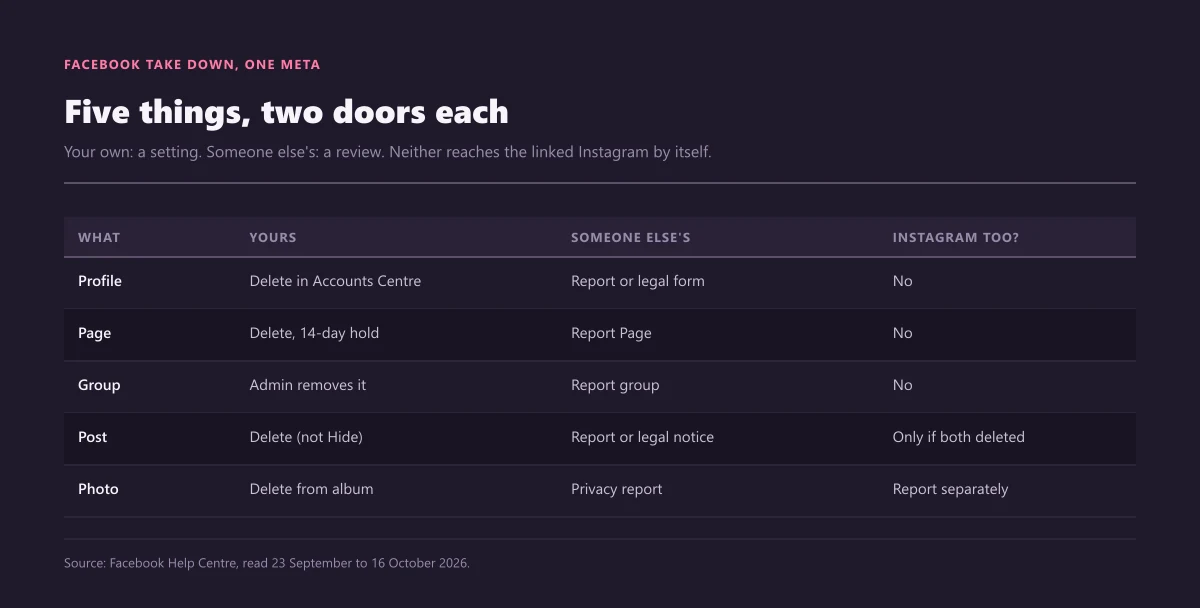
Five things can come down on Facebook, each by two different doors. None of them reaches across to Instagram on its own, even when the two accounts sit in the same Accounts Centre.
Whether you typed how to take down facebook page, how to take down facebook post, facebook take down post or just facebook taken down, the first step is the same: decide whose it is. The phrase facebook take down covers jobs that have nothing in common apart from the word. Removing your own Page is a settings change. Getting a stranger's Page removed is a review by Meta. A facebook take down request about a defamatory post is a legal notice. Sorting the job first saves weeks.
| What | If it is yours | If it is someone else's | Does the linked Instagram come down? |
|---|---|---|---|
| Your profile (the account) | Delete in Accounts Centre | Report profile; under-age, impersonation or legal form | No. Instagram stays unless you delete it too |
| A Page | Unpublish, deactivate or delete (full control) | Report Page from Options | No. A linked Instagram professional account keeps running |
| A group | Admin deletes it member by member, then leaves | Report group | No |
| A post | Delete post (Hide only clears your profile) | Report post; legal form for unlawful content | Only if the same item was cross-posted and you delete both |
| A photo or profile picture | Delete from the album | Privacy report for images of you or your child | No. Report the Instagram copy separately |
The last column is the one people miss. Accounts Centre links the two apps for login, payments and cross-posting, but each account is judged and deleted on its own. A Facebook profile removed for breaking the rules can drag a linked Instagram into review when the same person is behind both, yet that is a separate decision Meta makes, not something the take down request carries with it.
How to take down a Facebook account that is yours
Delete it from Accounts Centre. Deletion is reversible for a short window, then final, and it touches only the Facebook profile you pick.
Go to Settings, then Accounts Centre, then Personal details, then Account ownership and control, and choose Deactivation or deletion. Deactivation hides the profile and can be undone by logging back in. Deletion starts a countdown; log in before it ends and the request is cancelled. When Accounts Centre asks which profile, pick only the Facebook one if you mean to keep Instagram.
Two side effects catch people out. Deactivating your account also deactivates any Page that only you controlled, and messages you sent stay with the people who received them. Download your information first if you want the photos. If you later need to remove a separate, abandoned Instagram profile, taking down an old Instagram account or a single photo works the same way on that side.
How do I take down my Facebook page without losing it by mistake?
Before you settle how to take down your Facebook page, pick the strength you need: unpublish hides it, deactivate hides it from everyone, delete removes it after 14 days. All three need full control of the Page.
How to take down a Facebook page you run depends on how final you want it. Meta's Page visibility guide separates the options clearly. Unpublishing keeps the Page editable while hidden from the public. Deactivating hides it from everyone, followers included, and freezes editing. Neither deletes anything. To delete, open the Page, then Settings and privacy, Settings, Access and control. Meta's deletion article says the Page goes dark at once and is deleted for good after 14 days.
So how can I take down my Facebook page when I am only an editor? You cannot. Deleting or deactivating needs "Facebook access with full control", and a Page left with nobody holding full control is deactivated and scheduled for deletion automatically. If an old agency holds it, the fix is an admin dispute, not a report. A deactivated Page can only be reactivated from your personal profile, under Your activity.
Whichever way you take down your Facebook page, an Instagram professional account linked to it stays live. Unlink it in Accounts Centre first if the Page was its ad account.
How to get a Facebook page taken down when it isn't yours
Report the Page itself, not just a post, and say which rule it breaks. Meta reads the Page; the number of people who reported it is not the test.
Anyone searching how to take down a page on Facebook that belongs to someone else ends up at one button. To report, tap Options below the cover photo and choose Report Page, as Meta's Page report article describes. If the Page has blocked you, a friend can file the same report. Before you write anything, open the Page Transparency panel: it shows the creation date, previous names and the countries its managers work from. A Page renamed three times in a month is a much stronger case than one complaint about tone.
Meta states that the number of times something is reported does not decide whether it comes down. That is why a coordinated wave of reports against a harmless Page goes nowhere, and why one detailed report can get a scam Page removed. When a Page targets someone on both apps, a report against an Instagram story or Page filed at the same time gives each review team the full picture.
A facebook group taken down follows the same logic: report the group from its menu, and add the posts that break the rules.
How to take down a Facebook post: yours, a reply, or someone else's
Your own post: Delete post. Hide only clears it from your profile. Somebody else's post: report it, or send a legal notice if it breaks the law rather than a rule.
How to take down a post on Facebook that you wrote is one tap: open the three dots and choose Delete. Meta's post help page is precise about the difference: deleting removes the post from Facebook entirely, while hiding it only takes it off your profile, so it can still turn up in Feed. If a friend tagged you, removing the tag does not remove their post either.
How to take a post down from Facebook when someone else wrote it is a review, not a button, and how to get a Facebook post taken down starts with the report menu on the post. When the post is unlawful rather than just rude, such as defamation or a privacy breach, Meta's legal forms and EU notices under the Digital Services Act carry more weight, and the reporter gets a written decision. Our guide to filing a legal removal request on Instagram walks through the same Meta legal intake from the Instagram side, and the steps to get an Instagram post or account taken down mirror this one.
A message that says your facebook post taken down is a removal by Meta, not by another user. That is an appeal question, covered further down.
How to take down a photo on Facebook, including a profile picture
Your own photo: delete it from the album. A photo of you that someone else posted: use the privacy report, which only covers you, your child or someone you legally represent.
People asking how to take down profile picture on Facebook usually mean every old one, not just the current image. Open Photos, then Albums, then Profile pictures, pick the image and choose Delete photo, as Meta's profile picture guide shows. Changing the picture is not enough: Meta notes that your profile picture is always public, and older ones stay in the album until you delete them.
For a photo someone else uploaded, Meta's image privacy report accepts images of you, your child under 13, or a person you are the legal guardian of. Adults outside the US are covered where local law gives a right to removal; in the UK the ICO's guidance on erasure is the reference point. When the same image is on Instagram, what to do when someone posts a picture or video of you on Instagram covers the matching form.
Does Facebook take down videos with copyrighted music, or stock photos?
Yes to both, when the rights holder files. Music is also blocked or muted by automatic matching, and a Page that works as a music-listening service can be removed.
Facebook's music guidelines say a video using recorded music can be blocked, muted or removed, and that a Page, profile or group used to create a music listening experience can be deleted. The rights holder sets the outcome through matching, so a clip can pass in one country and be muted in another.
Do stock photos get taken down on Facebook? When the agency or photographer files a notice through Meta's intellectual property form, yes, even on a post with a paid licence that did not cover social media. Buying a licence is not a defence if its terms exclude the use. Repeat notices become strikes, which is the same machinery as a copyright strike on Instagram, shared across Meta.
Facebook won't take down a fake profile of me: what still works?
Switch from the general report to the impersonation route, prove who you are, and file on Instagram too if the same person copied you there.
A general report about a fake profile often comes back as "doesn't go against our Community Standards", because the reviewer cannot tell which account is real. Meta's impersonation help page has its own flow: Report profile, then Pretending to be someone, then Me. People without a Facebook account can use the contact form linked there and attach ID.
If the profile belongs to a child under 13, the under-age report form takes the URL directly. Meta deletes the account when the age is reasonably verified, but it does not send confirmation, so check the link yourself. When the same impostor runs an Instagram account, getting an Instagram account taken down is a separate report, and threads like the ones we looked at in what Reddit says about taking down an Instagram page show how often people file only one side.
Content taken down on Facebook: how do you appeal it?
Start in Account Status, which lists every removal and strike, then request another review. A first strike on a Page can sometimes be cleared by the admin who posted it.
If you see content taken down on Facebook, or a whole facebook page taken down, open Account Status from your profile under Help and support. It covers the profile and every Page it manages, and shows the rule cited. From there, choose Request review. For a content taken down facebook appeal that fails, Meta may offer an Oversight Board reference number.
For a facebook page taken down appeal, check Page status first. Meta's first-strike option lets the admin who posted the content remove a warning once a year by completing a short review, but the content itself stays removed. Whole-account disables follow the grounds in Meta's disabled-account article, such as repeated violations or misrepresented identity, and the restrictions expire after a year.
The same Meta review sits behind Instagram. If your Instagram was hit in the same sweep, the Instagram appeal form and the steps for an Instagram disabled account notice are the parallel route. When a first appeal has already failed, read recovering a disabled Instagram account after an appeal and, for final decisions, what is left once an Instagram account is permanently disabled. A softer limit shows up as Instagram's "we restrict certain activity" message rather than a removal.
Reporters get a review too: under Support Inbox, Reports about others, Meta's review request usually answers within 24 hours.
Facebook or Instagram: which one takes things down more often?
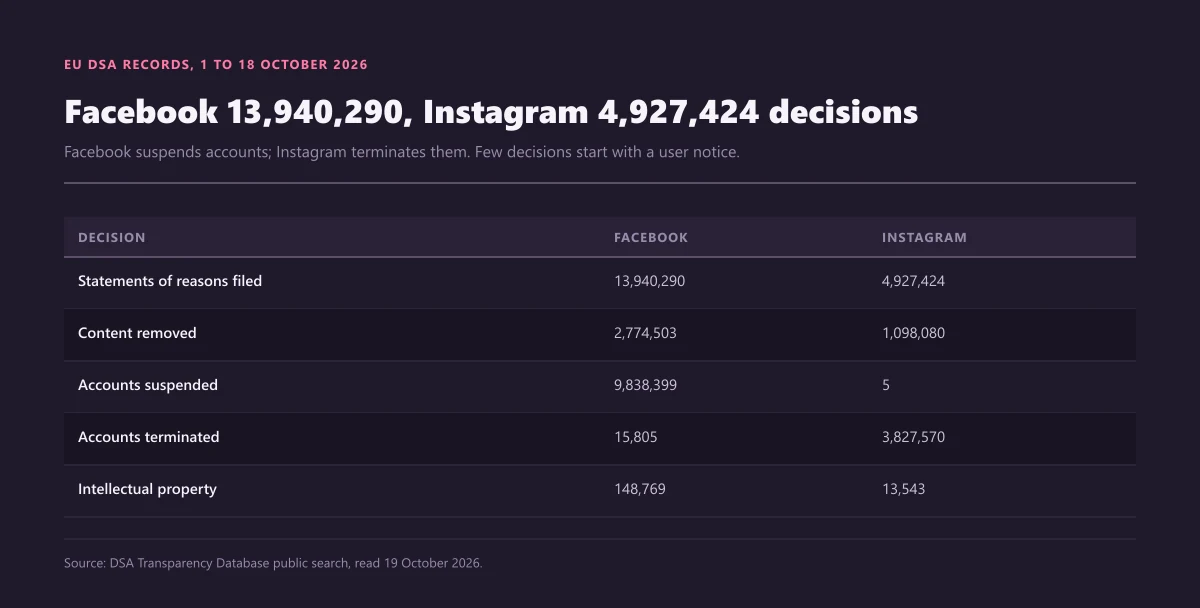
In the EU records for 1 to 18 October 2026, Facebook logged 13,940,290 decisions and Instagram 4,927,424. Most Facebook account actions are suspensions; few started with a user notice.
Every platform in the EU has to file a statement of reasons for each moderation decision in the DSA Transparency Database. We filtered it for Facebook and Instagram on 19 October 2026, for decisions dated 1 to 18 October.
| Decision, 1–18 Oct 2026 | ||
|---|---|---|
| Statements of reasons filed | 13,940,290 | 4,927,424 |
| Content removed | 2,774,503 | 1,098,080 |
| Accounts suspended | 9,838,399 | 5 |
| Accounts terminated | 15,805 | 3,827,570 |
| Intellectual property | 148,769 | 13,543 |
Three things stand out. Only 9,649 of Facebook's decisions began with an Article 16 notice, the formal route an ordinary user or lawyer files, which is under 1%; the rest came from Meta's own detection. Facebook suspends accounts while Instagram terminates them, so the same breach reads differently on each side. And 98% of Facebook's intellectual property decisions removed the content, which makes a rights-holder notice the route most likely to end in a removal. The database records decisions, not outcomes for a named person, so read it as a pattern, not a promise.
Can a Facebook take down free up a username or Page name?
Rarely. A removed Facebook Page releases its @name slowly if at all, and a removed Instagram account keeps its handle blocked. Nobody gets a name by reporting its holder.
Some requests are really about a name: a squatter Page holding a brand, or an Instagram handle that matches it. Taking the Page down does not hand the name over, and on Instagram a disabled account keeps its handle locked, which is why an Instagram username shown as taken can stay that way for months.
For the legitimate routes, read how to get a taken username on Instagram and how to claim a taken Instagram name through Meta, and where a trademark is involved, an Instagram support request with the registration attached. If you are browsing instead, see which 4-letter Instagram handles are realistic, rare Instagram usernames and the market for Instagram usernames for sale.
Sources
- Facebook Help CentreUnpublish or deactivate a Page
- Facebook Help CentreDelete a Facebook Page, 14-day hold
- Facebook Help CentreReport a Page
- Facebook Help CentreReport counts do not decide removal
- Facebook Help CentreDelete or hide a post
- Facebook Help CentreReport a photo or video that violates your privacy
- Facebook Help CentreReport an account pretending to be you
- Facebook Help CentreRemove a first-time strike from a Page
- FacebookMusic guidelines
- European CommissionDSA Transparency Database, Facebook and Instagram, 1 to 18 October 2026
Frequently asked questions
How do you take down a Facebook page?
If it is yours, open Settings and privacy, Settings, Access and control, and delete it; the Page goes dark at once and is gone after 14 days. If it is someone else's, tap Options below the cover photo and choose Report Page.
How do you take down a Facebook post?
Open the three dots on your own post and choose Delete; Hide only removes it from your profile. For someone else's post, use Report post, or Meta's legal form when the post is unlawful.
How you take down a post on Facebook that someone else shared of you?
Report it from the post menu. If it shows an image of you, use Meta's image privacy report, which covers you, your child under 13 or someone you legally represent.
How do you take down your Facebook page if you are not the admin?
You cannot; deleting needs full control. Ask the person who has it, or file an admin dispute if the Page was built for you and the holder has gone.
Does deleting Facebook delete my Instagram?
No. Accounts Centre asks which profile to delete, and choosing only Facebook leaves Instagram running. A linked Instagram professional account also survives when its Facebook Page is deleted.
How do I take down a Facebook page I created years ago?
Log in to the personal profile that created it and check you still have full control, then delete it under Access and control. If you lost access, recover the old profile first; Meta will not hand a Page to a new profile on a report.
How do I take down a Facebook post after people have shared it?
Delete the original. Shares of a deleted post stop showing it, but screenshots and re-uploads are new posts and need their own reports.
How do you take down a page on Facebook that copies a business?
Report the Page as pretending to be a business, and if the business holds a trademark, file Meta's trademark form with the registration number.
Why was my Facebook page taken down with no warning?
Account Status shows the rule cited for every removal. Severe violations can remove a Page on the first strike; otherwise check for earlier warnings and request a review from the same screen.
Is there a Facebook take down request form for lawyers?
Yes. Meta runs legal and intellectual property intake forms, and in the EU an Article 16 notice under the Digital Services Act gets a written, reasoned decision.