Support requests · help forms, Report a problem, the in-app list and fake support messages
Instagram support request: nine help forms tested, and where each reply lands
Instagram doesn't run a ticket desk. It runs a handful of separate doors, and each one sends its answer somewhere different. On 14 October 2026 we opened nine of the form addresses that guides still pass around, signed out, and read the Help Centre pages behind the rest.
An Instagram support request is anything you ask Instagram to review: a report, an appeal, a bug note or a help form. In the app it sits under Help, then Support requests, and replies arrive there or by email. Ordinary accounts get no ticket number. On 14 October 2026, four of the nine public form addresses we opened still loaded a form.
What is an Instagram support request, and is it the same as an Instagram support ticket?
It is Instagram's own label for something you asked it to look at. It isn't a ticket in the help-desk sense: there's no number, no named agent and no place in a queue.
Most companies hand you a reference when you write in. Instagram doesn't, and that gap is why people search for an Instagram support ticket and come back with nothing. What exists is a list inside the app. Open your profile, tap the menu, scroll to More info and support, and tap Help. One of the rows there holds your requests.
The name of that row depends on which of Meta's pages you read. The page on checking the status of a report calls it Support Requests, with Reports inside. A second Help Centre page, read on the same afternoon, gives the app path as Help, then Reports and violations, then Reports. Both describe one list. If your app shows the second label, you haven't lost anything.
So an IG support request is an entry in that list, or an email thread Meta opened after you used a form. The closest thing to an Instagram help ticket belongs to paying subscribers. Meta Verified support, as its help page read on 2 October 2026, gives each chat a case ID and one of three statuses: Received, In progress or Completed. A case there closes by itself if you don't answer the agent within seven days.
Everyone else works without a reference. That changes how you should keep records, which we come back to at the end.
Where does each request go, and where does the answer arrive?
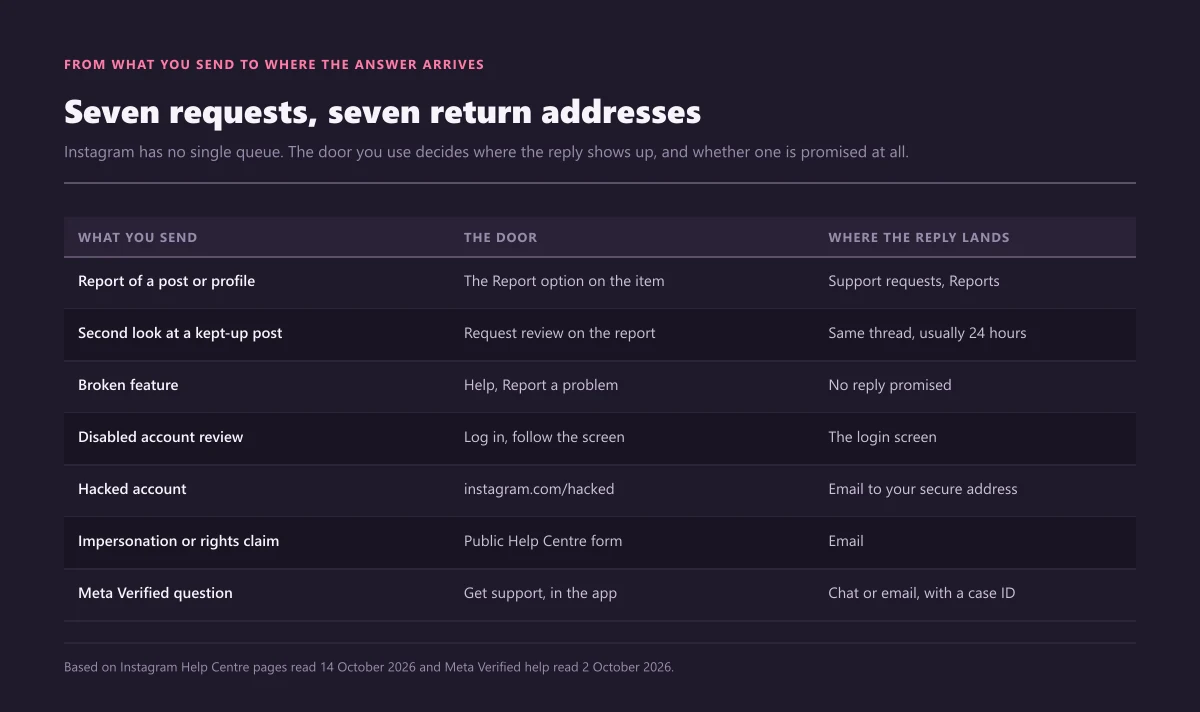
The door you use decides the return address. Reports answer inside the app, recovery answers by email, and a bug note may never answer at all.
Instagram has no single queue behind the scenes that you can write to. It has intake points, each built for one job. Sending the right problem through the wrong one is the commonest reason a request goes quiet. A disabled account described in a bug note goes to the people who fix broken buttons.
| What you send | The door | Where the reply lands |
|---|---|---|
| Report of a post, story, message or profile | The Report option on the item itself | Support requests, under Reports |
| A second look at content Instagram left up | Request review, inside that report | The same thread, usually within 24 hours |
| A broken feature | Help, then Report a problem | No reply is promised |
| Review of a disabled account | Log in and follow the screen | The login screen |
| A hacked or stolen account | instagram.com/hacked, on a mobile device | Email, at a secure address you give |
| Impersonation, copyright or trademark | A public Help Centre form | Email, at the address on the form |
| A Meta Verified question | Get support, inside the verified account | Chat or email, with a case ID |
Two rows cover most of what our desk is asked about. For the first, reporting one post, story or message has the tap-by-tap route for each item type. For the fifth, the full hacked-account recovery sequence picks up from the moment the login link fails.
People sometimes call the in-app list the Instagram support inbox. That's a fair description of what it does, with one catch: it only holds what started inside the app. A form you filled in on the web answers in your email, and an Instagram support message about it won't show up beside your reports.
Which Instagram help form still opens without logging in? We tested nine
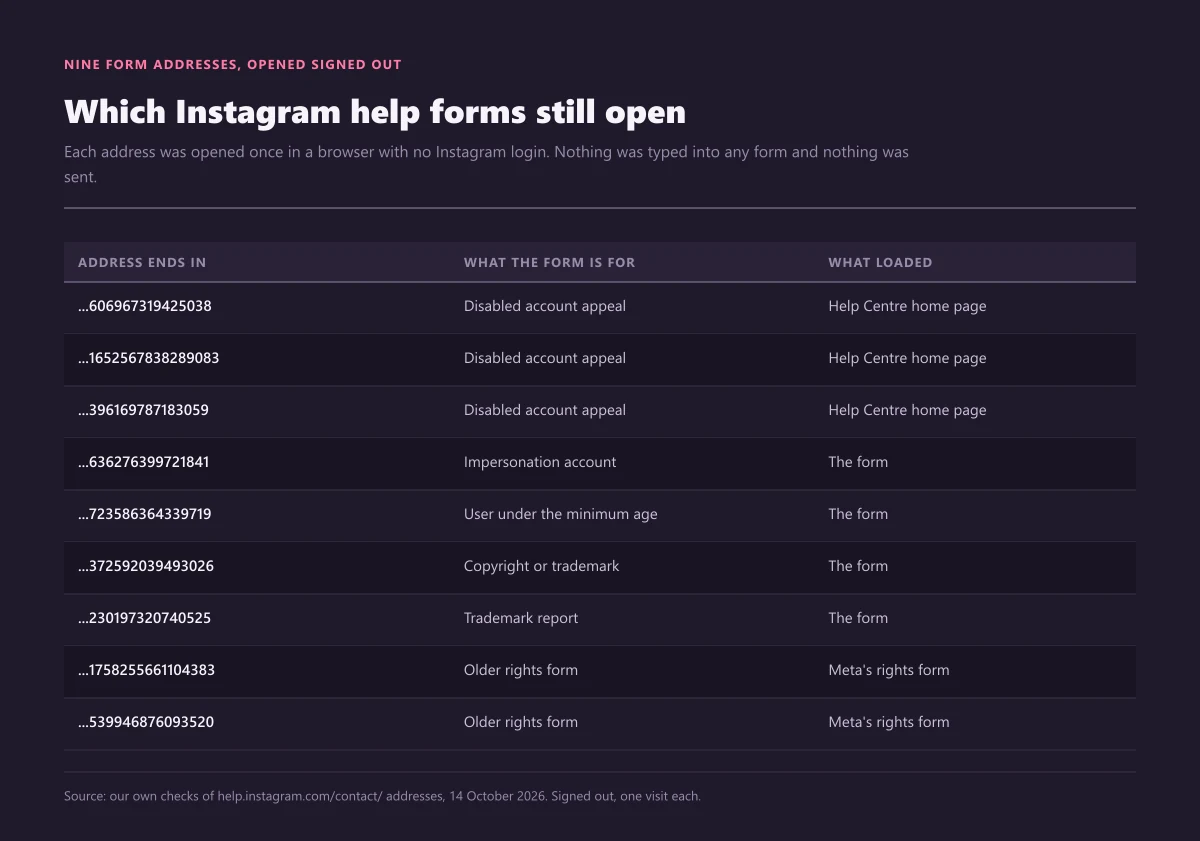
Four of nine. The impersonation, under-age, rights and trademark forms loaded. The three disabled-account addresses that older guides cite all landed on the Help Centre home page.
Guides to contacting Instagram are full of links that begin help.instagram.com/contact/ and end in a long number. We collected nine of them and, on 14 October 2026, opened each one once in a browser with no Instagram login. We typed nothing into any form and sent nothing. The point was only to see what a locked-out person would find. When we opened the first disabled-account address, the browser showed the Help Centre search box under "How can we help you?" and no form.
| Address ends in | What it is for | What loaded, signed out |
|---|---|---|
| …606967319425038 | Disabled account appeal | Help Centre home page |
| …1652567838289083 | Disabled account appeal | Help Centre home page |
| …396169787183059 | Disabled account appeal | Help Centre home page |
| …636276399721841 | Impersonation account on Instagram or Threads | The form |
| …723586364339719 | User under the minimum age | The form |
| …372592039493026 | Copyright or trademark | The form |
| …230197320740525 | Trademark report | The form |
| …1758255661104383 | Older rights form address | Meta's Intellectual Property Reporting Form |
| …539946876093520 | Older rights form address | Meta's Intellectual Property Reporting Form |
A caution about the first three rows. Landing on the home page doesn't prove a form was deleted, only that nothing answers at that address for someone who isn't logged in. For a person locked out of a disabled account, that amounts to the same thing.
The four that loaded are narrow. The impersonation form opens with three choices, and the third, "I can't log into my old account", leads to recovery steps and not to a report. The under-age form warns that you "will not get confirmation that the account has been deleted". The trademark form carries the line "Abuse of this form may result in the termination of your account." None of the four is a general Instagram support contact form, and none accepts a request about your own login.
The last two rows forwarded to help.meta.com, where one rights form now serves all of Meta's apps. If that is your route, what a copyright removal does to the reported account explains the consequences on the other side, and what a registered trademark does for an Instagram name covers the trademark form's limits.
Where did the Instagram help form for a disabled account go?
Into the login screen. Instagram's page on disabled accounts names no web form; it tells you to log in and follow what appears.
For years the standard advice was to fill in the Instagram help disabled account form. Older guides also call it the Instagram help form for disabled account appeals, and its own title was "My Instagram account was deactivated". All three addresses we tried for it now land on the Help Centre home page. Instagram's page about disabled accounts, read the same day, makes no mention of a form. Its instruction is that you "may be able to ask us to review the decision by logging into Instagram and following the on-screen instructions."
So the appeal now lives behind your username and password. Type them into the app, and the disabled notice either offers a review or it doesn't. The page gives no deadline for the review and no second address to write to. It does add that an account deleted by you, or by someone holding your password, can't be restored at all.
What you do next depends on what the screen said. If the notice is final, read what a permanent disable still leaves open. If you appealed and lost, the steps left after a refused appeal is the relevant page. A time-limited lock is a separate case, covered in recovering a suspended account.
Be wary of anyone selling a private copy of the old form. There isn't a back door, and what an unban service can and cannot do sets out where paid help ends.
Is there an Instagram help form for account recovery?
There's a guided flow, not a form you can bookmark. It starts at instagram.com/hacked on a mobile device and continues by email.
Instagram's hacked-account page describes the sequence. First it asks you to look for a message from security@mail.instagram.com, which can undo an email change. Next comes a login link from the Forgot password? screen. Only when both fail does it offer the step people mean by a recovery form: you "may be able to request support from us on a mobile device".
That request wants one thing above all, "a secure email address that only you can access". What follows depends on the account. With no photos of you on it, you get an automatic email from the Support Team at Meta asking for the sign-up email or phone number and the type of device you registered on. With photos of you, the flow asks for a video selfie, which Instagram says is deleted within 30 days.
Meta's newsroom reported in December 2025 that the relative success rate of hacked-account recovery had risen by more than 30% in the US and Canada over the year, and that new account hacks had fallen by more than 30% worldwide. Those are Meta's own figures and it didn't publish the base rate, so treat them as a direction, not a probability.
If you've been round this loop twice already, the contact points that do answer about a lost account lists what is left, including the paid agent queue.
What does Report a problem send to Instagram, and does anyone answer?
It sends a bug note with your device and account details attached. The Help Centre page promises to store it; it doesn't promise a reply.
The tool that people look up as Instagram support Report a problem has one purpose: telling Instagram that a feature is broken. The Help Centre page for it says so in its first line and asks you to update the app before reporting. In the Android and iPhone app the route is short.
- Go to your profile and tap the menu in the top right.
- Under More info and support, tap Help.
- Tap Report a Problem.
- Go back and shake the phone where the fault appears, or tap Report problem without shaking.
- Describe what happened, add a screenshot and send.
The page states that "information about your device and Instagram account related to the issue" is included automatically, and that you can add full logs and diagnostics. It says the report is kept "only for as long as required to resolve the issue". It also sends two groups elsewhere: abuse or spam goes to the content report tools, and login trouble goes to the recovery pages.
This is why an Instagram customer service report about a disabled account, sent through the Instagram Help Report a problem screen, tends to vanish. Nobody at the other end is assigned to reply. An Instagram help report of that kind is useful for one thing: a fault you can reproduce, described with the phone model, the app version and the exact tap that fails.
We'd add one habit. Screenshot what you sent, since the page describes no way to reread a bug note afterwards.
How do you check the Instagram support requests held for your account?
Open Help, then Support requests, then Reports. Each entry shows whether Instagram acted, and some let you ask for another review.
The list is the only place the support requests Instagram has logged against your account are visible. The Help Centre says three things happen there: you can read the policy your report was judged under, see the decision, and ask for a review of it. It also admits a gap. "Every report you've made may not be viewable in Support Requests," the page says. A missing entry isn't proof the report failed to send.
When Instagram leaves reported content up, the review button is the next move. Its page on reports that didn't lead to removal gives the path in three taps.
- Open the update Instagram sent about its decision.
- Tap See report details.
- Tap Request review, then confirm.
The content is looked at again "usually within 24 hours". If the decision stands a second time, some cases can go to the Oversight Board, which selects only some of the eligible appeals.
That 24-hour line is the single response time Instagram publishes for any request on this page. Nothing comparable exists for disabled accounts, hacked accounts or forms.
Some problems are better served by a different instrument altogether. For a photo or video of you posted without consent, the privacy route usually beats a plain report. Where a court order or a national law is involved, Instagram's legal removal request route is the one to use. A support request Instagram can act on is one that reaches the team that owns the rule you're relying on.
How do you tell a real Instagram support message from a fake one?
Check it against the app, not against the message. Instagram lists the security emails it sent you, and a real one never arrives as a Direct message asking for a code.
Once you've filed something, you're primed to expect an answer, and scammers know it. The US Federal Trade Commission counted more than a million imposter-scam reports in 2025, with losses of about $3.5 billion. A message that claims to continue your open request is one of the easier ways in.
Instagram gives you a way to check. Its security settings hold a Recent emails list covering the last 14 days, as the Help Centre page on emails from Instagram read on 2 October 2026. If an Instagram help message in your inbox isn't on that list, Instagram didn't send it. The hacked-account page names one sender outright, security@mail.instagram.com.
Three signs settle most cases. A real reply never asks for your password or a login code. It doesn't arrive from a profile called Instagram Support with a blue tick in its picture. And it doesn't ask for money. The Better Business Bureau put that last point plainly in its February 2025 alert on fake customer service accounts: "You should never have to pay to recover your accounts."
One newer contact point is real. Every Help Centre page we read on 14 October carried a link to chat with the Meta AI support assistant. Meta's announcement says it can respond "in under five seconds", and that taking actions on your behalf works on Facebook first, with Instagram to follow. It answers questions. It doesn't reopen a disabled account.
Paid help exists too, and some of it is honest. How to check whether a paid recovery service is legitimate gives the tests we'd apply before sending anyone a deposit.
Can a support request get you an Instagram username?
No form on our list of nine asks for one. The only route that touches names is the trademark report, and it ends in removal, not in a transfer to you.
A good share of the requests people want to send are about a handle: a name that's refused, held by a dead account, or sitting on a profile with no posts. Instagram has no intake for these. Start with whether Instagram hands over inactive usernames on request, then pick the guide that matches what you're seeing.
- The sign-up field refuses the name: what the "not available" sentence covers, which screen is doing the refusing, fixes for a refused username, sorted by cause and names refused with no visible profile behind them.
- You want to know if it's free: checking a handle without locking the sign-up field, how availability is decided and where free names start, by length.
- Somebody holds it: what can free a username someone else holds, the states an unused handle can be in and how a name leaves a dormant account.
- You control both accounts, or money is involved: swapping names between two accounts you control, what buying a username involves under Instagram's terms and the seller's side of a handle sale.
- You're still choosing: ways to end up with the handle you had in mind.
None of those ends with a message to support, and that's the honest answer. Usernames go to whoever registered first.
What should you write down before sending any request?
Your own reference. Instagram won't give you one, so the date, the door and a screenshot are the only record you'll have.
Because there's no ticket number, a second request can't point back to the first. If you ever need to show a regulator, a lawyer or an out-of-court dispute body what you asked and when, your notes are the file. Ours for each case fit on one line: the date, which door, the username involved, what was attached and where the reply should land.
Send one request per problem and give it time. Filing the same report five times doesn't move it up: Instagram's Help Centre says the number of times something is reported doesn't decide whether it's removed. And keep the two kinds of request apart in your head. A request about your own account is yours alone to make, since it turns on your identity. An Instagram support report about another account, where that account genuinely breaks the rules, is something a third party can help you prepare.
Sources
- Instagram Help CentreCheck the status of something you've reported to Instagram
- Instagram Help CentreWhat to do if Instagram didn't remove content you reported
- Instagram Help CentreReport a technical problem on Instagram
- Instagram Help CentreAbout disabled Instagram accounts
- Instagram Help CentreIf you think your Instagram profile has been hacked
- Instagram Help CentreReport an impersonation account on Instagram or Threads (form)
- Instagram Help CentreTrademark report form
- Facebook Help CentreMeta Verified support: chat, email, case ID and statuses
- Instagram Help CentreReview recent emails sent from Instagram
- Federal Trade CommissionNew trends in reports of imposter scams, 7 May 2026
Frequently asked questions
Is there an Instagram support ticket contact form?
No. Instagram has separate forms for impersonation, under-age users, copyright and trademark, and none of them issues a ticket. Requests about your own account start from the login screen or instagram.com/hacked, and reports start from the item you are reporting.
How long does an Instagram support request take?
Instagram publishes one figure. When you ask for another review of content it left up, the content is reviewed again usually within 24 hours. It gives no time for disabled-account reviews, hacked-account requests or the public forms.
Why is my report missing from Support requests?
Instagram's Help Centre says every report you have made may not be viewable in Support Requests. A missing entry does not prove the report failed. Check that you are logged in to the account you reported from, since the list belongs to that account.
Does Instagram reply to Report a problem?
The Help Centre page promises no reply. It says the report is stored only for as long as required to resolve the issue, with your device and account details attached. Use it for broken features, not for disabled accounts or abuse.
Is there an Instagram support form I can fill in without an account?
Yes, a few. On 14 October 2026 the impersonation, under-age user, rights and trademark forms all opened in a browser with no login. They cover reports about other accounts. None of them handles a request about your own login.
Where is the Instagram support inbox in the app?
Go to your profile, tap the menu, and under More info and support tap Help. The list is labelled Support requests on some of Instagram's pages and Reports and violations on others. It holds reports sent from inside the app, not forms filled in on the web.
Can someone else send an Instagram support request for me?
Not for your own account, because recovery checks your identity with a login link or a video selfie. Reports about a rule-breaking account can be prepared with help. Meta's rights form accepts the owner or an authorised representative. Never hand anyone your password or login codes.