Reporting · the report menu catalogue, read from Instagram's Help Centre on 25 October 2026
Instagram report options: every reason on the menu and what it sets off
The Report button on Instagram opens a short menu, and the reason you tap decides who looks at it, what they check and whether anything can happen to the other account. This page goes through every option on that menu, one by one, with what it sets off.
Instagram report options are the reasons on the Report menu: nine for a post, from "I just don't like it" to intellectual property, and three for a profile. Each one sends the report to a different check. Most go to a review against the Community Guidelines; "I just don't like it" only changes your own feed.
What is report on Instagram, and what does report mean on Instagram?
A report is a request for a rule check, not a vote and not a penalty.
What is report on Instagram? It is the button that sends a post, story, reel, comment, message or profile to Instagram's reviewers with a reason attached. What does report mean on Instagram in practice? That you are asking Instagram to check the content against its Community Guidelines. Instagram's page on what happens when you report, read on 25 October 2026, says it will "hide or remove" the content if it goes against those rules. If it does not, the report still counts for you: similar posts may appear lower in your feed, Suggested Posts and Explore.
So what is report in Instagram not? It is not a count. One accurate report with the right reason does more than fifty with the wrong one, because the reason decides which rule the reviewer reads. People who search what does report mean in Instagram are usually about to tap the button for the first time; the rest of this page is the menu they will see. What is Instagram report, in one line? The Instagram report button plus a reason. Report on Instagram means the same thing whether you start from a post, a chat or a profile, and what does report on Instagram mean for the other person? Nothing, unless a rule was broken. If you want the step-by-step for a whole account rather than the reasons, our guide on reporting an Instagram profile or page has the taps.
Instagram report options for a post: all nine reasons
The post menu lists nine reasons. Each one routes the report to a different rule.
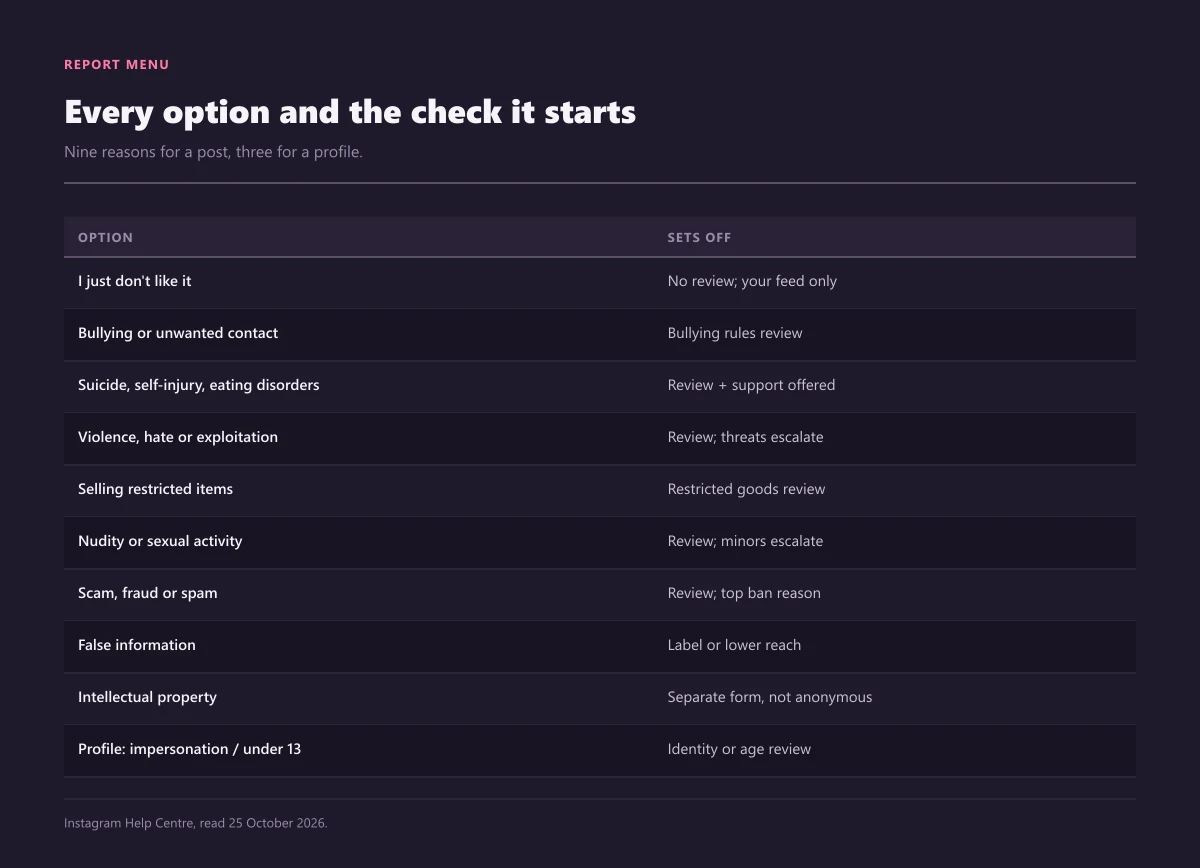
Instagram's Report a post or profile page lists the report option in Instagram for posts as nine reasons, in this order. These are the Instagram report types every post, reel and story shares; some open a second screen that narrows the reason down. The table shows what each covers and what it sets off once you tap it.
| Report option | What it covers | What it sets off |
|---|---|---|
| I just don't like it | Nothing against the rules; you would rather not see it | No review; offers mute, unfollow or block and lowers similar posts for you |
| Bullying or unwanted contact | Harassment, insults, someone who keeps messaging you | Review against bullying rules; may ask if it is about you or someone else |
| Suicide, self-injury or eating disorders | Posts that promote or show self-harm | Review, plus support resources offered to the poster |
| Violence, hate or exploitation | Threats, hate speech, terrorism, trafficking | Review; a credible threat is a police matter as well |
| Selling or promoting restricted items | Drugs, weapons, animals, alcohol, tobacco | Review against the restricted goods rules |
| Nudity or sexual activity | Nudity, sexual content, sexual exploitation | Review; content involving a child is escalated |
| Scam, fraud or spam | Fake giveaways, phishing, fake sellers, spam | Review; the most common account ban reason Meta files |
| False information | Claims fact-checking programmes may label | Labelling or lower reach, rarely removal |
| Intellectual property | Your copyright or trademark | Hands you to a form; your name goes to the poster |
Two rows behave differently from the rest. "I just don't like it" is not a report in the rule-breaking sense; it opens tools for your own feed. "Intellectual property" leaves the menu and opens a form, and it is the only option where your name is shared. Everything else is anonymous: Instagram says "the account you reported won't see who reported them".
What happens if you tap Instagram report "I just don't like it"?
Nothing happens to the other account. Something happens to your feed.
Choosing Instagram report "I just don't like it" does not start a review. Instagram treats it as a signal about you, not about the post: it offers to unfollow, mute, restrict or block the account and uses the tap to show you less of the same kind of content. The poster is not told and no strike is counted.
That makes it the right choice for content that is annoying but allowed, and the wrong choice for anything that actually breaks a rule. If a post is a scam, a threat or a fake account, picking "I just don't like it" throws away the report. Pick the reason that names the rule, even if it takes one more screen.
Report options for a profile, a comment and a message
A profile has three reasons of its own. Comments and messages use the post list.
From a profile, the Report button first asks what you are reporting: a single post, message or comment, or the account itself. For the account, Instagram gives three reasons:
| Profile reason | What comes next |
|---|---|
| It's posting content that shouldn't be on Instagram | Opens the same reason list as a post |
| It's pretending to be someone else | Asks whether it is you, someone you know, a celebrity or a business |
| It may be under the age of 13 | Sends the account to an age review |
Comments are reported by holding them and tapping Report, and they use the same reason list as posts; see our page on reporting a comment on Instagram. Messages are reported from inside the chat. Impersonation is the reason people get wrong most often: if the fake account copies you, say it is you, because a report from the person being copied carries the most weight. If the account is a fake brand page, a business report fits better, and if it uses a name you own, see what to do when an Instagram username is taken.
Restrict, block and report on Instagram: which one does what?
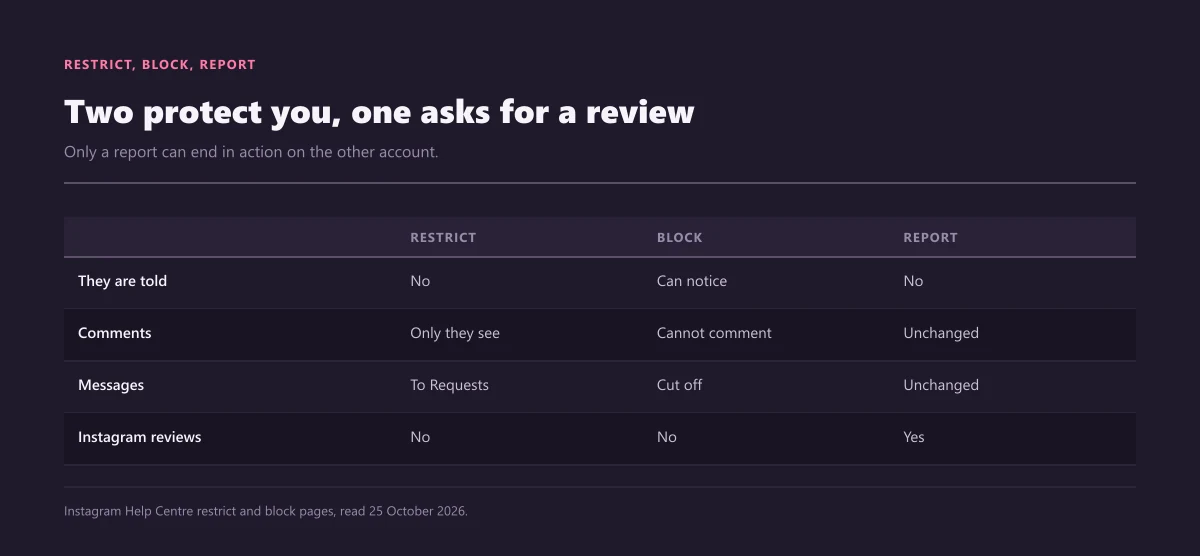
Restrict and block protect you. Only report asks Instagram to act on the other account.
The block and report Instagram combination is often offered together, and people assume they are one thing. They are not; Instagram block and report are two separate actions in one flow. Instagram's Restrict page says a restricted person "won't be able to see when you're online or if you've read their messages", and their comments are shown only to them until you approve. A block cuts contact. Neither tells Instagram that a rule was broken.
| Restrict | Block | Report | |
|---|---|---|---|
| Who knows | Nobody is told | They can tell if they look for you | Nobody is told who reported |
| Their comments | Visible only to them until you approve | They cannot comment on your posts | Unchanged unless Instagram removes them |
| Their messages | Move to Message Requests, no read receipts | Cannot message you | Unchanged |
| Instagram reviews it | No | No | Yes, against the Community Guidelines |
| Can end in a ban | No | No | Yes, if the rules were broken |
So the Instagram restrict block report choice comes down to what you want. To stop seeing someone, restrict or block. To have Instagram check their content, report. When you block and report on Instagram in one flow, the block protects you at once and the report goes to review on its own clock. Restrict block report Instagram questions usually come from harassment; our page on reporting bullying and harassment on Instagram covers that case.
What can you report on Instagram, and what is the Instagram report policy?
Anything that breaks the Community Guidelines, plus a few legal problems that use separate forms.
What can you report on Instagram? Posts, reels, stories, comments, messages, profiles, live videos and ads. The Instagram report policy is simple: a community guidelines Instagram report is judged only against those guidelines, not against whether the content is rude or unfair. An Instagram report violation has to match a written rule. A report violation Instagram cannot match to one is closed, and the content stays.
Some problems sit outside the menu. Copyright and trademark claims go through the intellectual property forms; privacy and legal requests have their own forms; people without an account can use the signed-out forms. Each platform draws these lines differently. Compare how a report on X is handled, the steps for reporting Telegram groups, or how Facebook accounts, pages and posts are taken down inside the same Meta systems.
How the Instagram reporting system works after you tap a reason
The reason picks the rule; machines sort first; people see a fraction.
The Instagram reporting system is a queue, not a person. The reason you pick decides the rule; automated systems check the item first, and some reports go to human reviewers. Meta said in January 2025, in More Speech and Fewer Mistakes, that its automated systems would focus on illegal and high-severity violations, and that for less severe ones it would rely on someone reporting an issue first. That is why the Instagram report system matters more for everyday problems than for the worst ones.
The EU's DSA Transparency Database shows the split. Between 1 and 24 October 2026, Instagram filed 6,675,961 moderation decisions in the EU. Only 4,164 of them, 0.1%, came from formal user notices under Article 16; 6,671,702 were filed as Instagram's own initiative, which is where in-app reports end up. Of the Article 16 notices, 3,360 were intellectual property claims, 454 privacy, 52 cyber violence and 170 scams, and 4,101 were marked as decided without automation.The Instagram reporting feature people tap every day is mostly invisible in the legal statistics.
Can Instagram AI report you?
Not as a user would. But most enforcement starts with a machine, not a report.
Can Instagram AI report you? There is no AI that files a report the way a user does. What exists is automated detection: classifiers that flag spam, scams, nudity and other high-severity content without anyone pressing a button. In the DSA figures above, Instagram's own-initiative decisions outnumber formal user notices many times over, so an account is far more likely to be actioned by detection than by a report.
That cuts both ways. A post nobody reported can still be removed, and a post reported a hundred times can stay if no rule matches. Report tools sold as a shortcut, whether a TikTok mass report bot, a YouTube mass report bot, a Twitter mass report bot, a Telegram mass report bot or a WhatsApp mass report bot, run into the same wall: the reviewer still reads the rule. Snapchat works the same way, whether through a Snapchat report bot or a Snapchat mass report. We explain how mass reporting an Instagram account is treated, and why some YouTube channels were banned for mass reporting.
Instagram not letting me report: why reporting is not working
Most failures have a plain cause. A few are limits on your own account.
When Instagram reporting is not working, check these causes in order. Report on Instagram not working is rarely a global outage:
- You are signed out or on a limited account. Reporting needs a signed-in account; without one, use the signed-out forms.
- Your account is restricted. Accounts under limits can lose some features for a time; see what "we restrict certain activity" means.
- The content is already gone or hidden. A removed post leaves nothing to report.
- You blocked the account first. Unblock briefly, or report from a message or comment you still see.
- An old app version. Update the app or try instagram.com in a browser.
If Instagram is not letting me report the same item a second time, that is by design: one account files one report per item. The Instagram report center for checking what you sent is Settings, then Help, then Support requests, then Reports. It shows the status of each report and the decision.
The report button on other platforms and outside the app
Every platform has a report button. The menus differ, and some problems need a different door.
The report button on Instagram is one of many with almost the same layout. Moderation rules elsewhere differ in detail: compare how Discord handles reports with the rules for reporting a Kick channel. Some problems are not about a post at all. A copied website goes through a domain takedown with the host, and a dispute over a name goes through the rules on IG usernames that are not available, 4-letter Instagram usernames or what happens when you sell an Instagram handle.
Whichever Instagram reporting tool you use, the button, a form or a support request, the same rule holds: pick the reason that names the rule, attach what proves it, and report once. Report button Instagram questions after that are about outcomes; our page on what reporting someone on Instagram does follows a report to its result.
Sources
- Instagram Help CentreReport a post or profile on Instagram
- Instagram Help CentreWhat happens when you report a post or profile
- Instagram Help CentreRestrict or unrestrict someone on Instagram
- Instagram Help CentreBlocking people
- Instagram Help CentreReporting copyright infringements
- Meta NewsroomMore Speech and Fewer Mistakes, 7 January 2025
Frequently asked questions
What are the Instagram report options?
For a post: I just don't like it, bullying, self-harm, violence, restricted items, nudity, scam or spam, false information and intellectual property. For a profile, three more.
What does report on Instagram mean?
It asks Instagram to check a post, comment, message or profile against the Community Guidelines. If a rule is broken, the content is hidden or removed.
Does the person know I reported them?
No. Reports are anonymous, except intellectual property reports, where your name and contact can be shared with the poster.
What is the difference between block and report on Instagram?
Blocking stops the person contacting you. Reporting asks Instagram to review their content. You can do both, and blocking does not send a report.
Where is the Instagram report center?
In the app, go to Settings, Help, Support requests, then Reports. Each report you sent shows its status and the decision.
Why is Instagram not letting me report?
Usually the content is already removed, you blocked the account, your app is old, or your own account is under a temporary limit.
Does choosing "I just don't like it" hurt the other account?
No. It starts no review. It only offers to mute, restrict or block and shows you less similar content.