Content removal · nine kinds of unwanted content and the one route that fits each
How to remove inappropriate content on Instagram: sort it first, then pick the door
Most removal requests fail because the right post went through the wrong door. A photo of you reported as "inappropriate", a mugshot reported as bullying, an abused dog reported as spam: each lands with a reviewer who checks a rule the post does not break. This page sorts the content first.
To remove inappropriate content on Instagram, tap the three dots on the post, tap Report and pick the reason that matches what the post shows. A photo of you goes through the privacy form instead, and your own photo reposted goes through the copyright form. Content you only want to stop seeing is a settings job.
How to remove inappropriate content on Instagram: which job is yours?
Either you want it off your screen, or you want it off Instagram. They are different jobs with different tools.
Search how to report inappropriate content on Instagram and you get one answer: tap Report. That is right for half the cases. The other half are people who never needed a report at all, because the post breaks no rule and simply should not keep showing up for them, and people whose content needs a form the Report button does not reach.
So the first question is not how, but what. Is it a post that harms someone, or a post that bothers you? Is it about you, or about anyone? Is the problem the post, or the account behind it? Answer those three and the route picks itself. The diagram below is the short version; the table in section three is the long one.
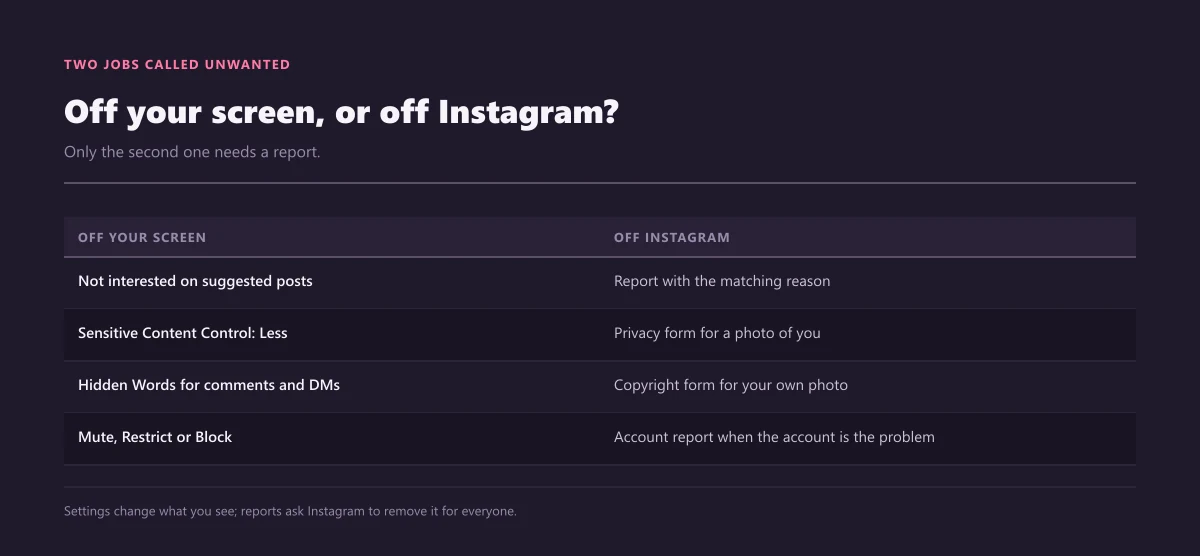
How to remove unwanted content from Instagram you keep seeing
Four settings take it off your screen in minutes. None of them removes it for anyone else.
If the problem is your Explore page, your Reels or the comments under your own posts, a report is the slow way. These four controls are the quick one, and they are how to remove unwanted content from Instagram as far as you are concerned.
- Not interested. Tap the three dots on a suggested post or Reel and choose Not interested. Instagram shows fewer posts like it.
- Sensitive Content Control. In Settings, open Sensitive Content Control and choose Less instead of Standard. Instagram's sensitive content help page explains that this changes what is recommended to you, not what accounts you follow post.
- Hidden Words. Filters comments and message requests that contain offensive words, emoji or phrases you add yourself.
- Mute, Restrict or Block. Mute hides an account you follow; Restrict hides its comments from others without telling it; Block ends contact.
Use these when the content is lawful and within the rules but not for you. Reporting a post that breaks no rule brings back a refusal and does nothing for your feed.
Report inappropriate Instagram content: which door fits which content?
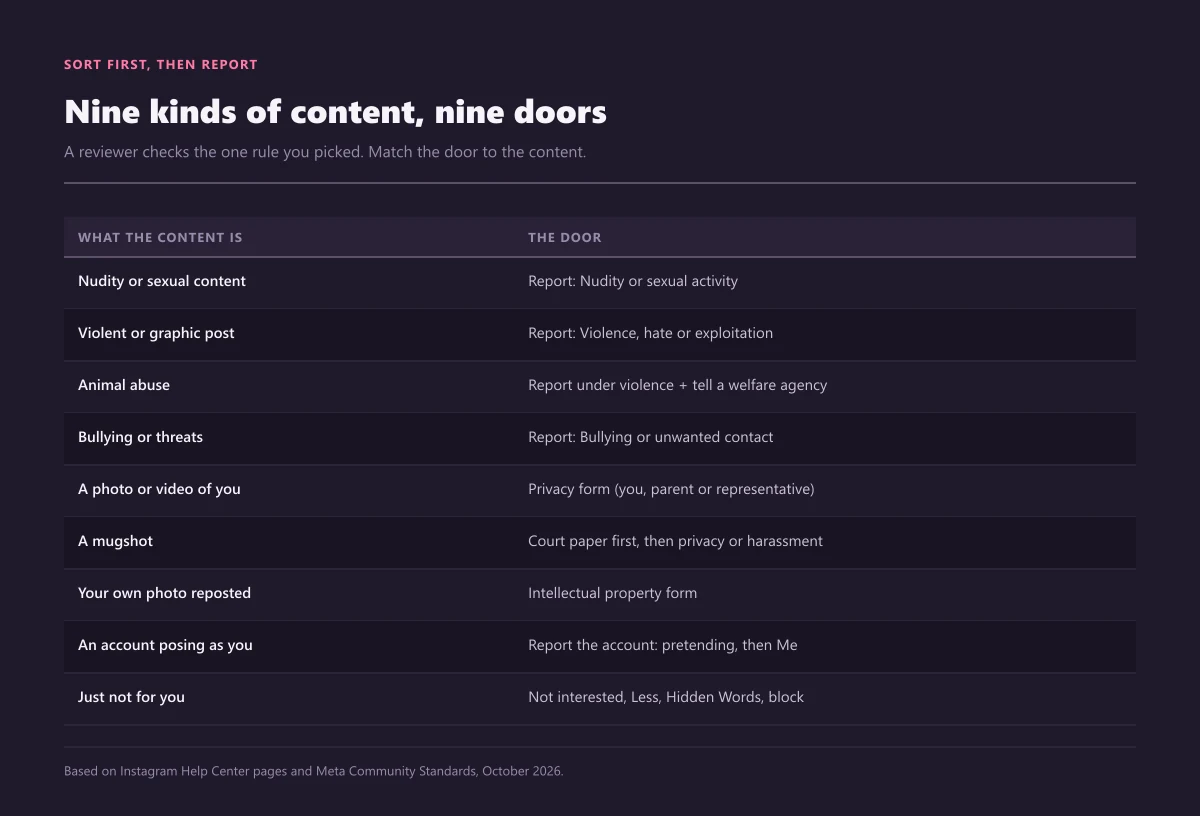
Nine kinds of content, nine routes. Matching the two is most of the work.
Each report is checked against one rule, the one you picked. A reviewer who opens a report about nudity does not go looking for a privacy problem in the same post. That is why the reason you choose matters more than how many people choose it. Find the row that describes what the post shows, not how it makes you feel.
| What the content is | The door | Who may file | What to expect |
|---|---|---|---|
| Nudity or sexual content | In-app: Report, then Nudity or sexual activity | Anyone who sees it | Removal if it breaks the rules; intimate images of you also go to StopNCII |
| Violent or graphic posts | In-app: Report, then Violence, hate or exploitation | Anyone | Removal, or a warning screen if shared to raise awareness |
| Animal abuse or cruelty | In-app: Report, then the violence reason and the animal option | Anyone | Removal of the post; the animal still needs a local welfare agency |
| Bullying, threats, insults | In-app: Report, then Bullying or unwanted contact | Anyone; stronger from the target | Removal of the item, strikes on the account |
| A photo or video of you | Privacy form, or Report as a privacy violation | Only you, a parent or a legal representative | Depends on your age and the privacy law where you live |
| A mugshot | Privacy form or harassment report; often neither works | You or your representative | Usually stays up unless the law where you live, or a court, says otherwise |
| Your photo or video, reposted | Intellectual property form | The person who took it | Removal per item; your name can be shared with the poster |
| An account pretending to be you | Report the account: pretending to be someone, then Me | You or your representative | Account removal |
| Content you just do not want to see | Not interested, Sensitive content, Hidden Words, mute or block | You | It leaves your screen, not Instagram |
Two rows need a word of warning. A photo of you and a mugshot sit with privacy rules that depend on your age and where you live, so a refusal there is often about law, not effort. And the copyright row is the only one where your name can travel to the person who posted. Our guide to getting a single post taken down, then the account behind it covers what happens when one post turns out to be part of a pattern.
How to get a post removed from Instagram, step by step
Three dots, Report, the matching reason. The account you report does not see who reported it.
For most people asking how to get an Instagram post removed, the path is the same on iPhone and Android, and it is the same whether you want to know how to remove someone's Instagram post or a whole Reel.
- Open the post and tap the three dots, Instagram calls them Options, above or beside it.
- Tap Report.
- Choose the reason that matches the row in the table above, then the closest option under it.
- Submit, and keep a screenshot of the post with the date. It may change before anyone reviews it.
Instagram's post reporting help page says the account you reported won't see who reported it. That holds for these in-app reasons, not for copyright, where your details can be shared.
How to get a picture removed from Instagram follows the same steps; so does how to get a video removed from Instagram, whether it is a Reel, a post or a Story. For Instagram video removal on a live broadcast, report it while it is live: once a Live ends without being shared, there may be nothing left to review. You cannot remove someone's post from Instagram yourself, only report it, and only its owner or Instagram can delete it.
Can you get a post removed from Instagram immediately?
Not on request. Some content is removed fast because it is caught by machines, not because of the report.
People ask how to get a post removed from Instagram immediately because the harm is happening now. There is no fast lane you can buy or click. What decides speed is the kind of content: nudity, graphic violence and known abuse images are matched by machines in seconds, while privacy and harassment reports wait for a person.
The only public clock is the EU one. In Meta's transparency report for Instagram, January to June 2026, on its regulatory transparency page, the median time from a legal notice to action was 28.89 hours, counted only for notices it acted on. In-app reports have no published figure. If an intimate image of you is involved, StopNCII creates a hash on your own device so partner platforms, Instagram among them, can block copies before they spread.
What does not speed it up is volume. We explain why in how mass reporting an Instagram account really works, and why selling a spam report bot for Instagram is selling noise.
How to report a picture of me on Instagram as a privacy violation
If the post shows you and you did not agree to it, the privacy route, not Report as inappropriate, is the one that can work.
For instagram report photo of me and instagram report picture of me, the in-app Report menu has a privacy option, and outside the app there is Instagram's privacy violation form, titled Report a Violation of your Privacy on Instagram or Threads. People search for it as report a violation of your privacy on instagram, or mistype it as "report violation of your private on instagram"; it is the same form. This is how to report a picture of me on Instagram when the poster will not take it down.
The form asks who you are reporting for: yourself, a child, or another adult. A parent can file for a child under 13; a teenager of 13 or over has to file their own. An adult files for another adult only as their legal representative. Each privacy violation report on Instagram needs the link to the post; without one, the form stops. Our page on a picture or video of you posted without consent walks through every question on that form.
Then the hard part. Meta's privacy violations standard removes adults' images on report only where the reporter is outside the United States and local law may give a right to removal. So an Instagram report privacy violation can succeed in one country and fail in another for the same photo. To report privacy violation Instagram style, as an adult in the US, you usually need another rule the post breaks: harassment, nudity, or copyright if you took the photo.
How to remove my picture from someone else's Instagram when you are only tagged: tap the post, tap your username, then Remove me from post (Remove tag on Android), as Instagram's tag removal page describes. That takes the tag off, not the photo. A privacy violation photo removal request on Instagram is the step for the photo itself, and the Instagram privacy report is one per post, so list every link.
How to get a mugshot taken down on Instagram
Instagram has no mugshot rule. A booking photo usually stays up unless another rule or the law where you live says otherwise.
Of all the questions on this page, how to get a mugshot taken down on Instagram has the least comfortable answer. A booking photo released by police is generally a public record in the US, and Meta's privacy standard does not single out mugshots. Reported as inappropriate, it is usually refused.
What does work, in this order:
- Clear the record first. If the charge was dropped or the record sealed or expunged, keep the court paper. It turns a public-record photo into one with a legal reason to come down.
- Report the use, not the photo. A mugshot posted to mock, threaten or shame you can be reported as bullying or harassment, which is about the caption and comments, not the image.
- Use the privacy form where the law helps. Outside the US, privacy law can give an adult a right to removal; the form above is the route.
- Never pay a page to take it down. Several US states restrict charging to remove booking photos, and a page offering removal for a fee is often the same one that posted it. Google also removes results from sites that charge to remove content about you.
If the same photo sits on a website or a lookalike domain, that part goes to the host and registrar, which our domain takedown service handles.
How to report animal abuse on Instagram
Report the post under violence, report the account if it exists for this, and tell a welfare agency where the animal is.
How do you report animal abuse on Instagram so it actually comes down? Use the violence reason, not "I just don't like it". The steps are the same for how to report animal cruelty on Instagram:
- Tap the three dots on the post, Reel or Story, then Report.
- Choose Violence, hate or exploitation, then the option closest to what the post shows.
- If the account exists to post such content, report the account too, from its profile.
- Save the link and the username before you report. You will need them for step five.
- Contact the local animal welfare agency or police where the animal is, if you can tell.
Meta's violent and graphic content standard covers animals as well as people, and its coordinating harm standard bans admitting to or threatening harm to animals. An Instagram report animal abuse case can still end with a warning screen rather than removal when the post condemns the cruelty or documents a rescue. An Instagram animal abuse report removes the post; it does not rescue the animal. That is why step five matters, and why you should report animal abuse on Instagram before the account deletes the post. To report animal abuse Instagram users have flagged together, one accurate report is enough; many identical ones add nothing.
Reported it, and Instagram said it doesn't break the rules?
Check the door, ask for a review, and then decide whether the account, not the post, is the problem.
A refusal usually means the reason did not match the content. Check the table in section three, and if you picked the wrong door, file again through the right one. If you picked the right one, you can request a review from your support requests. In the EU, a further dispute can go to an out-of-court body such as Appeals Centre Europe.
When the same account keeps posting the content, stop thinking post by post. The guide on getting an Instagram account taken down covers the account routes, and taking down one photo from an old account covers your own old uploads, which no report can reach.
Is the same content on other apps too?
Often. Each platform has its own door, and a removal on Instagram does not reach them.
Unwanted content travels. A photo removed from Instagram may already sit on a Facebook page, an X account or a Telegram channel. On Facebook, taking down a Facebook account, page or post runs through the same Meta systems; on X, reporting an account on X has its own forms; and reporting a Telegram group or channel covers channels that repost it.
Wherever it is, the advice against report waves holds. Sellers of TikTok mass report bots, report bots aimed at YouTube, bots for reporting on X, Telegram report bots, WhatsApp report bots, Snapchat report bots and Snapchat report waves all run into a reviewer who checks one rule. Discord and Kick write abusive reporting into their own rules, as we found for Discord report services and Kick channel reporting, and waves can hit the wrong target, as with YouTube channels banned after mass reporting.
Sources
- Instagram Help CenterReport a post or profile on Instagram
- Instagram Help CenterReport a Violation of your Privacy on Instagram or Threads
- Instagram Help CenterRemove yourself from a post you are tagged in
- Instagram Help CenterSensitive Content Control on Instagram
- Meta Transparency CenterCommunity Standards: Coordinating Harm and Promoting Crime
- Google Search HelpRemove content about you on sites with exploitative removal practices
- Meta Transparency CenterCommunity Standards: Privacy Violations
- Meta Transparency CenterCommunity Standards: Violent and Graphic Content
- Meta Transparency CenterRegulatory transparency reports (EU DSA, Instagram, January to June 2026)
Frequently asked questions
How do you remove inappropriate content on Instagram?
Tap the three dots on the post, tap Report and pick the reason that matches the content. A photo of you goes through the privacy form, and your own photo reposted goes through the copyright form.
How do I remove unwanted content from my Instagram feed?
Use Not interested on suggested posts, set Sensitive Content Control to Less, add Hidden Words, and mute, restrict or block accounts. These change what you see, not what is on Instagram.
Can I remove someone else's Instagram post myself?
No. Only the owner or Instagram can delete it. You can report it, and if you are tagged you can remove the tag from the post.
Will the person know I reported their post?
For in-app reports, Instagram says the account will not see who reported it. Copyright reports differ: your name and contact details can be shared with the poster.
Can I get a mugshot removed from Instagram?
Rarely on report alone. Mugshots are often public records. A sealed or expunged record, a harassing caption, or privacy law where you live gives you a stronger case.
What happens after I report animal abuse on Instagram?
A reviewer checks the post against the violent and graphic content rules and removes it or adds a warning screen. Tell a local animal welfare agency too; the report does not reach them.