Phone numbers · login, password reset, two-factor codes, confirm prompts and recovery without the number
Phone number on Instagram: the four jobs it does, and what breaks when you lose it
A phone number on an Instagram account isn't one setting. It's a login name, a reset address, a second lock and a contact detail, and they live in different menus. On 15 October 2026 we opened Instagram's password reset screen signed out and read the Help Centre pages behind each of those jobs.
A phone number on Instagram does four jobs: it can log you in, receive a password reset link, receive two-factor codes by SMS or WhatsApp, and match you with contacts. It stays private. You change it in Accounts Center under personal details, while the two-factor number has its own setting under Password and security.
What does a phone number on Instagram do for your account?
Four separate things: it's a login name, the address a reset link goes to, the target for two-factor codes, and a key Instagram uses to match you with people and ads.
Most people add a number once, at sign-up, and never think about it again. Signing up for Instagram with phone number instead of email puts the number into every one of those jobs on day one. Instagram's page on why it asks for your number lists the uses in its own words: helping you log in, sending security and activity messages, "using your contacts to recommend accounts to follow", and improving ads, where "We match your contact information with information we get from other sources".
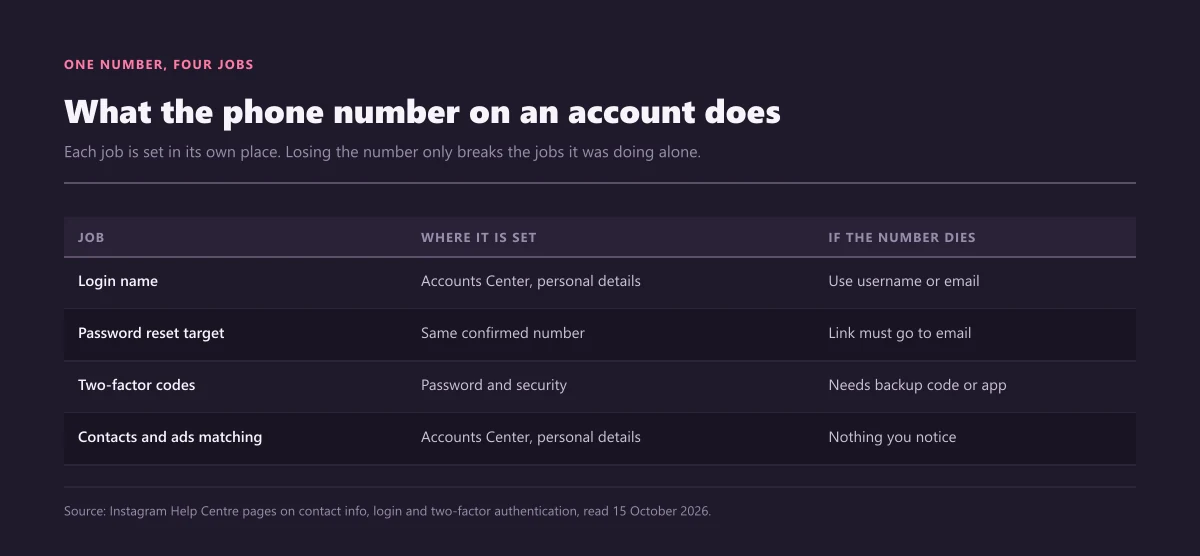
| Job | Where it is set | What happens when the number dies |
|---|---|---|
| Login name | Accounts Center, personal details | You log in with the username or email instead |
| Password reset target | The same confirmed number | The reset link has to go to a confirmed email |
| Two-factor codes by SMS or WhatsApp | Password and security, Two-factor authentication | A new device can't get past the code screen without a backup code or an app |
| Contacts and ads matching | Accounts Center, personal details | Nothing you would notice |
The third row is the one that locks people out. The first two have fallbacks built in, because a username and an email do the same work. A two-factor code sent to a number you no longer hold has no fallback unless you set one up while you still could.
Can other people see the phone numbers on Instagram accounts?
No. Instagram says mobile numbers and email addresses are always private on your accounts, and the personal details you add don't appear on your public profile.
The Help Centre is direct about it: "Mobile numbers and email addresses are always private on your Instagram accounts." The page on personal information adds that what you update there "won't be part of your public profile on Instagram". And the page on why Instagram asks for your number says it doesn't ever sell personal information, your number included.
Private isn't the same as invisible, though. If somebody has your number saved and has synced their contacts, Instagram may suggest your account to them. That's the contacts job from the table above doing what it was built for.
The phone numbers on Instagram that strangers can read were put there by a person: in a bio, a caption, a story or a comment. If the number is yours and the post isn't, that's a privacy problem with its own route. Instagram's privacy route for things posted about you covers the report itself, and what happens to an account after you report it explains why a report doesn't always remove the whole profile.
How do you update the phone number on Instagram?
Log in, open Accounts Center, then Profiles and personal details, and edit the contact information. Instagram's Help Centre describes no way to change it while logged out.
The steps below follow Instagram's page on updating personal information as it read on 15 October 2026. It gives the computer route; the app has the same Accounts Center behind the menu on your profile. The page also warns that people are being moved to Meta Accounts, so you may see Meta Account settings where it says Accounts Center.
- Click More in the bottom left, then Settings. In the app, tap the menu on your profile.
- Open Accounts Center, then Profiles and personal details.
- Open the contact information entry and add the new number.
- Confirm the new number with the code Instagram sends to it.
- Remove the old number once the new one shows as confirmed.
Step five has a rule attached. You can remove a confirmed number "as long as you still have at least one confirmed mobile number or email address on your account". Instagram won't let an account end up with no contact detail at all.
One thing a contact-info edit may not touch: the number your security codes go to. Instagram handles the instagram phone number update for two-factor on a separate page with its own steps, covered further down. Check both places after you switch SIMs, not just one.
Why does Instagram keep asking you to confirm your phone number?
The Help Centre gives four reasons: you added a number and never confirmed it, time has passed since you last updated it, your device suggested a number, or you haven't added one at all.
Those four come from the same Help Centre page, and none of them is a penalty. The number on that prompt is only added "if you choose to add it". So the everyday version of instagram phone number verification is a reminder you can finish in a minute.
A different screen looks similar and behaves differently. If you're stuck on confirm phone number, unable to reach your feed, unable to skip, and the code either never comes or comes and gets refused, that isn't a reminder. Instagram doesn't publish a Help page for that state. Our reading is that it's a check placed on the account, and the account's standing matters more than the number you type.
When the instagram stuck on confirm phone number screen won't move, a few habits help. Use a number you own and can receive texts on. Type it with the country code and no leading zero. Don't cycle through friends' numbers, because each one is another failed attempt on the same account. If instagram phone number verification is not working after that, look at what else the account is showing. A notice about the "We restrict certain activity" block, a suspension with a countdown or a disabled screen points to a different fix. Sorting which kind of ban you have is the starting point, the steps left after a refused appeal come next if you already lost one, and how Instagram ban waves start helps if thousands of others hit the same screen the same week.
Can you log in to Instagram with a phone number instead of a username?
Yes, if the number is confirmed on the account. Instagram's login page says to type it without any zeros before the country code and without symbols.
The Help Centre page on logging in lists three things the first field accepts: an email, a username, or a phone number that's confirmed on the account. For the instagram login phone number case, it adds the formatting rule above, and that rule explains a lot of failed logins. A number typed the way you'd dial it at home, with a leading zero, may not match the one stored.
There's a second door. If your Facebook and Instagram accounts sit in the same Accounts Center and are "allowed to log in to each other", the phone number and password of the Facebook account can open the Instagram one. People who swear they never added a number to Instagram are sometimes logging in through that link.
Instagram login without phone number works exactly the same way: type the username or email instead. The number is never required to log in. It only becomes required when two-factor codes are set to go to it and you sign in on a phone or computer Instagram doesn't recognise. On a device it remembers, the instagram phone number login goes through with the password alone.
How do you reset an Instagram password with a phone number?
Type the number into the reset screen and Instagram sends a link or a code to it. The screen we opened on 15 October 2026 called the step Find your account and the button Continue, not Send login link.
Instagram's password page still describes the older wording: tap Forgot password?, enter a username, email or phone, then tap Send login link, and "A link will be sent to either your email or phone". When we opened the reset screen in a browser with no login the same afternoon, the words had changed. We typed nothing and sent nothing.
| Help Centre page | Live screen, signed out | |
|---|---|---|
| Heading | Recover your Instagram password | Find your account |
| What the field asks for | Username, email or phone | Mobile number, username or email |
| Button | Send login link | Continue |
| How it arrives | A link to your email or phone | "You may receive WhatsApp and SMS notifications from us" |
| If it fails | Visit the page in a browser | Can't reset your password? |
Two details matter for anyone trying the instagram reset password phone number route. The screen now puts the mobile number first, so it's the expected input, not a fallback. And the delivery line names WhatsApp before SMS. If you search for the text and find nothing, open WhatsApp.
People phrase the search as instagram reset password by phone number or as instagram reset password with phone number, and the answer is the same flow. To reset instagram password using phone number, the number has to be the confirmed one on the account. A number you added and never confirmed doesn't receive anything.
Why is the Instagram code not reaching your phone?
Usually because it went somewhere you aren't looking, or to a number the account doesn't treat as confirmed. Check those before you ask for another one.
When the instagram phone number code is not sending, or seems not to be, run through this list in order. Each item is something we'd rule out before blaming Instagram.
- WhatsApp. The reset screen warns that codes may come by WhatsApp, and two-factor can be set to WhatsApp too. Look there first.
- The format. Country code, no leading zero, no spaces or plus signs, as the login page asks.
- Which number. The code goes to the confirmed number on the account, which may be a SIM you replaced years ago, not the phone in your hand.
- Filters. Short-code texts often land in an unknown-senders or spam folder in the messages app.
- Patience. Ask once, wait a few minutes, and use only the newest code. A pile of requests produces a pile of codes and no clue which is current.
If none of those explain it, switch methods rather than retrying. A confirmed email takes a reset link. A code from an authentication app works for two-factor and doesn't use the phone network at all. A saved backup code works once each. And a phone or computer that's still logged in can change the number for you, which ends the problem for good.
How do you put a new phone number on two-factor authentication?
In Accounts Center, open Password and security, then Two-factor authentication. Pick the account, choose SMS or WhatsApp, then Use different phone number, and enter the 6-digit code sent to the new number.
These are the steps from Instagram's page on changing the two-factor number, read on 15 October 2026. They cover both the instagram two factor authentication change phone number case and adding an instagram two factor authentication new phone number after a SIM swap.
- Click More in the bottom left, then Settings, then Accounts Center.
- Open Password and security, then Two-factor authentication, and pick the account.
- With two-factor already on, choose SMS or WhatsApp.
- Choose Use different phone number, enter the new number and continue.
- Type the 6-digit code texted to the new number and continue.
- Save the backup codes Instagram shows, then click Done.
If Accounts Center doesn't show these options, the page gives an older app route: profile, menu, Security, Two-factor authentication, then Change phone number below the Next button, "Instead of entering a code".
One line on the SMS two-factor page changes how the settings fit together: "When you enter a telephone number to turn on two-factor authentication, it becomes the confirmed number for your account." So a two-factor edit can rewrite your contact details, even if the reverse isn't promised. And all of this needs you logged in. If the old number is what's stopping you, the next section is the one to read.
What can you do after losing the phone number tied to Instagram?
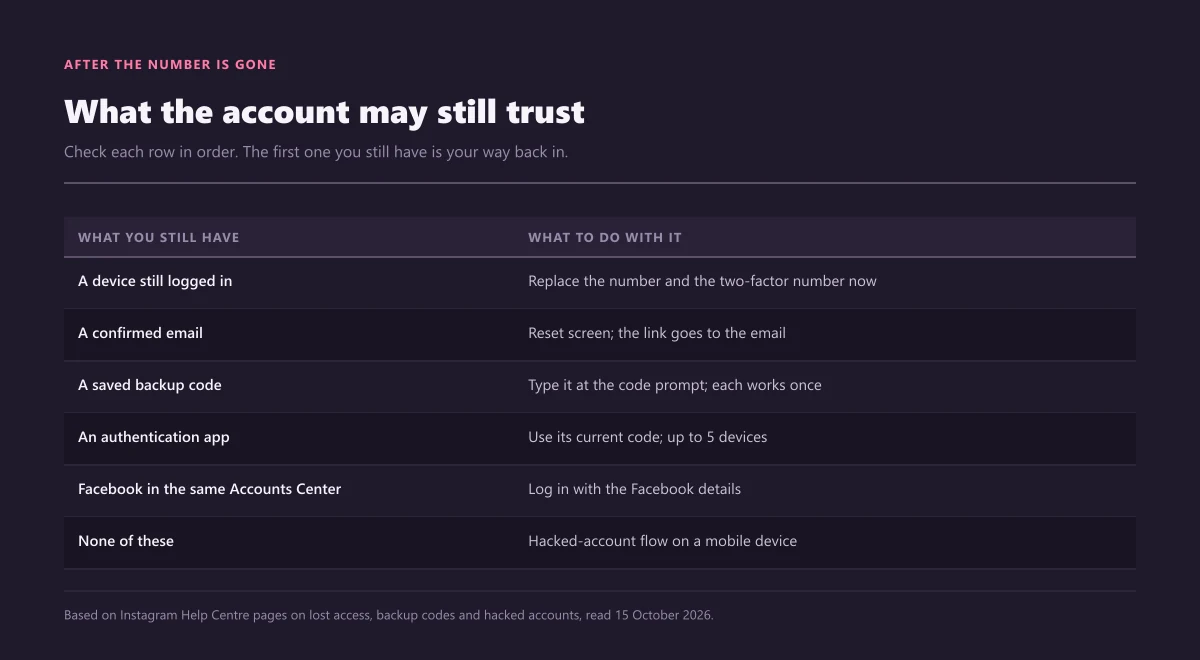
Use whatever else the account still trusts: a logged-in device, a confirmed email, a backup code, an authentication app or a linked Facebook login. Losing the number only closes the doors it was holding.
Instagram lost phone number cases come in two shapes. In the easy one, you're still logged in somewhere and can swap the number today. In the hard one, instagram locked old phone number is the literal situation: codes keep going to a SIM you gave up, and every new login asks for one. Which shape you're in decides everything, so check before doing anything else.
| What you still have | What to do with it |
|---|---|
| A phone or computer still logged in | Replace the number in Accounts Center and on two-factor now |
| A confirmed email | Use the reset screen; the link goes to the email |
| A saved backup code | Type it at the code prompt; each works once |
| An authentication app | Use its current code; it can run on up to 5 devices |
| Facebook in the same Accounts Center | Log in with the Facebook number or email and password |
| None of these | The hacked-account flow, covered in the next section |
Backup codes have two catches on Instagram's page about them: you must be logged in to see or make them, and "Get new codes" cancels the old set. They only help if you saved them before the trouble began.
To recover instagram account without phone number, then, you need one of the other rows. That's also how to recover instagram account without phone number when the number was never really yours, like an old work SIM. An instagram recovery without phone number looks the same whether you lost the number or someone changed it. If someone else swapped it in, follow the hacked-account steps in order.
An instagram reset password without phone number is ordinary: put the email or username into the reset screen. To recover ig account without phone number when you only want the old profile gone, deleting an old account you can no longer log into and taking down one old photo instead of the whole account are the realistic routes. Instagram's recovery page explains why a dead number shouldn't stay as your instagram recovery phone number: change it "to ensure someone else can't gain access" through "a phone number you no longer use". Carriers hand old numbers to new customers.
Is there a way back without the email or the phone number?
Only through a linked Facebook login or the identity checks in Instagram's hacked-account flow. Instagram says that without the registered email and without a Facebook link, it can't give you access.
The sentence on Instagram's lost-access page is blunt: "If you can't access the email account you registered with and didn't link your Instagram and Facebook accounts, we're unable to give you access to the account." The same page says Instagram "can't provide any assistance" with getting back into the email account itself. That's a job for the email provider.
So how to recover instagram account without email or phone number comes down to two narrow doors. One is the Facebook login from earlier. The other is the request on Instagram's hacked-account page, made at instagram.com/hacked "on a mobile device". It asks for "a secure email address that only you can access", which can be a brand-new one. Depending on the account, it then asks for a video selfie, which Instagram says is deleted within 30 days.
Meta's newsroom said in December 2025 that new account hacks had fallen by more than 30% worldwide, and that the relative success rate of hacked-account recovery had risen by more than 30% in the US and Canada. The announcement gives no base rate, so read it as a direction.
To recover instagram account without email or phone number on a disabled account, the order changes, because the review only opens after login. Recovering a disabled account with neither email nor phone walks through that case, what a permanent disable still leaves open covers the final notice, and where each Instagram support request lands shows which forms still answer. A reset instagram password without email or phone number request has no form of its own.
If the account can't be recovered, what happens to its username?
It stays with the account. Losing the phone doesn't release the handle, and a new account can't take it while the old one still exists.
This is the question people reach a week later, once the recovery attempts stop. Instagram's own line on deleted accounts is that you can sign up again with the same email "but you may not be able to get the same username". Start with whether Instagram hands over inactive usernames, then pick the guide that fits.
- The old name is refused on a new account: what the refusal sentence covers, which screen is refusing it, fixes sorted by cause and names refused with no profile visible.
- You want to see if it's free: checking a handle without locking the field.
- The old account still holds it: the states an unused handle can be in, what can free a held username and the routes to a taken name, ranked.
- You control both accounts or it's a brand: moving a name between two accounts you control and what a trademark does for an Instagram name.
- Money comes up: what sellers of usernames are offering, the seller's side of a handle sale and why short handles cost what they do.
The cheapest fix is still the boring one: a confirmed email and a saved backup code, set up while the phone number on Instagram still works.
Sources
- Instagram Help CentreUpdate your name, email and other personal information on Instagram
- Instagram Help CentreLog into Instagram
- Instagram Help CentreRecover your Instagram password
- Instagram Help CentreUse text messages (SMS) for two-factor authentication on Instagram
- Instagram Help CentreChange your phone number for two-factor authentication on Instagram
- Instagram Help CentreHow you can use a backup code on Instagram
- Instagram Help CentreLost access to email or phone number linked to Instagram account
- Instagram Help CentreWhat to do if your login info is already used by another Instagram account
- Instagram Help CentreIf you think your Instagram profile has been hacked
Frequently asked questions
Can you use Instagram without a phone number?
Yes. You can sign up and log in with an email address or username, and no phone number is needed. A number becomes necessary only if you want two-factor codes by text message, because SMS two-factor needs a confirmed number on the account.
Is my phone number public on Instagram?
No. Instagram's Help Centre says mobile numbers and email addresses are always private on your accounts. People who have your number saved may see your account suggested if they synced their contacts.
Why does Instagram ask me to confirm my phone number again?
Instagram lists four reasons: you added a number without confirming it, time has passed since you last updated it, your device suggested a number, or you have none on the account. A suggested number is only added if you choose to add it.
Can two Instagram accounts use the same phone number?
Instagram's Help Centre states a limit for email, which can be linked to up to 5 Instagram accounts. It gives no figure for phone numbers, so if a number is refused as already in use, check whether another account of yours holds it.
Can I reset my Instagram password without my phone number?
Yes. Enter your username or email on the reset screen and the link goes to the confirmed email. You need the phone only if it is the sole confirmed contact on the account.
How do I change my two-factor number if I lost the old phone?
Get in first with a backup code, an authentication app code or a device that is still logged in. Then open Accounts Center, Password and security, Two-factor authentication, and choose Use different phone number.
Does Instagram sell my phone number?
Instagram's Help Centre says it doesn't ever sell personal information, including your mobile number. It does use the number to match contact information for ads and to recommend accounts from your contacts.