Reporting · the form directory, every link opened signed out on 23 October 2026
Instagram report form: every link, what each one asks for, and which work without an account
Search for an Instagram report form and you find a dozen numbered links, half of them dead. The live ones each do one job. Pick the wrong one and your report goes nowhere; pick the right one and it is often a single field. This page lists each form, opened without an Instagram login, and what it asks you first.
There is no single Instagram report form. With an account, you report from the post or profile: Options, then Report. Without one, the online forms cover users under 13, impersonation, privacy, intellectual property, defamation and, for California residents, specific harms. They all sit under help.instagram.com/contact; report.instagram.com does not exist.
Instagram report form directory: which link handles which harm?
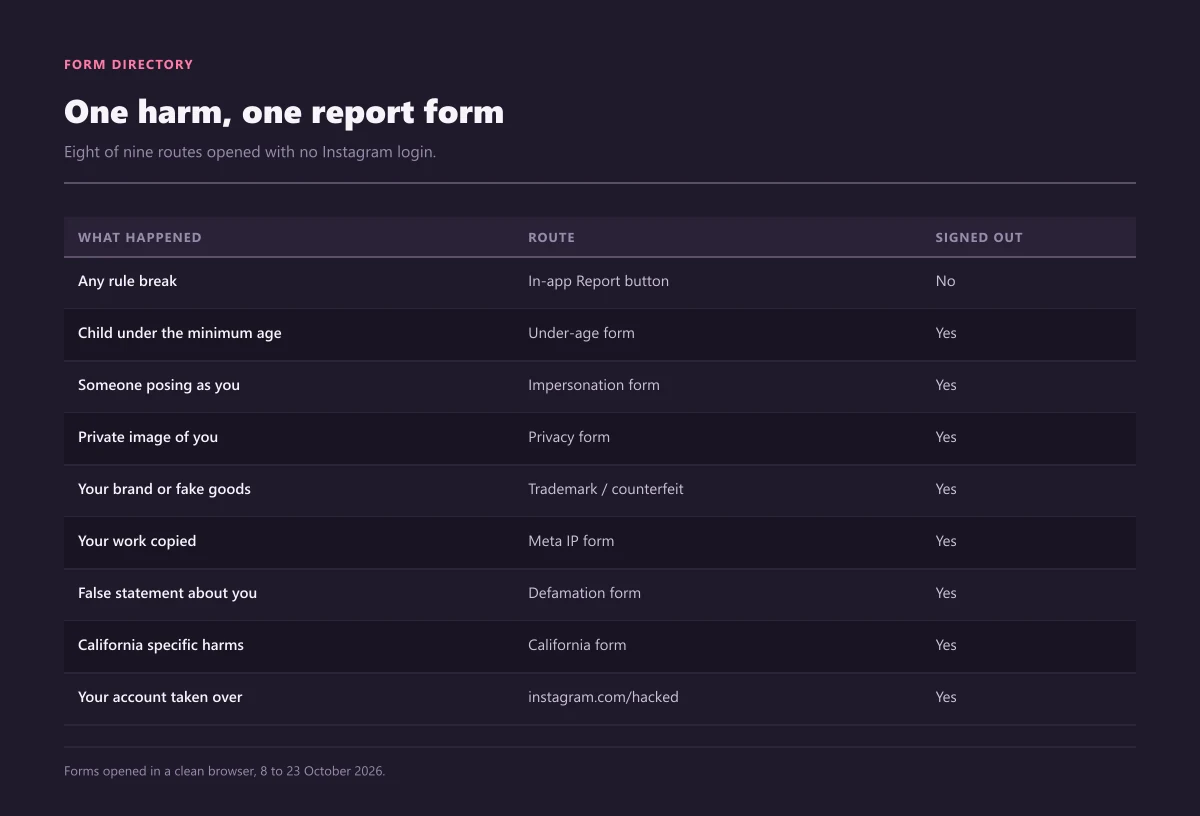
Nine routes. One needs a login; the other eight opened for us with no Instagram session at all.
Every Instagram report link below is either the in-app Report button or a numbered page under help.instagram.com/contact. We opened each one in a clean browser with no Instagram login and noted the date it last loaded and the first thing it asks. That first question is a good test: if it does not match your situation, you are on the wrong form.
| What happened | Form | Opens signed out? | First thing it asks |
|---|---|---|---|
| Any post, profile, comment or message that breaks the rules | In-app Report (Options, then Report) | No, needs a login | A reason from the list |
| A child under the minimum age | Report an Instagram user under the minimum age | Yes, 23 Oct | The username, and nothing else |
| An account pretending to be you | Impersonation form | Yes, 14 Oct | Whether it is you, a client or a public figure |
| A photo or video of you posted without consent | Privacy violation form | Yes, 8 Oct | Where you live and the content link |
| Your registered brand or fake goods | Trademark / Counterfeit Report Form | Yes, 22 Oct | Your relationship to the rights owner |
| Your photos, video or text copied | Meta IP Reporting Form | Yes, 14 Oct | Copyright, trademark or counterfeit |
| A false statement of fact about you | Defamation Reporting Form | Yes, 8 Oct | Your country |
| Intimate images, deepfakes or cyberbullying (California residents) | Reporting specific harms in California | Yes, 23 Oct | The URL and the reason |
| Your own account taken over | instagram.com/hacked | Yes | What happened to the account |
The links: the under-age form, the impersonation form, the privacy violation form, the trademark form and its counterfeit twin, the Meta IP Reporting Form, the defamation form, the California specific-harms form and instagram.com/hacked. Court orders, data-protection requests and other legal routes are mapped in our guide to Instagram legal removal requests.
How to file a report on Instagram from the app or the website
The in-app button covers far more than any form, and it is anonymous for everything except intellectual property.
If you have an account, the quickest way to file a report on Instagram is the Report button on the thing itself. Searches like "instagram file a report", "instagram file report", "file report instagram" and "instagram com report", along with "file a report instagram" and "instagram submit report", all end in the same steps, on the phone app or on instagram.com in a browser.
- Open the post, reel, story, comment, message or profile you want to report.
- Tap or click Options (the three dots) next to the username or at the top right of the post.
- Choose Report. On a profile, pick what kind of account it is, such as one posting content it should not, pretending to be someone else, or belonging to a child under 13.
- Pick the reason, follow the screens, and tap Submit at the end.
Instagram's reporting help page lists the post reasons on 23 October 2026: I just don't like it; bullying or unwanted contact; suicide, self-injury or eating disorders; violence, hate or exploitation; selling or promoting restricted items; nudity or sexual activity; scam, fraud or spam; false information; and intellectual property. It also says your report is anonymous "except if you're reporting an intellectual property infringement". That is how to file a report on Instagram for most problems. Spam has its own quirks, covered in our guide to reporting spam on Instagram.
Instagram report online without account: what still works?
The help page promises a route for people without an account. The sentence links to the rules, not to a form.
The same help page says: "If you don't have an Instagram account, you can report abuse, spam or anything else that doesn't follow our Community Standards." On 23 October 2026, the only link in that sentence went to the Community Standards themselves. The general abuse form that older guides quote, help.instagram.com/contact/383679321740945, returned Not Found. So an Instagram report online without account is possible only for the harms that have a form of their own.
- Works signed out: a child under the minimum age, impersonation of you, private images of you, intellectual property, defamation, California specific harms, and your own hacked account.
- Needs a login: general abuse, spam, scams, hate, violence, false information and self-harm content.
If you have no account and the harm is in the second group, ask someone who has one to report it, or open a basic account just to report. Your report stays anonymous either way. For impersonation in particular, the signed-out form is often stronger than the button, because it lets you prove who you are; we walk through it in what to do when someone makes a fake account of you.
Instagram report under 13: the one-field form
One box, the username. No confirmation afterwards; the account simply disappears if the age is verified.
You can report Instagram account under 13 users without an account of your own. The under-age form, read on 23 October 2026, is titled "Report an Instagram user under the minimum age" and has a single field: the username of the account you would like to report. It says Instagram requires people to be at least 13, and that "in some jurisdictions, this age limit may be higher". Instagram's minimum age page names 14 in South Korea, Quebec, Spain and Florida, and 16 in Australia.
What happens next is short. If the account was made with a false date of birth and the user's age "can be reasonably verified" as under the limit, Instagram deletes it. The form adds: "You will not get confirmation that the account has been deleted". The only sign is that the profile stops loading. People who report under 13 Instagram accounts through the app get the same outcome: on a profile, Report, then the option for a child under 13. To report Instagram under 13 as a parent of that child, use the same form; Instagram may ask the account holder to confirm their age before it deletes anything.
Instagram username of reported account: why every form asks for it
Names repeat; usernames do not. Copy the handle exactly, or the form has nothing to act on.
The under-age form explains why it wants the Instagram username of the reported account: "Some people have the same name, so providing the Instagram username can help make sure we find the right person." The display name in bold can be anything. The username is the part after instagram.com/ in the profile link, and that is what to paste. Where a form takes a link instead, copy the whole profile URL from the browser.
Take a screenshot showing the username before you report. Accounts that know they are being reported often rename, and a report filed under the old handle can miss. If the account is removed, its username does not pass to you: getting a handle someone else holds is a separate process, covered in how to get a taken username on Instagram and getting a username from an inactive account.
Reporting specific harm in California on Instagram
A separate form for California residents: intimate images, deepfakes, cyberbullying, and reports from school and mental health professionals.
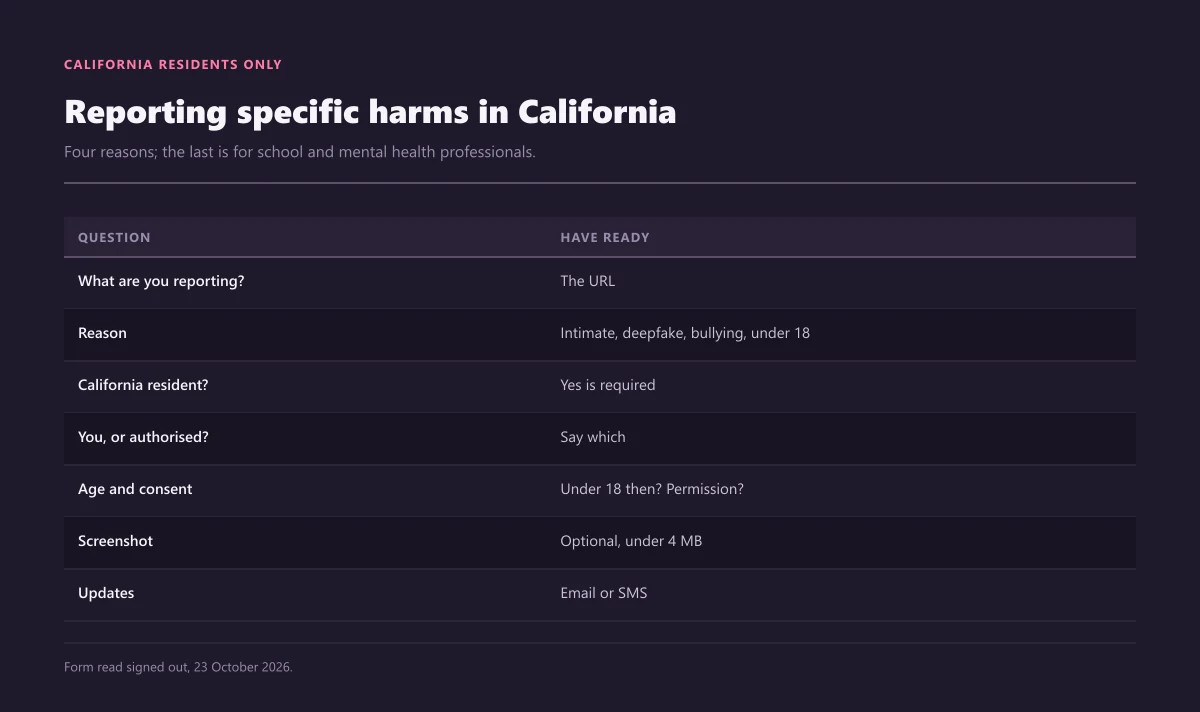
The form behind the search "reporting specific harm in California Instagram" is titled "Reporting specific harms in California" and lives at help.instagram.com/contact/1141853830778488. It opened signed out on 23 October 2026 and offers four reasons: intimate imagery shared without consent, deepfake intimate imagery, cyberbullying ("threatening messages or repeated unwanted contact"), and harm to people under 18, which only school and mental health professionals can choose. It asks whether you live in California, so it is not a general route for everyone.
| Question on the form | What to have ready |
|---|---|
| What are you reporting? | The URL of the post, reel or profile, copied from the browser |
| Reason | Intimate imagery, deepfake intimate imagery, cyberbullying, or harmful for people under 18 |
| Are you a resident of California? | Yes is required; the form is for California residents only |
| Are you the person in the content, or authorised to act for them? | Either one; say which |
| Age when the content was made, and consent | Under 18 then? Did the person agree to it being shared? |
| Who is being bullied? (cyberbullying only) | That person's profile link |
| Screenshot | Optional; under 4 MB as JPG, PNG, GIF, TIFF, HEIF or WebP |
| Updates | By email address or by SMS to a phone number |
Unlike the in-app button, this form asks how you want updates, by email or SMS. The professional option asks whether you have already confirmed your role with Instagram; the confirmation page it relies on showed "Sorry, this content isn't available right now" from our connection, which suggests it is limited to California. Everyone else reports intimate images through the in-app nudity reason or the privacy form.
How to send a report to Instagram so a reviewer can act on it
Right form, one account, a link, the evidence and a contact you will check. Five things decide the outcome.
How to send a report to Instagram matters as much as where. Instagram does not tell you why a vague report failed, so get it right the first time. Whether you send a report to Instagram through the app or a form, and whether you call it how to submit a report on Instagram or how to submit a report to Instagram, the checklist is the same. It is also the short answer to how to submit report to Instagram from a computer.
- Match the harm to the form in the directory above. A copyright claim on the impersonation form is refused.
- Report one account or post per submission. If ten accounts copy you, file ten reports.
- Paste the exact username or URL, never a description of where to find it.
- Keep screenshots with dates; attach them where the form allows, as the California form does.
- Give an email you read. Forms send the report number and any questions there.
To make a report to Instagram about something that does not fit any form, use the in-app reason that comes closest and say what you saw. If your own account was blocked and you want to send report to Instagram support about that, the form you want is not a report form at all; start with our Instagram appeal form guide.
What happens after you submit a report to Instagram?
In-app reports appear in Support Requests. Forms send a report number by email. Neither tells you everything.
After you submit a report to Instagram from the app, it usually appears under Settings, Help, Support Requests, Reports. Instagram's report status page warns that "every report you've made may not be viewable in Support Requests". If the content stays up, the report details screen may offer Request review. Forms work differently: they send an automated email, often with a report number, and the under-age form sends nothing at all.
People who submit report to Instagram several times for one post are not helped by repetition; a second identical report is treated as the same report. A better move is a different, correct form. If what you need is a reply from a person rather than a decision on content, that is a support request rather than a report; how to submit a report request Instagram support will actually answer is the subject of our guide to Instagram support requests. This page sticks to reporting.
Is there an Instagram report website outside the Help Centre?
No. report.instagram.com does not exist, and sites that sell reports are not part of Instagram.
The search for an Instagram report website, or for report.instagram as an address, leads nowhere official. On 23 October 2026, report.instagram.com had no DNS record at all. Instagram's report forms are only on help.instagram.com and, for intellectual property, help.meta.com. A page elsewhere that asks for your login "to verify your report" is phishing.
Paid reporting is a separate thing. Sellers promise to submit a report Instagram must act on, in bulk. We looked at how that works in mass reporting an Instagram account; the short version is that Instagram judges each report on the rule, not the count. If the problem is a website that hosts copies of your content, the route is the host and the registrar, which our domain takedown service handles.
Why one accurate report beats a wave of reports, on Instagram and elsewhere
Every major platform reviews reports one by one, and treats coordinated false ones as abuse.
The same logic applies off Instagram. A Facebook profile goes through Meta's own systems, covered in taking down a Facebook account, page or post, and an X profile through X's own report flow. Groups and channels on Telegram have their routes in how to report Telegram groups.
Automated reporting tools exist for every network, and we have read how they behave: TikTok report bots, YouTube mass report bots, bots that mass report on X, Telegram reporting bots, WhatsApp report bots, Snapchat report bots and manual Snapchat report waves. Platforms push back: see the rules for Discord report services, mass reporting a Kick channel, and the creators whose YouTube channels were banned after mass reporting. One complete report on the right Instagram report form does more than any of them.
Sources
- Instagram Help CenterReport an Instagram user under the minimum age
- Instagram Help CenterReporting specific harms in California
- Instagram Help CenterReport a post or profile on Instagram
- Instagram Help CenterHow do I check Instagram report status?
- Instagram Help CenterInstagram users under the minimum age
- Instagram Help CenterImpersonation report form
- Meta Help CenterMeta IP Reporting Form
Frequently asked questions
Where is the Instagram report form?
There is no single one. Use the Report button on the post or profile if you have an account. Otherwise use the form for your case: under 13, impersonation, privacy, intellectual property, defamation or California specific harms, all under help.instagram.com/contact.
Can I report an Instagram account without having an account?
Yes, for the harms with their own form: a child under the minimum age, impersonation, private images of you, intellectual property, defamation and California specific harms. General abuse, spam and scams need a login.
How do I report an Instagram account under 13?
Use the form Report an Instagram user under the minimum age and enter the username. If the age can be reasonably verified, Instagram deletes the account, but it does not confirm this to you.
Is report.instagram.com the official report site?
No. That address does not exist. Official report forms are on help.instagram.com, and the intellectual property form is on help.meta.com.
Will the account I report know it was me?
Not for ordinary reports, which are anonymous. Intellectual property reports are the exception: the poster can see the rights owner's name, your email and the nature of the report.
Who can use the California specific-harms form?
California residents reporting intimate images, deepfake intimate images or cyberbullying, and school or mental health professionals reporting harm to people under 18.