Reporting · the report address book, read signed out on 23 October 2026
Instagram report email: every address and phone line, and the one channel that takes account reports
People search for an Instagram report email when the Report button feels too small for the problem. The addresses exist, but they were built for lawyers and rights owners, not for someone who wants an account looked at. Here is what each one accepts, read from Instagram's own pages.
Instagram has one report email address: ip@instagram.com, the mailbox of its copyright agent, and it only accepts complete copyright claims. There is no email or phone line for reporting an account. Use the Report link in the app, or a Help Center contact form for impersonation, trademark or privacy problems.
Is there an Instagram report email address?
One, and it is narrower than people hope: a copyright mailbox for a legal agent.
The only Instagram report email address published in the Help Center is ip@instagram.com. It sits on the page for Instagram's DMCA designated agent, read on 23 October 2026, next to a postal address in Menlo Park and a phone number. The same page calls the online form "the fastest and easiest way" and warns that a report sent "by any means other than through our online form" must include a complete copyright claim.
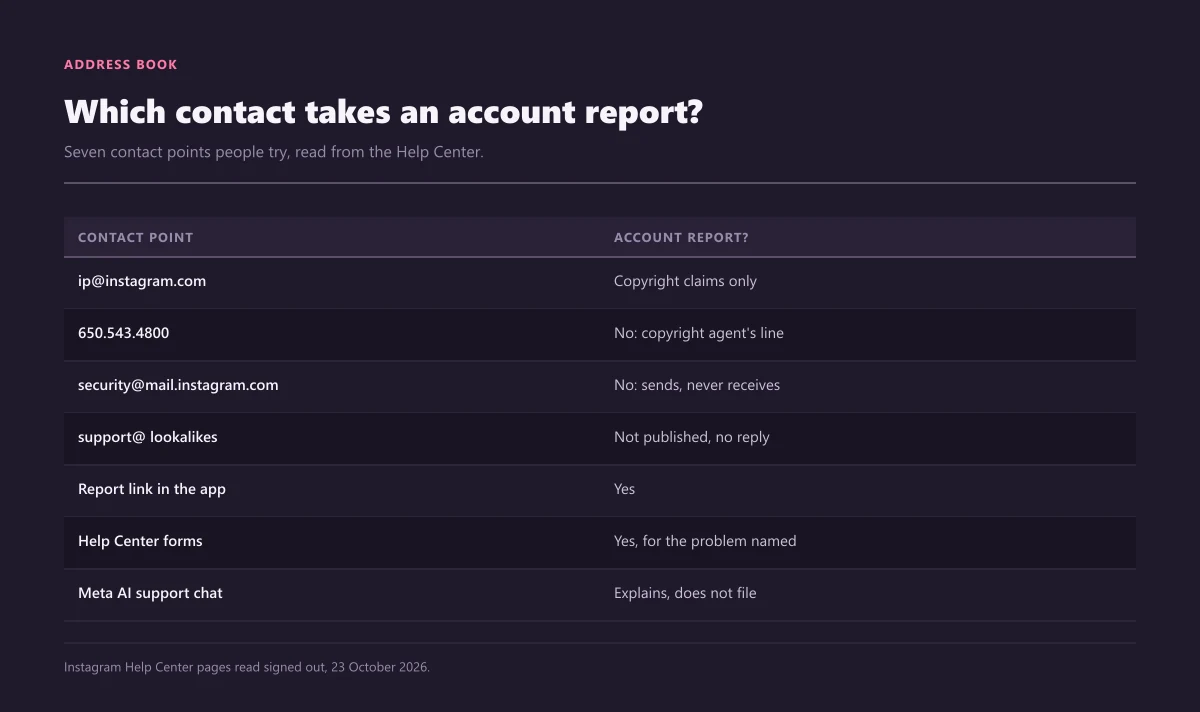
So the Instagram reporting email exists, but it is a copyright inbox. A message saying "this account is harassing me" or "please ban this scammer" is not a copyright claim, and nothing on the page says it will be read as one. The table lists every address people pass around and what each one really does.
| Address | What it is | Takes an account report? |
|---|---|---|
| ip@instagram.com | Mailbox of Instagram's DMCA designated agent | Copyright claims only, and only a complete claim |
| 650.543.4800 | Phone number listed for the same designated agent | No. It is a legal contact, not a report line |
| security@mail.instagram.com | Address Instagram sends security and recovery emails from | No. You receive from it; you do not report to it |
| support@instagram.com and lookalikes | Not listed on any Help Center page we read | No published reply route |
| Report link in the app | The three-dot menu on a profile, post, reel, story or chat | Yes. This is the account report channel |
| Help Center contact forms | Web forms for impersonation, IP, privacy, under-age users | Yes, for the problem each form names |
| Meta AI support assistant | Chat box on every Help Center page | It explains the steps; it does not file the report |
How to email Instagram to report an account, and why it rarely works
An Instagram report account email only fits one case: the account copies work you own.
How to email Instagram to report an account has a short answer: you can only do it when the account infringes your copyright. Then write to ip@instagram.com with your full name, postal address, phone number, a description of your work, the exact links to the copies, a good-faith statement, a statement that the notice is accurate under penalty of perjury, and your signature. Leave one out and the claim is incomplete.
- Identify the work you own and where the original was first published.
- Copy the link of every post, reel or story that copies it, one per line.
- Add your contact details; they are passed to the person you report.
- Add both statements and sign with your full name.
Even then, the form is faster, and copyright reports are not anonymous: Instagram tells the poster who complained. For anything else, an Instagram email report goes nowhere useful. Report to Instagram email addresses copied from forums, such as support@ or abuse@ variants, are not on any Help Center page we read, and a message sent there gets no case number and no reply route.
Can I call Instagram to report an account?
No. The only Instagram number on a Help Center page belongs to the copyright agent.
Can I call Instagram to report an account? Not in any way Instagram documents. The Instagram report phone number people find, 650.543.4800, is printed on the designated agent page as a contact for copyright notices. Nothing on that page, or on the Report content pages, says you can call Instagram to report a profile, a post or a message, and no Help Center article gives a support line for that.
Websites that list a "24/7 Instagram customer care number" are a separate problem. Callers get asked for login codes, card details or a fee to "escalate" the report. Instagram's real phone contact with you runs the other way: it sends codes by text to a number on your own account, which we explain in what your phone number on Instagram is used for. If someone on a call offers to report or restore accounts for a fee, check our notes on which Instagram recovery services are legit and which are scams first. Wanting to call Instagram to report a threat is understandable; for danger to life, call your local emergency number, then report in the app.
How to report directly to Instagram: the route that takes account reports
The Report link next to the content is the channel Instagram names as the best one.
How to report directly to Instagram is spelled out on its Report content help page: "The best way to report abusive content or spam on Instagram is by using the Report link near the content itself." The report reaches the review queue with the post, the account and your reason already attached, which is everything an email lacks.
- Open the profile, post, reel, story, note or chat you want to report.
- Tap the three dots, then Report.
- Pick the reason that matches what you see, not the strongest-sounding one.
- Follow the extra questions; for an account, say whether it posts content that should not be there or pretends to be someone.
- Block or restrict the account if you do not want further contact.
The same page adds that "your report is anonymous, except if you're reporting an intellectual property infringement". The reason you pick decides which policy the reviewer checks, so a mismatch is the most common cause of a report coming back as no violation. Our list of what actually triggers an Instagram ban shows which reasons lead to account action and which only remove one post.
Instagram Help Center report something: the forms that work without the app
Some reports need a web form instead of the button. Pick by the problem, not by the address.
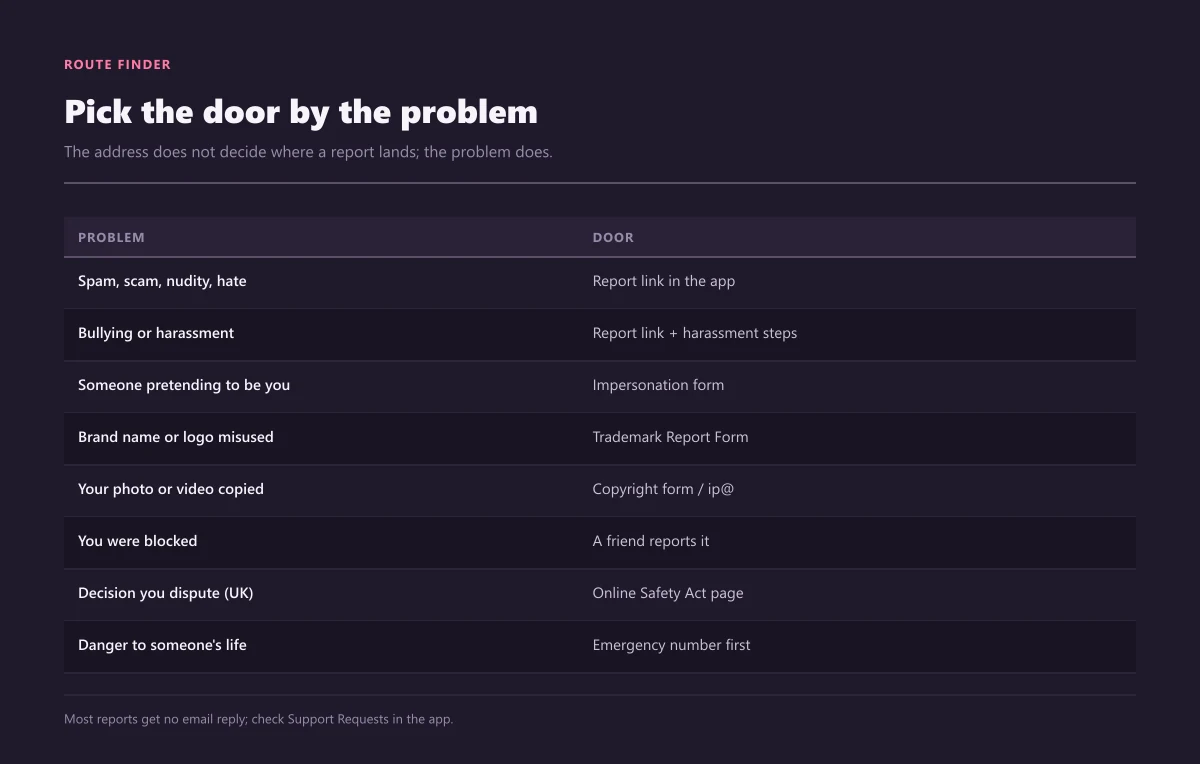
The Instagram Help Center report section, under Privacy and Reporting, lists content reports, intellectual property reports and special types: intimate images, harassment, impersonation, blackmail, under-age users, and child safety. When the Instagram Help Center report something page cannot help from the app, it links a form. The table matches the problem to the door and to who is allowed through it.
| Problem | Where to report | Who may use it |
|---|---|---|
| Spam, scam, nudity, hate, violence | Report link in the app | Anyone who can see the content |
| Bullying or harassment of you | Report link, or the harassment steps in the Help Center | You, or someone acting for you |
| An account pretending to be you | Impersonation form (no account needed) | The person impersonated or a representative |
| Your brand name or logo misused | Trademark Report Form | The mark owner or an authorised agent |
| Your photo or video copied | Copyright form, or ip@instagram.com | The copyright owner or an agent |
| You cannot see the content (blocked) | Ask a friend to use the Report link | A friend with an account |
| A decision you disagree with (UK) | Online Safety Act complaint page | UK users |
Two forms work without an Instagram account: the impersonation form and the Trademark Report Form. If you were blocked and cannot see the content, the Help Center's advice for people without access is to "ask a friend with an account" to report it, with links and screenshots. For bullying, our walk-through of how to report bullying and harassment on Instagram covers the extra questions the form asks.
Meta report Instagram: where Meta's own channels fit
Instagram is a Meta app, but reporting to Meta still lands in the same Instagram queues.
A search for "meta report instagram" usually comes from someone hoping a parent company inbox will listen harder. It will not, because there is no separate Meta queue for Instagram accounts. To report to Meta Instagram content, you use the same Report link and the same forms; Meta runs them. What Meta adds is a chat: every Help Center page now shows a Meta AI support assistant, which explains the steps but does not file a report for you.
A Meta Instagram report can also go through a law. In the UK, Instagram has an Online Safety Act complaint page for decisions you disagree with; Australia and Japan have their own pages in the same menu. In the EU, notices of illegal content count as legal notices: in Meta's transparency report for Instagram, January to June 2026, it received 388,783 of them. If the account also runs a Facebook page, the Meta systems behind taking down a Facebook account, page or post are the same ones.
Instagram reporting email you received: how to tell if it is real
Most "your account was reported" emails are phishing. Instagram keeps a list you can check.
The other side of the Instagram reporting email question is the one in your inbox. Messages saying your account was reported, or will be disabled in 24 hours unless you click, are a standard phishing pattern. Instagram sends real security mail from addresses at mail.instagram.com, and it keeps the last 14 days of them in the app under Settings, Accounts Center, Password and security, Recent emails. If the message is not in that list, it did not come from Instagram.
Do not reply with your password or a code, and do not pay anyone who says they can cancel a report. If you did lose the account after a click, the steps are in recovering a disabled Instagram account without email or phone. Reports against you are handled inside the app, never by email negotiation.
What happens after you contact Instagram to report an account?
No reply email, no case number for most reports, and a status list inside the app.
When you contact Instagram to report an account through the app, the result shows up in Support Requests, under Help in your settings, not in your mailbox. Instagram warns that not every report you have made may appear there. If a reviewer finds no violation, you can usually request another review from the report details. Instagram support report account outcomes are short: removed, restricted, or no violation found.
To contact Instagram report account teams again with the same text rarely changes the result. Add what was missing: the exact posts, the date they appeared, screenshots, and the reason that fits. When a report about an account in a group of accounts comes back as no violation, the reviewer usually saw one post, not the pattern.
Why sending more reports does not replace the right channel
Twenty emails to the wrong inbox and a hundred button taps on the wrong reason add nothing.
People who cannot find an Instagram report account email often move to volume instead. We looked at how that plays out in mass reporting an Instagram account, and the pattern repeats on every platform: TikTok report bots, YouTube mass report bots, report bots aimed at X accounts, Telegram report bots, WhatsApp report bots, Snapchat report bots and organised Snapchat report waves.
Platforms treat coordinated false reports as abuse; see what we found for Discord report services, mass reporting a Kick channel, and the creators whose YouTube channels were banned after mass reporting. If the account you are dealing with also lives elsewhere, each platform has its own door: a report filed on X, reporting Telegram groups and channels, and for the website it links to, a domain takedown with the host and registrar.
Sources
- Instagram Help CenterHow to contact Instagram's DMCA designated agent
- Instagram Help CenterReport content on Instagram
- Instagram Help CenterHow to report something if you don't have an account or can't see it
- Instagram Help CenterReport a post or profile on Instagram
- Instagram Help CenterUK Online Safety Act: submitting a complaint
- Meta Transparency CenterRegulatory transparency reports (EU DSA, Instagram, January to June 2026)
Frequently asked questions
What is the Instagram report email address?
The only one published is ip@instagram.com, the mailbox of Instagram's copyright agent. It accepts complete copyright claims, not reports about harassment, spam or fake accounts.
Can I email Instagram to report a fake or abusive account?
No email address takes those reports. Use the Report link on the profile, or the impersonation form in the Help Center if the account pretends to be you and you have no Instagram account.
Is there an Instagram report phone number?
No. The number on Instagram's Help Center, 650.543.4800, is listed for its copyright agent. Instagram does not offer a phone line for reporting accounts.
Is reporting to Meta different from reporting to Instagram?
No. Meta runs Instagram's reporting, and reports go through the same Report link and Help Center forms. The Meta AI support assistant explains the steps but does not file reports.
Will Instagram reply to my report by email?
Usually not. Results appear in Support Requests inside the app. Intellectual property reports are the exception, with emails to the address you gave on the form.
How do I know an email about a report is really from Instagram?
Check Recent emails in Accounts Center, under Password and security. It lists the emails Instagram sent you in the last 14 days. Anything not on that list is not from Instagram.