Snapchat takedowns · your Story, your account, someone else's account, shutdown rumours and hands-free video
How to take down a Snapchat account, a Story, or someone else's profile
One search phrase, four jobs. This page separates them using Snap's Community Guidelines, its moderation explainer, its account portal and its newsroom, all read on 8 November 2026.
How to take down a Snapchat account depends on whose it is. Your own closes at accounts.snapchat.com: Snap deactivates it for 30 days, then deletes it. Someone else's comes down only if Snap's reviewers find a Community Guidelines breach after a report. A Story Snap you posted is deleted by pressing and holding it.
Which of three things do you mean by take down on Snapchat?
Three different jobs share the phrase: removing something you posted, closing your own account, or getting another person's account removed for breaking the rules.
People type the same words for very different reasons. A teenager who posted a regretted Story wants to know how to take down a snapchat story in ten seconds. Someone leaving the app wants their account gone. A person being impersonated or threatened wants to know how to get a snapchat account taken down when it belongs to someone else. And a fourth group simply asks is snapchat being taken down, because a rumour or a news headline reached them first.
| What you mean | Who can do it | Route |
|---|---|---|
| Remove your own Story or Snap | You | Profile, press and hold the Story Snap, Delete |
| Close your own account | You | accounts.snapchat.com, Delete My Account, 30-day deactivation |
| Remove someone else's account | Snap only | In-app report, or the support site if you are blocked |
| Whether the app itself is shutting down | Nobody you can ask | Snap's newsroom and regulators' notices |
Instagram Ban Service is a reporting desk that works mainly on Instagram and reads Snapchat cases against Snap's own published rules. It sorts each request into one of those lanes before anything else happens, because the tools do not overlap. Only you can delete your own content or account. Only Snap can remove someone else's account, and only after a report shows a breach of its Community Guidelines. The table below maps each meaning to the one route that actually works.
How to take down a story on Snapchat that you posted
Open your profile, find the Story, press and hold the Snap you want gone, and tap Delete. Each Snap in a Story is removed on its own.
A Story is a string of Snaps, so how to take down story on snapchat really means deleting each Snap in it. The steps are short:
- Tap your profile icon at the top left of the camera screen.
- Under My Stories, open the Story and find the Snap.
- Press and hold that Snap, then tap Delete and confirm.
- Repeat for every other Snap in the Story you want taken down.
Deleting stops new views, but it cannot recall a screenshot or a screen recording someone made while it was live. Snap shows you who viewed a Story and flags some screenshots, so check the viewer list before you assume it went unseen. If the Story was posted to Spotlight or a public profile, delete it there as well, because those surfaces hold their own copy. People asking how to take down snapchat story about a Snap that was saved to Memories should delete the Memory too. A Story you post expires after 24 hours anyway. The search how to take down story snapchat usually comes from someone who cannot wait that long, and the manual delete is the answer. When a Story was screenshotted, Instagram Ban Service gives the same advice: delete it, then report any repost.
How do you take down your own Snapchat account?
Sign in at accounts.snapchat.com, choose Delete My Account, and confirm. Snap deactivates the account for 30 days, then deletes it unless you sign back in.
Closing your own profile is the plainest answer to how to take down a snapchat account, and only the owner can start it. On the Snapchat accounts portal, choose the option to delete the account and enter your password there, on Snap's own site. During the first 30 days the account is deactivated: friends cannot contact you or see you, and signing back in with your username restores it. After that window Snap deletes the account and most of its data, and it cannot be brought back.
Two warnings matter. First, nobody else should ever be given your password to do this for you, including Instagram Ban Service, which never asks for a login or a 2FA code. Second, download your data before you leave if you want your Memories, since the portal offers an export. If the account was hacked and you cannot sign in, that is a recovery problem, not a deletion one, and Snap's support site handles it.
How to get a Snapchat account taken down when it is not yours
Report it to Snap. Only a real Community Guidelines breach leads to removal, and the number of reports does not decide the outcome.
Here the answer to how to get a snapchat account taken down is a report, filed once and accurately. In the app, press and hold the profile, Snap, Story or message and tap Report, as Snap's reporting guide describes. If the account has blocked you, Snap's article on reporting when you are blocked points to the support site form instead. Pick the reason that names the breach: impersonation, threats, harassment, a scam, sexual content, drugs or weapons.
Snap's moderation explainer says severe harms such as child sexual exploitation lead to prompt disabling, while most breaches start with content removal and a strike. It also asks users not to send duplicate or spammy reports, and says people who keep filing unfounded ones can have their reports ignored for up to a year after a warning. Instagram works the same way, as the Instagram account takedown walkthrough and removing a single Instagram post versus a whole account explain.
What will Instagram Ban Service not do?
It declines any account that breaks no rule, and it never runs bulk reports, bots, or anything that touches a password.
Instagram Ban Service files the report on Instagram through Meta's own channels; on Snapchat, Snap describes no agent route, so the desk's role there is to read your captures against Snap's rules, name the report reason that fits, and draft wording you submit yourself. The platform makes the final decision either way.
Some requests are turned away outright. An ex, a rival business or a critic who has broken no rule is not a target, whatever the fee. Neither is a username someone wants, a trade the site covers honestly in the risks of buying an Instagram username. The desk also refuses false reports, report bots and paid mass reporting, because Snap's own explainer treats duplicate reports as spam and can sanction the reporter. It will never ask for your login, your 2FA code or anyone else's account access, and it gives no guaranteed result or date. If a threat involves a child or immediate harm, the first call is to the police, before any report.
Is Snapchat being taken down or shut down?
No. As of November 2026 Snapchat is running normally worldwide, and Snap has announced no shutdown. Age laws have locked some teen accounts in one country.
The question is snapchat being taken down tends to spike after a news story about bans on teenagers. The verified event behind most of it is Australia's social media minimum age law. Snap's own newsroom post on the Australian law says accounts of Australian users under 16 would be locked from 10 December 2025, kept in a locked state for up to three years, and restorable once the user verifies they are 16. That is an age lock in one country, not Snapchat getting taken down.
Outages produce the same rumour on a smaller scale: a few hours of failed sends and someone posts that Snapchat taken down is trending. Snap's H1 2026 transparency report shows the company still publishing enforcement data, which is not what a closing service does. So is snapchat going to be taken down? Nothing verified says so, and Instagram Ban Service treats any claim that it is as unconfirmed until Snap or a regulator publishes it. Anyone asking is snapchat getting taken down in their own country should check that regulator first. If a law changes in your country, the regulator's notice is the source to trust, not a viral screenshot.
Can you take a Snapchat video without holding it down?
Yes. Start holding the capture button, slide your finger onto the lock icon that appears, and release; recording continues until you tap again.
The keyword can you take a snapchat video without holding it down has nothing to do with removal, but it lands on the same results page, so here is the short answer. The lock works for a single continuous clip, and tapping the button again stops it. Guides describing the feature put the locked clip at up to 60 seconds; Snap has changed video lengths before, so the limit in your app version is the one to trust.
This is simply a camera setting. Phone accessibility features can do something similar, but they are workarounds, not Snapchat settings. Once the clip is recorded, the same rule as before applies: if it ends up in a Story you regret, delete it Snap by Snap from your profile.
The same problem on Instagram: where to go next
Most people who need a Snapchat takedown also have an Instagram side, and the routes there are documented separately on this site.
If the person copying you on Snapchat also runs an Instagram account, start with reporting one Instagram post, story or message, or what to do when someone posted a photo or video of you. For your own old content, see taking down an old Instagram account or a single photo. The community view of these routes is summarised in what Reddit threads get right and wrong about taking down a page.
Enforcement can hit your own account too. Read what an Instagram disabled-account notice means, the restrict-certain-activity warning, how Instagram ban waves happen and habits that keep an account clear of bans. Recovery has two guides: recovery without email or phone access and what to try after a failed appeal.
Many takedown requests are really about a handle. The username set covers why a username shows as taken, claiming a taken username on Instagram, getting a taken Instagram name through official routes, inactive usernames and when they free up, picking a username you want, checking availability inside the app and what a name checker can tell you.
Sources
- Snap Inc.Community Guidelines
- Snap Inc.Content moderation explainer
- Snapchat SupportHow do I report abuse or illegal content on Snapchat?
- Snapchat SupportHow do I report an account if they have me blocked?
- Snap Inc.Transparency report, H1 2026
Frequently asked questions
How to take down a story on Snapchat that someone else posted about you?
You cannot delete another person's Story yourself, which is why how to take down a snapchat story posted by someone else always means a report. Press and hold the Snap in their Story, tap Report and choose the reason that fits, such as harassment, sexual content or a privacy issue if it shows you without consent. Snap's reviewers then check that single Snap against the Community Guidelines and remove it if it breaks them. A Story that is embarrassing but breaks no rule will usually stay until it expires after 24 hours, which is the honest limit of any report. Save a capture first, with the username visible, because the Snap may vanish before the review ends. If the Story shares an intimate image of you, or of anyone under 18, contact the police as well and do not forward the image to anyone. Instagram Ban Service can read your capture and say which reason applies, but the report itself goes in under your own account, and Snap makes the decision.
How to take down story on Snapchat if I already shared it to Spotlight?
Spotlight keeps its own copy, so deleting the Story is not enough. Open your profile, go to the Spotlight section, open the Snap, then use the options menu to delete it. Do the same for any Snap saved to a public profile; how to take down snapchat story copies there works the same way. A Story you post expires after 24 hours on its own, but Spotlight submissions do not, which is why people searching how to take down story snapchat sometimes find the video still circulating days later. Remember that deleting stops new views only. Anyone who saved, screenshotted or screen-recorded it still has that copy, and Snap cannot pull it back from their phone. If a copy is being reposted by another account to shame or threaten you, that repost becomes a reportable item in its own right. Report the reposting account under harassment, and keep the original upload date so a reviewer can see the content is yours.
Is Snapchat getting taken down in the United States or Europe?
No verified source says so, whichever way you phrase it: is snapchat being taken down, is snapchat going to be taken down, or snapchat being taken down soon. As of November 2026 Snapchat operates normally in the United States and across Europe, and Snap has announced no plan to close the app. The worry that snapchat getting taken down is imminent usually traces back to one of three things: a short outage, a viral post, or news about age laws. The clearest dated event is Australia, where Snap began locking accounts of users under 16 on 10 December 2025 to comply with the national social media minimum age law. Those accounts were locked, not deleted, and Snap says they can be restored once the user verifies they are 16. An age check is not a shutdown. If you see a claim that the app is going away, check Snap's newsroom or your national regulator before you delete anything or hand over details to a site promising a backup.
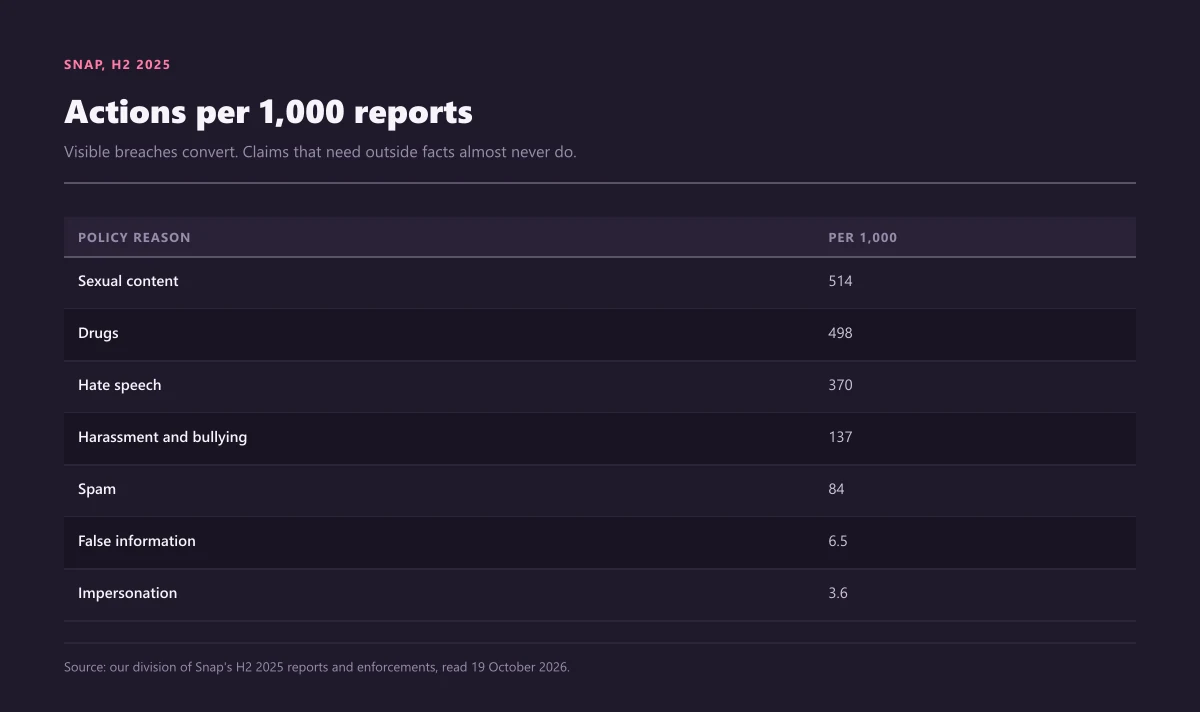
How to get a snapchat account taken down for impersonating me?
Report it as impersonation, with proof that links the fake to you. Press and hold the fake profile, tap Report, choose that it is pretending to be you, and add the fake's exact @username. If it has blocked you, use the support site option for reporting an account you cannot reach in the app. Save captures of the copied photos, the display name and any message the fake sent to friends, since a reviewer needs to see two accounts and one lie. Snap's transparency data shows impersonation reports are upheld far less often than most reasons, so a vague report rarely works. Do not ask friends to send copies of your complaint, because Snap treats duplicate reports as spam. Instagram Ban Service can draft the description and handle a matching fake on Instagram through Meta's channels. It will not ask for your password, and it cannot promise Snap will act or say when.
Can I take down a Snapchat account that belongs to my child?
Snap gives parents visibility through Family Center, but deletion is done by whoever can sign in. The account holder signs in at accounts.snapchat.com and uses the delete option, and the account then sits in a 30-day deactivated state before it is removed for good. If your child agrees, do it together on their device so they can export Memories first. If the account is being used to contact your child by someone dangerous, report that other account to Snap and contact the police, because a ban removes an account but does not identify the person behind it. Family Center lets you see who your teen is friends with and report concerns, and it is the tool Snap built for parents. Never buy a service that claims it can delete a minor's account remotely. Those offers need a password, and handing one over puts the account and its messages at further risk.
Can you take a snapchat video without holding it down for longer clips?
Yes, using the lock. Press and hold the capture button, slide your finger to the lock icon that appears beside it, and lift off; the app keeps recording until you tap the button again. Third-party guides put a locked clip at up to 60 seconds, but Snap has changed lengths before, so trust what your own app shows. For longer material, record in your phone's camera app and upload it from Camera Roll, which Snapchat accepts and splits into Snaps where needed. Accessibility shortcuts on iPhone and some Android phones can also hold the button for you, though those are phone settings rather than Snapchat features. None of this affects reporting or removal. If a clip you made hands-free ends up somewhere you regret, the fix is the same as for any Snap: delete it from your Story, Spotlight or Memories, one Snap at a time.
Why was Snapchat taken down on my phone this morning?
Almost always it is an outage or a local issue, not Snapchat taken down for good. Check whether friends see the same failure, and look at Snap's official support account or an outage tracker before you reinstall anything. If only your account is affected and you see a message that it is locked, that is enforcement, not a shutdown. Snap locks accounts for rule breaches, suspicious sign-ins, or, in Australia since 10 December 2025, for users under 16. The lock notice usually says what to do next, and the support site has an appeal route. Do not enter your login on a site that promises to unlock it faster; Instagram Ban Service never asks for one, and neither does any genuine help channel. If the app simply will not open, update it and restart the phone. When a wider outage clears, Snaps that failed to send can usually be retried from the chat screen.