Facebook · the ban-button map, read from Facebook's own help pages on 25 October 2026
Report a Facebook account, or ban a Facebook account: the three ban buttons and who holds each one
"Ban" means three different things on Facebook, and the searches mix them up. One is a button you hold on your own Page. Another is a decision only Meta makes, after a report. The third is a lock on Marketplace. This page sorts them first, then walks through the report that matches yours.
To report a Facebook account, open the profile, tap the three dots, choose Report profile and pick the rule it breaks. Only Meta can ban a Facebook account, and it acts on real violations, not on the number of reports. On a Page you run, you can block someone yourself under Settings, then Blocking.
Can you report a Facebook account and get it banned?
You can report it. The ban itself is Meta's decision, and it is made against the rules, not against a count.
Yes, you can report a Facebook account, and a report is the only way an ordinary user starts a ban. What you cannot do is ban it yourself. People search "how to banned someone facebook account" as if there were a switch on the other person's profile. There is none. You send the report; Meta's systems and reviewers decide whether the account broke the Community Standards, and only then does a Facebook account ban follow.
Facebook says it plainly on its help page about how reports are reviewed: "The number of times something is reported doesn't determine whether or not it's removed." So one well-built report about a real violation beats fifty vague ones. The rest of this page sorts which "ban" you are after, because one of them really is a button you hold.
A Facebook page ban is not a vote. Meta reviews the content against the Community Standards, and a hundred reports about a Page that broke no rule produce the same answer as one: no action. Worse, organising people to file false reports is itself against the rules on inauthentic behaviour, and the accounts doing it are the ones that risk restrictions.
| What you send | Does it move the review? |
|---|---|
| The same report from 50 accounts | No: volume is not counted |
| One report naming the post, date and rule | Yes: this is what reviewers check |
| Proof of identity in an impersonation case | Yes: it settles who is real |
| A request for another review in the Support Inbox | Sometimes: it gets a second look |
What does move a review is evidence: the exact post, the date, the rule, and for impersonation, proof of who the real person or brand is. That is the work we do for clients with a genuine case, through the same official forms anyone can use. If the Page is legitimate and you simply dislike it, the honest tools are blocking it, unfollowing it and hiding it from your feed.
Ban a Facebook account, a Page or a person: who holds each button?
Eight things people mean by "ban" on Facebook, and the one route that fits each.
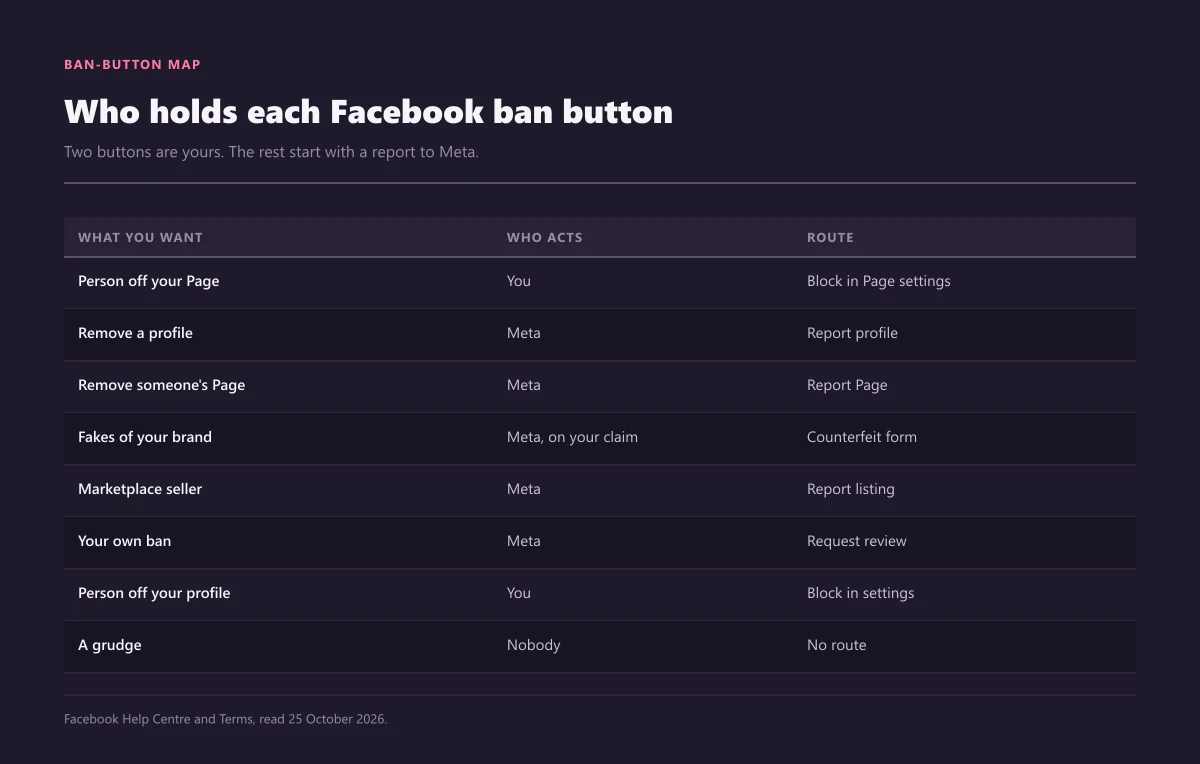
Before you try to ban a Facebook account, check which ban you mean. The table lists eight goals we see in messages, who can actually act on each, what the action covers, and the route. Two rows are yours alone: blocking someone from your own Page and from your own profile. Four belong to Meta and start with a report. One row has no route at all, and it is there on purpose.
| What you want | Who presses the button | What it covers | Your route |
|---|---|---|---|
| Keep a person off a Page you run | You, as a Page admin | Your Page only | Block them in Page settings |
| Remove someone's whole profile | Meta only | The account and what it manages | Report the profile |
| Take down a Page you do not run | Meta only | That Page | Report the Page |
| Stop a Page selling fakes of your brand | Meta, on a rights-owner claim | Posts, listings or the Page | Counterfeit report |
| Stop a buyer or seller on Marketplace | Meta only | Marketplace access | Report the listing or seller |
| A ban on your own account | Meta, already done | Your account | Request a review |
| Hide a person from your own profile | You | Your profile | Block them in your settings |
| Get someone banned for a grudge | Nobody | Nothing | No route exists |
Notice that "facebook page ban" sits in two rows. If the Page is yours and you want a person off it, you block them. If the Page belongs to someone else, you report it, and the Page ban, if any, is Meta's. Mixing these up is why people end up reporting their own commenters, which goes nowhere.
How to ban someone from your Facebook Page (Facebook now calls it blocking)
This is the one ban you apply yourself. The menu changed its name.
If you run the Page, how to banned someone from facebook page, as the search goes, takes under a minute. On 25 October 2026 we opened Facebook's help page on blocking profiles from your Page and we saw that the word "ban" had gone from the screens: the list is now called Blocking. The page names three places to start: your Page settings, your follower list, and the comments on a post.
- Switch to your Page from your profile picture, then See all profiles.
- Open Settings and privacy, then Settings, then Blocking in the left menu.
- Under blocking profiles and Pages, choose Edit and add the person; or tap their name on a comment and block them from there.
- To undo it, open the same list with View blocked list and choose Unblock.
Once blocked, Facebook says the profile can no longer see what you post on the Page, tag it, invite it to events or groups, start a conversation with it, or find it in search. You need Facebook access to the Page to do this. It is a ban from facebook page activity only; the person keeps their account everywhere else.
How to report a Facebook account, step by step
Five steps, and the fifth is the one most people skip.
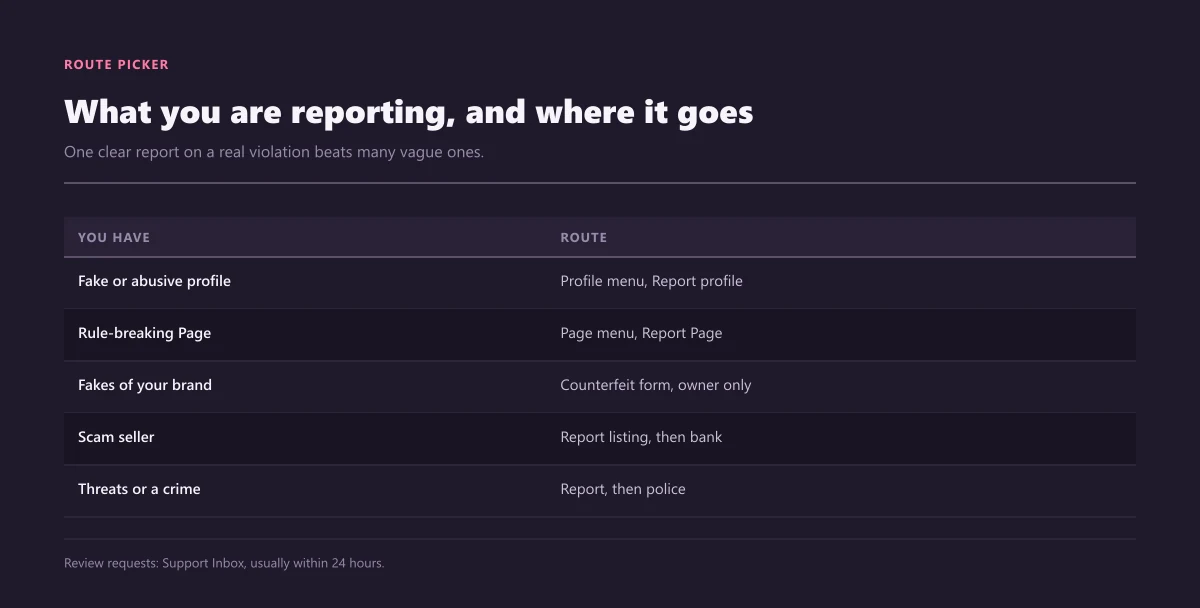
To report a Facebook account that is fake, hacked, abusive or posing as someone, use the profile's own menu. This is also the honest answer to "how to ban fb account": report it well and let the review run.
- Open the profile and tap the three dots under the cover photo.
- Choose Report profile, then the reason that matches what it did, not the worst one you can find.
- Where asked, point to the posts or messages that show it. A single post can be reported on its own.
- Save the profile link and screenshots with dates before you report; the account may vanish.
- Check the Support Inbox. Under Reports about others you can request another review, which Facebook says usually comes "within 24 hours".
On Instagram the same split applies: you report one post, story or DM on its own when only one item breaks a rule. Threats and doxxing are a police matter as well as a report, which we cover for threats and doxxing on Instagram. To tell afterwards whether a report worked, the signs are much the same as when you check whether a reported Instagram account was banned.
How to ban a page on Facebook that you do not run
You report it. Look at its transparency panel first, because it often tells you what to report.
How to ban a facebook page you do not run is the same question as how to report it. Facebook's page on reporting a Page sends you to the options below the cover photo, then Report Page. Meta adds that "you may then be able to submit a report", and that some feedback only trains its systems, so pick a specific reason if one fits.
Before you report, open Page Transparency: the Page name under the cover photo, then Transparency and privacy policy. It shows the creation date, where the managers are, and previous names. A Page renamed from a meme account into a "brand support" Page last month is worth a report for misrepresentation. Whether you want to ban facebook page content or the whole Page, the deciding factor is what it did, not how many people report it. How to ban a page on facebook from the Meta side, and whether the same route also reaches a linked Instagram, is the subject of our guide to taking down a Facebook account, Page or post. The Instagram version of the report sits in reporting an Instagram profile or business page.
How do you report a Facebook page for counterfeit goods?
Through the intellectual property forms, and only if you own the brand or act for its owner.
To report a facebook page for counterfeit goods, skip the normal Report Page menu. Counterfeits are an intellectual property claim, handled from Facebook's intellectual property help pages. The claim has to come from the rights owner or someone authorised to act for them, and it names the registered trademark, the country it is registered in, and the links to the Page, posts or listings that sell the fakes.
Meta runs the same pair of forms across its apps. Instagram's counterfeit report form, read on 22 October 2026, asks for one registered mark per report and accepts registration certificates as image or PDF files. A whole Page can be named if the whole Page exists to sell fakes; otherwise list the posts. If you are not the brand but a buyer who received a fake, the counterfeit form is not yours to file. Report the listing or seller as a scam, contact your bank or card issuer, and tell the brand, which can file the claim itself.
What does a Facebook account ban actually cover, and how often does it happen?
Meta lists the grounds. The EU numbers show who really triggers bans.
A facebook account ban is a disabled account. Meta's page on why accounts are disabled lists the grounds: repeated violations, a single severe one, accounts made to evade earlier restrictions, dangerous individuals, convicted sex offenders, and accounts that "misrepresent their identity". Lighter penalties are restrictions on posting or messaging, which expire; Instagram has the same tier, shown as the "we restrict certain activity" message.
The EU DSA Transparency Database shows the scale. Between 1 and 23 October 2026, Facebook filed 15,088,046 account suspensions in the EU, plus 20,279 terminations. Only 229 of those suspensions followed a user's formal notice under Article 16 of the Digital Services Act. Almost every Facebook account ban came from Meta's own detection. The same database logged 14,550 Article 16 notices against Facebook in that window, and 10,444 of them, about 72%, were intellectual property claims. That is why the triggers matter more than the reports. The triggers overlap with what triggers an Instagram ban, and the daily spikes are what people call an Instagram or Facebook ban wave. What a disabled state means on the Instagram side is in our explainer on a disabled Instagram account.
Can I create a new Facebook account to use Marketplace after a ban?
Not without Meta's permission. The Terms say so in one sentence.
Can I create a new facebook account to use marketplace after a ban? The Facebook Terms, section 3.1, read on 25 October 2026, say you may create only one account for yourself, and that if Meta disabled your account for breaking its Terms or policies, you agree not to create another one without its permission. Permission is at Meta's sole discretion. A second account opened to reach Marketplace is exactly the evasion that the disable grounds above list, and it can take the new account down with the old one.
Check first which ban you have. Losing Marketplace alone is a commerce restriction under the Commerce Policies, and your profile still works. Look for a review option on the Marketplace screen or in Account Status and use it. If the whole account is disabled, the appeal comes first. The same order applies on Instagram, where our guides on how to get an Instagram account unbanned and on what to do after an Instagram appeal walk through it. If you are simply locked out rather than banned, start with getting back into your Instagram account.
Does a banned account free up its name for someone else?
Not while the account still exists. This matters most on Instagram, where handles are scarce.
People sometimes report an account because they want its name. A ban does not release it. On Instagram, a disabled account keeps its handle until the account is deleted, which is why a name can show as not available on Instagram for months. The reasons Instagram gives are covered in why Instagram says a username is not available, and you can test a list of names with an Instagram name checker.
Legitimate ways to get a name exist. A handle sitting on a dead profile is the subject of getting an inactive Instagram username; a handle someone uses is covered in what to do when an Instagram username is taken. Short and rare handles are their own market, with 4-letter Instagram usernames, rare Instagram usernames and Instagram usernames listed for sale, and two friends can trade names with a username swap between two accounts. Facebook Page usernames follow their own rules. Our advice is simple: report an account for what it did, and get a name through these routes, never through a report.
Sources
- Facebook Help CentreBlock or unblock profiles on your Facebook Page
- FacebookTerms of Service, section 3.1
- Facebook Help CentreHow reports are reviewed
- Facebook Help CentreRequest another review of a report
- Facebook Help CentreReport a Facebook Page
- Facebook Help CentreWhy Facebook accounts are disabled
- Instagram Help CenterCounterfeit Report Form
- European CommissionDSA Transparency Database: Facebook account decisions, 1 to 23 October 2026
Frequently asked questions
Can I ban someone's Facebook account myself?
No. Only Meta can ban a Facebook account. You can report it, and you can block the person from your own profile or from a Page you run.
How do I ban someone from my Facebook Page?
Switch to the Page, open Settings and privacy, then Settings, then Blocking, and add the person. You can also block them from their comment on a post.
Does reporting a Facebook account many times get it banned faster?
No. Facebook says the number of reports does not decide whether something is removed. One clear report about a real violation is what counts.
Will the person know I reported their Facebook account?
Facebook does not tell them who reported them. They may see that content was removed, but not your name.
How to ban an FB account if it keeps harassing me?
Block it from your profile at once, then report the profile with the messages or posts that show the harassment. Meta decides the ban; a clear report with dates is what it acts on.
Who can report a Facebook page for counterfeit goods?
The brand owner or someone authorised to act for them, through the intellectual property forms. A buyer should report the seller as a scam and contact their bank.
Can I open a new Facebook account if mine was banned?
Facebook's Terms say not without Meta's permission. Appeal the ban first; a second account can be treated as evasion.