Reporting · eight kinds of quiet account and the route that exists for each
How to report an inactive Instagram account when there is no button for it
People who ask how to report an inactive Instagram account usually want one of two things: a username back, or a stale profile gone because it hurts them. On 21 October 2026 we went through Instagram's report menu and help pages to see which of those a report can actually do.
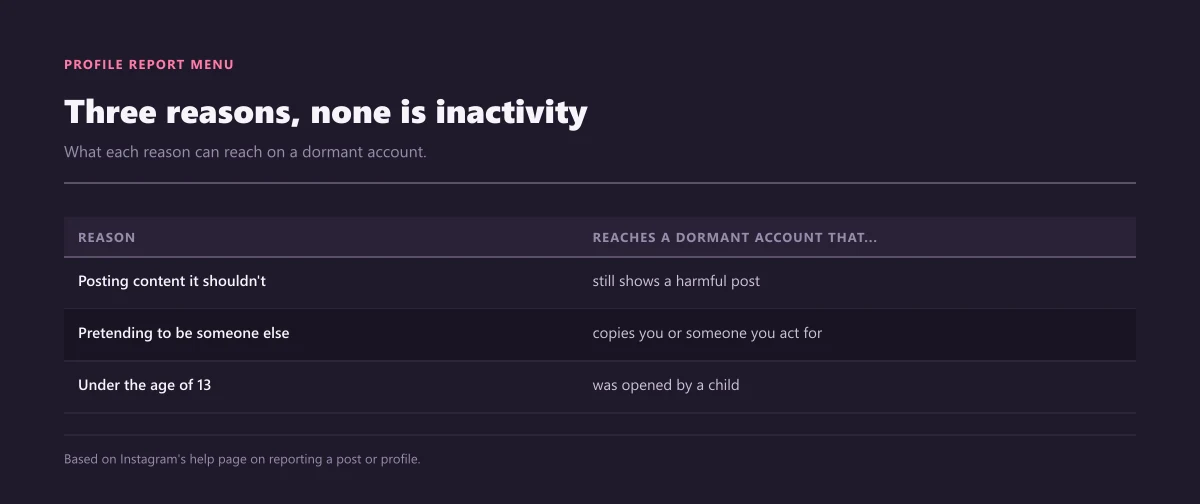
You cannot report an inactive Instagram account for being inactive: the profile Report menu offers only three reasons, posting content it shouldn't, pretending to be someone else, or belonging to a child under 13. A quiet account is reportable only through one of those, or through the memorial and removal forms for someone who has died.
Can you report an inactive Instagram account?
Not for the inactivity itself. Instagram's profile report has no reason for an account that stopped posting.
Instagram's help page on reporting a post or profile says you can report a profile for three things: posting content it shouldn't, pretending to be someone else, or being a child under the age of 13. Posts get a longer list, from bullying to intellectual property, but none of the nine post reasons is "inactive" either. So the honest answer to can i report an inactive instagram account is no, not as a category of its own.
That surprises people, because the account looks abandoned and the handle looks wasted. But inactivity breaks no rule in the Community Guidelines or the Terms of Use. A person may sign up, post twice and never come back, and Instagram treats that as their choice. The same answer applies to can you report inactive instagram accounts in bulk: a stack of reports that all say "nobody uses this" gives a reviewer nothing to act on.
What a report can do is reach an inactive account that also does something reportable. That is most of the useful cases, and it is what the rest of this page sorts out.
What kind of inactive account are you looking at?
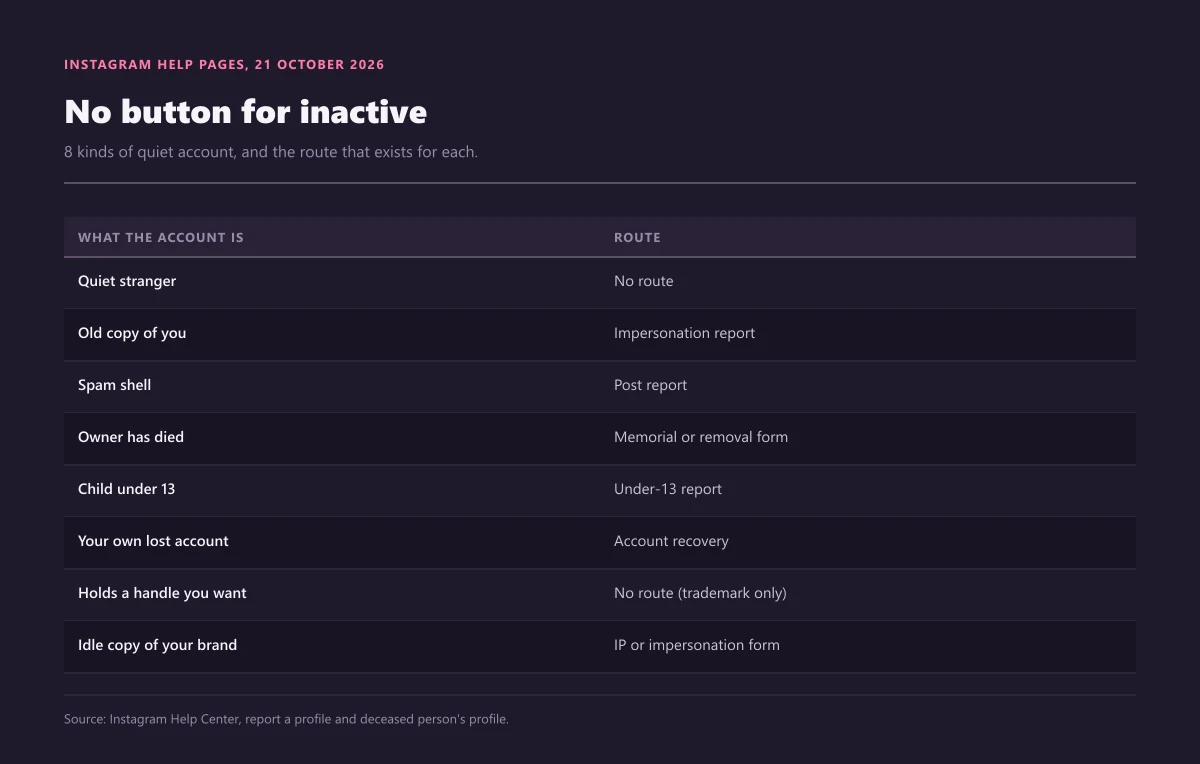
Eight kinds of quiet account cover nearly every request. Only 2 of them have no route at all.
Before you report an inactive Instagram account, decide what it actually is. Reporting inactive Instagram account profiles goes wrong mostly at this step: people ask how to report inactive Instagram account pages, or how to report an Instagram account for inactivity, when the account is really a copy of them or a memorial case. The table matches each kind to the route Instagram publishes, who is allowed to use it, and the proof the form asks for. We built it from Instagram's help pages as they read on 21 October 2026.
| What the account is | Route that exists | Who can file | What Instagram needs |
|---|---|---|---|
| A stranger's account that simply went quiet | No report route; Instagram's own inactivity sweeps | Nobody | Nothing; it breaks no rule |
| An old account using your name or photos | Profile report: pretending to be someone else | You or your representative | Your ID, or the person's if you act for them |
| A dormant shell still showing scam or spam posts | Post report: scam, fraud or spam | Anyone with an account | The post itself |
| The account of someone who has died | Memorialization request, or removal by family | Anyone (memorialize); immediate family (remove) | Proof of death; for removal, proof of family tie |
| An account run by a child under 13 | Profile report: under the age of 13 | Anyone | The profile; a parent may give more detail |
| Your own account you can no longer open | Account recovery, not a report | Only you | Your email, phone or ID check |
| A quiet account sitting on a handle you want | No report route; trademark claim only if you own the mark | A trademark owner | Registration details |
| A copy of your brand or business page left idle | Intellectual property or impersonation form | The rights holder | Registration or proof of the business |
The two rows with no route are the two most common requests. Everything else runs through a form or a menu that already exists, and most of those are free and quicker than people expect.
How to report an inactive account on Instagram, step by step
Open the profile, tap the three dots, choose Report, then pick the reason that is true. The account's age does not matter.
The steps for how to report an inactive account on Instagram are the same as for any profile. What changes is the reason you pick, and that reason has to be true of the account. Whether you search how to report inactive account on Instagram, how to report inactive account instagram or instagram report inactive account, the route below is the only one in the app.
- Open the profile, from search or from a post it left behind.
- Tap the three dots next to the username, then Report.
- Choose the type of account: posting content it shouldn't, pretending to be someone else, or under 13.
- Follow the on-screen questions. For impersonation, say whether it copies you, someone you know, a celebrity or a business.
- For a single bad post on an old grid, report that post instead and pick its reason.
Instagram's help page says reports are anonymous except intellectual property claims, so the owner of the quiet account does not see your name. You may be able to follow the result in your support requests. If nothing is removed, Instagram may still show you less of that kind of content.
How to report an inactive account that is pretending to be you
Use the impersonation reason. An old copy of you is reportable however long it has been silent.
The strongest case in this whole search is an abandoned account that copies a real person: an old fan page that became a fake, a profile someone set up with your photos years ago, or a business name squatted and left. Pick "pretending to be someone else", then "me" or the person you represent. Instagram may ask for a photo of a government ID, and only the person copied, or someone acting for them, can file this way.
If the copy is of your business or your logo, the intellectual property form usually fits better than the impersonation reason, because it rests on a registration Instagram can check. The same split applies beyond Instagram; on Facebook the route for a dead copy of a page is laid out in taking down a Facebook account, page or post, and on X in how to report an X account.
When the copied site sits outside social media entirely, the job moves to the host or registrar; our domain takedown service page covers that part.
How to get Instagram to remove an inactive account of someone who died
Ask Instagram to memorialize it, which anyone can request, or, as immediate family, ask for removal.
This is the one case where Instagram itself offers a way for how to get Instagram to remove an inactive account that the requester does not own. Its page on a deceased person's profile gives two routes. Anyone can ask for memorialization, with proof of death such as a link to an obituary or a news article. A memorialized profile stays up, is secured against logins, and is kept out of places where it might upset friends and family.
Removal is narrower. Only verified immediate family members can request it, and the form asks for proof of the tie, for example the person's birth certificate, their death certificate, or proof under local law that you represent them or their estate. Instagram also states it never gives anyone the login for a memorialized profile.
Families sometimes find a second, older account years later. Each account needs its own request, and an obituary link usually covers both.
What if the inactive account is your own?
Then you need recovery, not a report. Reporting your own lost account only adds it to a review queue.
A good share of people searching how to report instagram account for inactivity are looking at their own old profile, locked behind an email they no longer have. Reporting it does nothing useful: Instagram cannot tell a report from the owner apart from anyone else's, and it will not hand over an account because someone flagged it.
Start from the login screen's help options with any email or phone you ever used. If Instagram suspended the account rather than you abandoning it, the steps differ, and suspended Instagram account recovery walks through the appeal and the deadline. If you can get in, you can deactivate or delete it yourself, which frees nothing immediately but ends the question.
Does mass reporting an inactive Instagram account work?
No. Volume does not turn inactivity into a breach, and coordinated reporting is itself a rule problem.
Sellers pitch report waves at handle hunters all the time, promising that a few hundred reports will clear a dormant name. The report still has to pick one of the real reasons, and a reviewer who opens an empty or harmless profile finds nothing. We explain the mechanics in what mass reporting an Instagram account really does.
The pattern is the same on every network we have checked: reviewers read the account, not the count. That holds for TikTok report bots, YouTube report bots, bots sold for X, Telegram report bots and WhatsApp report bots. Snapchat sellers offer both manual Snapchat report waves and automated Snapchat report bots, with the same result.
The waves also land on the senders. Under Article 23 of the Digital Services Act large platforms in the EU must suspend, after a warning, people who often send manifestly unfounded notices, and several platforms name abusive reporting outright: we read those rules for Discord and for Kick and Twitch. Creators also learn the hard way that a wave can hit the innocent, as in YouTube channels banned after mass reporting.
Can you report inactive accounts on other apps?
Not for inactivity there either. Every large platform reports conduct, and each clears dormant accounts on its own schedule.
The question comes up for every network. Telegram lets you report content inside a group or channel, and how to report Telegram groups shows the in-app and email routes; a group that simply went silent is not one of them. Telegram deletes accounts that stay unused for the period the owner sets, six months by default. X, Facebook and TikTok work the same way as Instagram: a dormant account is reportable for what it shows or whom it copies, never for being dormant.
So a single checklist works everywhere: does the account show something harmful, copy a real person or brand, belong to someone who died, or belong to a child? If none of those is true, no report on any platform will move it.
Instagram inactive account report: what to send so it is read
One report from the person affected, with the right reason and the proof the form asks for. Nothing else speeds it up.
An instagram inactive account report that gets acted on looks the same as any other good report. A typical request we receive is a professional whose name sits on a profile someone created in 2016 and never used. The fix is not a wave; it is one impersonation report from that person, with an ID photo, filed through the profile menu.
- File as the person affected, or as their representative, never as an unrelated crowd.
- Pick the reason that is true: content, impersonation, under 13, or a memorial request.
- Keep a screenshot of the profile and its link before you report, in case it changes.
- Use the intellectual property or legal forms when the problem is a trademark, a copyright or private content.
- Leave alone an account that breaks nothing. Instagram's own sweeps are the only thing that removes it.
Sources
- Instagram Help CenterReport a post or profile on Instagram
- Instagram Help CenterReport a deceased person's profile on Instagram
- Instagram Help CenterThreads and Instagram's inactive username policy
Frequently asked questions
Can you report an inactive Instagram account?
Not for inactivity. The profile Report menu offers three reasons: posting content it shouldn't, pretending to be someone else, or belonging to a child under 13. An inactive account is reportable only if one of those is true, or through the memorial and removal forms if the owner has died.
How do I report an Instagram account for inactivity?
There is no inactivity option to choose. Instagram removes inactive accounts in its own routine sweeps and does not take user requests to release a dormant account or its username.
Will reporting an inactive account free its username?
No. A report on a quiet account that breaks no rule is closed without action, and even when Instagram removes an inactive account, the name is not always released straight away.
How do I get Instagram to remove the account of someone who died?
Anyone can request memorialization with proof of death, such as an obituary link. Verified immediate family can request removal with a birth or death certificate or proof that they represent the estate.
Does the owner of an inactive account see who reported it?
No. Instagram says reports are anonymous, except intellectual property reports, where the claimant's details can be shared with the account owner.
Can I report my own old Instagram account to delete it?
No. Use account recovery from the login screen with any email or phone you used. Once you are back in, you can delete the account yourself.